Free system disk space going out by itself

robergto

New member
Local time
10:39 AM
Messages
8
Hi forum! Thanks for your help!
I am having this free disk space problem that I'd like to understand. The message appeared quite some time ago. I had my thunderbird profile in the C disk, as well as some data. So, I moved it and deleted other stuff, and got myself bright beautiful blank space on the C, around 7gbs.-
Thing is it was a month ago or so, and now, the problem appears again. So, I am asking for a kind of solution, but in first place, I'd like to kwon what's going on.-
I have downloaded quite a few things, but they are in another partition. I always wipe off the temporal files, as well as internet temporary files. If I install programs, they are in another partitio too, but is not the case, for I have not installed almost anything(I know that even if we put the 'program' in a partition, some data goes in C nevertheless).-
I am aware of the existance of those progs that will show the ammount of data and its location and stuff. I have read mostly how to get rid of useless things, but I'd like to know what happens, and if I can prevent it from occuring.-
I have seen so far, with one of those that show the data, that the same archive can be located in both folders. :sarc: That happened with the thunderbird profile files, which 1 gb would be 2 gb of disk allocation.-

Thanks again, and be well!
 

My Computer My Computer

OS
Windows 7 both 32 and 64 bits and Ultimate
Hey!
Update:
I didn't do a thing, and I have now 3,5 GB of free space, out of nowhere. Any ideas?
 

My Computer My Computer

OS
Windows 7 both 32 and 64 bits and Ultimate
I'm not sure of the question. :confused: Are you asking about what Thunderbird does or what Windows does when you install a program? Or.....????? Please be specific.
 

My Computer My Computer

Computer type
PC/Desktop
Computer Manufacturer/Model Number
Built 2/11/2011
OS
Windows 7 Pro-x64
CPU
i7-2600 3.4GHz - 3.8GHz Turbo
Motherboard
Intel DH67BL-B3
Memory
8Gb - 2x4GB, Muskin 991770 PC3-1333
Graphics Card(s)
Integrated Intel HD 2000
Sound Card
Integrated Intel 10.1 HD, RealTek ALC892
Monitor(s) Displays
Asus LCD VH222H, Haier HL24XSL2a
Screen Resolution
1920x1080, 1920x1080
Hard Drives
Crucial SSD C300-128Gb,
Western Digital WD5002AALX - 500Gb,
Western Digital WD7501AALS - 750Gb
PSU
Seasonic 650W 80+ Gold Modular
Case
Rosewill Defender
Cooling
Stock CPU, Four 120mm case fans, PCH fan added
Keyboard
Logitech EX100 Y-RBH94 Wireless
Mouse
Logitech EX100 M-RCE95 Wireless
Internet Speed
3.0/1.5 Mbs
Antivirus
Microsoft Security Essentials
Browser
Microsoft Internet Explorer 11
Other Info
Antec Veris Premier-Multimedia IR Station,
Cyber Accoustics-3602 Speakers,
AFT XM-5U Card Reader,
Hauppauge TV-HVR-2250,
Sony LX300 USB Turntable
You really need to use "one of those programs that will show the ammount of data and its location and stuff".

I'd recommend Treesize Free

See what it tells you about where the space is being used.

Also, how big is the boot partition? Can you post a screen capture of a full screen Disk Management window.
 

My Computer My Computer

Computer type
PC/Desktop
Computer Manufacturer/Model Number
Lenovo IdeaCenter 450
OS
Windows 10 Pro X64
CPU
Intel Quad Core i7-4770 @ 3.4Ghz
Memory
16.0GB PC3-12800 DDR3 SDRAM 1600 MHz
Graphics Card(s)
Intel Integrated HD Graphics
Sound Card
Realtek HD Audio
Monitor(s) Displays
HP 22" LCD
Screen Resolution
1680 x 1050
Hard Drives
250GB Samsung EVO SATA-3 SSD
2TB Seagate ST2000DM001 SATA-2
1.5TB Seagate ST3150041AS SATA
Keyboard
Dell USB
Mouse
Lenovo USB
Internet Speed
Cable via Road Runner 3MB Upload, 30MB Download
Antivirus
Windows Defender, MBAM Pro, MBAE
Browser
Seamonkey
Other Info
UEFI/GPT
PLDS DVD-RW DH16AERSH
Hey! Thanks for your answers.-
I am not interested in thunderbird, I just named it, my mistake. What I want to know is how windows manages the free space, and the reason for having lost about 7 gb of free space when I didn't do anything on it. I know how to erase things, and I have quite a few of those programs(thanks for suggesting one, I didn't know it). But I am not up to it.-
I mentioned thunderbird for it has quite large archives, and, I saw them duplicated. But the same happend with other files, I don't remember their names, they where .msi I guess(Install packages).-

So, I'll try to be specific:
1) How does windows manage free space?
2) What can I do to prevent it from using all the free space?
3) What happens when some free space comes back by itself?
As I said before, I had 3,5 GB(around 7 PM), and now(10 pm) I have 2,93 GB, and did not do anything, neither insalled a program, nor downloaded any file. I did not even entered web sites. I have been just listening to some music, and was no infront the computer.-
4) I am not willing to use the treesize kind of program in first place, for I am not trying to free space and get it lost again. Might I be a noob, apologies if that's the case, but I want the free space to stopo being consumed, not just erase things.-

Thanks!
 

My Computer My Computer

OS
Windows 7 both 32 and 64 bits and Ultimate
Ummm, without detailed information from a utility such as Treesize, members really can't assist you.
TreeSize Free tells you where precious disk space has gone.
 

My Computer My Computer

Computer type
Laptop
Computer Manufacturer/Model Number
HP Pavilion dv6-6c10us
OS
x64 (6.3.9600) Win8.1 Pro & soon dual boot x64 (6.1.7601) Win7_SP1 HomePrem
CPU
AMD A6-3420M APU with Radeon(tm) HD Graphics
Motherboard
Hewlett-Packard 1805
Memory
6.00 GB
Graphics Card(s)
AMD Radeon(TM) HD 6520G
Sound Card
(1) AMD High Definition Audio Device (2) IDT High Definiti
Monitor(s) Displays
HP W2072a 20" LCD (1600 x 900) @ 60 Hz
Screen Resolution
1366 x 768 x 32 bits (4294967296 colors) @ 60 Hz
Hard Drives
ST640LM0 00 HM641JI SATA Disk Device
Keyboard
Logitech k520 wireless KB
Mouse
Logitech m320 wireless mouse (bundled with KB)
Internet Speed
15/5 | 54 MB Wireless 'n'
Antivirus
Realtime: Defender or Avast | On-demand: Malwarebytes, ESET
Browser
IE 11 on Win8, IE 10 on win 7
Other Info
Media: [Gimp, Audacity, VLC] || Comm: [WEmail 2012, Skype] || Productivity: [OpenOffice,| Textpad] || Utils: [Sysinternals, cCleaner, Speccy, Defraggler]

My Computer My Computer

OS
Windows 7 both 32 and 64 bits and Ultimate
We would also have to know what's running on your system. Windows isn't causing the problem. You obviously have software (or malware) running in the background using disk space. Start Windows Resource Monitor and click on the Disk tab. This will show you all processes using disk and what files are in use.

We can't see your system for here so speculating on what is using the disk is just a guess.
 

My Computer My Computer

Computer type
PC/Desktop
Computer Manufacturer/Model Number
Built 2/11/2011
OS
Windows 7 Pro-x64
CPU
i7-2600 3.4GHz - 3.8GHz Turbo
Motherboard
Intel DH67BL-B3
Memory
8Gb - 2x4GB, Muskin 991770 PC3-1333
Graphics Card(s)
Integrated Intel HD 2000
Sound Card
Integrated Intel 10.1 HD, RealTek ALC892
Monitor(s) Displays
Asus LCD VH222H, Haier HL24XSL2a
Screen Resolution
1920x1080, 1920x1080
Hard Drives
Crucial SSD C300-128Gb,
Western Digital WD5002AALX - 500Gb,
Western Digital WD7501AALS - 750Gb
PSU
Seasonic 650W 80+ Gold Modular
Case
Rosewill Defender
Cooling
Stock CPU, Four 120mm case fans, PCH fan added
Keyboard
Logitech EX100 Y-RBH94 Wireless
Mouse
Logitech EX100 M-RCE95 Wireless
Internet Speed
3.0/1.5 Mbs
Antivirus
Microsoft Security Essentials
Browser
Microsoft Internet Explorer 11
Other Info
Antec Veris Premier-Multimedia IR Station,
Cyber Accoustics-3602 Speakers,
AFT XM-5U Card Reader,
Hauppauge TV-HVR-2250,
Sony LX300 USB Turntable
What program and/or method are you seeing free space change?

You say you are jumping from 200 MB to 3.5 GB


My Computer My Computer

Computer type
PC/Desktop
Computer Manufacturer/Model Number
Home made Desktop
OS
Windows 10 Pro. 64/ version 1709 Windows 7 Pro/64
CPU
Intel i7-6800K @ 4.3
Motherboard
ASUS X-99 Deluxe II
Memory
Corsair Platinum 16 gig @2400
Graphics Card(s)
EVGA GTX 1070 OC
Monitor(s) Displays
Asus 27" LED LCD/VE278Q
Screen Resolution
1920-1080 or 1280-720 HDMI
Hard Drives
INTEL SSD 730-240 Gb Sata 3.0/
PSU
EVGA Platium 1200W
Case
Phanteks Luxe Tempered Glass 8 fans/ one radiator
Cooling
XSPC/ Water Cooled CPU
Keyboard
Das 4 Professional
Mouse
Logitech M705/MX Anywhere 2-S
Internet Speed
100 mbits
Antivirus
Microsoft Security Essentials/ Malwarebytes Premium 3.0/ SAS
Browser
I.E. 11 default/Firefox/ ISP Time Warner Cable/Spectrum
Other Info
LG BluRay Burner/
Sound system-KLipsch-THX/
Icy Dock ssd Hot Swap bays.
Suggestion

Pure speculation as stated already but - check your settings for system restore on all drives. If a restore point gets created it can use a ton of space with no obvious signs of activity.

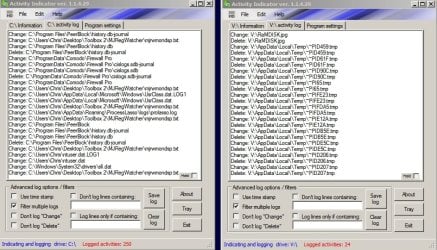
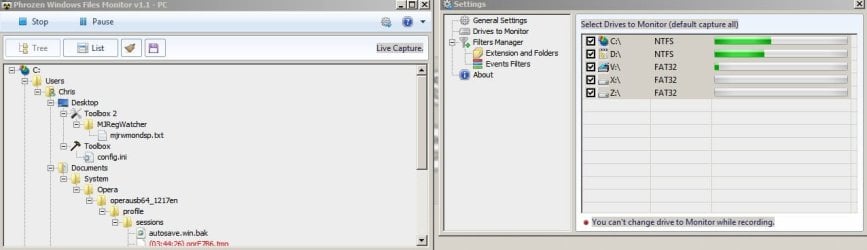
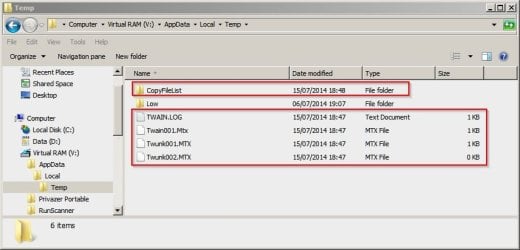
Other than that it is possible to install yet more software to monitor directories. Here's screenshots from my machine running a couple of apps that run without installation and can monitor file changes.

Activity Indicator.jpg

Phrozen File Monitor.jpg
 

My Computer My Computer

Computer type
Laptop
Computer Manufacturer/Model Number
ASUS
OS
Microsoft Windows 7 Home Premium 64-bit 7601 Multiprocessor Free Service Pack 1
CPU
AMD C-60 APU with Radeon(tm) HD Graphics
Motherboard
ASUSTeK COMPUTER INC. X501U
Memory
4.00 GB
Graphics Card(s)
AMD Radeon HD 6290 Graphics
Sound Card
(1) AMD High Definition Audio Device (2) Realtek High Defi
Screen Resolution
1366 x 768 x 32 bits (4294967296 colors) @ 60 Hz
Hard Drives
Hitachi HTS545050A7E380 SATA Disk Device
Antivirus
Comodo CIS & FW, SecureAplus App Whitelisting, Threatfire
Browser
Cyberfox 64bit, Opera 64bit, Airfox
Other Info
Spy-The-Spy, HitmanPro.Alert, Norton Connect Safe, MJRegWatcher, BitDefender TrafficLight, Voodoo Shield, Zemana AntiMalware
Hey! I'm back, sorry for delay.-
I've been quite interested in the resource monitor, kind of like it. How many things go on without knowing, he he!
Yes, I went from less than 200MB to 3,5 GB. Just the windows explorer info. Today I'm about 2,27 GB right now, and the use of the box has been quite the same. Just listening to music, thunderbird(which stores just one mail account in C drive), and some minor surfing(for this investigation purposes I try not to use the machine so much).-
As for the system restore thing, I have it enables just in C.-
Say, it's really weird that the space comes back by itself(Where was it? Where did it go?), that's what leads me to want to know what it's all about. Like, where windows stores temp data, or flash data, when I see pictures or use a program like photoshop. That's more or less what I have in mind when I ask for opinions. I know you guys are the ones that know about this stuff.-
Thanks again for your time and answers, I appreciate them. Will check those apps to monitor, they sound good. I already use some of the sysinternals progs for monitoring(you know, like disk monitor or process explorer), but the ones you post your pictures here are interesting indeed.-

Greetings!
 

My Computer My Computer

OS
Windows 7 both 32 and 64 bits and Ultimate
Use WinDirStat or similar product. Run it when you space is gone and see what is consuming the space. It should be pretty obvious, but if not run it again when you the free space returns and compare. Otherwise, it's all guessing here.
 

My Computer My Computer

Computer type
PC/Desktop
OS
Win 7 Enterprise x64
Temp Data

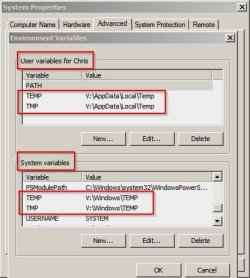
On my machine temp data tends to get stored in the folders configured under System Properties > Advanced > Environment Variables but that doesn't apply to all temp data. Some programs use their own location for a cache or data storage.

See this link about Spotify for example. Listening to songs via Spotify can use up a huge amount of disk space!

How to clear, change or move the Spotify cache - gHacks Tech News

Temp folders located here (on my machine - it's not the default locations) - Try Start> Run then type sysdm.cpl and press Enter. Then Advanced > Environment Variables. Don't change anything though!

Environment Variables.jpg

Example:

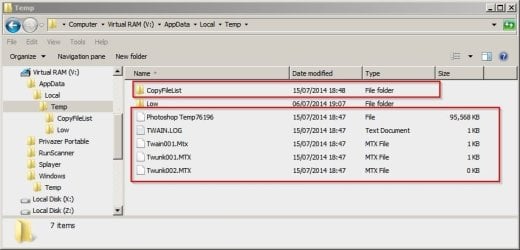
Photoshop creates temp files when opening an image:

Photoshop Temp.jpg

Not all of those files are deleted when exiting Photoshop and they need to be cleared using other methods:

Photoshop Temp 2.jpg
 

My Computer My Computer

Computer type
Laptop
Computer Manufacturer/Model Number
ASUS
OS
Microsoft Windows 7 Home Premium 64-bit 7601 Multiprocessor Free Service Pack 1
CPU
AMD C-60 APU with Radeon(tm) HD Graphics
Motherboard
ASUSTeK COMPUTER INC. X501U
Memory
4.00 GB
Graphics Card(s)
AMD Radeon HD 6290 Graphics
Sound Card
(1) AMD High Definition Audio Device (2) Realtek High Defi
Screen Resolution
1366 x 768 x 32 bits (4294967296 colors) @ 60 Hz
Hard Drives
Hitachi HTS545050A7E380 SATA Disk Device
Antivirus
Comodo CIS & FW, SecureAplus App Whitelisting, Threatfire
Browser
Cyberfox 64bit, Opera 64bit, Airfox
Other Info
Spy-The-Spy, HitmanPro.Alert, Norton Connect Safe, MJRegWatcher, BitDefender TrafficLight, Voodoo Shield, Zemana AntiMalware
Are you using something like Defraggler or the integrated one. I know Defraggler on my machine count the free space between files as filled space after having defrag my drive. At some reboot point it is disappearing like magic, Guess, its compacting the free space somehow...
 

My Computer My Computer

Computer type
PC/Desktop
Computer Manufacturer/Model Number
Custom Build
OS
Windows 7 Professional SP1 - x64 [Non-UEFI Boot]
CPU
Ivy Bridge Core i5 3570K (Delidded)
Motherboard
Asus P8Z77-V LE PLUS
Memory
G.Skill "Ares" DDR3 PC3-12800 - 1600MHz (16Gb)
Graphics Card(s)
Asus Dual-RX480-O4G
Sound Card
Creative Sound Blaster Z w/5.1 sound system
Monitor(s) Displays
Asus IPS 23"
Screen Resolution
16/9
Hard Drives
Internal:
500Go Sata 6Gb/s (x2)
500Go Sata 3Gb/s (x2)
SSD 60Go Sata 6Gb/s
PSU
In Win C 900W Series 80+ Platinum
Case
Thermaltake Chaser A71
Cooling
Custom Water Cooling Loop
Keyboard
Cooler Master QuickFire XTi
Mouse
Razer Imperator 2012 (4G)
Antivirus
MSE
Browser
IE 11.0.xxx Rtm
Other Info
"Raid0" with Intel Smart Response Technology (HDD/SSD)
Thanks for all your answers. So far I have 730 MB left, and the same environment. Except I have used a few times photoshop or played some games. But this was during the las two days, and I had 900 mb by then. Still don't know where the space goes, or how to prevent it from vanishing.-
Great info on photoshop Callender, thanks. It's also a good idea to compare situations with one of those space-progs, grateful too. You can close the thread if you like for I don't think I'll be coming back, situation is quite the same =/ Oh, and I am not using defraggler or one of them. And just use winamp for music purposes.-

Greetings!
 

My Computer My Computer

OS
Windows 7 both 32 and 64 bits and Ultimate
Back
Top