
Solved Freeze, stalls at start up, factory reset = problem still occurs

Imjulie

New member
Local time
1:23 AM
Messages
8
Hi everyone,
I'm new here and not very tech savy.
One week ago, my samsung laptop froze, I tried to alt+ctrl+dlt but nothing happened. I decided to let it sit there for about 30mins to see if it would unfreeze itself, it didn't and I had to force shut down. When the laptop was booted up, it stalled at starting windows for over 30mins. I had everythig backed up on an external hard drive so I went ahead and tried to do a factory reset. The laptop worked fine until today when it froze again! Can anyone tell me why this is happening?

Also, I find that running a factory reset through the repair disk takes a really long time to load. It literally takes a good 5mins to load the "select country and language" box, upto 1hr to get to the "select your operating system" page and about 30mins to load the selection page where you can choose to repair, backup or restore. Is this normal? Or am I doing somthing wrong?

Additonal information:
Samsung laptop rc430 almost 1 year old
Windows 7 home premium 64 bit
6gb ram
Comodo anti virus
i7 chip
Still on warranty and 2 yr additional warranty
Only used to browse internet, not a gamer
Windows update daily
Virus scans daily
Ccleaner used daily for cleanup and registry
Only downloaded trusted files since the last reset (adobe, java, skype etc)
 

My Computer My Computer

At a glance

Windows 7 home premium x64
Computer type
Laptop
Computer Manufacturer/Model Number
Samsung RC530
OS
Windows 7 home premium x64
Antivirus
Comodo
Browser
Comodo browser, similar to google chrome
Are you able to get to Safemode without delay ??
 

My Computer My Computer

At a glance

Windows 7 ultimate x64
Computer Manufacturer/Model Number
Nothing specific....what ever the clients provide for Repair
OS
Windows 7 ultimate x64
I would like to add a suggestion.
At this time stop using any 3rd party program that does anything to Windows 7 registry.
I will go back to watching and put you back in the good hands of centaur78.
 

My Computer My Computer

At a glance

Windows 10 Pro. 64/ version 1709 Windows 7 Pr...Intel i7-6800K @ 4.3Corsair Platinum 16 gig @2400EVGA GTX 1070 OC
Computer type
PC/Desktop
Computer Manufacturer/Model Number
Home made Desktop
OS
Windows 10 Pro. 64/ version 1709 Windows 7 Pro/64
CPU
Intel i7-6800K @ 4.3
Motherboard
ASUS X-99 Deluxe II
Memory
Corsair Platinum 16 gig @2400
Graphics Card(s)
EVGA GTX 1070 OC
Monitor(s) Displays
Asus 27" LED LCD/VE278Q
Screen Resolution
1920-1080 or 1280-720 HDMI
Hard Drives
INTEL SSD 730-240 Gb Sata 3.0/
PSU
EVGA Platium 1200W
Case
Phanteks Luxe Tempered Glass 8 fans/ one radiator
Cooling
XSPC/ Water Cooled CPU
Keyboard
Das 4 Professional
Mouse
Logitech M705/MX Anywhere 2-S
Internet Speed
100 mbits
Antivirus
Microsoft Security Essentials/ Malwarebytes Premium 3.0/ SAS
Browser
I.E. 11 default/Firefox/ ISP Time Warner Cable/Spectrum
Other Info
LG BluRay Burner/
Sound system-KLipsch-THX/
Icy Dock ssd Hot Swap bays.
I can't go into safemode, it stalls at classpnp. I have the windows 7 installation disk as well, would a clean install be any better than a factory reset?

The thing is, when I purchased the laptop about 11 months ago, I installed everything that I needed during the first week. As of late, I didn't install any thing, all downloads were documents from my university website and all window updates are all up to date.
 

My Computer My Computer

At a glance

Windows 7 home premium x64
Computer type
Laptop
Computer Manufacturer/Model Number
Samsung RC530
OS
Windows 7 home premium x64
Antivirus
Comodo
Browser
Comodo browser, similar to google chrome
Yes a Clean Install would be better option based on what you say...

But prior to that...do you have any usb device connected to your laptop when its booting ??

Could you run Autoruns and then click on File> Save.. Save the file in .arn format and upload here. Will have a look on the startup as well.
 

My Computer My Computer

At a glance

Windows 7 ultimate x64
Computer Manufacturer/Model Number
Nothing specific....what ever the clients provide for Repair
OS
Windows 7 ultimate x64
Hi centaur78, I really appreciate the help you're providing me. :)

To answer your question, I didn't have anything connected to my laptop besides the power cable.

I'm in the middle of doing a clean install. How long is it suppose to take to get pass the "setup is starting..."? I've been timing it and it's almost hitting the 2 hour stage.

As I've mentioned before, I'm not really familiar with these computer things and I try to understand by asking questions, I hope you don't mind.

Before the clean install, I wasn't able to get in safe mode or past the "starting windows" screen, how will I be able to run the program? Am I suppose to put Autoruns on a usb, boot my laptop using Linux and then proceed? Since I'm doing a clean install at the moment, I can't really do anything until it's done.
 

My Computer My Computer

At a glance

Windows 7 home premium x64
Computer type
Laptop
Computer Manufacturer/Model Number
Samsung RC530
OS
Windows 7 home premium x64
Antivirus
Comodo
Browser
Comodo browser, similar to google chrome
I don't mind.... you may ask as many question as you want..!! will be happy to help

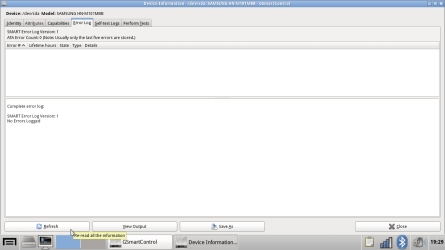
But from the looks of how things are going... i have a bad feeling your HDD has bad sectors...

If you were able to install windows by now and reach the desktop... i would suggest you run Crystal Disk and post a snapshot of the SMART values here for each HDD/SSD.

If not let me know..
 

My Computer My Computer

At a glance

Windows 7 ultimate x64
Computer Manufacturer/Model Number
Nothing specific....what ever the clients provide for Repair
OS
Windows 7 ultimate x64
No luck progressing past the "Setup is starting" (during win7 installation) waited over 12 hours. The hard drive light on my laptop isn't on, does this mean that there's something wrong with my installation disk? It's not frozen either, because my mouse is working and it's just a little blue circle spinning around.

Again, I've tried to factory reset using both repair disk (samsung solution 5) and without the disk (relying on the built in recovery samsung solution 5) but this time around it stalled.

With the repair disk:
I was able to get to the "select language and keyboard" screen, pressed OK and it continued to stall on the blue (not bsod but the background for win7 or something). Left it sitting there for half a day without progress.

With the built in recovery:
The recovery button for my samsung laptop s F4. Pressed F4 and entered the green screen for samsung solution 5. The green screen should have "samsung solutions 5" in large font along with "loading" but this time around it only showed the "loading" and it either stalled or froze for over 2 hours.

At the moment I only have 2 options: factory reset and clean install. Neither of them is working. Any suggestions? Is this type of problem covered in the warranty (I'm still on the 1 year limited int. warranty and have bought an additional 2 year), if it is - I might just let them deal with it.
 

My Computer My Computer

At a glance

Windows 7 home premium x64
Computer type
Laptop
Computer Manufacturer/Model Number
Samsung RC530
OS
Windows 7 home premium x64
Antivirus
Comodo
Browser
Comodo browser, similar to google chrome
My Computer My Computer

At a glance

Windows 7 ultimate x64
Computer Manufacturer/Model Number
Nothing specific....what ever the clients provide for Repair
OS
Windows 7 ultimate x64
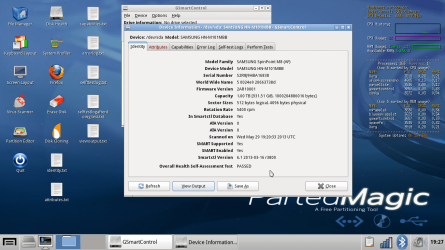
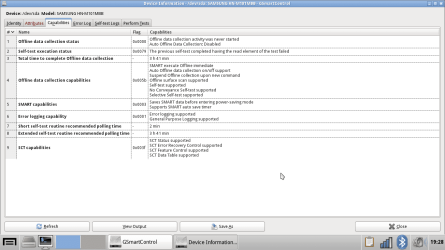
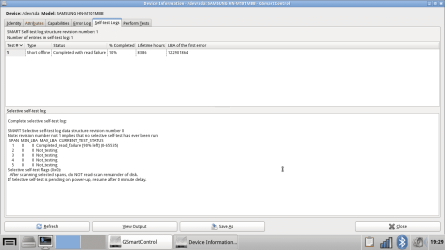
I followed the links and posted the screenshots for : identity,attributes,capabilities,error log,self test log and view output. I wasn't sure which one was needed.
 

Attachments

  • screenshot1.png
    screenshot1.png
    188.4 KB · Views: 4
  • screenshot2.png
    screenshot2.png
    46.8 KB · Views: 3
  • screenshot3.png
    screenshot3.png
    34.9 KB · Views: 3
  • screenshot4.png
    screenshot4.png
    22 KB · Views: 2
  • screenshot5.png
    screenshot5.png
    36.5 KB · Views: 2
  • viewoutput.txt
    viewoutput.txt
    5.1 KB · Views: 2

My Computer My Computer

At a glance

Windows 7 home premium x64
Computer type
Laptop
Computer Manufacturer/Model Number
Samsung RC530
OS
Windows 7 home premium x64
Antivirus
Comodo
Browser
Comodo browser, similar to google chrome
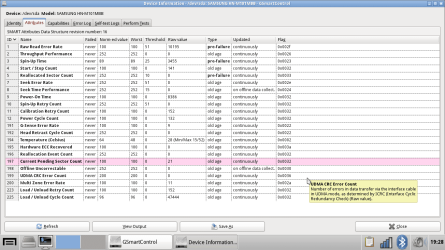
Bingo ... there you have it

if you look at the "Attribute" tab... and the "Current Pending Sector Count" you will see the RAW value which is hex is 21... which mean 33 (in Decimal) sectors that are waiting to be remapped as bad or good based on how the Drive firmware is programmed to work on it..

This is a sign of drive being corrupted and would fail in the long run... I would suggest to get this replaced if under warranty...or buy a new harddrive and reinstall windows on it (whichever way you prefer to do it)


What "Current Pending Sector Count" means
Count of "unstable" sectors (waiting to be remapped, because of unrecoverable read errors). If an unstable sector is subsequently read successfully, this value is decreased and the sector is not remapped. Read errors on a sector will not remap the sector immediately (since the correct value cannot be read and so the value to remap is not known, and also it might become readable later); instead, the drive firmware remembers that the sector needs to be remapped, and will remap it the next time it's written.[27] However some drives will not immediately remap such sectors when written; instead the drive will first attempt to write to the problem sector and if the write operation is successful then the sector will be marked good (in this case, the "Reallocation Event Count" (0xC4) will not be increased). This is a serious shortcoming, for if such a drive contains marginal sectors that consistently fail only after some time has passed following a successful write operation, then the drive will never remap these problem sectors.
 

My Computer My Computer

At a glance

Windows 7 ultimate x64
Computer Manufacturer/Model Number
Nothing specific....what ever the clients provide for Repair
OS
Windows 7 ultimate x64
If you also look at the read test .... you will see it failed at 10% .. thats almost at the beginning of the disk sector... which is where your boot files and core windows files will be located... and hence the loooooooooooong time read those sectors..
 

My Computer My Computer

At a glance

Windows 7 ultimate x64
Computer Manufacturer/Model Number
Nothing specific....what ever the clients provide for Repair
OS
Windows 7 ultimate x64
Is there anyway to fix the HDD now? A fix or anything to get the laptop running temporarily?
 

My Computer My Computer

At a glance

Windows 7 home premium x64
Computer type
Laptop
Computer Manufacturer/Model Number
Samsung RC530
OS
Windows 7 home premium x64
Antivirus
Comodo
Browser
Comodo browser, similar to google chrome
You could try and do a low level format of the HDD but that not a sure shot solution.

If its data that you want to retrieve.. you can use the parted magic live CD and mount the drive and probably save as much data that you can
 

My Computer My Computer

At a glance

Windows 7 ultimate x64
Computer Manufacturer/Model Number
Nothing specific....what ever the clients provide for Repair
OS
Windows 7 ultimate x64
Ah... I'll just get it replaced. I didn't think that problems like this would occur in less than 12 months from purchase and I always back up my files on an external hard drive.

Thank you sooooo much for all your time and effort in helping me! Really appreciated it and learnt a few things too.
 

My Computer My Computer

At a glance

Windows 7 home premium x64
Computer type
Laptop
Computer Manufacturer/Model Number
Samsung RC530
OS
Windows 7 home premium x64
Antivirus
Comodo
Browser
Comodo browser, similar to google chrome
Well a word of advice ... just do a google search "samsung hn m101mbb problems" and the first few link would give you an idea... the problem with this model... its not you that is having this problem...

Though these are almost a year old threads at forums... it could be that samsung might have upgraded the firmware of the HDD... not sure...

If you feel the issue is resolved.. please mark the thread as Solved and REP those helped.
 

My Computer My Computer

At a glance

Windows 7 ultimate x64
Computer Manufacturer/Model Number
Nothing specific....what ever the clients provide for Repair
OS
Windows 7 ultimate x64
Thanks for the advice.
 

My Computer My Computer

At a glance

Windows 7 home premium x64
Computer type
Laptop
Computer Manufacturer/Model Number
Samsung RC530
OS
Windows 7 home premium x64
Antivirus
Comodo
Browser
Comodo browser, similar to google chrome
Back
Top