Freshly installed Windows7 Pro 64bit, Windows Explorer problems

coyote455

New member
Local time
2:27 PM
Messages
37
Location
Hungary
Hi!

I've just bough a new (new for me) laptop, and apart from this problem, it WOULD BE absolutely perfecf in every aspect. :mad:

I took out the original Seagate HDD, and snapped in my 840 EVO SSD. I reinstalled windows 7 (from DVD), no problems.
But when I tried to cut and paste a few gigs of videos, Windows Explorer just "freezed". The cut process stops at a certain point, and even after 30 mins, it's just stuck. I had to cancel the process (knowing it might damage the video files) and had to do it again and again till I succeeded.
When I open a folder, I see the green loading bar at navigation panel, which NEVER completes. It needs a few minutes to reach the end, ALMOST, but it's just stuck at the end and never completes.

Then I notice a process in the task manager, DLLHOST.EXE, which takes up about 50% of CPU power and obviously the whole system performance bogs down a bit because of this. When this happens, I usually manually kill the dllhost.exe and then everything gest back to normal.
It might be worth mentioning, that this dllhost process only starts causing problems if I open ONE CERTAIN folder. Can it be due to one (or more) problematic video?
Also, a few days ago I had the same problem with explorer.exe, it took up about 50% os CPU power and I cannot even kill that process, obviously.

My question is, WHY? I was thinking it might be my SSD (which is about 3,5yrs old), according to HD Sentinel, the performace (percentage) drops by 1-2% every single day since installation. It's 92 now.

Does any of you have an idea about what causes this?
 

My Computer

Computer type
Laptop
Computer Manufacturer/Model Number
HP
OS
Windows 7 Professional 64 bit
CPU
IB Intel Core i3-3110M
Memory
6GB 1333 Mhz
Graphics Card(s)
-
Screen Resolution
1366*768
Hard Drives
Samsung 840 EVO 120 GB
Internet Speed
20/1
Browser
Chrome
Hi,
Have you fully updated the new install yet ?
Possibly svchost.exe is soaking up resources ?
When manually installing updates you need to switch your update settings to Never check for updates and restart the machine first.

Make sure KB3020369 is installed if not manually install it this is the main article page with all versions,
https://support.microsoft.com/en-us/kb/3020369
These other links do prompt you to download as soon as you click on them just to give you a heads up :)
Win-7 32 bit
https://download.microsoft.com/down...B0A-35769CBBE6B0/Windows6.1-KB3020369-x86.msu
Win-7 64 bit
https://download.microsoft.com/down...020-EC41D56B074F/Windows6.1-KB3020369-x64.msu

Then manually install KB3172605 main article page with all versions,
https://support.microsoft.com/en-us/kb/3172605
KB3172605
Win-7 32 bit
https://download.microsoft.com/down...A9C-6B30C3E1735A/Windows6.1-KB3172605-x86.msu

Win-7 64 bit
https://download.microsoft.com/down...67F-C713F7821374/Windows6.1-KB3172605-x64.msu

After switch your windows update settings back to what you had prior and manually check for updates and the rest should show up shortly.
 

My Computer

Computer type
PC/Desktop
Computer Manufacturer/Model Number
Custom assembled by me :}
OS
Win-7-Pro64bit 7-H-Prem-64bit
CPU
i7-5930K 2nd i9-9940x both water blocked VRM's too
Motherboard
ASUS SABERTOOTH X99 2nd ASUS x299 Apex
Memory
Trident-z 3200C14 2nd Trident-z 3600C16
Graphics Card(s)
EVGA 1080ti ftw3 2nd Titan Xp both water blocked
Sound Card
Built-in Realtek
Monitor(s) Displays
1-AOC G2460PG 24"G-Sync 144Hz/ 2nd 1-ASUS VG248QE 24" 144Hz
Screen Resolution
1920 x 1080 144Hz
Hard Drives
2-Samsung M.2 Evo & Evo Plus
2-Samsung 850 EVO 500GB SSD's/ 3-2.5 W.D. Black 1tb-&3-1tb/3-3.5 WD Black 1tb hdd's
PSU
EVGA SuperNOVA 1000-P2 2nd 1200-P2
Case
2-Corsair Obsidian Series 450D Black ATX Mid Tower
Cooling
Custom water loops
Keyboard
Logitech G710+/ 2nd Logitech G910
Mouse
2-RedDragon M901 Perdition 16400 dpi Gaming mouse = wired
Internet Speed
Comcast Ping 19ms 89.31mbps download speed 6.12mbps upload
Antivirus
Malwarebytes Pro/ Superantispyware Pro
Browser
FireFox & Pale moon
Other Info
2nd ASUS X299 Apex/Intel i9-9940x with Custom water loop/7H-Prem-x64/Corsair 450D case/Ram Trident-z 3600C16 4x8gb / Samsung970Evo plus 500gb SSD/Dual ssd EZ swap evo/PSU EVGA SuperNova 1200w-P2 80+Platinum/GPU Titan Xp /8-ML-140 on push-pull on 2-280GTX rads
Hi!

Actually, I haven't installed any updates yet. This freaking Windows Update is the other major problem.
Last time I left the laptop on idle for 5 hours to give time to Windows Update..I came back to see that it's still stuck at searching!

Yes, I frequently see one scvhost.exe process (even though I set update to "search for updates but let me decide whether to download and install them") that takes up almost 1.5Gb or RAM. I also kill that manually every time, and then no problem again.

I also tried this WSUS offline stuff, it managed to download everything, but then I got an error message right before attempting to install them..
 

My Computer

Computer type
Laptop
Computer Manufacturer/Model Number
HP
OS
Windows 7 Professional 64 bit
CPU
IB Intel Core i3-3110M
Memory
6GB 1333 Mhz
Graphics Card(s)
-
Screen Resolution
1366*768
Hard Drives
Samsung 840 EVO 120 GB
Internet Speed
20/1
Browser
Chrome
Hi
Try the process I posed
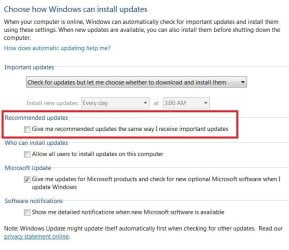
This time be sure to Exclude Recommended updates from being mixed into and installing with the real Important updates
Then only load the Important updates first.
After create a system image and deal with the recommended update so you have a way to restore the system if you get errors....
http://www.sevenforums.com/tutorials/73828-imaging-free-macrium.html
update settings.JPG
 

My Computer

Computer type
PC/Desktop
Computer Manufacturer/Model Number
Custom assembled by me :}
OS
Win-7-Pro64bit 7-H-Prem-64bit
CPU
i7-5930K 2nd i9-9940x both water blocked VRM's too
Motherboard
ASUS SABERTOOTH X99 2nd ASUS x299 Apex
Memory
Trident-z 3200C14 2nd Trident-z 3600C16
Graphics Card(s)
EVGA 1080ti ftw3 2nd Titan Xp both water blocked
Sound Card
Built-in Realtek
Monitor(s) Displays
1-AOC G2460PG 24"G-Sync 144Hz/ 2nd 1-ASUS VG248QE 24" 144Hz
Screen Resolution
1920 x 1080 144Hz
Hard Drives
2-Samsung M.2 Evo & Evo Plus
2-Samsung 850 EVO 500GB SSD's/ 3-2.5 W.D. Black 1tb-&3-1tb/3-3.5 WD Black 1tb hdd's
PSU
EVGA SuperNOVA 1000-P2 2nd 1200-P2
Case
2-Corsair Obsidian Series 450D Black ATX Mid Tower
Cooling
Custom water loops
Keyboard
Logitech G710+/ 2nd Logitech G910
Mouse
2-RedDragon M901 Perdition 16400 dpi Gaming mouse = wired
Internet Speed
Comcast Ping 19ms 89.31mbps download speed 6.12mbps upload
Antivirus
Malwarebytes Pro/ Superantispyware Pro
Browser
FireFox & Pale moon
Other Info
2nd ASUS X299 Apex/Intel i9-9940x with Custom water loop/7H-Prem-x64/Corsair 450D case/Ram Trident-z 3600C16 4x8gb / Samsung970Evo plus 500gb SSD/Dual ssd EZ swap evo/PSU EVGA SuperNova 1200w-P2 80+Platinum/GPU Titan Xp /8-ML-140 on push-pull on 2-280GTX rads
See this post: http://www.sevenforums.com/performa...rer-crashing-lot-post3212992.html#post3212992

Also check "MediaPreview" software mentioned here: http://www.sevenforums.com/software/393567-where-most-recently-used-lists-3.html#post3234325

I tried out Media Preview anyway. And guess what? Besides seemingly working good, it allows Explorer to show thumbnails for .flv files. And I quickly discovered that it doesn't build a thumbnail for a corrupt file! It turns out I had a lot of corrupt .flv files!
.

So basically try installing MediaPreview and see if it will create video thumbnails. If thumbnails are missing for videos they may well be corrupt and cause Explorer issues. Another option: Remove those video files by placing them on an external drive and disconnect the drive. Reboot and see if the issue is resolved.

You can get the same issue with corrupt image files.
 

My Computer

Computer type
Laptop
Computer Manufacturer/Model Number
ASUS
OS
Microsoft Windows 7 Home Premium 64-bit 7601 Multiprocessor Free Service Pack 1
CPU
AMD C-60 APU with Radeon(tm) HD Graphics
Motherboard
ASUSTeK COMPUTER INC. X501U
Memory
4.00 GB
Graphics Card(s)
AMD Radeon HD 6290 Graphics
Sound Card
(1) AMD High Definition Audio Device (2) Realtek High Defi
Screen Resolution
1366 x 768 x 32 bits (4294967296 colors) @ 60 Hz
Hard Drives
Hitachi HTS545050A7E380 SATA Disk Device
Antivirus
Comodo CIS & FW, SecureAplus App Whitelisting, Threatfire
Browser
Cyberfox 64bit, Opera 64bit, Airfox
Other Info
Spy-The-Spy, HitmanPro.Alert, Norton Connect Safe, MJRegWatcher, BitDefender TrafficLight, Voodoo Shield, Zemana AntiMalware
@ThrashZone: Thanks, I'm gonna try it!

@Callender: Reading your comment I realized that I have one certain folder where I noticed missing thumbnails!
I'm gonna try moving the whole folder on my pendrive and see if explorer.exe still causing CPU throttling.
 

My Computer

Computer type
Laptop
Computer Manufacturer/Model Number
HP
OS
Windows 7 Professional 64 bit
CPU
IB Intel Core i3-3110M
Memory
6GB 1333 Mhz
Graphics Card(s)
-
Screen Resolution
1366*768
Hard Drives
Samsung 840 EVO 120 GB
Internet Speed
20/1
Browser
Chrome
Hi,
Along with the 2 already updates I mentioned you could also install this updates rollup KB3125574
You have to get it at the catalog using internet explorer though
Microsoft Update Catalog
 

My Computer

Computer type
PC/Desktop
Computer Manufacturer/Model Number
Custom assembled by me :}
OS
Win-7-Pro64bit 7-H-Prem-64bit
CPU
i7-5930K 2nd i9-9940x both water blocked VRM's too
Motherboard
ASUS SABERTOOTH X99 2nd ASUS x299 Apex
Memory
Trident-z 3200C14 2nd Trident-z 3600C16
Graphics Card(s)
EVGA 1080ti ftw3 2nd Titan Xp both water blocked
Sound Card
Built-in Realtek
Monitor(s) Displays
1-AOC G2460PG 24"G-Sync 144Hz/ 2nd 1-ASUS VG248QE 24" 144Hz
Screen Resolution
1920 x 1080 144Hz
Hard Drives
2-Samsung M.2 Evo & Evo Plus
2-Samsung 850 EVO 500GB SSD's/ 3-2.5 W.D. Black 1tb-&3-1tb/3-3.5 WD Black 1tb hdd's
PSU
EVGA SuperNOVA 1000-P2 2nd 1200-P2
Case
2-Corsair Obsidian Series 450D Black ATX Mid Tower
Cooling
Custom water loops
Keyboard
Logitech G710+/ 2nd Logitech G910
Mouse
2-RedDragon M901 Perdition 16400 dpi Gaming mouse = wired
Internet Speed
Comcast Ping 19ms 89.31mbps download speed 6.12mbps upload
Antivirus
Malwarebytes Pro/ Superantispyware Pro
Browser
FireFox & Pale moon
Other Info
2nd ASUS X299 Apex/Intel i9-9940x with Custom water loop/7H-Prem-x64/Corsair 450D case/Ram Trident-z 3600C16 4x8gb / Samsung970Evo plus 500gb SSD/Dual ssd EZ swap evo/PSU EVGA SuperNova 1200w-P2 80+Platinum/GPU Titan Xp /8-ML-140 on push-pull on 2-280GTX rads
Back
Top