Full screen problem in my laptop while playing games

annyarun

New member
Local time
9:39 AM
Messages
2
Hi All,

I use dell inspiron 15 inch along with windows 7.
recently i have installed nfs MW. but when i cannot play this game with full screen. i get black bars on each side of the screen.. its very irritating.. please help..

Regards,
Arun
 

My Computer My Computer

Computer Manufacturer/Model Number
Dell
OS
windows 7
CPU
intel core 2 duo
Memory
4gb
Graphics Card(s)
512mb ATI
Monitor(s) Displays
15 inch
Hard Drives
320 gb
and also please let me know is my graphic card used by the game.. how i can crosscheck it..?
 

My Computer My Computer

Computer Manufacturer/Model Number
Dell
OS
windows 7
CPU
intel core 2 duo
Memory
4gb
Graphics Card(s)
512mb ATI
Monitor(s) Displays
15 inch
Hard Drives
320 gb
i have the same problem as yours and i fixed it.
but first tell me the highest and lowest resolution of the game and the lowest resolution of your screen.
 

My Computer My Computer

Computer Manufacturer/Model Number
DELL INSPIRON 1545
OS
Windows 7 Ultimate
CPU
Intel Pentium Dual CPU T3400 @ 2.16ghz 2.17 ghz
Memory
2.00 GB RAM 250 GB HD
Graphics Card(s)
Intel Express Chipset Family
Sound Card
IDT High Definition Audio Codec
Screen Resolution
1366x768
i have same problem my highest resolution is 1280x800 and my lowest resolution is 800 x 600.. need your help how did you do it
 

My Computer My Computer

OS
windows 7
Very simple steps:

i have tested it in my
windows 7 32bit ultimate
dell laptop
ati mobility radeon hd 4570
latest ati catalyst driver-application
1366x768 screen
with GTA San Andreus game

1)Go to ATI CATALYST Applicaton:
- Graphics/Desktop & Display/ click triangle button in big Screen Model and press "Properties" option
- now change resolution to lower one.(in my lapy i have changed it from 1366x768 to 1280x720.)
- Save & Exit.
2)now again go to ATI CATALYST Application
- Graphics/Desktop & Display/ this time click on bottom left small Laptop icon's triangle from where u can get to "Configure" option
- now you will find three scaling options:
>Preserve aspect ratio
>full screen
>centered
- u select full screen button
- save & exit.
3)now go to desktop
- click right click of mouse
- go to "Personalize" option
- than click "Display" button
- in that u will find "Display Resolution" Option,go to there.
- now change resolution to max (as it was 1366x768 in my case)
- apply ,save changes abd exit .

you have done,full screen full resolution boom

(if it does not work than try all this procedure after minimizing the game .as i have first started game than switched to desktop via tab button (minimize game) and than i have done above all procedure.i am just saying i dont no that if this stuff affect or not but try if you want.)

(here i have done changing resolution by two diff methods and use full screen option in ati application
first u might not get three option in configuration option and also cant change scaling option as they are brown as mentioned in step 2 but after lowering resolution u can access them)

if u like please respond
thankx
have a fun

 

My Computer My Computer

OS
Windows 7 Ultimate x32
i tried using the graphics property to fix it,
and it worked alright,
but,
the game display is very poor,
compared to, when am using windows Vista,
am i missing a driver?
and if i am,
which one is it?

the other thing is that, the
ati mobility radeon hd 4570
does not work on my laptop
instead it finishes the installation process
but,
when i try running it,
it once again starts the installation process

am using Mobile Intel (R) 4 series express chipset family
i would really want to know
how this driver differs in window 7 and windows Vista
 

My Computer My Computer

Computer Manufacturer/Model Number
Dell Inspiron 1545
OS
window 7 Ultimate 32 bit
CPU
Pentium (R) dual-core CPU t4200 @ 200GHZ and 200 MHZ
Memory
4096MB RAM
Graphics Card(s)
Mobile intel (R) 4 series express chipset family
Monitor(s) Displays
Generic PNP Monitor
Hard Drives
500GB
Case
DELL
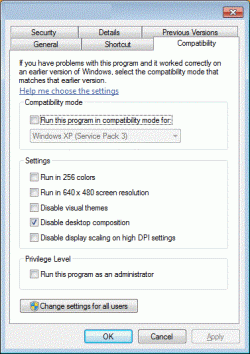
Easily Disable Win 7 Aero Before Running an Application

(Such as a Video Game)

Same problem on mutiple them games that will switsh to my desktop while playing them.

You can edit the properties of a shortcut and tell Windows to automatically disable Aero as soon as you start that application, and then re-enable it again once the application is closed.

Simply right-click on the shortcut and choose Properties, and then the Compatibility tab:
 

Attachments

  • dk.gif
    dk.gif
    40.8 KB · Views: 836

My Computer My Computer

Computer Manufacturer/Model Number
DELL
OS
Home Premium 64bit.
CPU
I3
For insurance, I check in the three Disable checkboxes and Run as admin, too.

Aero theme sucks for tons of classics and slightly older games. Using that Compatibility method is a real charm.
 

My Computer My Computer

Computer Manufacturer/Model Number
Compaq Presario
OS
Windows 7 Home Edition 64-bit
Memory
4 gigger
Graphics Card(s)
NVIDIA GeForce GT 440
Screen Resolution
1920x1080
PSU
AMD 2.30GHz
Keyboard
USB Logitech wired..with the volume knob not buttons :)
Mouse
USB wired
Internet Speed
AT&T (384kilos down 40 kilos up) wired
You can't adjust it in the game video settings?
 

My Computer My Computer

Computer type
PC/Desktop
Computer Manufacturer/Model Number
Custom Build
OS
Windows 7 Pro 64bit build 7601 SP1
CPU
Intel Core I5 3570K 3.4Ghz w/ Zalman CNPS9900NT RT
Motherboard
MSI Z77A-G45 Gaming
Memory
G.Skill F3-12800CL9D-8GbXL ; 4Gx2
Graphics Card(s)
EVGA Geforce GTX 770 Superclocked
Sound Card
Creative Sound Blaster Z
Monitor(s) Displays
Dual ViewSonic VX2770Smh-LED Black 27"IPS-Panel
Screen Resolution
1920x1080
Hard Drives
Kingston Hyper X 240GB SSD Win8 Pro 64bit 6GB/s Sata III
Intel 335 Series SSD 240GB Win8 Storage 6GB/s Sata III
Intel 320 Series SSD 600GB Storage 3GB/s Sata II
Western Digital Scorpio Black 1TB - Docked via Esata
PSU
Coolermaster GX 750W
Case
Corsair Vengence C70
Cooling
Coolermaster 120mm and Enermax 140mm
Keyboard
Corsair Vengence K70
Mouse
Logitech G500
Internet Speed
22mbps+
Browser
Firefox, Chrome, IE
Other Info
Swan M50W 2.1 speakers
APC UPS
Thermaltake BlacX HDD Dock
Samsung BD Optical Drive
Netgear WNDR4500
Very simple steps:

i have tested it in my
windows 7 32bit ultimate
dell laptop
ati mobility radeon hd 4570
latest ati catalyst driver-application
1366x768 screen
with GTA San Andreus game

1)Go to ATI CATALYST Applicaton:
- Graphics/Desktop & Display/ click triangle button in big Screen Model and press "Properties" option
- now change resolution to lower one.(in my lapy i have changed it from 1366x768 to 1280x720.)
- Save & Exit.
2)now again go to ATI CATALYST Application
- Graphics/Desktop & Display/ this time click on bottom left small Laptop icon's triangle from where u can get to "Configure" option
- now you will find three scaling options:
>Preserve aspect ratio
>full screen
>centered
- u select full screen button
- save & exit.
3)now go to desktop
- click right click of mouse
- go to "Personalize" option
- than click "Display" button
- in that u will find "Display Resolution" Option,go to there.
- now change resolution to max (as it was 1366x768 in my case)
- apply ,save changes abd exit .

you have done,full screen full resolution boom

(if it does not work than try all this procedure after minimizing the game .as i have first started game than switched to desktop via tab button (minimize game) and than i have done above all procedure.i am just saying i dont no that if this stuff affect or not but try if you want.)

(here i have done changing resolution by two diff methods and use full screen option in ati application
first u might not get three option in configuration option and also cant change scaling option as they are brown as mentioned in step 2 but after lowering resolution u can access them)

if u like please respond
thankx
have a fun
thankyou very much this worked for me
 

My Computer My Computer

OS
windows 7 home premium 64 bit
help

i would like to try this but i don't understand how to. How do i do this?
 

My Computer My Computer

OS
Windows 7 Home Premium 64bit.
Whome they use INTEL HD Graphics

Pleas install latest Intel HD graphics driver

Then right click on desktop and select Screen resolution then select resolution 800x600 and apply and keep changes

Now go to Intel(R) HD Graphics on show hidden icons on the right bottom of your taskbar and right click on it Graphics Options>Panel Fit>(and select)Scale Full Screen
Thats it then go to Screen resolution then select resolution 1366x768(recommended) and apply and keep changes

Now open And Play Nfs MW
 

My Computer My Computer

OS
windows7 home premium 64bit
For Screen size 15",15.6"........Hey..Try this instead.It workd for me.Open the graphic properties from control panel and Check the resolution of your system.It willbe set as 1366x768,if it is,then u have to change that to 1360x768.There will be No noticeable changes on the desktop.Click OK to apply the changes you have made.Now try running the game.
 

My Computer My Computer

OS
wINDOWS 7 uLTIMATE X64
i would like to try this but i don't understand how to. How do i do this?

Hey..Try this instead.It workd for me.Open the graphic properties from control panel and Check the resolution of your system.It willbe set as 1366x768,if it is,then u have to change that to 1360x768.There will be No noticeable changes on the desktop.Click OK to apply the changes you have made.Now try running the game.
 

My Computer My Computer

OS
wINDOWS 7 uLTIMATE X64
Very simple steps:

i have tested it in my
windows 7 32bit ultimate
dell laptop
ati mobility radeon hd 4570
latest ati catalyst driver-application
1366x768 screen
with GTA San Andreus game

1)Go to ATI CATALYST Applicaton:
- Graphics/Desktop & Display/ click triangle button in big Screen Model and press "Properties" option
- now change resolution to lower one.(in my lapy i have changed it from 1366x768 to 1280x720.)
- Save & Exit.
2)now again go to ATI CATALYST Application
- Graphics/Desktop & Display/ this time click on bottom left small Laptop icon's triangle from where u can get to "Configure" option
- now you will find three scaling options:
>Preserve aspect ratio
>full screen
>centered
- u select full screen button
- save & exit.
3)now go to desktop
- click right click of mouse
- go to "Personalize" option
- than click "Display" button
- in that u will find "Display Resolution" Option,go to there.
- now change resolution to max (as it was 1366x768 in my case)
- apply ,save changes abd exit .

you have done,full screen full resolution boom

(if it does not work than try all this procedure after minimizing the game .as i have first started game than switched to desktop via tab button (minimize game) and than i have done above all procedure.i am just saying i dont no that if this stuff affect or not but try if you want.)

(here i have done changing resolution by two diff methods and use full screen option in ati application
first u might not get three option in configuration option and also cant change scaling option as they are brown as mentioned in step 2 but after lowering resolution u can access them)

if u like please respond
thankx
have a fun

Holy f*ck! It worked... I was suffering all the day until I found your post.
Thank you man!
 

My Computer My Computer

OS
Windows 7 Professional x64
Hi
i used Sony vaio 15 inch along with windows 7 Home Premium (Service Pack 1)
recently i have installed Age of Empires ii and also yesterday i installed Commando game.while i play the both games, i found full screen problem, mean i cannot play the game with full screen. i get black bars on each side of the screen. its very irritating. please help me to how fix it. pls

my System description -

Intel Core(TM)[email protected]
6 GB RAM
Windows7 Home Premium (Service Pack 1)
DirectX 11
Graph-AMD Radeon HD 7500M/7600M Series
 

My Computer My Computer

OS
windows7 Home Premium 64Bit.
Full screen resolution problem during game play

Hi,
I am using Lenovo Z580 Laptop with windows7 homebasic 64 bit OS.I have Nvidia Geforce 640M 2GB Graphic card. I am also facing the same problem.Please help me...
Thank you
 

My Computer My Computer

OS
windows7 homebasic 64 bit
Hello... its worked for me too in my hp laptop core i3... but now i'm using dell core i7 and i can't find the Ati ctalyst option or any other graphic card controller in my laptop...please help...

Thank You...waiting for you reply
 

My Computer My Computer

Computer type
Laptop
Computer Manufacturer/Model Number
Dell
OS
windows 8
CPU
552
All of u see chintan123's post
do all steps or see my Thread ''Classic Games Widescreen resolution'' in this section :)
 

My Computer My Computer

Computer type
Laptop
Computer Manufacturer/Model Number
Asus K54L
OS
Windows 7 Ultimate x86 SP1
CPU
Intel(R) Pentium(R) B950 CPU @ 2.10 Ghz
Motherboard
ASUSTek Computer Inc.
Memory
2GB DDR3
Graphics Card(s)
Intel HD Graphics 3000
Sound Card
Realtek High Definiton Audio
Screen Resolution
1366x768 (60Hz)
Hard Drives
320GB SATA
Antivirus
Avast Free Antivirus 7.0.1474
Browser
Google Chrome
Hi All,

I use dell inspiron 15 inch along with windows 7.
recently i have installed nfs MW. but when i cannot play this game with full screen. i get black bars on each side of the screen.. its very irritating.. please help..

Regards,
Arun

hi
yo must do these:
1.change your resolution to 800*600
2.right click on desktop and select graphics option and panel fit and scale full screen
3.change back your resolution
it's ok
good luck
 

My Computer My Computer

Computer type
Laptop
Computer Manufacturer/Model Number
dell
OS
32 bit
CPU
core i7
Back
Top