Gadget Load

Frugalfart

New member
Is there any way to have Window's gadgets to load after a set period of time when you log onto your PC? I have a couple of instant messaging gadgets that come up before I can get logged onto the messaging service. As a result, the gadgets don't attach to the client. Once I have logged on, I have to remove then add the gadget to get them to show properly. I'm not sure it is worth the trouble.
 

My Computer

Computer Manufacturer/Model Number
Dell Studio XPS 435T
OS
Windows 7
CPU
Core i7 920
Memory
9 GB
Graphics Card(s)
NVIDIA GeForce GTS 240
Sound Card
Creative SB X-Fi
Monitor(s) Displays
Dell ST2410
Hard Drives
1 TB
Is there any way to have Window's gadgets to load after a set period of time when you log onto your PC? I have a couple of instant messaging gadgets that come up before I can get logged onto the messaging service. As a result, the gadgets don't attach to the client. Once I have logged on, I have to remove then add the gadget to get them to show properly. I'm not sure it is worth the trouble.


Hi and welcome

Gadgets load with sidebar.exe. You can have services delay start, but sidebar needs to launch early. thay shouldnt launch before you log on, for only in your logon does the computer know which user you are.

Can you be a bit more specific?
 

My Computer

Computer Manufacturer/Model Number
HP Pavillion dv-7 1005 Tx
OS
Win 8 Release candidate 8400
CPU
[email protected]
Memory
4 gigs
Graphics Card(s)
Nvidia 9600M
Sound Card
HD built-in
Monitor(s) Displays
17" Wxga
Screen Resolution
1440x900
Cooling
none
Internet Speed
45Mb down 5Mb up
When I log into Windows, I must put in my password for Simp - Secway Instant Messenger Privacy. It is a program that encrypts instant messaging. After I do that, Live Messenger comes up for me too enter my password. By the time I enter my password, Messenger Gadget has loaded and says I need to log on, however it will not connect to messenger after I do without exiting the gadget and opening it back up again. The same thing happens to my Skye gadget on occasion but not nearly as often. If I could set a timer to open my gadgets two minutes after I log onto my PC, it would give me time to log onto my messenger services and the gadgets would operate normally on startup.
 

My Computer

Computer Manufacturer/Model Number
Dell Studio XPS 435T
OS
Windows 7
CPU
Core i7 920
Memory
9 GB
Graphics Card(s)
NVIDIA GeForce GTS 240
Sound Card
Creative SB X-Fi
Monitor(s) Displays
Dell ST2410
Hard Drives
1 TB
I use WinPatrol to schedule the delayed starts. Sidebar is one example. Go to the Startup Programs button > right click on sidebar > Move to delayed start program list. Then go to the Delayed Start button > right click on sidebar > delay Start Options. There you can set the delay time. Works perfectly. WinPatrol has other (security) features. Read the documentation. It is highly recommended.
 
Last edited:

My Computer

Computer Manufacturer/Model Number
HP, Dell, Gateway, Toshiba - 4 laptops and 2 desktops
OS
Vista, Windows7, Mint Mate, Zorin, Windows 8
CPU
from 1.6GHz Duo to i7
Monitor(s) Displays
2x HP w2207
Hard Drives
5x HDD, 7x SSD, 12x Externals
Keyboard
with trackball - no mices
Mouse
Trackball mice
Internet Speed
DSL 6000
Is there any way to have Window's gadgets to load after a set period of time when you log onto your PC? I have a couple of instant messaging gadgets that come up before I can get logged onto the messaging service. As a result, the gadgets don't attach to the client. Once I have logged on, I have to remove then add the gadget to get them to show properly. I'm not sure it is worth the trouble.


You can either use something like Winpatrol, was mentioned, or Glary utilities to put it in the delayed start up, and specify the time delay.

Or you could create a task in task scheduler for it.

Just would have to use Autoruns, or go type msconfig in the start menu search, go to the Startup tab, and uncheck the sidebar.exe entry so the sidebar doesn't start at logon with Windows, but rather from your specified scheduled task.

Then create the task for C:\Program Files\Windows Sidebar\sidebar.exe.
You could then specify the time delay, or times you want it to load, the specified account with logon, etc..

This tutorial outlines creating a basic task. Or you can just choose Create task.

http://www.sevenforums.com/tutorials/12444-task-scheduler-create-new-task.html?ltr=T
 

My Computer

Computer type
PC/Desktop
Computer Manufacturer/Model Number
Airbot 2.0
OS
Windows 7 Ultimate x64 SP1
CPU
Core i7 920 (D0) @ 4Ghz, *26c idle *65c full load on air
Motherboard
Asus P6X58D Premium - Sata 6Gb/s - USB 3.0
Memory
12GB DDR3 Corsair Dominator -CMD12GX3M6A1600C8 at 1600MHz
Graphics Card(s)
Zotac Geforce GTX 770
Sound Card
ASUS Xonar D2X
Monitor(s) Displays
1 LG 24" Flatron W2453V-PF 1 Samsung 24" P2450H both 2ms RT
Screen Resolution
1920x1080@60hz
Hard Drives
1 Samsung 250GB 840 Evo SSD
1 OCZ Vertex2 180GB SSD
1 TB Samsung Spinpoint F1 7200RPM 32MB cache
2 500GB WD Caviar Blacks 7200RPM 32MB cache (WD5001AALS)

Pioneer DVD Burner DVR-S18M
PSU
Corsair HX1000W
Case
Cooler Master HAF 932
Cooling
Case Fans *3 230mm, *1 140mm/CPU - *Tuniq Tower 120 Extreme
Keyboard
Logitech Wireless MK700
Mouse
Logitech Wireless MK700
Internet Speed
DL 15 Mbps UL 0.98 Mbps
Antivirus
None
Browser
Firefox Nightly
Other Info
Processor-7.7 *RAM- 7.9 *Graphics-7.9 *Gaming Graphics- 7.9 *SSD- 7.8 W.E.I final score= 7.7
*Phone- LG Nexus 5
I tried out Win Patrol. The good news is that it worked flawlessly. The bad news is I got a pop up that said "This Program doesn't want to be Delayed". It then states it can be put back into the startup normally or you can chose to disable it and Win Patrol will continuously remove it from the startup list. I'm not sure if that would be a good thing to do as it says it does not recommend doing this. What's up with that? Why doesn't it like to be delayed? I think it is playing hard to get along with!! lol
 

My Computer

Computer Manufacturer/Model Number
Dell Studio XPS 435T
OS
Windows 7
CPU
Core i7 920
Memory
9 GB
Graphics Card(s)
NVIDIA GeForce GTS 240
Sound Card
Creative SB X-Fi
Monitor(s) Displays
Dell ST2410
Hard Drives
1 TB
Might be a better idea to try the scheduled task suggestion I posted then.
 

My Computer

Computer type
PC/Desktop
Computer Manufacturer/Model Number
Airbot 2.0
OS
Windows 7 Ultimate x64 SP1
CPU
Core i7 920 (D0) @ 4Ghz, *26c idle *65c full load on air
Motherboard
Asus P6X58D Premium - Sata 6Gb/s - USB 3.0
Memory
12GB DDR3 Corsair Dominator -CMD12GX3M6A1600C8 at 1600MHz
Graphics Card(s)
Zotac Geforce GTX 770
Sound Card
ASUS Xonar D2X
Monitor(s) Displays
1 LG 24" Flatron W2453V-PF 1 Samsung 24" P2450H both 2ms RT
Screen Resolution
1920x1080@60hz
Hard Drives
1 Samsung 250GB 840 Evo SSD
1 OCZ Vertex2 180GB SSD
1 TB Samsung Spinpoint F1 7200RPM 32MB cache
2 500GB WD Caviar Blacks 7200RPM 32MB cache (WD5001AALS)

Pioneer DVD Burner DVR-S18M
PSU
Corsair HX1000W
Case
Cooler Master HAF 932
Cooling
Case Fans *3 230mm, *1 140mm/CPU - *Tuniq Tower 120 Extreme
Keyboard
Logitech Wireless MK700
Mouse
Logitech Wireless MK700
Internet Speed
DL 15 Mbps UL 0.98 Mbps
Antivirus
None
Browser
Firefox Nightly
Other Info
Processor-7.7 *RAM- 7.9 *Graphics-7.9 *Gaming Graphics- 7.9 *SSD- 7.8 W.E.I final score= 7.7
*Phone- LG Nexus 5
I haven't looked at Glary Utilities yet but wouldn't that basically do the same as the Win Patrol? As for the other suggestion, I'll look into it later today. I did look at the scheduler on an XP system but I didn't see anything to delay start. How would I go about that? Maybe Win 7 has more options. I'll check it out tonight when I get home.
 

My Computer

Computer Manufacturer/Model Number
Dell Studio XPS 435T
OS
Windows 7
CPU
Core i7 920
Memory
9 GB
Graphics Card(s)
NVIDIA GeForce GTS 240
Sound Card
Creative SB X-Fi
Monitor(s) Displays
Dell ST2410
Hard Drives
1 TB
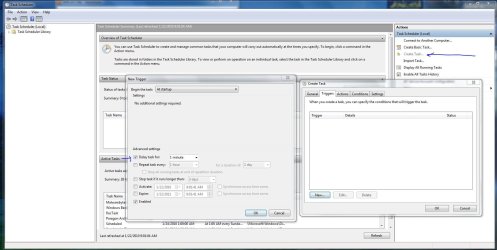
The delayed start option is there under Create task. Probably not under Create basic task. Just use Create Task, gives you more options.

Capture-0.JPG
 

My Computer

Computer type
PC/Desktop
Computer Manufacturer/Model Number
Airbot 2.0
OS
Windows 7 Ultimate x64 SP1
CPU
Core i7 920 (D0) @ 4Ghz, *26c idle *65c full load on air
Motherboard
Asus P6X58D Premium - Sata 6Gb/s - USB 3.0
Memory
12GB DDR3 Corsair Dominator -CMD12GX3M6A1600C8 at 1600MHz
Graphics Card(s)
Zotac Geforce GTX 770
Sound Card
ASUS Xonar D2X
Monitor(s) Displays
1 LG 24" Flatron W2453V-PF 1 Samsung 24" P2450H both 2ms RT
Screen Resolution
1920x1080@60hz
Hard Drives
1 Samsung 250GB 840 Evo SSD
1 OCZ Vertex2 180GB SSD
1 TB Samsung Spinpoint F1 7200RPM 32MB cache
2 500GB WD Caviar Blacks 7200RPM 32MB cache (WD5001AALS)

Pioneer DVD Burner DVR-S18M
PSU
Corsair HX1000W
Case
Cooler Master HAF 932
Cooling
Case Fans *3 230mm, *1 140mm/CPU - *Tuniq Tower 120 Extreme
Keyboard
Logitech Wireless MK700
Mouse
Logitech Wireless MK700
Internet Speed
DL 15 Mbps UL 0.98 Mbps
Antivirus
None
Browser
Firefox Nightly
Other Info
Processor-7.7 *RAM- 7.9 *Graphics-7.9 *Gaming Graphics- 7.9 *SSD- 7.8 W.E.I final score= 7.7
*Phone- LG Nexus 5
Well after taking sidebar out of the startup and configuring a schedule for it, I have completely different problems. The delay worked fine. Now however, I get a message on my messenger gadget that it doesn't like my 64 bit OS and my Skype gadget failed to run at all.
 

My Computer

Computer Manufacturer/Model Number
Dell Studio XPS 435T
OS
Windows 7
CPU
Core i7 920
Memory
9 GB
Graphics Card(s)
NVIDIA GeForce GTS 240
Sound Card
Creative SB X-Fi
Monitor(s) Displays
Dell ST2410
Hard Drives
1 TB
Thought I had it figured out. I removed the changes I had made and started over making sure I used the sidebar under Program Files (86). Same end result. Not sure what's going on.....
 

My Computer

Computer Manufacturer/Model Number
Dell Studio XPS 435T
OS
Windows 7
CPU
Core i7 920
Memory
9 GB
Graphics Card(s)
NVIDIA GeForce GTS 240
Sound Card
Creative SB X-Fi
Monitor(s) Displays
Dell ST2410
Hard Drives
1 TB
Back
Top