Gadget Transparency

SeattleMike

New member
I'm going with the motto of "the only stupid question is the one you don't ask" and reaching out to people who know more than I do...

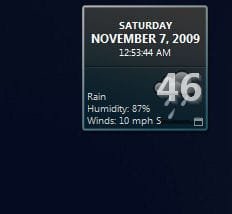
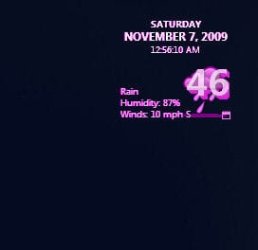
The images attached should serve to illustrate my problem, which is no matter how I attempt the make the background transparent, I get the magenta transparency mask that lies buried in the windows code. I have tried transparent .png files and editing the opacity in the .html code.

The gadget is called "simple date" and can be downloaded from Microsoft's Gadget website. I've grown to love it but, in cleaning up my desktop, I've realized it would be perfect if it had a transparent background rather than the whole thing being transparent.

So, my question is... can anyone tell me how to get the result I am looking for?
 

Attachments

  • Image1.jpg
    Image1.jpg
    72.5 KB · Views: 322
  • Image2.jpg
    Image2.jpg
    15.7 KB · Views: 6,200
  • Image3.jpg
    Image3.jpg
    16.9 KB · Views: 6,202

My Computer

Computer Manufacturer/Model Number
HP HDX18t
OS
Windows 7 HP 64
CPU
Intel Q9100
Memory
4GB DDR3
Graphics Card(s)
nVidia 9600m GT
Screen Resolution
1920x1080
Anyone?
 

My Computer

Computer Manufacturer/Model Number
HP HDX18t
OS
Windows 7 HP 64
CPU
Intel Q9100
Memory
4GB DDR3
Graphics Card(s)
nVidia 9600m GT
Screen Resolution
1920x1080
So, I am guessing the answer is "no, it can't be done"
 

My Computer

Computer Manufacturer/Model Number
HP HDX18t
OS
Windows 7 HP 64
CPU
Intel Q9100
Memory
4GB DDR3
Graphics Card(s)
nVidia 9600m GT
Screen Resolution
1920x1080
So, I am guessing the answer is "no, it can't be done"

Hey Mike sorry that nobody has gave you a answer. I have tried also to do this but got the same result as you have! I think it can be done, but you need to figure out the coding with in the gadget and I wish I could do it but I don't know how but if I do figure it out I'll let you know!

;)
 

My Computer

Computer Manufacturer/Model Number
Toshiba Satellite
OS
Windows 7 Ultimate SP1 64-bit
CPU
AMD Athlon(tm) II P320 Dual-Core Processor
Motherboard
AMD
Memory
4GB DDR 3
Graphics Card(s)
ATI Mobility Radeon HD 4200 Series
Sound Card
Conexant SmartAudio HD
Screen Resolution
1280 - 800
Hard Drives
320GB
For Windows gadgets, any HTML elements that have any alpha pixels (such as the anti-aliased texts in your case) should only be used on a solid background. If you use them on a transparent background, the alpha pixels will be displayed as the annoying magenta pixels.

The gadget API provides a way to draw anti-aliased text directly over the desktop with background of any transparency, but you will probably need a lot of works to convert all necessary HTML texts in your gadget to this version.
 

My Computer

OS
Windows Vista
For Windows gadgets, any HTML elements that have any alpha pixels (such as the anti-aliased texts in your case) should only be used on a solid background. If you use them on a transparent background, the alpha pixels will be displayed as the annoying magenta pixels.

The gadget API provides a way to draw anti-aliased text directly over the desktop with background of any transparency, but you will probably need a lot of works to convert all necessary HTML texts in your gadget to this version.

Oh I have the time, just not the knowledge to know how to go about it. Can you link this information?
 

My Computer

Computer Manufacturer/Model Number
HP HDX18t
OS
Windows 7 HP 64
CPU
Intel Q9100
Memory
4GB DDR3
Graphics Card(s)
nVidia 9600m GT
Screen Resolution
1920x1080
For Windows gadgets, any HTML elements that have any alpha pixels (such as the anti-aliased texts in your case) should only be used on a solid background. If you use them on a transparent background, the alpha pixels will be displayed as the annoying magenta pixels.

The gadget API provides a way to draw anti-aliased text directly over the desktop with background of any transparency, but you will probably need a lot of works to convert all necessary HTML texts in your gadget to this version.

Oh I have the time, just not the knowledge to know how to go about it. Can you link this information?

Gadgets on MSDN
Gadgets (Windows)

And this is probably the section you are looking for.
Developing a Gadget for Windows Sidebar Part 2: The G:BACKGROUND, G:IMAGE, G:TEXT Presentation Elements and GIMAGE Protocol
Gadgets for Windows Sidebar - Presentation Object Reference

The parts you need to know are G:IMAGE and G:TEXT.
 

My Computer

OS
Windows Vista
Back
Top