GAMES menu issue

Syrius

New member
Hello all!

I'm new in this forum and I have been testing W7 RC for a couple of weeks.

Aside some minor problems with WMP12, this OS has all the possibilities to finally replace XP.

I've got a question anyway about the GAMES menu, the one you can reach from start menu. I updated D-Fend (the frontend for the famous DOSBOX) and it installed automatically a link in that menu. I did this first on VISTA and it did the same, but it is a dead one that has to be edited to work. I did with Vista, but with 7 even right-clicking does not work with dead links in games menu.

What should I do to edit/remove that link?

Thanks all :)
 

My Computer

Computer Manufacturer/Model Number
Myself
OS
Windows 7 RC (build 7100)
CPU
Intel Core Quad DUO Q9650 @3.61 GhZ
Motherboard
Asus P5Q PRO
Memory
2X1GB Corsair Dominator@533MhZ
Graphics Card(s)
Ati Radeon HD4870
Sound Card
Integrated Realtek 7.1 Crystal sound chip
Monitor(s) Displays
19''Acer AL1917
Screen Resolution
1280x1024
Hard Drives
Seagate Barracuda 300GB 7200rpm
Maxtor 190GB 7200rpm
PSU
Cooler Master Silent Power 700W
Case
2*80mm blue led fans, 2*120mm blue led fans, oled display
Cooling
ZALMAN CNPS9100Led
Keyboard
Trust easy scroll silverline keyboard
Mouse
Microsoft Bluetooth notebook mouse 5000
Internet Speed
ADSL 20Mb
open the window (double click the menu button) then right click > hide. It is gone from your eyes, but i do not see why there is no right click > delete there lol.
 

My Computer

Computer Manufacturer/Model Number
Homebuilt power rig
OS
Windows 7 build 7100
CPU
Intel Core2Duo 6600
Motherboard
Asus P5K
Memory
4GB ddr2
Graphics Card(s)
ATI Radeon 4870
Sound Card
Soundblaster XFi Extreme Audio
Monitor(s) Displays
Samsung 226BW
Screen Resolution
1600x1050
Hard Drives
2x 400gb SATA
1x 800gb SATA
PSU
400watt
Case
Antec Nine Hundred
Cooling
stock
Internet Speed
1.2mbps
open the window (double click the menu button) then right click > hide. It is gone from your eyes, but i do not see why there is no right click > delete there lol.

Thanks for you answer :)

As I said before right-clicking on the object isn't working :( I tried to find the registry keys of the games menu items to modify the link details from there but I coldn't find them...
 

My Computer

Computer Manufacturer/Model Number
Myself
OS
Windows 7 RC (build 7100)
CPU
Intel Core Quad DUO Q9650 @3.61 GhZ
Motherboard
Asus P5Q PRO
Memory
2X1GB Corsair Dominator@533MhZ
Graphics Card(s)
Ati Radeon HD4870
Sound Card
Integrated Realtek 7.1 Crystal sound chip
Monitor(s) Displays
19''Acer AL1917
Screen Resolution
1280x1024
Hard Drives
Seagate Barracuda 300GB 7200rpm
Maxtor 190GB 7200rpm
PSU
Cooler Master Silent Power 700W
Case
2*80mm blue led fans, 2*120mm blue led fans, oled display
Cooling
ZALMAN CNPS9100Led
Keyboard
Trust easy scroll silverline keyboard
Mouse
Microsoft Bluetooth notebook mouse 5000
Internet Speed
ADSL 20Mb
Hi Syrius, welcome to the forums.

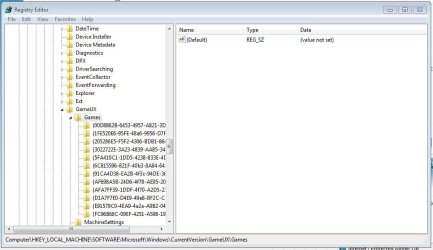
I think i've found what your after. If you run regedit (from the start menu search bar), navigate to
HKEY_LOCAL_MACHINE\SOFTWARE\Microsoft\Windows\CurrentVersion\GameUX\Games
You can then move down the list and look for what you're after (it will be found under 'Title'). You should then be able to delete that key and it will be removed from the games list.

Hope this helps :)


Jeff
 

Attachments

  • Capture.JPG
    Capture.JPG
    84.6 KB · Views: 155

My Computer

Computer Manufacturer/Model Number
Compaq Desktop
OS
Windows 7 Ultimate x64
CPU
AMD Sempron Dual Core
Memory
3GB
Graphics Card(s)
NVIDIA GeForce 6150SE nForce 430
Screen Resolution
1024x768
Hard Drives
150GB Sata
Thanks Jeff! I've found the key: it seems that the installer set the game as Windows native so in the registry key were missing some strings that did not make possible running the program from there.

Thanks again :)

PS. Followed the advice in your signature :)
 

My Computer

Computer Manufacturer/Model Number
Myself
OS
Windows 7 RC (build 7100)
CPU
Intel Core Quad DUO Q9650 @3.61 GhZ
Motherboard
Asus P5Q PRO
Memory
2X1GB Corsair Dominator@533MhZ
Graphics Card(s)
Ati Radeon HD4870
Sound Card
Integrated Realtek 7.1 Crystal sound chip
Monitor(s) Displays
19''Acer AL1917
Screen Resolution
1280x1024
Hard Drives
Seagate Barracuda 300GB 7200rpm
Maxtor 190GB 7200rpm
PSU
Cooler Master Silent Power 700W
Case
2*80mm blue led fans, 2*120mm blue led fans, oled display
Cooling
ZALMAN CNPS9100Led
Keyboard
Trust easy scroll silverline keyboard
Mouse
Microsoft Bluetooth notebook mouse 5000
Internet Speed
ADSL 20Mb
Back
Top