
Getting rid of Chinese! (language, not people)

EDITED POST ABOVE - in case you didn't see it.

If that is too complicated, you can just export the registry into regfiles, from within windows:

Just right click each one and select export.
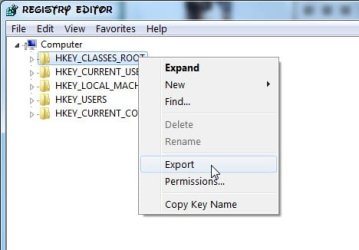
AEXPORT.jpg


then 7-zip each exported .reg file .


Be more difficult for me to look thru those - but very easy for you to do.
 

My Computers My Computers

  • At a glance

    7 X64i5 84002x8gb 3200mhz
    Computer type
    PC/Desktop
    OS
    7 X64
    CPU
    i5 8400
    Motherboard
    gigabyte b365m ds3h
    Memory
    2x8gb 3200mhz
    Hard Drives
    various
    PSU
    pure power 11 400w cm
    Case
    Coolermaster
    Cooling
    cryorig m9i
  • At a glance

    7x64g54008gb ddr4 2400
    Computer type
    PC/Desktop
    OS
    7x64
    CPU
    g5400
    Motherboard
    ga b365m ds3h
    Memory
    8gb ddr4 2400
    PSU
    xfx pro 450w
Boot the 7 dvd/repair disc.

My laptop didn't come with a disc... in fact, I don't think my last laptop came with one either. I will have to do the second option, sorry for more work on your end! Here it comes...
 

My Computer My Computer

At a glance

Windows 7 Basic 32bit
Computer Manufacturer/Model Number
Toshiba T210 Laptop
OS
Windows 7 Basic 32bit
There is a difference here - it may account for your apps. thinking you want them to install in chinese:

View attachment lang.zip


It's important you have some kind of external bootable media.

You should be able to run off Toshiba recovery discs from within windows 7.

You can certainly run off a windows 7 repair disc ( you can't install from that - repair options only ).
 

My Computers My Computers

  • At a glance

    7 X64i5 84002x8gb 3200mhz
    Computer type
    PC/Desktop
    OS
    7 X64
    CPU
    i5 8400
    Motherboard
    gigabyte b365m ds3h
    Memory
    2x8gb 3200mhz
    Hard Drives
    various
    PSU
    pure power 11 400w cm
    Case
    Coolermaster
    Cooling
    cryorig m9i
  • At a glance

    7x64g54008gb ddr4 2400
    Computer type
    PC/Desktop
    OS
    7x64
    CPU
    g5400
    Motherboard
    ga b365m ds3h
    Memory
    8gb ddr4 2400
    PSU
    xfx pro 450w
I downloaded your zip and here is what I see...

YourLanguage said:
[HKEY_LOCAL_MACHINE\SYSTEM\ControlSet001\Control\Nls\Language]

"InstallLanguage"="0409"
"Default"="0409"
"InstallLanguageFallback"=hex(7):65,00,6e,00,2d,00,55,00,53,00,00,00
"DefaultLanguage"="0804"

MyLanguage said:
[HKEY_LOCAL_MACHINE\SYSTEM\ControlSet001\Control\Nls\Language]

"InstallLanguage"="0409"
"Default"="0809"

OK, I found a page with language codes on it...
Chinese: 804, US English: 409, UK English: 809
Language Codes - Sorted by Locale

I went back into my registry and pulled up those keys and I see what you are talking about. Do you think I should just edit the keys that are currently set to 804 and change them to 809? It seems like that is what I should do, but editing the registry has been drilled into me as being something to do very, very carefully.

As for the bootable media, I don't have much experience with Windows 7. Should it come with a CD? My laptop doesn't even have a CD drive in it (I just realized, haha) so should I be able to create a bootable USB data stick or something? I'm glad you mentioned this, I could be up shxt creek without something!
 

My Computer My Computer

At a glance

Windows 7 Basic 32bit
Computer Manufacturer/Model Number
Toshiba T210 Laptop
OS
Windows 7 Basic 32bit
Seems to me these two entries are extra to mine.

"InstallLanguageFallback"=hex(7):65,00,6e,00,2d,00,55,00,53,00,00,00
"DefaultLanguage"="0804"

You might find removing them stops the programs thinking you are using chinese language.

I don't think changing that en-us entry ( 0409 ) to en-uk (0809) is going to make any difference.

I don't know how/if there would be any effect on activation status.

As you don't appear to have any kind of backup of your registry or system , I suggest you do so first.

One should always have an image of the o/s to revert to at any time.


There is an imaging program that comes with windows 7, but free 3rd party alternatives are better.

Macrium free is probably your best bet.

D/l and install it - then make an image of your windows 7 partition ( and the 100mb) partition onto an external drive. Macrium Reflect FREE Edition - Information and download

You also need to create the macrium recovery media - you can run that off from within the program itself.

You will need a usb flash drive for that as you have no cd drive.

If you ever restore using the manufacturer recovery partition - you may find that it is chinese again. The recovery partition will conrtain an image which takes the pc back to the state you originally received it.
 

My Computers My Computers

  • At a glance

    7 X64i5 84002x8gb 3200mhz
    Computer type
    PC/Desktop
    OS
    7 X64
    CPU
    i5 8400
    Motherboard
    gigabyte b365m ds3h
    Memory
    2x8gb 3200mhz
    Hard Drives
    various
    PSU
    pure power 11 400w cm
    Case
    Coolermaster
    Cooling
    cryorig m9i
  • At a glance

    7x64g54008gb ddr4 2400
    Computer type
    PC/Desktop
    OS
    7x64
    CPU
    g5400
    Motherboard
    ga b365m ds3h
    Memory
    8gb ddr4 2400
    PSU
    xfx pro 450w
Oops, I meant changing the entry from 804 (Chinese) to 409 (US English), I accidentally said 804 (Chinese) to 809 (UK English) but you answered 409 (US English) to 809 (UK English). Confusing. So again, could I just change the "DefaultLanguage"="0804" to "DefaultLanguage"="0409" and then get rid of the "InstallLanguageFallback" key?

And in an interesting turn of events, last night at dinner a friend of a friend mentioned that he is a microsoft vendor here in Shanghai and he can get a copy of Windows Ultimate legit for $30. So assuming that he isn't BS, I should be able to.... oh crap. I don't have a CD drive in my laptop! Oh no! I guess this means I need to find an external CD drive, right?
 

My Computer My Computer

At a glance

Windows 7 Basic 32bit
Computer Manufacturer/Model Number
Toshiba T210 Laptop
OS
Windows 7 Basic 32bit
Yes. you will need an external cd drive - sounds a great bargain:D

If you are getting Ultimate - then you have nothing to lose - try deleting these two entries

"InstallLanguageFallback"=hex(7):65,00,6e,00,2d,00,55,00,53,00,00,00
"DefaultLanguage"="0804"

They don't exist on my system.

Merging this reg file will do it for you.

View attachment remove0804.reg


Keep us updated.
 

My Computers My Computers

  • At a glance

    7 X64i5 84002x8gb 3200mhz
    Computer type
    PC/Desktop
    OS
    7 X64
    CPU
    i5 8400
    Motherboard
    gigabyte b365m ds3h
    Memory
    2x8gb 3200mhz
    Hard Drives
    various
    PSU
    pure power 11 400w cm
    Case
    Coolermaster
    Cooling
    cryorig m9i
  • At a glance

    7x64g54008gb ddr4 2400
    Computer type
    PC/Desktop
    OS
    7x64
    CPU
    g5400
    Motherboard
    ga b365m ds3h
    Memory
    8gb ddr4 2400
    PSU
    xfx pro 450w
OK, I merged that registry file and I checked my registry and it has been corrected. I am going to uninstall AVG and re-download it to test this.

Thank you so much for your help, it was far beyond what I expected!
 

My Computer My Computer

At a glance

Windows 7 Basic 32bit
Computer Manufacturer/Model Number
Toshiba T210 Laptop
OS
Windows 7 Basic 32bit
I assume avg installed in chinese the first time , and hopefully will reinstall in English.

You might find avg left a lot of stuff behind when you thought you uninstalled it.

Not sure if that will have any effect.

There are free uninstall apps which help clear old registry entries left by the app. own uninstaller , for general use, Advanced Uninstaller Free - Free software downloads and software reviews - CNET Download.com works well for me - finds and uninstalls 64 bit apps. as well.

There are special uninstallers available at the site of the av companies specifically for removing their junk

AVG - Download tools


http://www.appremover.com/
 

My Computers My Computers

  • At a glance

    7 X64i5 84002x8gb 3200mhz
    Computer type
    PC/Desktop
    OS
    7 X64
    CPU
    i5 8400
    Motherboard
    gigabyte b365m ds3h
    Memory
    2x8gb 3200mhz
    Hard Drives
    various
    PSU
    pure power 11 400w cm
    Case
    Coolermaster
    Cooling
    cryorig m9i
  • At a glance

    7x64g54008gb ddr4 2400
    Computer type
    PC/Desktop
    OS
    7x64
    CPU
    g5400
    Motherboard
    ga b365m ds3h
    Memory
    8gb ddr4 2400
    PSU
    xfx pro 450w
I used Advanced Uninstaller and it found a couple of things in my startup files that shouldn't be there.

Also re-installed AVG and there is no Chinese to be seen, so our fix seems to have worked.
 

My Computer My Computer

At a glance

Windows 7 Basic 32bit
Computer Manufacturer/Model Number
Toshiba T210 Laptop
OS
Windows 7 Basic 32bit
That's interesting - thanks for the update.:D
 

My Computers My Computers

  • At a glance

    7 X64i5 84002x8gb 3200mhz
    Computer type
    PC/Desktop
    OS
    7 X64
    CPU
    i5 8400
    Motherboard
    gigabyte b365m ds3h
    Memory
    2x8gb 3200mhz
    Hard Drives
    various
    PSU
    pure power 11 400w cm
    Case
    Coolermaster
    Cooling
    cryorig m9i
  • At a glance

    7x64g54008gb ddr4 2400
    Computer type
    PC/Desktop
    OS
    7x64
    CPU
    g5400
    Motherboard
    ga b365m ds3h
    Memory
    8gb ddr4 2400
    PSU
    xfx pro 450w
Back
Top