Hanging on intensive activity

NorthernScrub

New member
Local time
11:03 PM
Messages
1
I have a very odd issue. I have an old machine with Win7 on it that I use mainly for games that won't play nice on Linux, as well as the odd film since it has more storage than my workstation.

Recently I've noticed applications start to hang in very strange ways. They will also, upon being summarily executed in task manager, leave behind a ghost process that cannot be killed - be it from TM or via the command line.

At first I thought it might be my storage on its way out. However, the 1tb drive in there is only four or five years old, and SMART says nothing untoward about it. I tried switching to another, albeit older, drive, with the same issue.

What is interesting about the issue is that it seems to be invisible to applications. Those applications that create logs don't seem to notice anything about the crash, and those that don't often forget the state they were in before the crash.

It was, at first, any torrent client that I might use. Then it started occuring in browsers, and finally in games and their launchers. I'm leaning toward perhaps the storage controller being on its way out, but perhaps someone here might be able to guide me in the right direction.

For info:
View attachment DxDiag.txt
 

My Computers

System One System Two

  • OS
    7HPx64
  • Computer type
    PC/Desktop
There are many possibilities here, so without sitting in front of your computer this could be a lot of guess work and a process of elimination. Well, I guess that's what computer repair is all about anyway. LOL! Lets begin in no particular order.

1) According to your DXDiag log, C drive has very little capacity left. If C drive is your main OS drive (which is should be I might add) it's gonna choke with swamp usage and other things.

2) I see you're using a virtual CD drive. Sometimes those drivers can cause issues. Temp uninstall it in safe mode using Revouninstaller. I use WinCDEmu for what it's worth...

3) Check your RAM. RAM can be an very interesting beast. One day things are fine, next day not so fine, and sometimes just random shenanigans happen. Use Memtest86, not the + version. Last I looked the + version was outdated. MemTest86 - Official Site of the x86 and ARM Memory Testing Tool Windows dose have their built-in memory testing tool, but I trust Memetest more. LOL Start with all memory sticks. If any, and I mean just one issue shows up in Memtest, deduce down by testing one stick at a time.

4) All USB devices should be unplugged and in lieu of the USB mouse/keyboard I'd use PS/2 for testing. Yeah, kinda hard to come by for PS/2. That's why I go to second hand stores or yard sales for those precious items. And it's why I prefer a motherboard with at least one PS/2 interface. If PS/2 is not an option, just use the USB mouse. For keyboard usage with just a mouse, mouse on over to: Start orb | Accessories | Ease of access | On-Screen Keyboard. Better yet, prior to unplugging the whole USB lot, right click the On-Screen Keyboard and copy, then paste as a shortcut on the desktop for quick and ready access in absence of a keyboard.
The goal here is to eliminate as many USB devices as possible to rule them out. This may go for your virtual audio cable. But I have my doubts. I use two virtual audio cables myself. The Nirsoft program usbdeview can uninstall HID devices. Just be careful using it...
5) Temp deactivate the dedicated GPU or completely uninstall the GPU from the PCI-e slot and its driver and make sure you go into UEFI/BIOS and the onboard GPU is on if there's an option there. Goal here is to rule out shenanigans with the dedicated GPU and its driver.

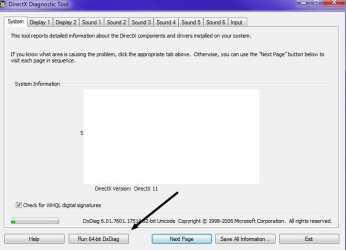
6) Run dxdiag in 64 bit version as well and check for problem devices. A problematic 64 bit dependency could be there.

dxdiag.jpg


7) Does the issue occur in safe mode or safe mode with networking?

8) What is the name of the "ghost process"? Does it have a PID (Process ID)? To show PIDs, in Task Manager go to View at the top and "Select Columns." Compare and contrast that PID in Process Hacker or Process Explorer. Look at its threads.

9) Fire up autoruns and looks for stuff that may be starting that shouldn't. Be very careful what you do in here. Autoruns for Windows - Windows Sysinternals | Microsoft Docs

10) How's the PSU? Is it quite old? Is it name brand and a reputable name brand at that?

When did the issue first occur? Retrace your steps. I'd start with RAM testing.

Have loads of fun. :D HAHA


P.S.

Don't trust SMART data as an absolute. You want to actually TEST the drive/s. I like Hard Disk Sentinel.

Hiren's Boot CD has HDD testing tools as well as other testing tools. Hiren's BootCD PE
 

My Computer

Computer type
PC/Desktop
OS
Windows 7 Ultimate x64
Back
Top