
Hard drive preventing clean shutdown/sleep/restart stop 0x9F

dpetican

New member
Local time
12:18 PM
Messages
5
I recently purchased a new (used) Asus laptop K53SV because I needed better graphics and wanted to downgrade to Windows 7. When I purchased the laptop I gave the store a brand new 256GB SSD and they duly transferred the contents of the original WD 640GB drive to the SSD. The laptop has worked perfectly ever since.

However, I was stuck with a 640GB drive. So just the other day I decided to replace the CDROM drive with the WD 640GB. Who uses CDROM drives anymore? I have an external one if I really need it. I bought the correct HD carrier and installed the drive. But now I cannot cleanly shutdown/sleep/restart etc. If I shutdown the screen goes black after awhile but the power button light stays on. After a few more minutes the system blues screens with this error:

Driver power state failure
Stop 0x9F

So I did a diagnostic startup to eliminate the possibility of any other driver causing the problem because I had also upgraded the internal wireless at the same time. Still same problem. So I removed the WD 640GB and now the system shutdowns/restarts/sleeps normally.

BTW when the WD 640GB is in the system I am able to use it without any apparent problems.

WD support is having problems right now otherwise I would have downloaded their diag utility before posting. I will do that but in the mean time any suggestions? Is there anything inherently wrong with what I did? Did I miss something? Thanks.
 

My Computer My Computer

At a glance

Windows 7 Home Premium 64bitIntel Core i5 2430M6GBIntel HD Graphics 3000 NVIDIA GeForce GT 540M
Computer type
Laptop
Computer Manufacturer/Model Number
Asus K53SV
OS
Windows 7 Home Premium 64bit
CPU
Intel Core i5 2430M
Motherboard
Adata SP550 256GB SSD
Memory
6GB
Graphics Card(s)
Intel HD Graphics 3000 NVIDIA GeForce GT 540M
Hi dpetican, welcome to the Forum.

Have you accessed the BIOS & checked that the CD/DVD drive is not still showing in the boot order. If so you will have to remove it from the start up list.

Then go to Control Panel then Device Manager & see if the CD/DVD is still showing & if so uninstall it.

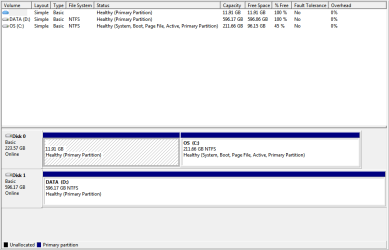
Could you then post back with a screen shot of your Disc Management with the 640GB drive attached to your computer. The tutorial below will show you how to do that & there is a link at the end of it explaining how to upload that to the Forum.

Disk Management - Post a Screen Capture Image
 

My Computer My Computer

At a glance

Windows 7 Home Premium 64 bit sp1Intel i5 3570 3.4Ghz Ivy Bridge SKT 1155 quad...G-Skill Rip Jaws 16Gb (8x2) DDR3 -1600 PC3 12...Gigabyte NVIDIA GT610 1Gb DDR3 810/1200 PCI-E...
Computer type
PC/Desktop
Computer Manufacturer/Model Number
Self built using existing case
OS
Windows 7 Home Premium 64 bit sp1
CPU
Intel i5 3570 3.4Ghz Ivy Bridge SKT 1155 quad core
Motherboard
Gigabyte Z77-HD3 SKT 1155 2xSata 3, 4x USB 3.0
Memory
G-Skill Rip Jaws 16Gb (8x2) DDR3 -1600 PC3 12800 CL 10 red
Graphics Card(s)
Gigabyte NVIDIA GT610 1Gb DDR3 810/1200 PCI-E 2.0 Silent
Sound Card
NVIDIA High Definition & Realtech High Definition Audio
Monitor(s) Displays
2 x Philips 226V4L 16:9 aspect ratio
Screen Resolution
1920 x 1080 HD
Hard Drives
Samsung 840 Pro 256gb SSD, SATA 3.
Hitachi Touro Portable 1tb, USB 3.0 HDD used for image b/ups.
PSU
Corsair VS450
Case
Codeng
Cooling
PSU fan & CPU fan
Keyboard
Logitech
Mouse
Logitech Wireless trackball M570
Internet Speed
Wireless 3G. 3mg down & 550kb up.
Antivirus
Bitdefender Internet Security 2020
Browser
Opera (Current Version) & Firefox
Other Info
MS Office 2013 Pro. Davis weather station software. MGE Nova 600 avr UPS.
Screenshot of disk management attached. Nothing related to CDROM left in the BIOS. Interestingly the 2nd HD doesn't even show up as a boot option. However, I did discover this in the event viewer:

Source: Service Control Manager
Date: 16-12-12 11:13:16 PM
Event ID: 7026
Task Category: None
Level: Error
Keywords: Classic
User: N/A
Computer: User-PC
Description:
The following boot-start or system-start driver(s) failed to load:
cdrom
Event Xml:
<Event xmlns="http://schemas.microsoft.com/win/2004/08/events/event">
<System>
<Provider Name="Service Control Manager" Guid="{555908d1-a6d7-4695-8e1e-26931d2012f4}" EventSourceName="Service Control Manager" />
<EventID Qualifiers="49152">7026</EventID>
<Version>0</Version>
<Level>2</Level>
<Task>0</Task>
<Opcode>0</Opcode>
<Keywords>0x8080000000000000</Keywords>
<TimeCreated SystemTime="2016-12-13T04:13:16.466825500Z" />
<EventRecordID>26869</EventRecordID>
<Correlation />
<Execution ProcessID="640" ThreadID="644" />
<Channel>System</Channel>
<Computer>User-PC</Computer>
<Security />
</System>
<EventData>
<Data Name="param1">
cdrom</Data>
</EventData>
</Event>
 

Attachments

  • diskmgmt.png
    diskmgmt.png
    10.4 KB · Views: 2

My Computer My Computer

At a glance

Windows 7 Home Premium 64bitIntel Core i5 2430M6GBIntel HD Graphics 3000 NVIDIA GeForce GT 540M
Computer type
Laptop
Computer Manufacturer/Model Number
Asus K53SV
OS
Windows 7 Home Premium 64bit
CPU
Intel Core i5 2430M
Motherboard
Adata SP550 256GB SSD
Memory
6GB
Graphics Card(s)
Intel HD Graphics 3000 NVIDIA GeForce GT 540M
I am certainly not an expert on BIOS settings, so it might be best to wait for someone to come in & offer advice on removing this item showing in your event viewer.
"Description:
The following boot-start or system-start driver(s) failed to load:
cdrom".


Also your OS disc C has a 11.91GB primary partition that appears to be empty. This may have been the result of the "store" cloning the original 640GB disc to the new SSD. Care needs to be exercised when removing partitions on discs, so again it would be best to wait for more help here.

I have asked for more help so be patient & wait for help.
 

My Computer My Computer

At a glance

Windows 7 Home Premium 64 bit sp1Intel i5 3570 3.4Ghz Ivy Bridge SKT 1155 quad...G-Skill Rip Jaws 16Gb (8x2) DDR3 -1600 PC3 12...Gigabyte NVIDIA GT610 1Gb DDR3 810/1200 PCI-E...
Computer type
PC/Desktop
Computer Manufacturer/Model Number
Self built using existing case
OS
Windows 7 Home Premium 64 bit sp1
CPU
Intel i5 3570 3.4Ghz Ivy Bridge SKT 1155 quad core
Motherboard
Gigabyte Z77-HD3 SKT 1155 2xSata 3, 4x USB 3.0
Memory
G-Skill Rip Jaws 16Gb (8x2) DDR3 -1600 PC3 12800 CL 10 red
Graphics Card(s)
Gigabyte NVIDIA GT610 1Gb DDR3 810/1200 PCI-E 2.0 Silent
Sound Card
NVIDIA High Definition & Realtech High Definition Audio
Monitor(s) Displays
2 x Philips 226V4L 16:9 aspect ratio
Screen Resolution
1920 x 1080 HD
Hard Drives
Samsung 840 Pro 256gb SSD, SATA 3.
Hitachi Touro Portable 1tb, USB 3.0 HDD used for image b/ups.
PSU
Corsair VS450
Case
Codeng
Cooling
PSU fan & CPU fan
Keyboard
Logitech
Mouse
Logitech Wireless trackball M570
Internet Speed
Wireless 3G. 3mg down & 550kb up.
Antivirus
Bitdefender Internet Security 2020
Browser
Opera (Current Version) & Firefox
Other Info
MS Office 2013 Pro. Davis weather station software. MGE Nova 600 avr UPS.

My Computer My Computer

At a glance

Windows 10 Proi5-650016GB DDR4 2133 Crucial Ballistix Sport LTMSI GeForce GTX 1060 GAMING X 6G
Computer type
PC/Desktop
Computer Manufacturer/Model Number
Custom build
OS
Windows 10 Pro
CPU
i5-6500
Motherboard
Gigabyte B150-HD3P-CF
Memory
16GB DDR4 2133 Crucial Ballistix Sport LT
Graphics Card(s)
MSI GeForce GTX 1060 GAMING X 6G
Sound Card
Intel Display Audio
Monitor(s) Displays
Liyama ProLite XB2483HSU-B2
Screen Resolution
1920 x 1080
Hard Drives
Crucial MX200 500GB & Toshiba DT01ACA300 3TB
PSU
Corsair RM550x
Case
Fractal Design Define S
Cooling
Cooler Master TX3 i
Keyboard
Func KB-460 (MX Red)
Mouse
Corsair Gaming M65 RGB
Antivirus
Bitdefender Total Security 2016 + MBAM Pro + MBAE Pro
Browser
Google Chrome
Other Info
Creative Sound Blaster Tactic3D Rage V2 headset
But now I cannot cleanly shutdown/sleep/restart etc. If I shutdown the screen goes black after awhile but the power button light stays on. After a few more minutes the system blues screens with this error:

Driver power state failure
Stop 0x9F

Here are the BSOD Posting instructions:
Blue Screen of Death (BSOD) Posting Instructions

There are some really good experts here that can help with BSOD's.
 

My Computer My Computer

At a glance

Multi-Boot W7_Pro_x64 W8.1_Pro_x64 W10_Pro_x6...AMD Athlon II x4 6206GB GSkill DDR2 800AMD 4670 GPU + AMD 4200 IGP
Computer type
PC/Desktop
Computer Manufacturer/Model Number
home built
OS
Multi-Boot W7_Pro_x64 W8.1_Pro_x64 W10_Pro_x64 +Linux_VMs +Chromium_VM
CPU
AMD Athlon II x4 620
Motherboard
Gigabyte GA-MA785G-UD3H
Memory
6GB GSkill DDR2 800
Graphics Card(s)
AMD 4670 GPU + AMD 4200 IGP
Sound Card
on board Realtek ALC889A
Monitor(s) Displays
RCA 40" LCD TV, Insignia 32" LCD TV, HP 15" LCD monitor
Screen Resolution
1680 x 1050
Hard Drives
OCZ Vertex 3 120GB,
Samsung F3 1TB (3),
Several others - WD, Seagate, Hitachi, ...
PSU
Corsair 500 W
Case
Rosewill mid tower
Cooling
CM 90mm rifle
Keyboard
Gyration wireless, Logitech wireless, Dell USB wired
Mouse
Gyration wireless, Logitech wireless, V7 USB wired
Internet Speed
Spectrum - 100Mbps D / 10Mbps U
Antivirus
Avast, MBAM3, EMET, WinPatrol
Browser
Pale Moon, Firefox, IE
Other Info
2 multi-boot PC's
Mainly HTPC/Office/Gen purpose (no gaming).
Trendnet USB KVM.
LG DVD burner/Blue Ray Player.
Tray system for removable SATA backup drives.

Not currently OCd, under-volted.
I use Hybrid sleep, rarely re-boot or shutdown.

Hauppauge HD-PVR, Avermedia PCIe TV Tuner, Hauppauge PCI TV Tuner.

My Computer My Computer

At a glance

Windows 7 Home Premium 32 bit
OS
Windows 7 Home Premium 32 bit
  • I've tested the hard drive and it passed. SMART attributes look okay.
  • I also tried another hard drive and it caused the same problem. Remember the problem goes away when the second hard drive is not present.
  • The presence or absence of the CDROM does not seem to affect the behavior.
  • All drivers were up-to-date before installing the new hardware. I downloaded and installed the latest Intel Chipset Device Software anyway.
  • The 11.91GB partition on the C drive is a special Asus recovery partition.
  • I restored to the BIOS defaults. The second hard drive now shows up in the BIOS, but I may have overlooked it the first time.
  • I attempted to flash the BIOS as I noticed there have been some updates. However the Asus winflash utility will not run on my system. Says I do not have an Asus system. Oy! The BIOS easy flash did not recognize the file I downloaded as compatible with my system. I'm sure I downloaded the correct files. I will have to ask on Asus forums.
  • BSOD info attached.
  • I noticed in the BIOS that I have 3 SATA channels but only 2 connectors. Currently the boot drive is on channel 0, while the second hard drive is on channel 1.
Thanks.
 

Attachments

My Computer My Computer

At a glance

Windows 7 Home Premium 64bitIntel Core i5 2430M6GBIntel HD Graphics 3000 NVIDIA GeForce GT 540M
Computer type
Laptop
Computer Manufacturer/Model Number
Asus K53SV
OS
Windows 7 Home Premium 64bit
CPU
Intel Core i5 2430M
Motherboard
Adata SP550 256GB SSD
Memory
6GB
Graphics Card(s)
Intel HD Graphics 3000 NVIDIA GeForce GT 540M
"I attempted to flash the BIOS as I noticed there have been some updates. However the Asus winflash utility will not run on my system. Says I do not have an Asus system. Oy! The BIOS easy flash did not recognize the file I downloaded as compatible with my system. I'm sure I downloaded the correct files."
That is VERY strange.
I would focus on updating the BIOS.
You said that it is a used laptop. Is it possible that the motherboard was replaced by a different one?
Look on BIOS for the MB information and compare to the model you have.
 

My Computers My Computers

  • At a glance

    Windows 7 HP 64i5 6600K - 800MHz to 4200MHz4+4G GSkill DDR4 3000IG - Intel 530
    Computer type
    PC/Desktop
    Computer Manufacturer/Model Number
    custom build
    OS
    Windows 7 HP 64
    CPU
    i5 6600K - 800MHz to 4200MHz
    Motherboard
    GA-Z170-HD3P
    Memory
    4+4G GSkill DDR4 3000
    Graphics Card(s)
    IG - Intel 530
    Monitor(s) Displays
    Samsung 226BW
    Screen Resolution
    1680x1050
    Hard Drives
    (1) -1 SM951 – 128GB M.2 AHCI PCIe SSD drive for Windows 7 and Lubuntu
    (2) -1 WD SATA 3 - 1T for Data
    (3) -1 WD SATA 3 - 1T for backup
    PSU
    Thermaltake 450W TR2 gold
    Keyboard
    Old and good Chicony mechanical keyboard
    Mouse
    Logitech mX performance - 9 buttons (had to disable some)
    Internet Speed
    500Mb/s
    Browser
    Firefox 64
    Other Info
    TinyWall firewall
  • At a glance

    Windows 7 Proi7-4500U 800MHz to 3.0GHz(4+4)G DDR3 1600IG intel 4400 + NVIDIA GeForce GT 745M
    Computer type
    Laptop
    System Manufacturer/Model Number
    Asus Q550LF
    OS
    Windows 7 Pro
    CPU
    i7-4500U 800MHz to 3.0GHz
    Motherboard
    Asus Q550LF
    Memory
    (4+4)G DDR3 1600
    Graphics Card(s)
    IG intel 4400 + NVIDIA GeForce GT 745M
    Sound Card
    Realtek
    Monitor(s) Displays
    LG Display LP156WF4-SPH1
    Screen Resolution
    1920 x 1080
    Hard Drives
    BX500 120G SSD for Windows and programs +
    1T HDD for data
    Internet Speed
    500 Mb/s
    Browser
    Firefox
    Other Info
    TinyWall firewall
I've tested the hard drive and it passed. SMART attributes look okay.
I also tried another hard drive and it caused the same problem. Remember the problem goes away when the second hard drive is not present.

Possible causes:
- BIOS
- driver of the controller
- controller itself

Code:
Event[3962]:
  Log Name: System
  Source: Disk
  Date: 2016-12-15T16:26:02.996
  Event ID: 11
  Task: N/A
  Level: Error
  Opcode: N/A
  Keyword: Classic
  User: N/A
  User Name: N/A
  Computer: User-PC
  Description: 
The driver detected a controller error on \Device\Harddisk2\DR2.

A processor is waiting for a process to work on an IRP, but for some reason the process exceeded a DPC request so it couldn't get to the IRP in time. Due to the limit of the minidump I can't get more out of it.
 

My Computer My Computer

At a glance

Windows 10 Proi5-650016GB DDR4 2133 Crucial Ballistix Sport LTMSI GeForce GTX 1060 GAMING X 6G
Computer type
PC/Desktop
Computer Manufacturer/Model Number
Custom build
OS
Windows 10 Pro
CPU
i5-6500
Motherboard
Gigabyte B150-HD3P-CF
Memory
16GB DDR4 2133 Crucial Ballistix Sport LT
Graphics Card(s)
MSI GeForce GTX 1060 GAMING X 6G
Sound Card
Intel Display Audio
Monitor(s) Displays
Liyama ProLite XB2483HSU-B2
Screen Resolution
1920 x 1080
Hard Drives
Crucial MX200 500GB & Toshiba DT01ACA300 3TB
PSU
Corsair RM550x
Case
Fractal Design Define S
Cooling
Cooler Master TX3 i
Keyboard
Func KB-460 (MX Red)
Mouse
Corsair Gaming M65 RGB
Antivirus
Bitdefender Total Security 2016 + MBAM Pro + MBAE Pro
Browser
Google Chrome
Other Info
Creative Sound Blaster Tactic3D Rage V2 headset
Interesting. Thanks for the info. I was able to successfully update the bios using winflash. I had to install the Asus ACPI driver in order for winflash to recognize my system. I've doubled checked everything else and it looks good. What about the Intel Rapid Start driver; would that help?

BTW I'm not sure if I mentioned it before but when the screen goes black I can hear the second drive spin up.

As for further troubleshooting the only thing I can think of is to try a completely new install. Both a factory restore and fresh install and see if the problem is present in these configurations. Unfortunately I don't have the time for that right now.

Any other suggestions would be helpful. I may just have to live without the second hard drive :( Thanks.
 

My Computer My Computer

At a glance

Windows 7 Home Premium 64bitIntel Core i5 2430M6GBIntel HD Graphics 3000 NVIDIA GeForce GT 540M
Computer type
Laptop
Computer Manufacturer/Model Number
Asus K53SV
OS
Windows 7 Home Premium 64bit
CPU
Intel Core i5 2430M
Motherboard
Adata SP550 256GB SSD
Memory
6GB
Graphics Card(s)
Intel HD Graphics 3000 NVIDIA GeForce GT 540M

My Computers My Computers

  • At a glance

    Windows 7 HP 64i5 6600K - 800MHz to 4200MHz4+4G GSkill DDR4 3000IG - Intel 530
    Computer type
    PC/Desktop
    Computer Manufacturer/Model Number
    custom build
    OS
    Windows 7 HP 64
    CPU
    i5 6600K - 800MHz to 4200MHz
    Motherboard
    GA-Z170-HD3P
    Memory
    4+4G GSkill DDR4 3000
    Graphics Card(s)
    IG - Intel 530
    Monitor(s) Displays
    Samsung 226BW
    Screen Resolution
    1680x1050
    Hard Drives
    (1) -1 SM951 – 128GB M.2 AHCI PCIe SSD drive for Windows 7 and Lubuntu
    (2) -1 WD SATA 3 - 1T for Data
    (3) -1 WD SATA 3 - 1T for backup
    PSU
    Thermaltake 450W TR2 gold
    Keyboard
    Old and good Chicony mechanical keyboard
    Mouse
    Logitech mX performance - 9 buttons (had to disable some)
    Internet Speed
    500Mb/s
    Browser
    Firefox 64
    Other Info
    TinyWall firewall
  • At a glance

    Windows 7 Proi7-4500U 800MHz to 3.0GHz(4+4)G DDR3 1600IG intel 4400 + NVIDIA GeForce GT 745M
    Computer type
    Laptop
    System Manufacturer/Model Number
    Asus Q550LF
    OS
    Windows 7 Pro
    CPU
    i7-4500U 800MHz to 3.0GHz
    Motherboard
    Asus Q550LF
    Memory
    (4+4)G DDR3 1600
    Graphics Card(s)
    IG intel 4400 + NVIDIA GeForce GT 745M
    Sound Card
    Realtek
    Monitor(s) Displays
    LG Display LP156WF4-SPH1
    Screen Resolution
    1920 x 1080
    Hard Drives
    BX500 120G SSD for Windows and programs +
    1T HDD for data
    Internet Speed
    500 Mb/s
    Browser
    Firefox
    Other Info
    TinyWall firewall
Well I just tried an SSD and that didn't solve the problem. I'm officially giving up. I will just use external drives for the time being. At some point I will reinstall Windows 7 and see if that fixes the problem. Maybe at that some point Microsoft will have released Windows 11. The upgrade Win7 users have been waiting for :haha: Thanks for the help anyway.
 

My Computer My Computer

At a glance

Windows 7 Home Premium 64bitIntel Core i5 2430M6GBIntel HD Graphics 3000 NVIDIA GeForce GT 540M
Computer type
Laptop
Computer Manufacturer/Model Number
Asus K53SV
OS
Windows 7 Home Premium 64bit
CPU
Intel Core i5 2430M
Motherboard
Adata SP550 256GB SSD
Memory
6GB
Graphics Card(s)
Intel HD Graphics 3000 NVIDIA GeForce GT 540M
Back
Top