Hardware "hash" within virtualbox

dhruv17singhal

New member
Hi,

I have a retail copy of Windows & Home Premium installed on an old Compaq laptop (that originally came with Windows XP OEM, which I, fortunately, chose not to upgrade). The laptop is now so old and slow that I have decided to install Linux on it and use its retail license for VirtualBox.

I would like to know how VirtualBox presents the hardware to the guest OS; does it present or emulate the underlying hardware itself, so that, at any time, a guest OS (i.e. Windows 7) running on VirtualBox on a particular computer (with any host OS), produces the same hardware hash (for identifying unique activations)? If not, then does it generate a unique virtual hardware every time it is installed on a host?

Basically, I have a multi-boot system on one of my desktops with Fedora, Ubuntu and Windows 7 (Ultimate). Each has VirtualBox installed on it. What I want is to have a single copy of Windows 7 (Home Premium, from the Laptop) installed on a vdi file, which I can share on the same desktop among the three OSes (by creating new virtual machine on the different hosts, and associating each with the same vdi file). I'll use Windows for testing new software as well as (on Linux) to run Windows-only softwares. I know that I can transfer the retail license from the Laptop to a virtual OS, but can the same guest OS be used with different hosts on the same "real" hardware, legally (i.e., without activation problems)?
 

My Computer

OS
Windows 7 Ultimate x64
CPU
Intel Core 2 Quad Q9650 3.00 GHz
Motherboard
Intel DQ45CB
Memory
6 GB
Monitor(s) Displays
LCD
Screen Resolution
1360 x 768
Hard Drives
Seagate Barracuda 7200.12 1TB x3;
Western Digital Cavaire Green 1TB x1
PSU
Seasonic 620W Power Supply (S12II-620)
Case
Cooler Master Elite 430 With Side Panel Window
Cooling
Cooler Master Hyper N620 CPU Cooler
Keyboard
Logitech Wireless Keyboard (MK250)
Mouse
Logitech Wireless Mouse (MK250)
Internet Speed
2 Mbps
Short and simple answer: no.

Every virtual machine has its own SID and "reports" virtualization platform specific emulated hardware. Two virtual machines using the same vid or vhd running on same platform (VBox, VPC, VMware) still both need and must have individual identifiers. There's no legal and valid way to activate several Windows virtual machines using the same product key without earlier installations losing their activation status.

Running sysprep with generalize switch resets all hardware specific information, including SID, to allow you to deploy an image of your Windows setup. However, it also resets the activation information, so using a retail product key you have no problems activating Windows when a generalized image is then transferred to a new hardware setup, whether a physical or virtual machine. Using an activated Windows vid or vhd when creating a new virtual machine and trying to activate it with the same key is then as any other scenario where you try to activate Windows with a product key already used to activate another machine and setup.

Kari
 

My Computer

Computer type
Laptop
Computer Manufacturer/Model Number
HP ENVY 17-1150eg
OS
Windows 10 Pro x64 EN-GB
CPU
1.6 GHz Intel Core i7-720QM Processor
Memory
6 GB
Graphics Card(s)
ATI Mobility Radeon HD 5850 Graphics
Sound Card
Beats sound system with integrated subwoofer
Monitor(s) Displays
17" laptop display, 22" LED and 32" Full HD TV through HDMI
Screen Resolution
1600*900 (1), 1920*1080 (2&3)
Hard Drives
Internal: 2 x 500 GB SATA Hard Disk Drive 7200 rpm
External: 2TB for backups, 3TB USB3 network drive for media
Cooling
As Envy runs a bit warm, I have it on a Cooler Master pad
Keyboard
Logitech diNovo Media Desktop Laser (bluetooth)
Mouse
Logitech Performance Mouse MX
Internet Speed
50/10 Mbps VDSL
Antivirus
Windows Defender 4.3.9431.0
Browser
Maxthon 3.5.2., IE11
You want to run a retail copy of the Windows 7 Home Premium as a VM. That's ok. You have 3 LINUX hosts on a single physical machine which you would like to run that VM upon.

As long as you do not run more than a single clone of the VM at a time I cannot see how this is different from a physical installation of an OS with 3 users.

Legally, you should be OK, but I can see that you may lose the activation every now and then, (doesn't everybody who does geeky things with Vista and 7 seem to?) but you are free to reinstall the OS as many times as you wish, as a physical or Virtual machine on a single computer. You can only use it as a single virtual OS machine at any time. What the host is at any time is irrelevant to the license.

Make up your own mind - here is the relevant part of the EULA:

EULAID:Win7RC.1_HP_NRL.EVL_en-US
2. USE WITH VIRTUALIZATION TECHNOLOGIES. Instead of using the software directly on the licensed device, you may install and use the software within only one virtual (or otherwise emulated) hardware system on the licensed device. When used in a virtualized environment, content protected by digital rights management technology, BitLocker or any full volume disk drive encryption technology may not be as secure as protected content not in a virtualized environment. You should comply with all domestic and international laws that apply to such protected content.

The "one virtual hardware system" is VirtualBox in your case, not the underlying OS IMO - virtualization removes the influence of the underlying host OS..

Keep a backup, that's quite legal. If your VM becomes invalidated, restore your backup image.

You are not a Pirate, and Microsoft has no interest in preventing genuine Developers or enthusiasts from using properly licensed, Microsoft products.
 

My Computer

Computer Manufacturer/Model Number
Acer 7520, Packard Bell dot se, Acer travelmate 2423
OS
Win 7 Ult + Starter, XP Pro +Home, 2kAS, Linux Mint 8, SuperOS
CPU
AMD 64 Athlon X2 , Intel Atom N450, Intel Celeron M 1.50 Ghz
Motherboard
Acer Fuquene
Memory
2.5GB ; 1GB; 2GB
Graphics Card(s)
Nvidia GeForce7000m; Intel; Intel
Sound Card
Realtek AC57
Monitor(s) Displays
17" ;10.1"; 19"
Screen Resolution
1440x900;1024x600;1440x900;
Hard Drives
WD 80, WD 320;
PSU
19v
Case
Laptop
Cooling
Air
Internet Speed
9.7Mb/s down 0.99Mb/s up
Other Info
ISP VIRGINMEDIA 10M cable broadband - D-Link DIR615 wireless router, 3Com OfficeConnect ASDL router used as wireless extender switch
@Karli

Other than sysprep, is there any way to get VirtualBox use exactly the same virtual machine on each host? I don't know whether the export/import appliance feature in VirtualBox produces the same SID or not.

Is there a way to backup the entire virtual machine (with vdi files and hardware SIDs)? Even if I limit the virtual machine to a single host (say Ubuntu), there will be times when I will have to reinstall VirtualBox on the host or even the host itself. Creating new virtual machine and attaching old virtual hard disk to it will still generate a new hardware (with different SID) and hence would invalidate the activation.

@fafhrd

I agree that Microsoft is not against legitimate users, like us, but we are caught in the crossfire between the pirates and Microsoft, and, hence, must suffer, unduly. I also agree that people playing with windows have to re-activate it several times.

I believe "within only one virtual (or otherwise emulated) hardware system" refers to a single virtual machine on a single host. Though VirtualBox hides the underlying system, I believe, it presents to the guest a unique piece of hardware, with its unique set of serial numbers and hardware IDs. So, every virtual machine is probably different, despite any resemblance it bears in the hardware model (e.g. chipset model etc.) Do tell me if you believe that I have a wrong conception of the activation process.
 

My Computer

OS
Windows 7 Ultimate x64
CPU
Intel Core 2 Quad Q9650 3.00 GHz
Motherboard
Intel DQ45CB
Memory
6 GB
Monitor(s) Displays
LCD
Screen Resolution
1360 x 768
Hard Drives
Seagate Barracuda 7200.12 1TB x3;
Western Digital Cavaire Green 1TB x1
PSU
Seasonic 620W Power Supply (S12II-620)
Case
Cooler Master Elite 430 With Side Panel Window
Cooling
Cooler Master Hyper N620 CPU Cooler
Keyboard
Logitech Wireless Keyboard (MK250)
Mouse
Logitech Wireless Mouse (MK250)
Internet Speed
2 Mbps
Any imaging software can help you to create an image to be transferred to another machine, but you can then have problems because of different hardware. Because of this, sysprep is the best alternative.

A virtual machine can be backed up as any other computer, even using guest's own native tools like Windows Backup.

Yes, it refers to a single vm on a single host. Every vm is, as is any real computer, a unique piece of hardware, as you put it, whether this hardware setup is emulated as in vm's or physical as in real computers.

Kari
 

My Computer

Computer type
Laptop
Computer Manufacturer/Model Number
HP ENVY 17-1150eg
OS
Windows 10 Pro x64 EN-GB
CPU
1.6 GHz Intel Core i7-720QM Processor
Memory
6 GB
Graphics Card(s)
ATI Mobility Radeon HD 5850 Graphics
Sound Card
Beats sound system with integrated subwoofer
Monitor(s) Displays
17" laptop display, 22" LED and 32" Full HD TV through HDMI
Screen Resolution
1600*900 (1), 1920*1080 (2&3)
Hard Drives
Internal: 2 x 500 GB SATA Hard Disk Drive 7200 rpm
External: 2TB for backups, 3TB USB3 network drive for media
Cooling
As Envy runs a bit warm, I have it on a Cooler Master pad
Keyboard
Logitech diNovo Media Desktop Laser (bluetooth)
Mouse
Logitech Performance Mouse MX
Internet Speed
50/10 Mbps VDSL
Antivirus
Windows Defender 4.3.9431.0
Browser
Maxthon 3.5.2., IE11
@Karl

So, I think, I can just make backups of the VDI files (maybe using VBoxManage clonehd command) and whenever I reset the VirtualBox system, I can use sysprep and later reactivate. But, if I remember correctly, sysprep can only be used a certain number of times (probably three) to reset the activation system. What shall I do after that? All I can think of, then, is to re-install the Windows system. Can you suggest better than this? Will something like Acronis TrueImage be of any help?
 

My Computer

OS
Windows 7 Ultimate x64
CPU
Intel Core 2 Quad Q9650 3.00 GHz
Motherboard
Intel DQ45CB
Memory
6 GB
Monitor(s) Displays
LCD
Screen Resolution
1360 x 768
Hard Drives
Seagate Barracuda 7200.12 1TB x3;
Western Digital Cavaire Green 1TB x1
PSU
Seasonic 620W Power Supply (S12II-620)
Case
Cooler Master Elite 430 With Side Panel Window
Cooling
Cooler Master Hyper N620 CPU Cooler
Keyboard
Logitech Wireless Keyboard (MK250)
Mouse
Logitech Wireless Mouse (MK250)
Internet Speed
2 Mbps
Acronis is OK, but the activated system image can be restored without need to re-activate only to same hardware. If it detects hardware change, you need re-activate.

Kari
 

My Computer

Computer type
Laptop
Computer Manufacturer/Model Number
HP ENVY 17-1150eg
OS
Windows 10 Pro x64 EN-GB
CPU
1.6 GHz Intel Core i7-720QM Processor
Memory
6 GB
Graphics Card(s)
ATI Mobility Radeon HD 5850 Graphics
Sound Card
Beats sound system with integrated subwoofer
Monitor(s) Displays
17" laptop display, 22" LED and 32" Full HD TV through HDMI
Screen Resolution
1600*900 (1), 1920*1080 (2&3)
Hard Drives
Internal: 2 x 500 GB SATA Hard Disk Drive 7200 rpm
External: 2TB for backups, 3TB USB3 network drive for media
Cooling
As Envy runs a bit warm, I have it on a Cooler Master pad
Keyboard
Logitech diNovo Media Desktop Laser (bluetooth)
Mouse
Logitech Performance Mouse MX
Internet Speed
50/10 Mbps VDSL
Antivirus
Windows Defender 4.3.9431.0
Browser
Maxthon 3.5.2., IE11
Part of any legal definition of "Breaking the law" is "intent" (not that Microsoft is likely to be taking any fraudulent single user to court anytime soon!). Is your intent to use this software (your retail Windows 7 Home Premium) fraudulent? Do you wish to use it in such a way as to deny Microsoft it's due remuneration?

If you run a single installation of your OS to a guestOS.vdi on host platform 1, and take a full backup of that guestOS.vdi to some mass storage medium, or other archival storage such as DVD, you are behaving legitimately. You perform some operation to test how host platform 1 interacts with your guest OS, and then shut down the VM and then the physical machine, you have done nothing outside your license agreement.

If you then boot into host platform 2 on the same physical machine, and from within your hypervisor installed upon that OS on that machine, you open the same guestOS.vdi, and perhaps access some data that had been stored by the previous session, you are still not doing anything wrong. And so on...

If you delete the "used" GuestOS.vdi (just because you want to use a clean copy, or because you have damaged your working copy) and revert to a copy of your archive, you are doing nothing outside your license terms.

If at some point, you find that the guest OS reports that it is not activated, and you run an online activation and it reports that you are not genuine, you have the option of talking to a Microsoft operator for a telephone activation, or getting further information at:

Windows 7 Genuine Advantage Validation Issues (Windows 7) Forum

where you can discuss your particular issues with technicians with access to Microsoft official genuine product databases, who will advise you further.

or

You can reload your archive copy

or

you can reinstall afresh.

If on the other hand, you run an office with a team of developers on linux workstations each testing their output on a separate clone of your Windows 7 guestOS.vdi, you are clearly breaking the terms of your EULA, and deserve to have legal action taken against you.
 

My Computer

Computer Manufacturer/Model Number
Acer 7520, Packard Bell dot se, Acer travelmate 2423
OS
Win 7 Ult + Starter, XP Pro +Home, 2kAS, Linux Mint 8, SuperOS
CPU
AMD 64 Athlon X2 , Intel Atom N450, Intel Celeron M 1.50 Ghz
Motherboard
Acer Fuquene
Memory
2.5GB ; 1GB; 2GB
Graphics Card(s)
Nvidia GeForce7000m; Intel; Intel
Sound Card
Realtek AC57
Monitor(s) Displays
17" ;10.1"; 19"
Screen Resolution
1440x900;1024x600;1440x900;
Hard Drives
WD 80, WD 320;
PSU
19v
Case
Laptop
Cooling
Air
Internet Speed
9.7Mb/s down 0.99Mb/s up
Other Info
ISP VIRGINMEDIA 10M cable broadband - D-Link DIR615 wireless router, 3Com OfficeConnect ASDL router used as wireless extender switch
Short and simple answer: no.

Every virtual machine has its own SID and "reports" virtualization platform specific emulated hardware. Two virtual machines using the same vid or vhd running on same platform (VBox, VPC, VMware) still both need and must have individual identifiers. There's no legal and valid way to activate several Windows virtual machines using the same product key without earlier installations losing their activation status.

Running sysprep with generalize switch resets all hardware specific information, including SID, to allow you to deploy an image of your Windows setup. However, it also resets the activation information, so using a retail product key you have no problems activating Windows when a generalized image is then transferred to a new hardware setup, whether a physical or virtual machine. Using an activated Windows vid or vhd when creating a new virtual machine and trying to activate it with the same key is then as any other scenario where you try to activate Windows with a product key already used to activate another machine and setup.

Kari

Hi Karl

I really hate having to disagree with you but you can "Clone" Virtual machines and these NEVER ask for a new activation. (Note whether or not this is legal is a mute point if you only run ONE at a time and are just using for testing different versions of Application Software such as say photoshop CS4 vs Photoshop CS5).

The SID changes such as with VMWARE you get a message the first time you power on a cloned VM Did you MOVE or COPY it. I just tick the I copied it box.

The only time Windows (any version) will ask for a re-activation is if the "Virtual Hardware" changes SIGNIFICANTLY - which usually means if you increase hugely the amount of RAM allocated to the VM or attempt to add very eseoteric and unusual hardware.

If you CREATE a VM by doing a Windows INSTALL then you WILL be asked to activate but an activated VM clones without problem and won't ask for re-activation --at least on vmware software.

You can clone also in various ways --acronis is good, also the Vmwware menu before powering on the VM ==> clone Virtual Machine or just simply use Windows explorer - just copy the vm data files to another location. No special backup / restore needed although my preference is to use Acronis since I use this for "Normal" backups and it makes the task more manageable --you don't want zillions of differet backup methodologies to backup machine images.


Cheers
jimbo
 

My Computer

Computer type
PC/Desktop
Computer Manufacturer/Model Number
Custom built, several laptops HP/ASUS
OS
Linux CENTOS 7 / various Windows OS'es and servers
CPU
Intel i7 Intel i5
Memory
8GB, 16GB
Graphics Card(s)
On Motherboard
Sound Card
Realtek HD audio
Monitor(s) Displays
Apple Cinema display, Samsung LCD
Screen Resolution
1920 X 1080
Hard Drives
4 X 1TB SATA
Mouse
Toshiba wireless laser
Internet Speed
> 20MB up
Jimbo, I'm only happy if I have wrong information and someone corrects me. I know you can VMware inside out, so I take it for granted that's true what you now told me.

My posts in thread are solely based on my own experience with VirtualBox and Virtual PC, not being familiar with VMware. I have not succeeded to clone Seven or XP vm's on Windows Seven host, then run them in Linux host keeping the activation status.

Kari

EDIT:

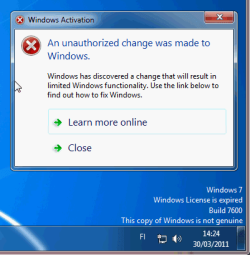
Here's a screenshot of a test I just made. I cloned an activated Windows 7 Enterprise vm running on VirtualBox on Windows, rebooted to OpenSUSE Linux, created a new vm using the clone in VirtualBox, booted the new vm and I had to re-activate it. Did so, shut down the new vm, booted back to Windows, run the old original vm, and got this:

Activation_removed.png
 

My Computer

Computer type
Laptop
Computer Manufacturer/Model Number
HP ENVY 17-1150eg
OS
Windows 10 Pro x64 EN-GB
CPU
1.6 GHz Intel Core i7-720QM Processor
Memory
6 GB
Graphics Card(s)
ATI Mobility Radeon HD 5850 Graphics
Sound Card
Beats sound system with integrated subwoofer
Monitor(s) Displays
17" laptop display, 22" LED and 32" Full HD TV through HDMI
Screen Resolution
1600*900 (1), 1920*1080 (2&3)
Hard Drives
Internal: 2 x 500 GB SATA Hard Disk Drive 7200 rpm
External: 2TB for backups, 3TB USB3 network drive for media
Cooling
As Envy runs a bit warm, I have it on a Cooler Master pad
Keyboard
Logitech diNovo Media Desktop Laser (bluetooth)
Mouse
Logitech Performance Mouse MX
Internet Speed
50/10 Mbps VDSL
Antivirus
Windows Defender 4.3.9431.0
Browser
Maxthon 3.5.2., IE11
Kari, did you change the hardware UUID, using VBoxManage? See Machine ID.
 

My Computer

OS
Windows 7 Ultimate x64
CPU
Intel Core 2 Quad Q9650 3.00 GHz
Motherboard
Intel DQ45CB
Memory
6 GB
Monitor(s) Displays
LCD
Screen Resolution
1360 x 768
Hard Drives
Seagate Barracuda 7200.12 1TB x3;
Western Digital Cavaire Green 1TB x1
PSU
Seasonic 620W Power Supply (S12II-620)
Case
Cooler Master Elite 430 With Side Panel Window
Cooling
Cooler Master Hyper N620 CPU Cooler
Keyboard
Logitech Wireless Keyboard (MK250)
Mouse
Logitech Wireless Mouse (MK250)
Internet Speed
2 Mbps
No. You might laugh now and think I'm just a stupid old fart (been used to be ignored and laughed because of my opinion ;)) but I need constantly to know everything I'm doing with my computers is 100% "kosher", valid and legal so I do nothing to try to work around this kind of obstacles. I'd rather have a valid license for every rig or vm than try to keep them activated using workarounds.

Kari
 

My Computer

Computer type
Laptop
Computer Manufacturer/Model Number
HP ENVY 17-1150eg
OS
Windows 10 Pro x64 EN-GB
CPU
1.6 GHz Intel Core i7-720QM Processor
Memory
6 GB
Graphics Card(s)
ATI Mobility Radeon HD 5850 Graphics
Sound Card
Beats sound system with integrated subwoofer
Monitor(s) Displays
17" laptop display, 22" LED and 32" Full HD TV through HDMI
Screen Resolution
1600*900 (1), 1920*1080 (2&3)
Hard Drives
Internal: 2 x 500 GB SATA Hard Disk Drive 7200 rpm
External: 2TB for backups, 3TB USB3 network drive for media
Cooling
As Envy runs a bit warm, I have it on a Cooler Master pad
Keyboard
Logitech diNovo Media Desktop Laser (bluetooth)
Mouse
Logitech Performance Mouse MX
Internet Speed
50/10 Mbps VDSL
Antivirus
Windows Defender 4.3.9431.0
Browser
Maxthon 3.5.2., IE11
Great spirit Kari ! Being IT professionals, we must respect the laws we make, for our own livelihood depends on others following our example.

Changing the hardware UUID is a part of cloning the VM. I believe, the EULA is not violated as long as there is only one activate copy, with a particular activation key, running in the world at an instance.
 

My Computer

OS
Windows 7 Ultimate x64
CPU
Intel Core 2 Quad Q9650 3.00 GHz
Motherboard
Intel DQ45CB
Memory
6 GB
Monitor(s) Displays
LCD
Screen Resolution
1360 x 768
Hard Drives
Seagate Barracuda 7200.12 1TB x3;
Western Digital Cavaire Green 1TB x1
PSU
Seasonic 620W Power Supply (S12II-620)
Case
Cooler Master Elite 430 With Side Panel Window
Cooling
Cooler Master Hyper N620 CPU Cooler
Keyboard
Logitech Wireless Keyboard (MK250)
Mouse
Logitech Wireless Mouse (MK250)
Internet Speed
2 Mbps
:) Well said.

I honestly believe this means, and is intented to be so, that if you clone a vm to be used on another rig or OS, the old one is no longer used.

For instance in my opinion and according to Windows 7 EULA every dual boot setup with two instances of Seven both with the same product key is not valid, not allowed. This extract from Seven EULA:
...
2. INSTALLATION AND USE RIGHTS.
a. One Copy per Computer. You may install one copy of the software on one computer. That computer is the “licensed computer.”
...
I know a lot of us geeks have a dual boot setup with two instances of Seven. As far as both instances have a separate key it's OK; using the same key is OK only if the second instance is activated using the key only after you have stopped using the first instance, for instance in situations where you are setting Windows in a new HD first making a dual boot setup and installing a new instance, then transferring you files and apps from old instance to new, finally discarding the old one and activating the new one.

In the same spirit, using a clone of an activated Windows instance in a new vm is only OK if the old vm is no longer needed. Defending the use of two instances activated with same key saying that I use only one at the time is for me not a valid excuse, and most certainly not in accordance with EULA. To simplify things a bit, it would be almost the same than buying a legal Windows 7 with mates, then everyone installs it to their own computers activating it with the same key, finally making a schedule to guarantee that only one of the gang is using his / her computer in any given time, only one instance of activated Windows used.

This, of course, is just how I interpret Windows 7 EULA. There are several threads on the Seven Forums where these kind of issues are discussed. Nowadays I try to stay away from those threads because I know my comments and opinions would be taken as provocation. I have to admit, I could be too provocative, too, so better to stay away from those threads ;).

However, my answers to you earlier in this thread are not solely based on my opinion. As my screenshot showed, I have also tested different scenarios to emphasize my point and be as sure about facts as possible before responding.

Kari
 

Attachments

My Computer

Computer type
Laptop
Computer Manufacturer/Model Number
HP ENVY 17-1150eg
OS
Windows 10 Pro x64 EN-GB
CPU
1.6 GHz Intel Core i7-720QM Processor
Memory
6 GB
Graphics Card(s)
ATI Mobility Radeon HD 5850 Graphics
Sound Card
Beats sound system with integrated subwoofer
Monitor(s) Displays
17" laptop display, 22" LED and 32" Full HD TV through HDMI
Screen Resolution
1600*900 (1), 1920*1080 (2&3)
Hard Drives
Internal: 2 x 500 GB SATA Hard Disk Drive 7200 rpm
External: 2TB for backups, 3TB USB3 network drive for media
Cooling
As Envy runs a bit warm, I have it on a Cooler Master pad
Keyboard
Logitech diNovo Media Desktop Laser (bluetooth)
Mouse
Logitech Performance Mouse MX
Internet Speed
50/10 Mbps VDSL
Antivirus
Windows Defender 4.3.9431.0
Browser
Maxthon 3.5.2., IE11
In that case, one must destroy the old VM after cloning it. (Well, that's not bad, especially if we are using the virtual system merely for testing, and is not emotionally attachment to the old VM !)
 

My Computer

OS
Windows 7 Ultimate x64
CPU
Intel Core 2 Quad Q9650 3.00 GHz
Motherboard
Intel DQ45CB
Memory
6 GB
Monitor(s) Displays
LCD
Screen Resolution
1360 x 768
Hard Drives
Seagate Barracuda 7200.12 1TB x3;
Western Digital Cavaire Green 1TB x1
PSU
Seasonic 620W Power Supply (S12II-620)
Case
Cooler Master Elite 430 With Side Panel Window
Cooling
Cooler Master Hyper N620 CPU Cooler
Keyboard
Logitech Wireless Keyboard (MK250)
Mouse
Logitech Wireless Mouse (MK250)
Internet Speed
2 Mbps
In that case, one must destroy the old VM after cloning it. (Well, that's not bad, especially if we are using the virtual system merely for testing, and is not emotionally attachment to the old VM !)
I slightly disagree. Even I as a tighta** old fart accept using common sense. Cloning an OS for instance to transfer it to a new rig / vm and taking the time needed to check everything works before discarding the old one is my approach. I am, or rather my wicked moral code is happy as far as I know only one instance is going to be used and old one discarded or other ways "de-activated" after the operation is fulfilled and completed.

:) Kari
 

My Computer

Computer type
Laptop
Computer Manufacturer/Model Number
HP ENVY 17-1150eg
OS
Windows 10 Pro x64 EN-GB
CPU
1.6 GHz Intel Core i7-720QM Processor
Memory
6 GB
Graphics Card(s)
ATI Mobility Radeon HD 5850 Graphics
Sound Card
Beats sound system with integrated subwoofer
Monitor(s) Displays
17" laptop display, 22" LED and 32" Full HD TV through HDMI
Screen Resolution
1600*900 (1), 1920*1080 (2&3)
Hard Drives
Internal: 2 x 500 GB SATA Hard Disk Drive 7200 rpm
External: 2TB for backups, 3TB USB3 network drive for media
Cooling
As Envy runs a bit warm, I have it on a Cooler Master pad
Keyboard
Logitech diNovo Media Desktop Laser (bluetooth)
Mouse
Logitech Performance Mouse MX
Internet Speed
50/10 Mbps VDSL
Antivirus
Windows Defender 4.3.9431.0
Browser
Maxthon 3.5.2., IE11
Again, Kari, you're quite right. Of course, any sane person won't hastily kill the old VM before making sure that the new setup works fine. But, often the old VM is in such a horrible state, that it is not worthy to consider using it any further!
 

My Computer

OS
Windows 7 Ultimate x64
CPU
Intel Core 2 Quad Q9650 3.00 GHz
Motherboard
Intel DQ45CB
Memory
6 GB
Monitor(s) Displays
LCD
Screen Resolution
1360 x 768
Hard Drives
Seagate Barracuda 7200.12 1TB x3;
Western Digital Cavaire Green 1TB x1
PSU
Seasonic 620W Power Supply (S12II-620)
Case
Cooler Master Elite 430 With Side Panel Window
Cooling
Cooler Master Hyper N620 CPU Cooler
Keyboard
Logitech Wireless Keyboard (MK250)
Mouse
Logitech Wireless Mouse (MK250)
Internet Speed
2 Mbps
Back
Top