
Having Issues With Getting Windows Update To Work Properly

dj2k

New member
Local time
10:03 PM
Messages
6
Location
New Jersey
Hello Seven Forums,

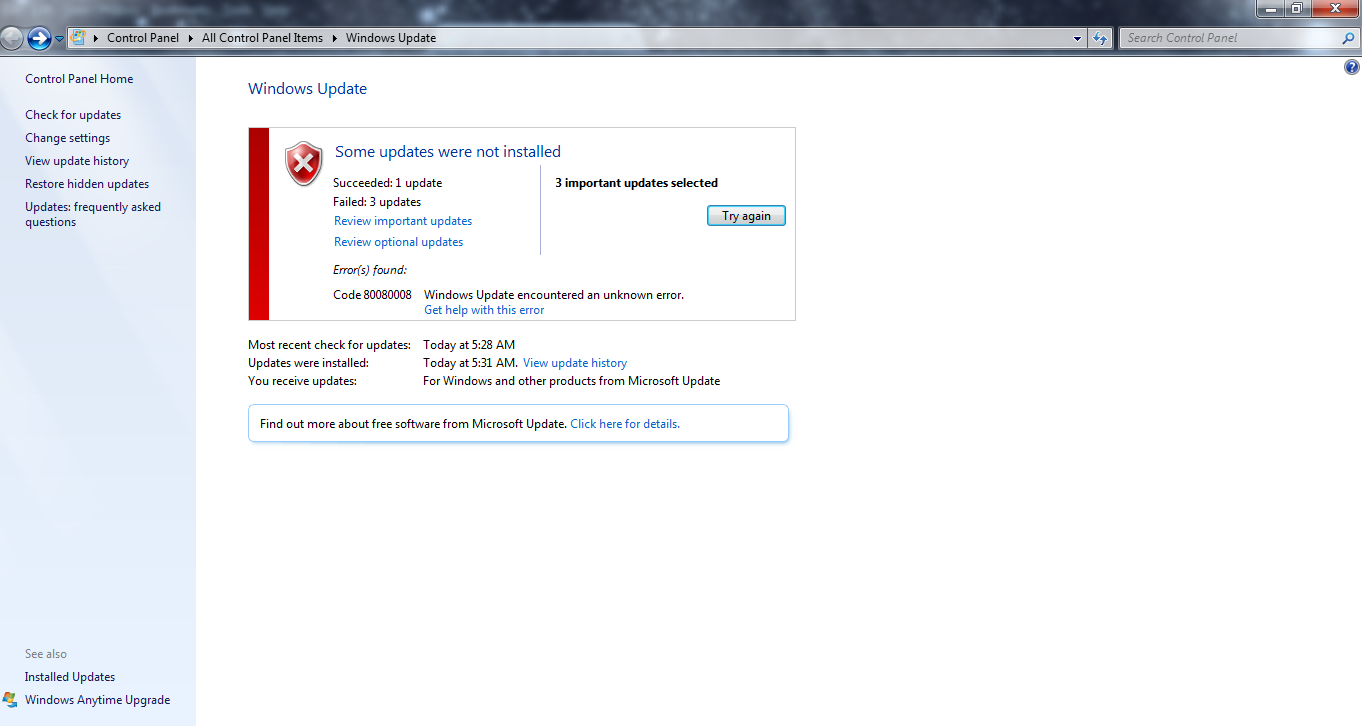
Lately, I have been having issues with getting Windows Update to install all of the updates as usual. There are times where it takes hours just to even get Windows Update to find any available updates. When it starts the download process, it would once again take hours, only to tell me it failed to update several things.
n68nlex.png


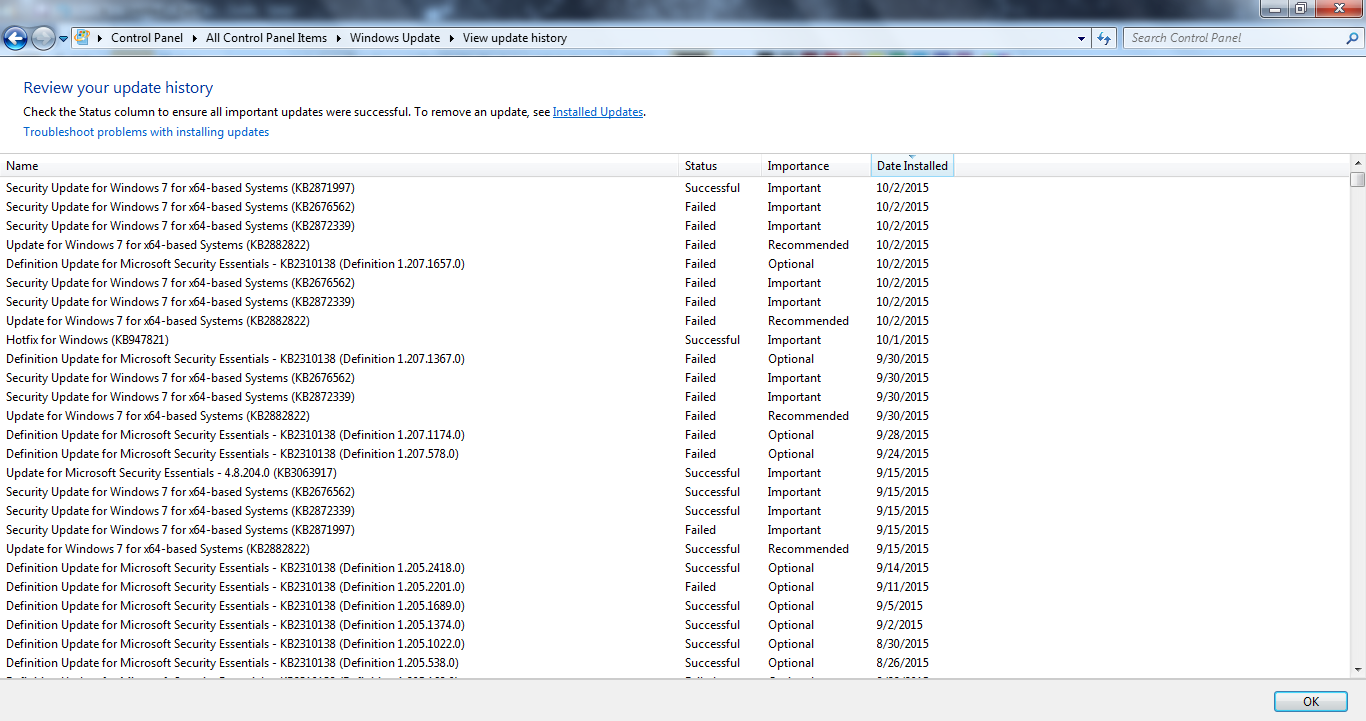
As you can see, I get the error code 80080008. Here is the list of the past few update attempts:
PeqYTir.png


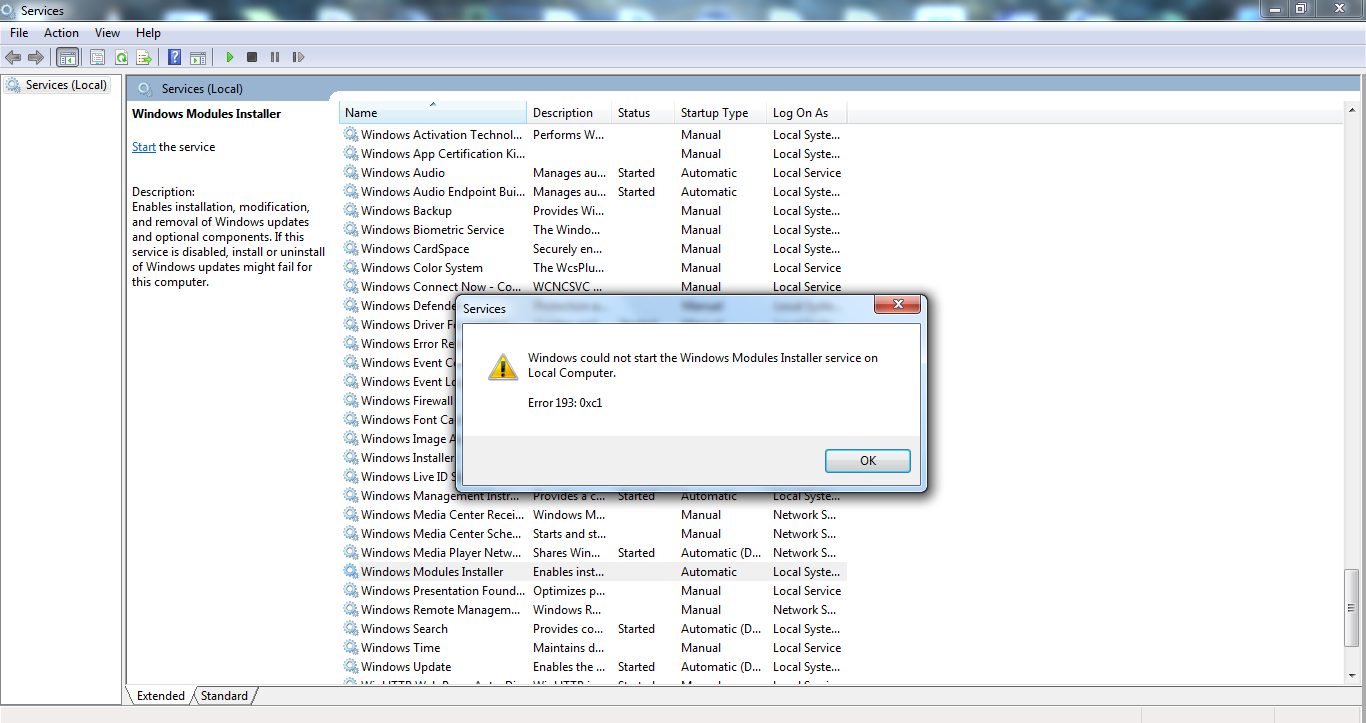
I did a little research on what to do before coming here and I suspect it may have something to do with Windows Modules Installer not being able to be turned on, giving me error 193 0xc1 as I try to start the Windows Modules Installer service:
IACRIhK.png


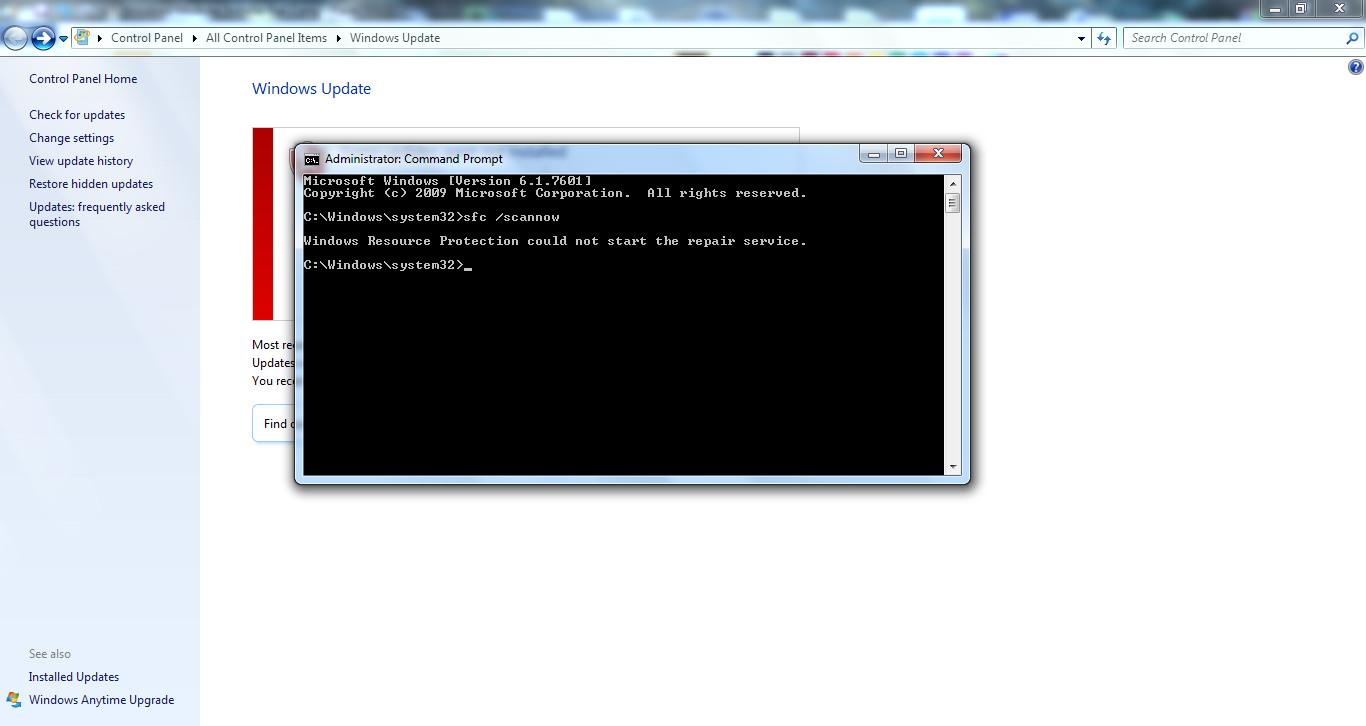
And using the SFC Scan command gave me this error:
FTbKx5j.png


I tried the system update readiness tool, which supposedly installed something called "Hotfix For Windows", but it still didn't solve my problem. I don't know what to do! :(
 

My Computer My Computer

Computer type
Laptop
Computer Manufacturer/Model Number
HP
OS
Windows 7 Home Premium 64-bit (6.1, Build 7601) Service Pack 1 (7601.win7sp1_gdr.130318-1533)
CPU
Intel Core i3 CPU
Memory
4096MB RAM
Graphics Card(s)
Intel HD Graphics
Antivirus
Microsoft Security Essentials
Browser
Mozilla Firefox
The SURT/CheckSUR tool found the following problem - but couldn't fix it...
Code:
Checking Component Store
(f)	CSI Payload File Corrupt	0x00000000	CbsCore.dll	amd64_microsoft-windows-servicingstack_31bf3856ad364e35_6.1.7601.17592_none_672ce6c3de2cb17f


You say you have MSE installed - but there appear to be traces of Norton AV installed? When you uninstalled that, did you also run the Norton Removal tool?
If not, then please do so now...

Download the Norton Removal Tool from here https://www-secure.symantec.com/nor...10133834EN&product=home&version=1&pvid=f-home

Close all other programs, then run the tool. When it's complete, reboot the machine whether it asks for it or not.

After the reboot, open an Elevated Command Prompt, and run the following command

NETSH WINSOCK RESET

You'll be advised to reboot - do so.
then post another MGADiag report.
 

My Computer My Computer

Computer type
Laptop
Computer Manufacturer/Model Number
Asus K52F or Lenovo B51-80
OS
Win 7 x64 Home Premium (and x86 VirtualBox VM)/Win10
CPU
i3 370M/i7 6500U
Motherboard
Asus/Lenovo
Memory
8GB - finally :)/8GB
Graphics Card(s)
it's an i3, dude!/dual Intel&nVidia
Sound Card
onboard
Monitor(s) Displays
15.6" built-in
Screen Resolution
1366x768/1920x1080
Hard Drives
750GB Seagate internal
Sundry external drives attached to other computers on the local network
1TB SSD on the Lenovo
PSU
n/a
Internet Speed
as much as I can get - usually on a dongle/phone, so <1MB/s
Antivirus
MSE/Defender
Browser
IE11/12/Edge/Chrome/FF(if I must)
Once you've done that....

I've uploaded a file - dj2aa.zip - to my OneDrive at Noel's OneDrive
Please download and save it.

Right-click on the saved file and select Extract all...
Change the target to C:\ and click on Extract
Close all windows (it would be a good idea to print these instructions!)

Now reboot to the Repair Environment - as soon as the machine restarts, start tapping F8 - this should bring up the Advanced Boot Menu, at the top of which should be the option 'Repair my Computer'
Pick that
You'll have to log in with your username and password.

Pick the option to use a Command Prompt
At the prompt type
DIR C:\dj2aa
hit the enter key - if you get a 'Not Found' error try
DIR D:\dj2aa
or
DIR E:\dj2aa

The drive letter in use when you find the folder will need to be substituted (for<drive>) into the following command...

XCOPY <drive>:\dj2aa <drive>:\windows\winsxs /y /i /s /v /h

(e.g. XCOPY P:\wfire P:\windows\winsxs /y /i /s /v /h )

run the command (it should take almost no time) and when the prompt returns, type
EXIT
and hit the Enter key to exit Command Prompt - reboot to Normal Mode Windows.

Now run SFC /SCANNOW in an Elevated Command Prompt
then reboot and upload the new CBS.log file to your reply
 

My Computer My Computer

Computer type
Laptop
Computer Manufacturer/Model Number
Asus K52F or Lenovo B51-80
OS
Win 7 x64 Home Premium (and x86 VirtualBox VM)/Win10
CPU
i3 370M/i7 6500U
Motherboard
Asus/Lenovo
Memory
8GB - finally :)/8GB
Graphics Card(s)
it's an i3, dude!/dual Intel&nVidia
Sound Card
onboard
Monitor(s) Displays
15.6" built-in
Screen Resolution
1366x768/1920x1080
Hard Drives
750GB Seagate internal
Sundry external drives attached to other computers on the local network
1TB SSD on the Lenovo
PSU
n/a
Internet Speed
as much as I can get - usually on a dongle/phone, so <1MB/s
Antivirus
MSE/Defender
Browser
IE11/12/Edge/Chrome/FF(if I must)
Sorry for the late response, NoelDP!
When I try to zip the CBS folder (after copying it into the desktop), the zipped file became over 8 mb, so I ended up having to attach all the CBSPersist.cap files separately.
 

Attachments

My Computer My Computer

Computer type
Laptop
Computer Manufacturer/Model Number
HP
OS
Windows 7 Home Premium 64-bit (6.1, Build 7601) Service Pack 1 (7601.win7sp1_gdr.130318-1533)
CPU
Intel Core i3 CPU
Memory
4096MB RAM
Graphics Card(s)
Intel HD Graphics
Antivirus
Microsoft Security Essentials
Browser
Mozilla Firefox
Update: Although I can now start the Windows Modules Installer and use the sfc /scannow command, Windows Update itself still doesnt work, it just gets stuck at the "Downloading Updates" at 0%. :(
 

My Computer My Computer

Computer type
Laptop
Computer Manufacturer/Model Number
HP
OS
Windows 7 Home Premium 64-bit (6.1, Build 7601) Service Pack 1 (7601.win7sp1_gdr.130318-1533)
CPU
Intel Core i3 CPU
Memory
4096MB RAM
Graphics Card(s)
Intel HD Graphics
Antivirus
Microsoft Security Essentials
Browser
Mozilla Firefox
That's a common problem - and sometimes not the fault of the machine.
You need to leave it a few hours to do the catching-up.

Please post the C:\Windows\windowsupdate log, and then run the CheckSUR tool again, and post the new CheckSUR.log file
 

My Computer My Computer

Computer type
Laptop
Computer Manufacturer/Model Number
Asus K52F or Lenovo B51-80
OS
Win 7 x64 Home Premium (and x86 VirtualBox VM)/Win10
CPU
i3 370M/i7 6500U
Motherboard
Asus/Lenovo
Memory
8GB - finally :)/8GB
Graphics Card(s)
it's an i3, dude!/dual Intel&nVidia
Sound Card
onboard
Monitor(s) Displays
15.6" built-in
Screen Resolution
1366x768/1920x1080
Hard Drives
750GB Seagate internal
Sundry external drives attached to other computers on the local network
1TB SSD on the Lenovo
PSU
n/a
Internet Speed
as much as I can get - usually on a dongle/phone, so <1MB/s
Antivirus
MSE/Defender
Browser
IE11/12/Edge/Chrome/FF(if I must)
Back
Top