MountainKing
New member
- Local time
- 2:51 PM
- Messages
- 17
I just reinstalled Windows 7 64bit after a crash. I reconnected my second HDD to the machine where prior to the crash I stored all my photos and music.
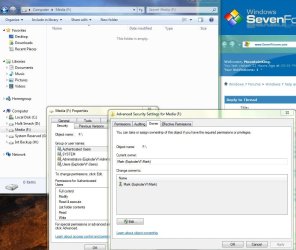
The problem is that there appears to be no folders or files visible in the drive, despite it showing over 300GB of used space. See the attached screenshot for a better view of what I am talking about.
Drive F is the first partition on the drive
Drive G is the second partition on the drive
--Both should have a ton of data on them, but I can't see any folders.
Am I missing something stupid? I'm not panicked yet, but drive F is really important to me.
Thanks EDIT***I just booted into the same PC via a Knoppix Live DVD and this OS sees all my files just as pretty as you please... so clearly the data is all there (thank the FSM), but Windows is misconigured. This is a gonna be a facepalm when I figure out what I did wrong isnt it?
The problem is that there appears to be no folders or files visible in the drive, despite it showing over 300GB of used space. See the attached screenshot for a better view of what I am talking about.
Drive F is the first partition on the drive
Drive G is the second partition on the drive
--Both should have a ton of data on them, but I can't see any folders.
Am I missing something stupid? I'm not panicked yet, but drive F is really important to me.
Thanks EDIT***I just booted into the same PC via a Knoppix Live DVD and this OS sees all my files just as pretty as you please... so clearly the data is all there (thank the FSM), but Windows is misconigured. This is a gonna be a facepalm when I figure out what I did wrong isnt it?
Attachments

Last edited:
My Computer
At a glance
Windows 7 Pro 64bit
- OS
- Windows 7 Pro 64bit