HDMI Audio Out, Realtek + Nvidia

ecion

New member
Local time
3:23 PM
Messages
4
Hi Guys,
I really need some help with this one.
I purchased a new PC, with a Gigabyte GA-H61MA-D2V motherboard that has on board realtek audio, I also purchased a nvidia geforce GT630 graphics card which has a built in audio processor and hdmi connection which is going to my LG 42PL6010 tv.

I've installed drivers for chipset, audio, graphics, but I'm unable to get any sound out of the HDMI port. I've set the default play back device as as the tv in control panel - sound. Choosing to test shows the audio bars moving but no sound comes out.
I've checked bios settings, tried with only audio drivers, or only graphics drivers, no joy.

I've tested the cable and tv with a hdmi equipped laptop, so can rule those out as a possible cause.

many thanks
Phill
 

My Computer My Computer

At a glance

Win 7 Pro x64
OS
Win 7 Pro x64
The default playback, if you are using HDMI should be the HDMI. I've never seen one with a "TV" listed as the default playback device. However, in most cases when an HDMI cable is connected Windows automatically switches the default playback device from "speakers" (your PC's RealTek audio) to the HDMI.

Have you installed the NVIDIA supplied video drivers (which include the video card's audio driver)? If not, go to www.nvidia.com and download and install the latest driver for the GT630 and Windows 7 64 bit.

Here is the direct link http://www.geforce.com/drivers/results/48847
 

My Computer My Computer

At a glance

Windows 10 64 bitIntel i7 6700K16GB Corsair DominatorIntel CPU Graphics
Computer type
PC/Desktop
Computer Manufacturer/Model Number
My Own Build
OS
Windows 10 64 bit
CPU
Intel i7 6700K
Motherboard
ASUS ROG Maximus VIII Hero
Memory
16GB Corsair Dominator
Graphics Card(s)
Intel CPU Graphics
Sound Card
RealTek
Monitor(s) Displays
27" Dell S2719dgf
Screen Resolution
2560X1440
Hard Drives
1 TB Samsung 850 EVO SSD for Win 10 Pro
500GB Samsung 850 EVO SSD for Win 10 Insider
2 TB drive for backup
PSU
EVGA Supernova 750G2
Case
BeQuiet Silent Base 600
Cooling
Deepcool Captain 120EX
Keyboard
Microsoft Wireless 2000
Mouse
Microsoft wireless
Internet Speed
100 MB/sec (Cable)
Antivirus
Microsoft Defender and Malwarebytes
Browser
Edge/Firefox
Other Info
Cakewalk (Sonar) by BandLab and Studio One 4.1 Pro recording studio software. MOTU 896Mk3 Hybrid recording interface, Frontier Tranzport wireless control unit, Behringer X-Touch Control Surface.
Five USB connected optical drives for CD Audio production using Nero BurningROM
Hi Firebred, yea I've already got the latest nvidia drivers (tried the ones from the brand[palit] too incase they helped but didnt, so im still on latest nvidia 64bit drivers at the moment.)

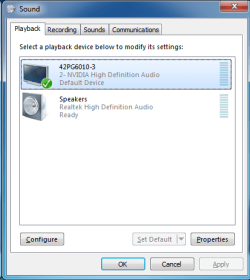
It doesn't list the word TV, it says the TV's model number, LG42PG6010-3 2-Nvidia High Definition Audio Device.
 

My Computer My Computer

At a glance

Win 7 Pro x64
OS
Win 7 Pro x64
I've never seen one do that. This is a new one.

Where are you seeing this? In the device manager or in the Sound panel/playback section?
 

My Computer My Computer

At a glance

Windows 10 64 bitIntel i7 6700K16GB Corsair DominatorIntel CPU Graphics
Computer type
PC/Desktop
Computer Manufacturer/Model Number
My Own Build
OS
Windows 10 64 bit
CPU
Intel i7 6700K
Motherboard
ASUS ROG Maximus VIII Hero
Memory
16GB Corsair Dominator
Graphics Card(s)
Intel CPU Graphics
Sound Card
RealTek
Monitor(s) Displays
27" Dell S2719dgf
Screen Resolution
2560X1440
Hard Drives
1 TB Samsung 850 EVO SSD for Win 10 Pro
500GB Samsung 850 EVO SSD for Win 10 Insider
2 TB drive for backup
PSU
EVGA Supernova 750G2
Case
BeQuiet Silent Base 600
Cooling
Deepcool Captain 120EX
Keyboard
Microsoft Wireless 2000
Mouse
Microsoft wireless
Internet Speed
100 MB/sec (Cable)
Antivirus
Microsoft Defender and Malwarebytes
Browser
Edge/Firefox
Other Info
Cakewalk (Sonar) by BandLab and Studio One 4.1 Pro recording studio software. MOTU 896Mk3 Hybrid recording interface, Frontier Tranzport wireless control unit, Behringer X-Touch Control Surface.
Five USB connected optical drives for CD Audio production using Nero BurningROM
In PlayBack - in Sound in Control Panel.
 

Attachments

  • playback.png
    playback.png
    13.5 KB · Views: 51

My Computer My Computer

At a glance

Win 7 Pro x64
OS
Win 7 Pro x64
For whatever reason that is not showing the usual "HDMI".

RIGHT click in a blank area in the panel and then check the boxes to show disabled and disconnected devices. Does the HDMI now show up?
 

My Computer My Computer

At a glance

Windows 10 64 bitIntel i7 6700K16GB Corsair DominatorIntel CPU Graphics
Computer type
PC/Desktop
Computer Manufacturer/Model Number
My Own Build
OS
Windows 10 64 bit
CPU
Intel i7 6700K
Motherboard
ASUS ROG Maximus VIII Hero
Memory
16GB Corsair Dominator
Graphics Card(s)
Intel CPU Graphics
Sound Card
RealTek
Monitor(s) Displays
27" Dell S2719dgf
Screen Resolution
2560X1440
Hard Drives
1 TB Samsung 850 EVO SSD for Win 10 Pro
500GB Samsung 850 EVO SSD for Win 10 Insider
2 TB drive for backup
PSU
EVGA Supernova 750G2
Case
BeQuiet Silent Base 600
Cooling
Deepcool Captain 120EX
Keyboard
Microsoft Wireless 2000
Mouse
Microsoft wireless
Internet Speed
100 MB/sec (Cable)
Antivirus
Microsoft Defender and Malwarebytes
Browser
Edge/Firefox
Other Info
Cakewalk (Sonar) by BandLab and Studio One 4.1 Pro recording studio software. MOTU 896Mk3 Hybrid recording interface, Frontier Tranzport wireless control unit, Behringer X-Touch Control Surface.
Five USB connected optical drives for CD Audio production using Nero BurningROM
yea that screen is with all devices shown, even disconnected or disabled.
 

My Computer My Computer

At a glance

Win 7 Pro x64
OS
Win 7 Pro x64
Uninstall the NVIDIA in the Device Manager then restart and it will be reinstalled see if that changes or helps things.

In the Device Manager RIGHT click on the entry for the NVIDIA Video Card, then LEFT click "Uninstall" DO NOT check the box to also uninstall the drivers. Restart the PC and when Windows starts it will detect and reinstall the video (and the audio from the Video card). This will screw up your video untill its reinstalled, but it will straighten out after that.
 

My Computer My Computer

At a glance

Windows 10 64 bitIntel i7 6700K16GB Corsair DominatorIntel CPU Graphics
Computer type
PC/Desktop
Computer Manufacturer/Model Number
My Own Build
OS
Windows 10 64 bit
CPU
Intel i7 6700K
Motherboard
ASUS ROG Maximus VIII Hero
Memory
16GB Corsair Dominator
Graphics Card(s)
Intel CPU Graphics
Sound Card
RealTek
Monitor(s) Displays
27" Dell S2719dgf
Screen Resolution
2560X1440
Hard Drives
1 TB Samsung 850 EVO SSD for Win 10 Pro
500GB Samsung 850 EVO SSD for Win 10 Insider
2 TB drive for backup
PSU
EVGA Supernova 750G2
Case
BeQuiet Silent Base 600
Cooling
Deepcool Captain 120EX
Keyboard
Microsoft Wireless 2000
Mouse
Microsoft wireless
Internet Speed
100 MB/sec (Cable)
Antivirus
Microsoft Defender and Malwarebytes
Browser
Edge/Firefox
Other Info
Cakewalk (Sonar) by BandLab and Studio One 4.1 Pro recording studio software. MOTU 896Mk3 Hybrid recording interface, Frontier Tranzport wireless control unit, Behringer X-Touch Control Surface.
Five USB connected optical drives for CD Audio production using Nero BurningROM
Back
Top