Help bat file to execute a bat

ali2k1

New member
Local time
10:29 AM
Messages
6
Hi everyone hope everyone in good health and have a good year. I need help please to make a bat file which works like a emulator or frintend to execute othe bat files. I've searched everywhere but cannot find a tutorial. Can some one please kind enough to help me. I understand it's not related to windows. My files are located in c program files and gave no idea how to go around it thank you!
 

My Computer

Computer Manufacturer/Model Number
Asrock ion 330ht
OS
32bit windows 7 ultimate
Memory
2gb
Monitor(s) Displays
HDTV
Hard Drives
320gb

My Computer

Computer type
PC/Desktop
Computer Manufacturer/Model Number
Self Built
OS
Windows 7 Ultimate 64bit
CPU
AMD Phenom Quad core 9950 black edition
Motherboard
Gigabyte
Memory
16Gb
Graphics Card(s)
2x XFX Radeon 5850
Sound Card
PCI Express X-Fi Titanium / Logitech G35
Monitor(s) Displays
2x HP 2410i
Screen Resolution
1920x1080
Hard Drives
2x 500Gb Seagate
1x 300Gb Seagate
1x 1Tb Seagate
2x 1Tb Hitatchi
PSU
Jean Tech Storm 700W
Case
Cooler Master COSMOS S
Cooling
Akasa Evo Blue Pro
Keyboard
Logitech G15
Mouse
Mad Catz M.M.O. 7
Internet Speed
12mb
Hi everyone hope everyone in good health and have a good year. I need help please to make a bat file which works like a emulator or frintend to execute othe bat files. I've searched everywhere but cannot find a tutorial. Can some one please kind enough to help me. I understand it's not related to windows. My files are located in c program files and gave no idea how to go around it thank you!

One batch file can call another by using the CALL statement. For example:

A.BAT:
Code:
@echo off 
echo Batch File A

B.BAT:
Code:
@echo off 
echo Batch File B 
call a


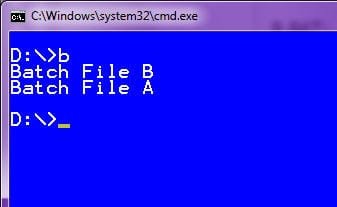
If B.BAT is run from the command prompt, you'll get the following output:

Image1.jpg
 

My Computer

Computer type
PC/Desktop
Computer Manufacturer/Model Number
Virtual Machine
OS
Windows 7 Professional 32-bit SP1
CPU
AMD A4/A6
Motherboard
Intel Corporation 440BX Desktop Reference Platform
Memory
3.00GB EDO
Graphics Card(s)
VMware SVGA 3D
Sound Card
High Definition Audio Device
Monitor(s) Displays
Generic Non-PnP Monitor on VMware SVGA 3D
Screen Resolution
1440x900
Hard Drives
1 x 60GB VMware Virtual SATA Hard Drive ATA Device
Antivirus
Kaspersky Total Security
I was looking at that tutorial but when I tried it, it says c program not found. Anyway this is what I'm trying to do but it's not working
Create a launcher.bat file with "START %1" in it
Make a new directory for all your PC Games batch files
For each game you have, create another .bat file containing START "C:\\pathtomygame.exe"
In ALA, add an emulator/rom launcher that runs launcher.bat, with the rom path to where all your .bat files are.

The thread is dead but this doesn't work.

Thank you for all your help
 

My Computer

Computer Manufacturer/Model Number
Asrock ion 330ht
OS
32bit windows 7 ultimate
Memory
2gb
Monitor(s) Displays
HDTV
Hard Drives
320gb
Back
Top