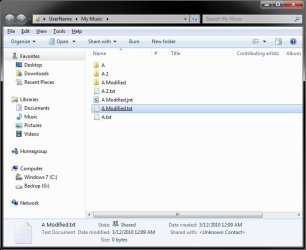
Hi, sorry if this is the wrong section, I'm new and didn't see a request section.
I wanted to know how to change the default name sort order from this:
A 2
A Modified
A
To:
A
A 2
A Modified
In windows 7.
Thanks in advance.
Ok, that IS bizarre. It's the space thats doing it.
If you remove all the spaces it sorts correctly. Or if you add a space to the A file (A[space]) then it also sorts correctly.
But I would expect that even if spaces had some sort of special sorting rule that the rule would be "One word file names sort before two word filenames". And that is definately not the case here.
My Computer
Computer Manufacturer/Model Number
Scratch built
OS
Windows 7 x64 Ultimate
CPU
i7 960
Motherboard
Asus P6X58D
Memory
12 Gig Corsair Dominator
Graphics Card(s)
Nvidia 480
Sound Card
Maudio Delta 44 + breakout box
Monitor(s) Displays
Dell UltraSharp U2410 24in and Samsung 21 dual monitors
I did a short search on the web and couldn't find anyne else mentioning it but I didn't spend more than a cople minutes on that... it does seem like an actual bug though. I can't think of a logical rule that would make sense. Fewer letters always sorts first and I would think that would exptend to fewer words as well.
Another experiement, I get the following:
A AAA.txt
A.txt
AA.txt
AAA.txt
I think I would expect this
A.txt
A AAA.txt
AA.txt
AAA.txt
or maybe even this:
A.txt
AA.txt
AAA.txt
A AAA.txt
But not the top one which is what you get
My Computer
Computer Manufacturer/Model Number
Scratch built
OS
Windows 7 x64 Ultimate
CPU
i7 960
Motherboard
Asus P6X58D
Memory
12 Gig Corsair Dominator
Graphics Card(s)
Nvidia 480
Sound Card
Maudio Delta 44 + breakout box
Monitor(s) Displays
Dell UltraSharp U2410 24in and Samsung 21 dual monitors
I don't know if this helps but as Brink said the problem only presents to files and not folders, unless the file has no extension then it sorts correctly, so the problem is that explorer thinks .(dot) is before space.
I just tested it on XP SP3 and the sort order is the same "bad" order as 7... wonder if SP 2 is different from SP3?
There were BIG changes to how Explorer works in SP3...
[Edit]Yup, found an XP SP 2 machine and the bug is NOT THERE. The sorting bug was introduced in XP SP3 and is perpetuated all the way through Windows 7. Nice... [/edit]
My Computer
Computer Manufacturer/Model Number
Scratch built
OS
Windows 7 x64 Ultimate
CPU
i7 960
Motherboard
Asus P6X58D
Memory
12 Gig Corsair Dominator
Graphics Card(s)
Nvidia 480
Sound Card
Maudio Delta 44 + breakout box
Monitor(s) Displays
Dell UltraSharp U2410 24in and Samsung 21 dual monitors
I don't think that that list of files would show it. You need one file in there with no spaces. like just "MCZ" and the question is, should that srt before or after all the other MCZ* files? on SP 2 (assuming the names are actually MCZ*.jpg) MCZ will be before and on SP3 it will be after.
My Computer
Computer Manufacturer/Model Number
Scratch built
OS
Windows 7 x64 Ultimate
CPU
i7 960
Motherboard
Asus P6X58D
Memory
12 Gig Corsair Dominator
Graphics Card(s)
Nvidia 480
Sound Card
Maudio Delta 44 + breakout box
Monitor(s) Displays
Dell UltraSharp U2410 24in and Samsung 21 dual monitors
Ok maybe the screenshot I picked was a bad idea but I have a folder with:
Ada.jpg
Ada 2.jpg
Ada Artwork.jpg
and they sort like this:
Ada 2.jpg
Ada Artwork.jpg
Ada.jpg
I realized of the worng order with that set of images.
Checked on wikipedia to see if there was an standard or something and nothing, I asked to see i there was a registry hack or something but I guess I'll just have to rename my images.
Anyways thanks.