Help needed to open Favorites shortcuts in same Explorer window

vailo

New member
Local time
6:38 AM
Messages
6
I do realize there's a couple extremely old threads on this already, but...


Immediately after installing a new printer (Canon MG3520, if relevant), this computer's started giving me trouble with everything shortcut-related.

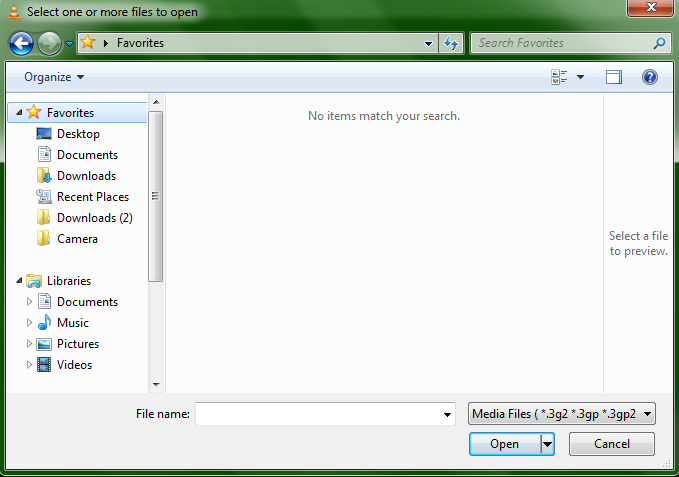
All shortcuts under the "Favorites" section of windows explorer now open in a new window. And because they can't open in the same window they're clicked from, it also means they can't open at all when I'm trying to upload files to websites. ("Favorites" itself can be opened, but then treats them as files instead of folders...)

I understand a system restore should, in theory, fix everything, but at the same time it would require installing the printer again, which will then more than likely cause the same problems, so I'm really looking for a way to not end up in that infinite loop.


So. For the basic extent of my own troubleshooting. "Open each folder in the same window" is checked, and HKEY_CLASSES_ROOT\Folder\shell currently looks like this:
fdip0Za.png


Any help would be super appreciated!
 

My Computer My Computer

At a glance

Windows 7 Home Premium 64bit
Computer type
PC/Desktop
Computer Manufacturer/Model Number
Toshiba
OS
Windows 7 Home Premium 64bit
Hello and welcome to the sevens forum...

Have you tried to reset your browser. I would do that to see if it will correct it's self also have you tried sfc /scannow.
 

My Computer My Computer

At a glance

Windows 7 Home Premium 64-Bit SP1Intel Core i7 26008.00 GB Dual-Channel DDR31024MB GeForce GT 420
Computer type
PC/Desktop
Computer Manufacturer/Model Number
Lenovo
OS
Windows 7 Home Premium 64-Bit SP1
CPU
Intel Core i7 2600
Motherboard
Lenovo
Memory
8.00 GB Dual-Channel DDR3
Graphics Card(s)
1024MB GeForce GT 420
Sound Card
Intergrated Realtex ALC888S
Monitor(s) Displays
LG W40 series Widescreen
Screen Resolution
1920 by 1080 widescreen
Hard Drives
932GB Hitachi HDS TB
External drive 640 GB also
PSU
300W
Case
Tower
Cooling
yes came installed
Keyboard
Lenovo
Mouse
Laser wirless 5000
Antivirus
MBAM / Superantispyware pro paid for.
Browser
Google /
Other Info
PLDS DVD-RW DH16ABSH
Hello and welcome to the sevens forum...

Have you tried to reset your browser. I would do that to see if it will correct it's self also have you tried sfc /scannow.


At the risk of sounding extremely stupid, Is there a way to reset it? I mean Task Manager probably will let me end explorer.exe, but it doesn't sound... Healthy.
I have turned the computer itself off multiple times, however. Which I would hope should be the same?

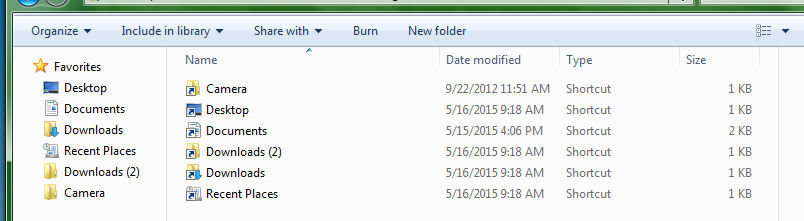
In case you meant internet browsers, I've restarted Firefox and left Chrome alone, but both of them (and additional programs like Notepad, VLC, etc) are still getting this useless folder with all six shortcuts being unclickable:
KwItnGG.png

...Even uploading these screenshots from my desktop, I'm having to scroll down and start from the C drive instead.


Anyway. Just tried out the scan. I'm not really sure if no result is a good thing or not in this case?
xT1j3S1.png
 

My Computer My Computer

At a glance

Windows 7 Home Premium 64bit
Computer type
PC/Desktop
Computer Manufacturer/Model Number
Toshiba
OS
Windows 7 Home Premium 64bit
Click on Organize then click on Folder and Search Options and see how it's set.

This image shows Folder Options from Tools in the Menu Bar (Your menu bar is turned off) but the window is the same.
 

Attachments

  • Folder Options.JPG
    Folder Options.JPG
    78.3 KB · Views: 1

My Computer My Computer

At a glance

Windows 7 Pro-x64i7-2600 3.4GHz - 3.8GHz Turbo8Gb - 2x4GB, Muskin 991770 PC3-1333Integrated Intel HD 2000
Computer type
PC/Desktop
Computer Manufacturer/Model Number
Built 2/11/2011
OS
Windows 7 Pro-x64
CPU
i7-2600 3.4GHz - 3.8GHz Turbo
Motherboard
Intel DH67BL-B3
Memory
8Gb - 2x4GB, Muskin 991770 PC3-1333
Graphics Card(s)
Integrated Intel HD 2000
Sound Card
Integrated Intel 10.1 HD, RealTek ALC892
Monitor(s) Displays
Asus LCD VH222H, Haier HL24XSL2a
Screen Resolution
1920x1080, 1920x1080
Hard Drives
Crucial SSD C300-128Gb,
Western Digital WD5002AALX - 500Gb,
Western Digital WD7501AALS - 750Gb
PSU
Seasonic 650W 80+ Gold Modular
Case
Rosewill Defender
Cooling
Stock CPU, Four 120mm case fans, PCH fan added
Keyboard
Logitech EX100 Y-RBH94 Wireless
Mouse
Logitech EX100 M-RCE95 Wireless
Internet Speed
3.0/1.5 Mbs
Antivirus
Microsoft Security Essentials
Browser
Microsoft Internet Explorer 11
Other Info
Antec Veris Premier-Multimedia IR Station,
Cyber Accoustics-3602 Speakers,
AFT XM-5U Card Reader,
Hauppauge TV-HVR-2250,
Sony LX300 USB Turntable
Click on Organize then click on Folder and Search Options and see how it's set.

This image shows Folder Options from Tools in the Menu Bar (Your menu bar is turned off) but the window is the same.


Y-yeah, I already said in the first post that that's been done. It has no effect.

I did just try your route anyway, but it looks like "Tools > Folder options..." and "Organize > Folder and search options" lead to the exact same place, so there's nothing available to change.


Keeping in mind, this whole problem affects only the shortcuts under Favorites. Regardless of whether they were there prior to the printer, or added after.
hXM4bN4.png
 

My Computer My Computer

At a glance

Windows 7 Home Premium 64bit
Computer type
PC/Desktop
Computer Manufacturer/Model Number
Toshiba
OS
Windows 7 Home Premium 64bit
Hi and welcome to SevenForums,
Right click the Favorites listing and click on Restore favorites links,

Not sure why you going through a registry editor to mess with this what changes have you made ?
You can also restore defaults as Carwiz images shows,

Then shut down your machine and re-start.
 

My Computer My Computer

At a glance

Win-7-Pro64bit 7-H-Prem-64biti7-5930K 2nd i9-9940x both water blocked VRM'...Trident-z 3200C14 2nd Trident-z 3600C16EVGA 1080ti ftw3 2nd Titan Xp both water blocked
Computer type
PC/Desktop
Computer Manufacturer/Model Number
Custom assembled by me :}
OS
Win-7-Pro64bit 7-H-Prem-64bit
CPU
i7-5930K 2nd i9-9940x both water blocked VRM's too
Motherboard
ASUS SABERTOOTH X99 2nd ASUS x299 Apex
Memory
Trident-z 3200C14 2nd Trident-z 3600C16
Graphics Card(s)
EVGA 1080ti ftw3 2nd Titan Xp both water blocked
Sound Card
Built-in Realtek
Monitor(s) Displays
1-AOC G2460PG 24"G-Sync 144Hz/ 2nd 1-ASUS VG248QE 24" 144Hz
Screen Resolution
1920 x 1080 144Hz
Hard Drives
2-Samsung M.2 Evo & Evo Plus
2-Samsung 850 EVO 500GB SSD's/ 3-2.5 W.D. Black 1tb-&3-1tb/3-3.5 WD Black 1tb hdd's
PSU
EVGA SuperNOVA 1000-P2 2nd 1200-P2
Case
2-Corsair Obsidian Series 450D Black ATX Mid Tower
Cooling
Custom water loops
Keyboard
Logitech G710+/ 2nd Logitech G910
Mouse
2-RedDragon M901 Perdition 16400 dpi Gaming mouse = wired
Internet Speed
Comcast Ping 19ms 89.31mbps download speed 6.12mbps upload
Antivirus
Malwarebytes Pro/ Superantispyware Pro
Browser
FireFox & Pale moon
Other Info
2nd ASUS X299 Apex/Intel i9-9940x with Custom water loop/7H-Prem-x64/Corsair 450D case/Ram Trident-z 3600C16 4x8gb / Samsung970Evo plus 500gb SSD/Dual ssd EZ swap evo/PSU EVGA SuperNova 1200w-P2 80+Platinum/GPU Titan Xp /8-ML-140 on push-pull on 2-280GTX rads
Hi and welcome to SevenForums,
Right click the Favorites listing and click on Restore favorites links,

Not sure why you going through a registry editor to mess with this what changes have you made ?
You can also restore defaults as Carwiz images shows,

Then shut down your machine and re-start.


As expected, that unfortunately did nothing.


For the registry thing, I'd been searching for answers before posting, and came across this thread in the process.
. . . Which never comes to a conclusion.
So since "look at the registry" was a potential request, I just figured it might help save time to have mine ready to view right from the start.


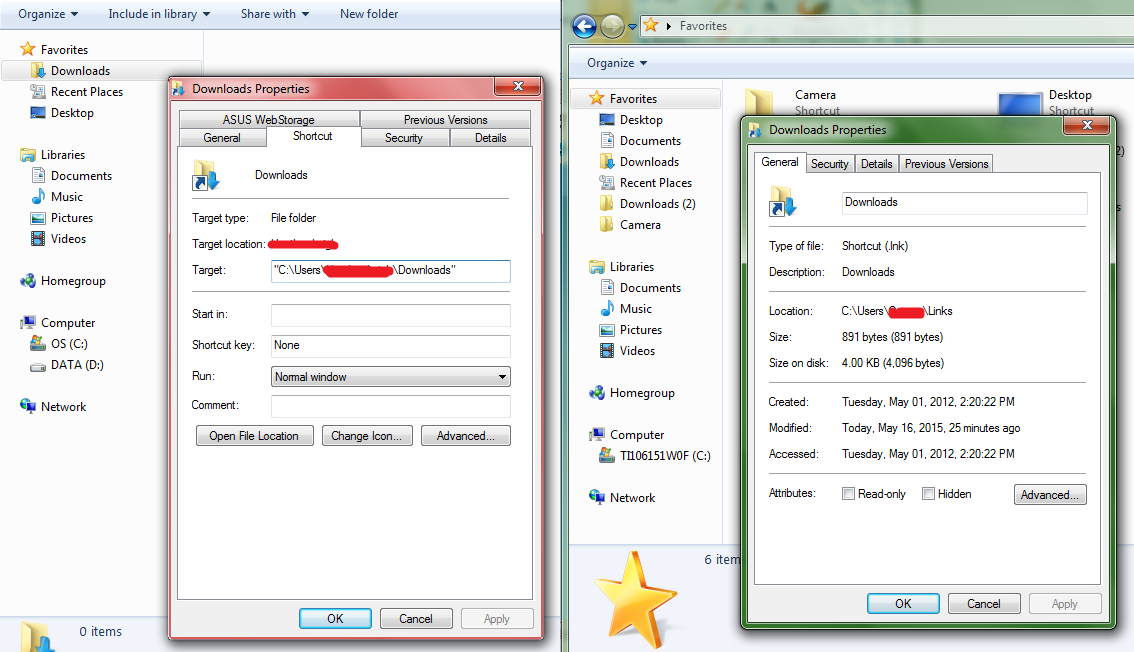
On a separate note, a friend was trying to help me out as well and we noticed our shortcuts have extremely different properties windows.
mE2Af8Y.png

Unlike the one on the left, mine has no "Shortcut" tab.

There probably could be normal reasons for that, but, it definitely seems like something to mention, since opening shortcuts is the entire issue.
 

My Computer My Computer

At a glance

Windows 7 Home Premium 64bit
Computer type
PC/Desktop
Computer Manufacturer/Model Number
Toshiba
OS
Windows 7 Home Premium 64bit
Hi,
You properties are from different location left is for downloads and the right is on favorites,

Click Start and click on your user name listed near the top right under your user image,
forget about the navigation pane right click the favorites folder on the main page.
See if there's any difference
 

My Computer My Computer

At a glance

Win-7-Pro64bit 7-H-Prem-64biti7-5930K 2nd i9-9940x both water blocked VRM'...Trident-z 3200C14 2nd Trident-z 3600C16EVGA 1080ti ftw3 2nd Titan Xp both water blocked
Computer type
PC/Desktop
Computer Manufacturer/Model Number
Custom assembled by me :}
OS
Win-7-Pro64bit 7-H-Prem-64bit
CPU
i7-5930K 2nd i9-9940x both water blocked VRM's too
Motherboard
ASUS SABERTOOTH X99 2nd ASUS x299 Apex
Memory
Trident-z 3200C14 2nd Trident-z 3600C16
Graphics Card(s)
EVGA 1080ti ftw3 2nd Titan Xp both water blocked
Sound Card
Built-in Realtek
Monitor(s) Displays
1-AOC G2460PG 24"G-Sync 144Hz/ 2nd 1-ASUS VG248QE 24" 144Hz
Screen Resolution
1920 x 1080 144Hz
Hard Drives
2-Samsung M.2 Evo & Evo Plus
2-Samsung 850 EVO 500GB SSD's/ 3-2.5 W.D. Black 1tb-&3-1tb/3-3.5 WD Black 1tb hdd's
PSU
EVGA SuperNOVA 1000-P2 2nd 1200-P2
Case
2-Corsair Obsidian Series 450D Black ATX Mid Tower
Cooling
Custom water loops
Keyboard
Logitech G710+/ 2nd Logitech G910
Mouse
2-RedDragon M901 Perdition 16400 dpi Gaming mouse = wired
Internet Speed
Comcast Ping 19ms 89.31mbps download speed 6.12mbps upload
Antivirus
Malwarebytes Pro/ Superantispyware Pro
Browser
FireFox & Pale moon
Other Info
2nd ASUS X299 Apex/Intel i9-9940x with Custom water loop/7H-Prem-x64/Corsair 450D case/Ram Trident-z 3600C16 4x8gb / Samsung970Evo plus 500gb SSD/Dual ssd EZ swap evo/PSU EVGA SuperNova 1200w-P2 80+Platinum/GPU Titan Xp /8-ML-140 on push-pull on 2-280GTX rads
Hi,
You properties are from different location left is for downloads and the right is on favorites,

Click Start and click on your user name listed near the top right under your user image,
forget about the navigation pane right click the favorites folder on the main page.
See if there's any difference

Well,
yes there's a huge difference, because the Favorites heading in the left pane doesn't have properties to begin with.


But yeah, for an example, "My Documents" from my user folder comes up with regular folder properties and stuff.
"Documents" from either the left pane's Favorites or the right pane's Links folder still turns out the same as the screenshot.

The folders are all fine. It's all my .lnk files that are screwy.


EDIT:
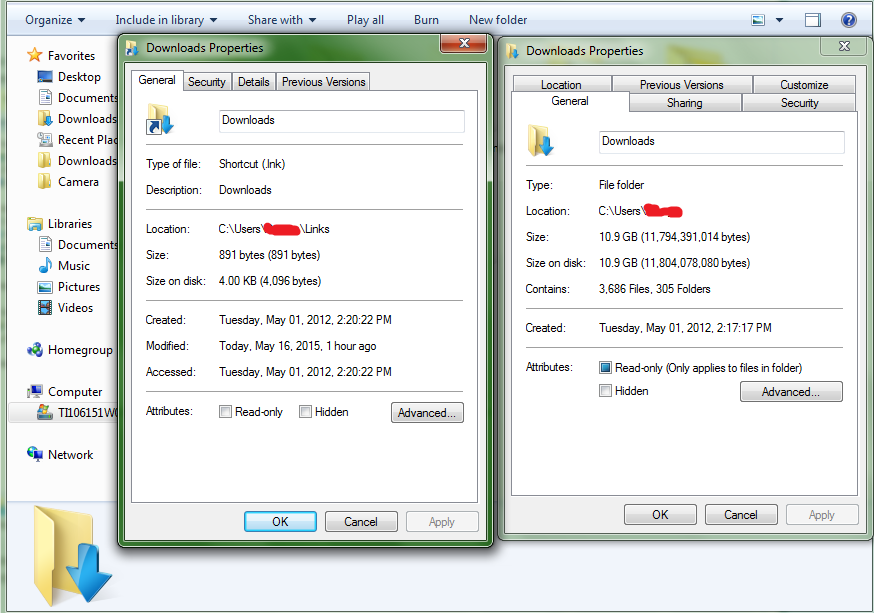
Screenshot from Downloads because why not. Left window's the shortcut, right window's the folder.
XfoUwWL.png
 

My Computer My Computer

At a glance

Windows 7 Home Premium 64bit
Computer type
PC/Desktop
Computer Manufacturer/Model Number
Toshiba
OS
Windows 7 Home Premium 64bit
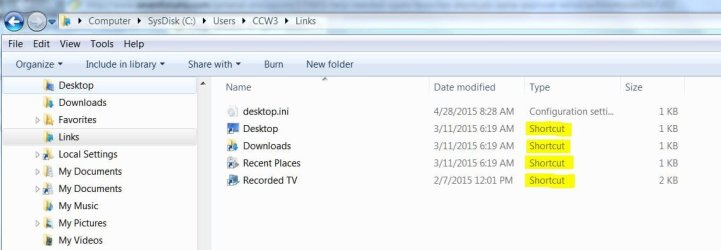
Navigate to: C:\Users\<user-name>\Links and see if there's actually any shortcuts in that folder.

Sample:
 

Attachments

  • User Links.JPG
    User Links.JPG
    50.5 KB · Views: 0

My Computer My Computer

At a glance

Windows 7 Pro-x64i7-2600 3.4GHz - 3.8GHz Turbo8Gb - 2x4GB, Muskin 991770 PC3-1333Integrated Intel HD 2000
Computer type
PC/Desktop
Computer Manufacturer/Model Number
Built 2/11/2011
OS
Windows 7 Pro-x64
CPU
i7-2600 3.4GHz - 3.8GHz Turbo
Motherboard
Intel DH67BL-B3
Memory
8Gb - 2x4GB, Muskin 991770 PC3-1333
Graphics Card(s)
Integrated Intel HD 2000
Sound Card
Integrated Intel 10.1 HD, RealTek ALC892
Monitor(s) Displays
Asus LCD VH222H, Haier HL24XSL2a
Screen Resolution
1920x1080, 1920x1080
Hard Drives
Crucial SSD C300-128Gb,
Western Digital WD5002AALX - 500Gb,
Western Digital WD7501AALS - 750Gb
PSU
Seasonic 650W 80+ Gold Modular
Case
Rosewill Defender
Cooling
Stock CPU, Four 120mm case fans, PCH fan added
Keyboard
Logitech EX100 Y-RBH94 Wireless
Mouse
Logitech EX100 M-RCE95 Wireless
Internet Speed
3.0/1.5 Mbs
Antivirus
Microsoft Security Essentials
Browser
Microsoft Internet Explorer 11
Other Info
Antec Veris Premier-Multimedia IR Station,
Cyber Accoustics-3602 Speakers,
AFT XM-5U Card Reader,
Hauppauge TV-HVR-2250,
Sony LX300 USB Turntable
Hi,
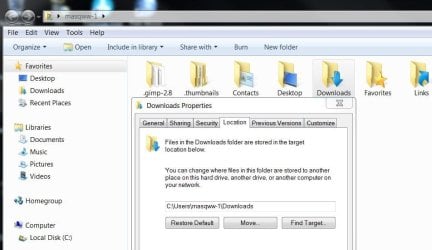
You seem fascinated with the downloads folder properties :/
user downloads properties.JPG
 

My Computer My Computer

At a glance

Win-7-Pro64bit 7-H-Prem-64biti7-5930K 2nd i9-9940x both water blocked VRM'...Trident-z 3200C14 2nd Trident-z 3600C16EVGA 1080ti ftw3 2nd Titan Xp both water blocked
Computer type
PC/Desktop
Computer Manufacturer/Model Number
Custom assembled by me :}
OS
Win-7-Pro64bit 7-H-Prem-64bit
CPU
i7-5930K 2nd i9-9940x both water blocked VRM's too
Motherboard
ASUS SABERTOOTH X99 2nd ASUS x299 Apex
Memory
Trident-z 3200C14 2nd Trident-z 3600C16
Graphics Card(s)
EVGA 1080ti ftw3 2nd Titan Xp both water blocked
Sound Card
Built-in Realtek
Monitor(s) Displays
1-AOC G2460PG 24"G-Sync 144Hz/ 2nd 1-ASUS VG248QE 24" 144Hz
Screen Resolution
1920 x 1080 144Hz
Hard Drives
2-Samsung M.2 Evo & Evo Plus
2-Samsung 850 EVO 500GB SSD's/ 3-2.5 W.D. Black 1tb-&3-1tb/3-3.5 WD Black 1tb hdd's
PSU
EVGA SuperNOVA 1000-P2 2nd 1200-P2
Case
2-Corsair Obsidian Series 450D Black ATX Mid Tower
Cooling
Custom water loops
Keyboard
Logitech G710+/ 2nd Logitech G910
Mouse
2-RedDragon M901 Perdition 16400 dpi Gaming mouse = wired
Internet Speed
Comcast Ping 19ms 89.31mbps download speed 6.12mbps upload
Antivirus
Malwarebytes Pro/ Superantispyware Pro
Browser
FireFox & Pale moon
Other Info
2nd ASUS X299 Apex/Intel i9-9940x with Custom water loop/7H-Prem-x64/Corsair 450D case/Ram Trident-z 3600C16 4x8gb / Samsung970Evo plus 500gb SSD/Dual ssd EZ swap evo/PSU EVGA SuperNova 1200w-P2 80+Platinum/GPU Titan Xp /8-ML-140 on push-pull on 2-280GTX rads
Navigate to: C:\Users\<user-name>\Links and see if there's actually any shortcuts in that folder.

Yep, everything in there is a shortcut.

cG3QuSc.png


They open normally from explorer, but read as an unsupported file type and can't be used at all, when using the "Browse" or "Open" option from any program.


Hi,
You seem fascinated with the downloads folder properties :/
Examples are examples. That said, though, you have a regular folder highlighted, not a shortcut, so I'm really not sure what you're even trying to show..
 

My Computer My Computer

At a glance

Windows 7 Home Premium 64bit
Computer type
PC/Desktop
Computer Manufacturer/Model Number
Toshiba
OS
Windows 7 Home Premium 64bit
Cannon Support shows Version 1.0 dated 03/10/15 as the current software so I suspect there's a problem with the install. It seems your user profile is corrupt and the install caused it. It's your choice to save a printer install or save a Windows install but I would go back to a restore point then download a fresh copy of the Cannon install software. If the problem returns, contact Cannon and see if they have a fix.

Here's the link: Canon U.S.A. : Consumer & Home Office : PIXMA MG3520
 
Last edited:

My Computer My Computer

At a glance

Windows 7 Pro-x64i7-2600 3.4GHz - 3.8GHz Turbo8Gb - 2x4GB, Muskin 991770 PC3-1333Integrated Intel HD 2000
Computer type
PC/Desktop
Computer Manufacturer/Model Number
Built 2/11/2011
OS
Windows 7 Pro-x64
CPU
i7-2600 3.4GHz - 3.8GHz Turbo
Motherboard
Intel DH67BL-B3
Memory
8Gb - 2x4GB, Muskin 991770 PC3-1333
Graphics Card(s)
Integrated Intel HD 2000
Sound Card
Integrated Intel 10.1 HD, RealTek ALC892
Monitor(s) Displays
Asus LCD VH222H, Haier HL24XSL2a
Screen Resolution
1920x1080, 1920x1080
Hard Drives
Crucial SSD C300-128Gb,
Western Digital WD5002AALX - 500Gb,
Western Digital WD7501AALS - 750Gb
PSU
Seasonic 650W 80+ Gold Modular
Case
Rosewill Defender
Cooling
Stock CPU, Four 120mm case fans, PCH fan added
Keyboard
Logitech EX100 Y-RBH94 Wireless
Mouse
Logitech EX100 M-RCE95 Wireless
Internet Speed
3.0/1.5 Mbs
Antivirus
Microsoft Security Essentials
Browser
Microsoft Internet Explorer 11
Other Info
Antec Veris Premier-Multimedia IR Station,
Cyber Accoustics-3602 Speakers,
AFT XM-5U Card Reader,
Hauppauge TV-HVR-2250,
Sony LX300 USB Turntable
Back
Top