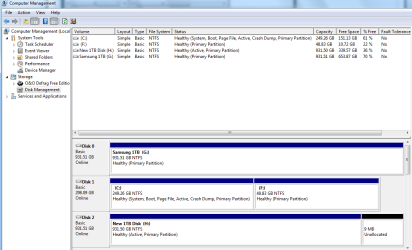
I set up my PC to dual boot to W7 or W8. All working fine until the PC refused to boot up saying there was an error due to removing a large storage device. I had pulled a 32GB USB stick from the machine earlier that day with using safely remove options.
I thought I could repair the boot loader but could not manage this. I had the retail W7 DVD so used that to hopefully repair Windows but managed somehow to install another version of W7.
Result is that after managing to repair my original W7 I now have two versions of W7 intalled on the same partition. (W8 is on a separate partition). I have used EasyBCD to rename the new W7 installation which I now wish to remove from the PC.
I can easily delete using EasyBCD but want to delete the actual installation as well not just the boot option. When I delete using EasyBCD does this delete the second (unwanted W7 installation) or just the option at startup. If only the startup title how do I delete the other unwanted installation. Will a system restore from my wanted W7 installation be sufficient.
I thought I could repair the boot loader but could not manage this. I had the retail W7 DVD so used that to hopefully repair Windows but managed somehow to install another version of W7.
Result is that after managing to repair my original W7 I now have two versions of W7 intalled on the same partition. (W8 is on a separate partition). I have used EasyBCD to rename the new W7 installation which I now wish to remove from the PC.
I can easily delete using EasyBCD but want to delete the actual installation as well not just the boot option. When I delete using EasyBCD does this delete the second (unwanted W7 installation) or just the option at startup. If only the startup title how do I delete the other unwanted installation. Will a system restore from my wanted W7 installation be sufficient.
My Computer
At a glance
W7Intel Quad 96004GBATI Radeon HD2600
- OS
- W7
- CPU
- Intel Quad 9600
- Motherboard
- Asus
- Memory
- 4GB
- Graphics Card(s)
- ATI Radeon HD2600
- Monitor(s) Displays
- NEC 18 inch LCD
- Hard Drives
- Samsung