
Hey guys,
I changed my system font to "Courier New" many years ago on my main PC, because I was doing a lot of categorising/archiving and I liked having a monospaced font for file explorer. I am pretty sure it was some tweak that involved either cmd or regedit, and it didn't take long to do, I found it online as either a guide or a forum post by somebody (from Google).
Anyways, I am looking to change it back to Segoe UI, so I thought, "Okay, let's look up some guides for changing system font for windows 7, as I likely did like 6 years ago, and then I'll go through the articles and guides until I confirm which method I used, then I'll just revert the changes", but the problem is, all the most common guides suggest changing things which (to the best of my knowledge) I have not changed on my PC, which I can tell by going to those locations and comparing myself.
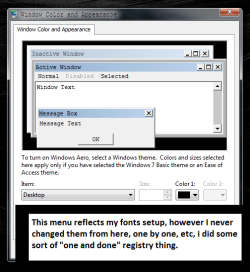
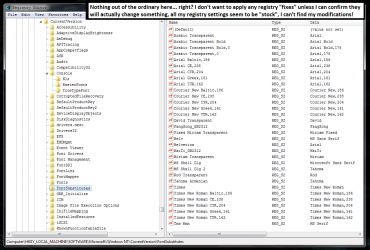
So whilst I am looking for a way to change the system font, I cannot just go about following random instructions - I need to confirm that what I'm editing is actually the same thing that got edited to begin with. From what I can tell, I didn't touch "CurrentVersion\Fonts" or "CurrentVersion\FontSubstitutes", but I am attaching pictures in case it helps. I also didn't touch the "personalisation" in control panel because I remember I did not go through each setting one by one or use any drop-down boxes.
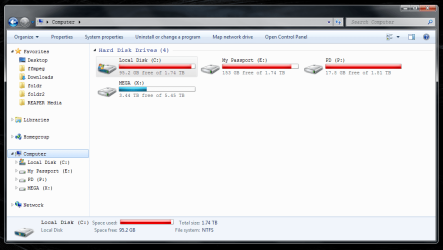
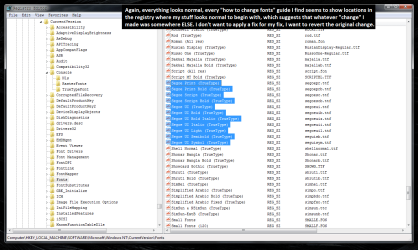
Attached are a bunch of screenshots of different programs, to show what got changed to Courier New back when I made the "change", there are also some screenshots of the registry. I was convinced that if I just kept using Ctrl+F in regedit searching "Courier", I could eventually find the culprit, but having no luck at the moment.
The pictures are annotated because this was first posted to Reddit and I thought it may help the people over there, my post was however "auto-removed" so whatever.
If any smart people can suggest other places in the OS I could look to find my change and revert them, maybe regedit still, or cmd, or cpl, I am really annoyed by this because usually I know the ins/outs of my system quite well.
Thanks in advance!
I changed my system font to "Courier New" many years ago on my main PC, because I was doing a lot of categorising/archiving and I liked having a monospaced font for file explorer. I am pretty sure it was some tweak that involved either cmd or regedit, and it didn't take long to do, I found it online as either a guide or a forum post by somebody (from Google).
Anyways, I am looking to change it back to Segoe UI, so I thought, "Okay, let's look up some guides for changing system font for windows 7, as I likely did like 6 years ago, and then I'll go through the articles and guides until I confirm which method I used, then I'll just revert the changes", but the problem is, all the most common guides suggest changing things which (to the best of my knowledge) I have not changed on my PC, which I can tell by going to those locations and comparing myself.
So whilst I am looking for a way to change the system font, I cannot just go about following random instructions - I need to confirm that what I'm editing is actually the same thing that got edited to begin with. From what I can tell, I didn't touch "CurrentVersion\Fonts" or "CurrentVersion\FontSubstitutes", but I am attaching pictures in case it helps. I also didn't touch the "personalisation" in control panel because I remember I did not go through each setting one by one or use any drop-down boxes.
Attached are a bunch of screenshots of different programs, to show what got changed to Courier New back when I made the "change", there are also some screenshots of the registry. I was convinced that if I just kept using Ctrl+F in regedit searching "Courier", I could eventually find the culprit, but having no luck at the moment.
The pictures are annotated because this was first posted to Reddit and I thought it may help the people over there, my post was however "auto-removed" so whatever.
If any smart people can suggest other places in the OS I could look to find my change and revert them, maybe regedit still, or cmd, or cpl, I am really annoyed by this because usually I know the ins/outs of my system quite well.
Thanks in advance!
Attachments

My Computer
At a glance
Windows 7 Home Premium
- Computer type
- PC/Desktop
- Computer Manufacturer/Model Number
- custom build, dual bios uefi
- OS
- Windows 7 Home Premium

