
Help. Windows 7 default user in recovery drive? Can't figure this out

Just one thing, is there anything on the Vista partition that you would want to keep, you can access Vista like this? It would be C: in your case.


Brink is the wiz around here.


click to enlarge
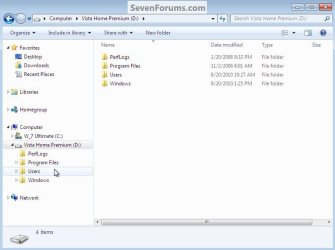
Vista.jpg
 

My Computer My Computer

At a glance

W 7 64-bit UltimateIntel Q9550 Yorkfield8GB Dominator 8500C5DATI : XFX 5870
Computer Manufacturer/Model Number
* BFK Customs *
OS
W 7 64-bit Ultimate
CPU
Intel Q9550 Yorkfield
Motherboard
ASUS P5Q Pro
Memory
8GB Dominator 8500C5D
Graphics Card(s)
ATI : XFX 5870
Sound Card
Realtek HD Audio 7-1
Monitor(s) Displays
1x 47" LCD HDMI & 3x 26" LCD HDMI
Screen Resolution
1920x1080P & 1920x1200
Hard Drives
1x 80GB Intel X25-M G2 SSD : 1x 500GB & 1x 640GB WD Caviar Black(s)
PSU
Corsair 620HX
Case
Cooler Master RC-690
Cooling
Tuniq Tower 120, 2x 140mm and 3x 120mm case fans
Keyboard
Microsoft 500
Mouse
Razer Diamondback 3G
Internet Speed
14 Mb/s
Other Info
1x Koutech 3Gb/s SATA HDD Hot Swap Rack
No nothing I would want to keep from Vista. I didn't have that many files in the first place and what I did I just put on a USB storage device. Just a bunch of MS word files, a few spreadsheets and such. All my music and photos I had on my iPod but just put those on my external HDD according to the backup tutorial.

You guys are all "the wiz" around here from my perspective hahaha
 

My Computer My Computer

At a glance

windows 7
OS
windows 7
Thanks, be sure to post back to this same thread to keep us informed as to your progress.
 

My Computer My Computer

At a glance

W 7 64-bit UltimateIntel Q9550 Yorkfield8GB Dominator 8500C5DATI : XFX 5870
Computer Manufacturer/Model Number
* BFK Customs *
OS
W 7 64-bit Ultimate
CPU
Intel Q9550 Yorkfield
Motherboard
ASUS P5Q Pro
Memory
8GB Dominator 8500C5D
Graphics Card(s)
ATI : XFX 5870
Sound Card
Realtek HD Audio 7-1
Monitor(s) Displays
1x 47" LCD HDMI & 3x 26" LCD HDMI
Screen Resolution
1920x1080P & 1920x1200
Hard Drives
1x 80GB Intel X25-M G2 SSD : 1x 500GB & 1x 640GB WD Caviar Black(s)
PSU
Corsair 620HX
Case
Cooler Master RC-690
Cooling
Tuniq Tower 120, 2x 140mm and 3x 120mm case fans
Keyboard
Microsoft 500
Mouse
Razer Diamondback 3G
Internet Speed
14 Mb/s
Other Info
1x Koutech 3Gb/s SATA HDD Hot Swap Rack
Try just once from Vista to make your factory Recovery disks so you have a path back to factory condition should you ever decide to sell your computer but keep your Win7. There should be a Recovery manager in your Vista All Programs list somewhere which generates the DVD's if the Recovery partition isn't corrupted with the Win7 install.

If this doesn't prove possible, then make a Win7 backup image of your current install saved externally. You will have to include both partitions since the System MBR is on Vista but you'll then have the ability to reimage Vista and delete the Win7 partition if you want to return to near-factory condition.

Now you can wipe the HD of all factory code using BarefootKid's great tutorial: http://www.sevenforums.com/tutorials/91339-ssd-hdd-optimize-windows-reinstallation.html

If you have a retail Upgrade version, it will reject the key during install until you do one of the workarounds given in tutorial to clean install Upgrade version, however many if not most of the student deals were full version so you can try key upfront to see: http://www.sevenforums.com/tutorials/31402-clean-install-upgrade-windows-7-version.html
 
here is my boot config

I'm starting to understand, I think.

Thanks again guys for helping me through this. I'll wait for your final comments before I do anything.
Sorry guys I was not around for a while. But I am on Central European time and had to take some ZZZZ's.
From the Boot snip it looks like my original guess was right - or? In that case, you can still proceed as I outlined in my post #6. But any other approach that gets you to a clean slate is good too. The bootable CD of Partition Wizard may be a great help for that.
Just make sure you first back up anything on your disk that you care to keep.

Re post #24 - Greg, how can he make a Vista factory recovery disk? If you look at his post #11, it says that Win7 was installed on D. That would have detroyed the recovery partition - or am I seeing things?
 
Last edited:

My Computer My Computer

At a glance

Vista, Windows7, Mint Mate, Zorin, Windows 8from 1.6GHz Duo to i7
Computer Manufacturer/Model Number
HP, Dell, Gateway, Toshiba - 4 laptops and 2 desktops
OS
Vista, Windows7, Mint Mate, Zorin, Windows 8
CPU
from 1.6GHz Duo to i7
Monitor(s) Displays
2x HP w2207
Hard Drives
5x HDD, 7x SSD, 12x Externals
Keyboard
with trackball - no mices
Mouse
Trackball mice
Internet Speed
DSL 6000
Re post #24 - Greg, how can he make a Vista factory recovery disk? If you look at his post #11, it says that Win7 was installed on D. That would have detroyed the recovery partition - or am I seeing things?

Hi Wolfgang. Just the off-chance that he might have not formatted D and the link to the Recovery image might still be intact. Seemed worth a try, not expecting anything.

More likely he'll need to capture an image of Vista using free Macrium Reflect (to cut Win7 out of the image) or Win7 backup imaging if he wants a path back to factory condition. Or he can order Recovery Disks later if the need arises, or find a Vista installer.

The point is that since Recovery is no longer salvageable, it can be wiped.
 
So after I moved and had some time to do the hdd erase and clean install I finally got it working. The tutorials on this site are great help.

However, now when I reinstalled win7 clean, according to the tutorial you suggested BFK, my computer will not recognize my product key. Again, I am using an OEM that I purchased from my school. It recognized the key when I did the primary install when everything was messy but will not recognize it now.

Can someone offer me help in this area, or point me to a tutorial?

I've learned a lot from this process and really appreciate all the help from everyone who contributed.
 

My Computer My Computer

At a glance

windows 7
OS
windows 7

My Computer My Computer

At a glance

W 7 64-bit UltimateIntel Q9550 Yorkfield8GB Dominator 8500C5DATI : XFX 5870
Computer Manufacturer/Model Number
* BFK Customs *
OS
W 7 64-bit Ultimate
CPU
Intel Q9550 Yorkfield
Motherboard
ASUS P5Q Pro
Memory
8GB Dominator 8500C5D
Graphics Card(s)
ATI : XFX 5870
Sound Card
Realtek HD Audio 7-1
Monitor(s) Displays
1x 47" LCD HDMI & 3x 26" LCD HDMI
Screen Resolution
1920x1080P & 1920x1200
Hard Drives
1x 80GB Intel X25-M G2 SSD : 1x 500GB & 1x 640GB WD Caviar Black(s)
PSU
Corsair 620HX
Case
Cooler Master RC-690
Cooling
Tuniq Tower 120, 2x 140mm and 3x 120mm case fans
Keyboard
Microsoft 500
Mouse
Razer Diamondback 3G
Internet Speed
14 Mb/s
Other Info
1x Koutech 3Gb/s SATA HDD Hot Swap Rack
It's all activated and good now.

Thanks so much for your help, BFK, whs, and greg. I really appreciate it. I'm definitely gonna stick around here to learn more.
 

My Computer My Computer

At a glance

windows 7
OS
windows 7
Hello again.


Glad to see you got it sorted and thanks for the update.
 

My Computer My Computer

At a glance

W 7 64-bit UltimateIntel Q9550 Yorkfield8GB Dominator 8500C5DATI : XFX 5870
Computer Manufacturer/Model Number
* BFK Customs *
OS
W 7 64-bit Ultimate
CPU
Intel Q9550 Yorkfield
Motherboard
ASUS P5Q Pro
Memory
8GB Dominator 8500C5D
Graphics Card(s)
ATI : XFX 5870
Sound Card
Realtek HD Audio 7-1
Monitor(s) Displays
1x 47" LCD HDMI & 3x 26" LCD HDMI
Screen Resolution
1920x1080P & 1920x1200
Hard Drives
1x 80GB Intel X25-M G2 SSD : 1x 500GB & 1x 640GB WD Caviar Black(s)
PSU
Corsair 620HX
Case
Cooler Master RC-690
Cooling
Tuniq Tower 120, 2x 140mm and 3x 120mm case fans
Keyboard
Microsoft 500
Mouse
Razer Diamondback 3G
Internet Speed
14 Mb/s
Other Info
1x Koutech 3Gb/s SATA HDD Hot Swap Rack
Back
Top