Watergate528
New member
Good Day..........I Have Windows 7 PRO 32 bit.
Looking for help on adding a program for right click Menu on a web page image.
So far, I have not found info to add anything to this menu.
The program I want to add is xp paint.exe
The Menu i have comes up as............
Open link in new tab
Open link in new window
Open link in new private window
Bookmark this link
Save link as.....
Save link to pocket
Copy link location
View image
Copy image
Copy image location
Save image as......
Email image
Set as desktop background.....
View image info
Send link to device ->
Inspect accessibility properties
Inspect element (Q)
Open image new tab
ABP (Adblocker) Block Element
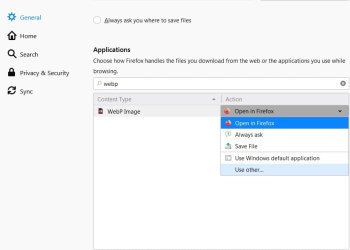
Reason I want to add this program is because some of the images I want to save are .webp images & they do not save.
I can copy image and manually open xp paint & paste the image & save as .jpg.
This would save a step in the process.
Any help,or ideas would be much appreciated.
Looking for help on adding a program for right click Menu on a web page image.
So far, I have not found info to add anything to this menu.
The program I want to add is xp paint.exe
The Menu i have comes up as............
Open link in new tab
Open link in new window
Open link in new private window
Bookmark this link
Save link as.....
Save link to pocket
Copy link location
View image
Copy image
Copy image location
Save image as......
Email image
Set as desktop background.....
View image info
Send link to device ->
Inspect accessibility properties
Inspect element (Q)
Open image new tab
ABP (Adblocker) Block Element
Reason I want to add this program is because some of the images I want to save are .webp images & they do not save.
I can copy image and manually open xp paint & paste the image & save as .jpg.
This would save a step in the process.
Any help,or ideas would be much appreciated.
My Computer
At a glance
Windows 7 Professional 32-bitIntel Pentium D 3.0 GHz Dual Core1 GB
- Computer type
- PC/Desktop
- Computer Manufacturer/Model Number
- HP
- OS
- Windows 7 Professional 32-bit
- CPU
- Intel Pentium D 3.0 GHz Dual Core
- Memory
- 1 GB
- Hard Drives
- 80 GB Sata
- Antivirus
- AVG
- Browser
- Firefox-Chrome