Help with allocating more memory to Minecraft

bogdan98nitu

New member
Local time
9:37 AM
Messages
18
I have 2GB of RAM and i use maybe half a gig.After doing some research I've seen some people allocating more memory to minecraft by creating a .bat file and inserting this coding (assuming I am using the correct words. Feel free to correct me):
java -Xmx512m -jar Minecraft2.jar
stop
When i run it,i get this error
capturernw.png

Any suggestions about this problem?
 

My Computer

OS
Windows 7 Ultimate 32bit.
Hello there, bogdan98nitu

This error happens due to the fact that the PATH of your java installation is not set in your system's environment variables.

You need to add your Java's installation path into your system variables following these steps:-


1) Open the System Properties box by pressing win key/start, type in sysdm.cpl, right click on the entry that appears and select run as administrator.


2) Select the Advanced tab at the top of the box.
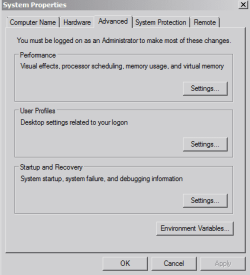
Capture1.PNG


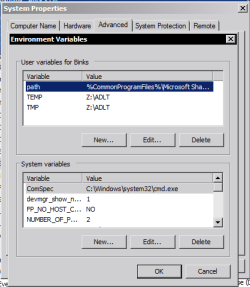
3) Click on Environment Variables

Capture2.PNG


4) Next, head to the Path entry of your System variables box, select it, and press Edit.

(Scroll down until you find it; alternatively if you're the only user on the machine, you can perform these steps at the Path entry of your User variables box)

Capture3.PNG


5) In the box that pops up, type in the full path of the location of your Java installation (e.g. C:\Program Files\Java), at the very end of the other variables by adding the ; symbol to the last entry present and following it up with your own.

In this example I'm adding some tools used by the Windows Performance Toolkit installed in the folder D:\Apps\WPT x64 to the path, notice the ; symbol after the previous entry.

DO
NOT delete any of the other variables.
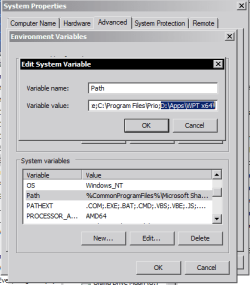

Capture4.PNG


6) Press OK, and OK again on the next box and another OK to the final box


7) Reboot your computer


The path of the java installation should be recognised and you shouldn't encounter that issue again

Hope that helps.

 

My Computer

Computer Manufacturer/Model Number
DELL SXPS 1640
OS
Windows 7 x64 Professional SP1
CPU
Intel C2D T9550 2.66 GHz @ 2.793 GHz (Thanks ThrottleStop!!)
Motherboard
Intel PM45
Memory
8 GB DDR3
Graphics Card(s)
ATI MOBILITY RADEON 4670
Sound Card
CREATIVE XFI AUDIO NOTEBOOK
Monitor(s) Displays
16.1 WLED
Screen Resolution
1920x1080
Hard Drives
Seagate ST9500420AS 500GB (465GiBi) 7200 RPM Drive

External Drives:-
2 TB WD Essentials x 3
1 TB WD Mybook Gen 1
1 TB WD Mybook Gen 2
1 TB Seagate
1 TB Seagate
320 GB WD Scorpio Black (enclosed)
PSU
90W Dell Power Brick
Case
Dell Chassis
Cooling
Coolermaster Cooling Pad
Keyboard
Built-in backlighted Keyboard
Mouse
Logitech Wireless Mini Mouse
Internet Speed
4/0.5
H all I was wondering im sure you've all seen the video tutorials where you change your java run time parameters but it never works Ive changed mine correctly as far as I no Ive restarted its still there and I open up minecraft no affect I don't get it is there a way to fix this please help !!!
 

My Computer

OS
Windows 7 Home Premium 64bit
CPU
Intel(R) Core(TM) i5-2400 CPU @ 3.10GHz (4CPUs), ~3.1GHz
Motherboard
Asrock H61M/U3S3
Memory
8GB RAM
Graphics Card(s)
AMD R9 280X 3gb
Monitor(s) Displays
Monitor: Generic PnP Monitor Display Mode: 1920 x 1080
Hard Drives
Samsung 2TB SATA HDD
Case
Aerocool Xpredator
H all I was wondering im sure you've all seen the video tutorials where you change your java run time parameters but it never works Ive changed mine correctly as far as I no Ive restarted its still there and I open up minecraft no affect I don't get it is there a way to fix this please help !!!

You need to make a new thread in the gaming subforum to discuss this issue; it's off-topic and unrelated to the OP's main query which has been answered.
 

My Computer

Computer Manufacturer/Model Number
DELL SXPS 1640
OS
Windows 7 x64 Professional SP1
CPU
Intel C2D T9550 2.66 GHz @ 2.793 GHz (Thanks ThrottleStop!!)
Motherboard
Intel PM45
Memory
8 GB DDR3
Graphics Card(s)
ATI MOBILITY RADEON 4670
Sound Card
CREATIVE XFI AUDIO NOTEBOOK
Monitor(s) Displays
16.1 WLED
Screen Resolution
1920x1080
Hard Drives
Seagate ST9500420AS 500GB (465GiBi) 7200 RPM Drive

External Drives:-
2 TB WD Essentials x 3
1 TB WD Mybook Gen 1
1 TB WD Mybook Gen 2
1 TB Seagate
1 TB Seagate
320 GB WD Scorpio Black (enclosed)
PSU
90W Dell Power Brick
Case
Dell Chassis
Cooling
Coolermaster Cooling Pad
Keyboard
Built-in backlighted Keyboard
Mouse
Logitech Wireless Mini Mouse
Internet Speed
4/0.5
Back
Top