Help with vmware

S193FA

New member
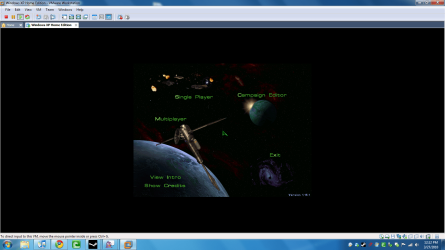
Is there anyway I make this game go full screen? Whatever I do it just stays this size or it minimizes the game if I hit "fit guest now". The desktop is the right size but the game goes to that size.

Help would be appreciated
 

Attachments

  • help.png
    help.png
    257.3 KB · Views: 52

My Computer

OS
Windows 7
Is there anyway I make this game go full screen? Whatever I do it just stays this size or it minimizes the game if I hit "fit guest now". The desktop is the right size but the game goes to that size.

Help would be appreciated

Starcraft runs perfectly on windows7 x32, why are you running it in VM?
 

My Computer

Computer type
PC/Desktop
Computer Manufacturer/Model Number
Custom Build
OS
Windows 10 Pro x64, Arch Linux
CPU
Intel Core 2 Quad Q8200 OC'd 3.08GHz
Motherboard
Asus Rampage formula LGA775
Memory
8GB DDR2 900Mhz
Graphics Card(s)
MSI GT730 2GB GDDR5 (Kepler)
Sound Card
Supreme FX2
Monitor(s) Displays
Samsung LS22F350 LED
Screen Resolution
1080P
Hard Drives
Kingston SSDNow UV400 120GB, 500GB Hitachi, 2TB Samsung, 500GB Seagate FreeAgent, 640GB Samsung, 160GB Toshiba (Arch)
PSU
AeroCool 500W Bronze
Cooling
Cooler Master V6 + 3X fans
Keyboard
Prolink keyboard
Mouse
Logitech M705
Internet Speed
1MiB/s
Browser
Chrome Beta
Actually it freezes all the time, if u Google "windows 7 starcraft freeze" or something you will see there is many people with the same problems.
 

My Computer

OS
Windows 7
Actually it freezes all the time, if u Google "windows 7 starcraft freeze" or something you will see there is many people with the same problems.

Have you tried compatibility mode?
 

My Computer

Computer type
PC/Desktop
Computer Manufacturer/Model Number
Custom Build
OS
Windows 10 Pro x64, Arch Linux
CPU
Intel Core 2 Quad Q8200 OC'd 3.08GHz
Motherboard
Asus Rampage formula LGA775
Memory
8GB DDR2 900Mhz
Graphics Card(s)
MSI GT730 2GB GDDR5 (Kepler)
Sound Card
Supreme FX2
Monitor(s) Displays
Samsung LS22F350 LED
Screen Resolution
1080P
Hard Drives
Kingston SSDNow UV400 120GB, 500GB Hitachi, 2TB Samsung, 500GB Seagate FreeAgent, 640GB Samsung, 160GB Toshiba (Arch)
PSU
AeroCool 500W Bronze
Cooling
Cooler Master V6 + 3X fans
Keyboard
Prolink keyboard
Mouse
Logitech M705
Internet Speed
1MiB/s
Browser
Chrome Beta
VMWare is no good for gaming with, so you might as well just install it on your system.
 

My Computer

Computer Manufacturer/Model Number
Sony Vaio FZ21Z
OS
Windows 7 Ultimate x64 ®™
CPU
Intel Core 2 Duo (2.2 GHz)
Motherboard
Sony (Intel Chipset)
Memory
2x 2GB Corsair (667 MHz)
Graphics Card(s)
NVIDIA 8600M GS (256MB)
Sound Card
Sigmatel
Monitor(s) Displays
15.4" TFT X-Black
Screen Resolution
1280x800
Hard Drives
Western Digital 300GB Scorpio Black (7200rpm)
Mouse
Logitech Anywhere MX
Internet Speed
Sky 5MB

My Computer

Computer Manufacturer/Model Number
Sony Vaio FZ21Z
OS
Windows 7 Ultimate x64 ®™
CPU
Intel Core 2 Duo (2.2 GHz)
Motherboard
Sony (Intel Chipset)
Memory
2x 2GB Corsair (667 MHz)
Graphics Card(s)
NVIDIA 8600M GS (256MB)
Sound Card
Sigmatel
Monitor(s) Displays
15.4" TFT X-Black
Screen Resolution
1280x800
Hard Drives
Western Digital 300GB Scorpio Black (7200rpm)
Mouse
Logitech Anywhere MX
Internet Speed
Sky 5MB
Well, Starcraft 2 is running great on my 7 64 bit PC so far.
 

My Computer

OS
Windows 7
CPU
i5-750
Motherboard
Asus
Memory
4GB DDR3 1600
Graphics Card(s)
GT220
Starcraft should run plenty fine under VMware...
 

My Computer

Computer Manufacturer/Model Number
Sony VPCF115FM
OS
Windows 7 Professional
CPU
Core i7 720M 2.80GHz
Memory
6GB PC 1666
Graphics Card(s)
nVidia 330M
Monitor(s) Displays
16" Sony
Screen Resolution
1920x1080
Hard Drives
500GB
Internet Speed
25Mbps
The problem with running any resource intensive program via a virtualization program is the fact that it's a program running within a program.

Regular Gaming

Starcraft asks Windows for resources
Windows retrieves resources from hardware through drivers

Virtual Gaming

Starcraft asks Windows(VM) for resources
Windows retrieves resources from virtual hardware (VMWare) through drivers
VMWare retrieves resources from Windows
Windows retrieves resources from hardware through drivers

In other words you're adding an entire extra set of steps to the process. Not only does the game have to wait that much longer to receive the resources it needs, but it has to deal with an extra set of drivers, an extra operating system and the program thats running that operating system. All in all it makes the game less responsive.
 

My Computer

Computer Manufacturer/Model Number
Apple Macbook Pro (April 2009)
OS
W7 Ult. x64 | OS X
CPU
Intel Mobile Core 2 Duo 2.93Ghz [T9800 Penryn]
Motherboard
NVIDIA nForce 730i Rev. B1 [Mac-F2268EC8 (U2E1)]
Memory
4096MB Samsung DDR3 Dual Channel [PC3-8500F 1066Mhz]
Graphics Card(s)
NVIDIA GeForce 9600M GT 512MB [G96M Rev. C1]
Sound Card
SB X-Fi Surround 5.1 USB | Onboard Realtek (Disabled)
Monitor(s) Displays
Acer x223wbd 22" | Apple Anti-Glare 17" (Disabled)
Screen Resolution
{Current} 1440x900 {Acer} 1680x1050 {Apple} 1920x1200
Hard Drives
{Internal}
Seagate Momentus 320GB 2.5" 7200RPM [ST9320421AS]

{Externals}
LaCie 320GB USB 2.0 HDD [301284UR]
LaCie 750GB USB 2.0 FW400 eSATA HDD [301314U]
LaCie 1TB USB 2.0 HDD [301304UR]
PSU
Magsafe
Case
Aluminum/Unibody (MBP52)
Cooling
2 x 6000 RPM Fans
Keyboard
Logitech G-15v2 [PN 920-000379]
Mouse
Logitech G-9 [PN 910-000338]
Internet Speed
12Mbps/2.5Mbps w/ 24Mbps Speed Boost [Comcast]
Other Info
Logitech X-540 Speakers [PN 970223-0122]
Sennheiser PC-151 Headset
^This is very true, but considering the resources the original StarCraft consumes, this is not a problem. I've run StarCraft on VMWare on Windows 7 on an old machine of mine before. A Core 2 Duo 1.8 GHz E4300 (no VT) and GMA950 with 2 GB of RAM, and it ran just fine.
 

My Computer

Computer Manufacturer/Model Number
Sony VPCF115FM
OS
Windows 7 Professional
CPU
Core i7 720M 2.80GHz
Memory
6GB PC 1666
Graphics Card(s)
nVidia 330M
Monitor(s) Displays
16" Sony
Screen Resolution
1920x1080
Hard Drives
500GB
Internet Speed
25Mbps
vmware actually isn't too bad for games, nowhere near perfect but it does support dx9c hw rendering and opengl 2.1 as of vmware 7.1 beta.

the problem with it and games going full screen is that it doesn't not change your actual monitors resolution just the virtual one so you need to set your real host windows resolution to that of the game's before launching the game in vmware then, make vmware full screen.
 

My Computer

OS
windows 7 x64
Back
Top
