
Hey guys,
I know this is a Windows 7 forum, but I'm running Windows 8, and I think I have just a general Windows issue that I can't seem to figure out.
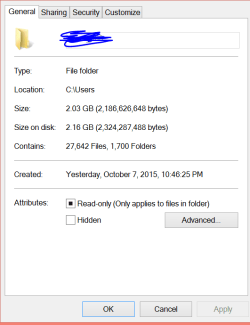
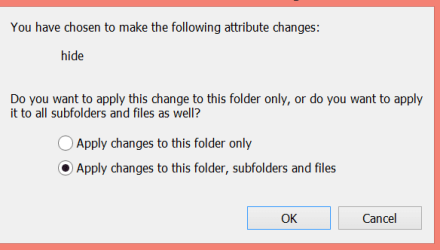
So what I did was something really stupid with my folders or something. If you look at the first screenshot, this is a properties menu that I generated from the "Users" folder in the C drive. I was trying to navigate to a hidden folder, so what I did was I checked that Hidden box and pressed OK. Then it prompted me with the second screenshot, and for some reason I pressed hide all folders, subfolders, and files and I went away from the computer. When I got back my computer was midway in running through all my folders and doing something (hiding) them? I canceled the process and my computer is really weird now.
I don't know if you're familiar with Windows 8 but the 'start' menu area is almost completely empty (it used to be full of all my different apps and whatnot), and if I scroll down to the next section it is also missing some stuff there too.
It seems like I did something so stupid that there are no solutions on google for it because.. well IDK.
I only post on this forum because I have had issues with Windows 7 in the past and y'all have been super helpful. I still love Windows 7, but I bought this surface pro3 with windows 8 for school and it has been just fine. If you can't answer the question because this feature is unfamiliar to you, sorry for wasting your time.
And I don't have any restore points that I can revert back to, but in a panic mode last night, I did do a 'system refresh'. I think it just deleted a bunch of my stuff (that I didn't really need like Skype and stuff) and that's it
Thank you.
I know this is a Windows 7 forum, but I'm running Windows 8, and I think I have just a general Windows issue that I can't seem to figure out.
So what I did was something really stupid with my folders or something. If you look at the first screenshot, this is a properties menu that I generated from the "Users" folder in the C drive. I was trying to navigate to a hidden folder, so what I did was I checked that Hidden box and pressed OK. Then it prompted me with the second screenshot, and for some reason I pressed hide all folders, subfolders, and files and I went away from the computer. When I got back my computer was midway in running through all my folders and doing something (hiding) them? I canceled the process and my computer is really weird now.
I don't know if you're familiar with Windows 8 but the 'start' menu area is almost completely empty (it used to be full of all my different apps and whatnot), and if I scroll down to the next section it is also missing some stuff there too.
It seems like I did something so stupid that there are no solutions on google for it because.. well IDK.
I only post on this forum because I have had issues with Windows 7 in the past and y'all have been super helpful. I still love Windows 7, but I bought this surface pro3 with windows 8 for school and it has been just fine. If you can't answer the question because this feature is unfamiliar to you, sorry for wasting your time.
And I don't have any restore points that I can revert back to, but in a panic mode last night, I did do a 'system refresh'. I think it just deleted a bunch of my stuff (that I didn't really need like Skype and stuff) and that's it
Thank you.
Attachments
My Computer
- Computer type
- PC/Desktop
- Computer Manufacturer/Model Number
- custom
- OS
- windows 7 professional 64 bit
- CPU
- AMD phenom II x4 975 processor 3.6 ghz
- Motherboard
- gigabyte ga-880gm-d2h
- Memory
- 8 gb
- Graphics Card(s)
- nvidea geforce gts 250
- Hard Drives
- corsair force 3 ssd ata 60 gb
300 gb standard hard drive
- Antivirus
- microsoft security essentials, malwarebytes
- Browser
- chrome