
Hide Contacts Folder

Kelderic

New member
I'm trying to organizing my User folder, but for some reason, the Contacts folder won't disappear when I make it Hidden. The subfolders inside it will disappear, but the Contacts folder itself won't. I have looked at the security settings, and it appears I have full control.

I have noticed this same problem with the Searches and Saved Games folders, but I just deleted those. Contacts I'd like to keep, if it's possible without it being visible.

Thank you for any help you can give.
 

My Computer

Computer Manufacturer/Model Number
Dell Inspiron 1720 Laptop
OS
Windows 7
Memory
4 GB
Monitor(s) Displays
17 in built in
Hard Drives
2 TB Western Digital External, 320 Internal.
Cooling
A fan + cut up pillo case directing airflow under the laptop
Hello Kelderic,

You might see if copying and pasting the command below in a elevated command prompt (run as administrator) and pressing Enter will be able to hide the Contacts folder for you instead.

attrib +h %USERPROFILE%\Contacts /S /D

Hope this helps,
Shawn
 

My Computer

Computer type
PC/Desktop
Computer Manufacturer/Model Number
Self built custom
OS
64-bit Windows 11 Pro for Workstations
CPU
Intel i7-8700K OC'd to 5 GHz
Motherboard
ASUS ROG Maximus XI Formula Z390
Memory
64 GB (4x16GB) G.SKILL TridentZ RGB DDR4 3600 MHz
Graphics Card(s)
ASUS ROG-STRIX-GTX1080TI-O11G-GAMING
Sound Card
Integrated
Monitor(s) Displays
2 x Samsung Odyssey G7 27"
Screen Resolution
2560x1440
Hard Drives
1TB Samsung 990 PRO M.2,
4TB Samsung 990 PRO PRO M.2,
TerraMaster F8 SSD Plus NAS
PSU
Seasonic Prime Titanium 850W
Case
Thermaltake Core P3
Cooling
Corsair Hydro H115i
Keyboard
Logitech wireless K800
Mouse
Logitech MX Master 4
Internet Speed
2 Gb/s Download and 100 Mb/s Upload
Antivirus
Malwarebyte Anti-Malware Premium
Browser
Google Chrome
Other Info
Logitech Z625 speaker system,
Logitech BRIO 4K Pro webcam,
HP Color LaserJet Pro MFP M477fdn,
APC SMART-UPS RT 1000 XL - SURT1000XLI,
Galaxy S23 Plus phone
Thank you for the help, Shawn.

It is now hidden in the main viewing pane of Windows Explorer, but in the Folders left pane, still appears.
 

My Computer

Computer Manufacturer/Model Number
Dell Inspiron 1720 Laptop
OS
Windows 7
Memory
4 GB
Monitor(s) Displays
17 in built in
Hard Drives
2 TB Western Digital External, 320 Internal.
Cooling
A fan + cut up pillo case directing airflow under the laptop
Ok. This will remove it from there as well. You may need to close and reopen the Windows Explorer window to refresh it afterwards. :)

attrib +r +s +h %USERPROFILE%\Contacts /S /D


If you ever wanted to restore this folder to it's default settings later, then you would use the command below.

attrib +r -s -h %USERPROFILE%\Contacts /S /D
 

My Computer

Computer type
PC/Desktop
Computer Manufacturer/Model Number
Self built custom
OS
64-bit Windows 11 Pro for Workstations
CPU
Intel i7-8700K OC'd to 5 GHz
Motherboard
ASUS ROG Maximus XI Formula Z390
Memory
64 GB (4x16GB) G.SKILL TridentZ RGB DDR4 3600 MHz
Graphics Card(s)
ASUS ROG-STRIX-GTX1080TI-O11G-GAMING
Sound Card
Integrated
Monitor(s) Displays
2 x Samsung Odyssey G7 27"
Screen Resolution
2560x1440
Hard Drives
1TB Samsung 990 PRO M.2,
4TB Samsung 990 PRO PRO M.2,
TerraMaster F8 SSD Plus NAS
PSU
Seasonic Prime Titanium 850W
Case
Thermaltake Core P3
Cooling
Corsair Hydro H115i
Keyboard
Logitech wireless K800
Mouse
Logitech MX Master 4
Internet Speed
2 Gb/s Download and 100 Mb/s Upload
Antivirus
Malwarebyte Anti-Malware Premium
Browser
Google Chrome
Other Info
Logitech Z625 speaker system,
Logitech BRIO 4K Pro webcam,
HP Color LaserJet Pro MFP M477fdn,
APC SMART-UPS RT 1000 XL - SURT1000XLI,
Galaxy S23 Plus phone
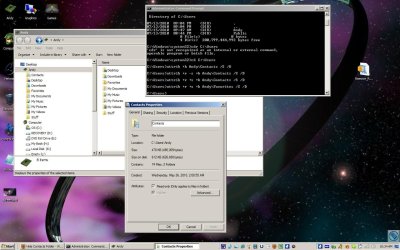
Still not working. I took a screen to show you, in case I made a mistake in the typing. For the Contacts folder properties, the Hidden is now active and unchangable, but still seen. I reopened and refreshed, and am going to try rebooting now.
 

Attachments

  • Screen2.jpg
    Screen2.jpg
    169.2 KB · Views: 189

My Computer

Computer Manufacturer/Model Number
Dell Inspiron 1720 Laptop
OS
Windows 7
Memory
4 GB
Monitor(s) Displays
17 in built in
Hard Drives
2 TB Western Digital External, 320 Internal.
Cooling
A fan + cut up pillo case directing airflow under the laptop
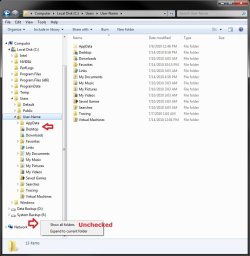
Ah, ok. I see the problem. You will need to uncheck Show all folders in the Navigation Pane. It should go away afterwards.

Show_all_folders.jpg
 

My Computer

Computer type
PC/Desktop
Computer Manufacturer/Model Number
Self built custom
OS
64-bit Windows 11 Pro for Workstations
CPU
Intel i7-8700K OC'd to 5 GHz
Motherboard
ASUS ROG Maximus XI Formula Z390
Memory
64 GB (4x16GB) G.SKILL TridentZ RGB DDR4 3600 MHz
Graphics Card(s)
ASUS ROG-STRIX-GTX1080TI-O11G-GAMING
Sound Card
Integrated
Monitor(s) Displays
2 x Samsung Odyssey G7 27"
Screen Resolution
2560x1440
Hard Drives
1TB Samsung 990 PRO M.2,
4TB Samsung 990 PRO PRO M.2,
TerraMaster F8 SSD Plus NAS
PSU
Seasonic Prime Titanium 850W
Case
Thermaltake Core P3
Cooling
Corsair Hydro H115i
Keyboard
Logitech wireless K800
Mouse
Logitech MX Master 4
Internet Speed
2 Gb/s Download and 100 Mb/s Upload
Antivirus
Malwarebyte Anti-Malware Premium
Browser
Google Chrome
Other Info
Logitech Z625 speaker system,
Logitech BRIO 4K Pro webcam,
HP Color LaserJet Pro MFP M477fdn,
APC SMART-UPS RT 1000 XL - SURT1000XLI,
Galaxy S23 Plus phone
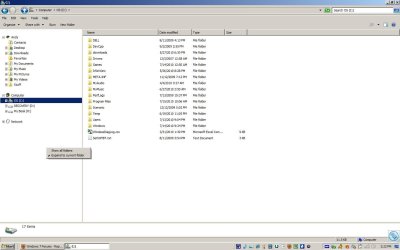
I hate to keep coming back, but that still didn't fix it. Though my User profile didn't use to be there, which is strange.
 

Attachments

  • screen3.jpg
    screen3.jpg
    105.9 KB · Views: 81

My Computer

Computer Manufacturer/Model Number
Dell Inspiron 1720 Laptop
OS
Windows 7
Memory
4 GB
Monitor(s) Displays
17 in built in
Hard Drives
2 TB Western Digital External, 320 Internal.
Cooling
A fan + cut up pillo case directing airflow under the laptop
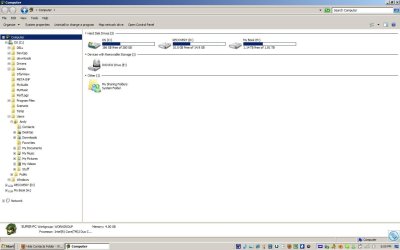
Hmm, you have a modified Windows Explorer window with a UP toolbar button, and with your user profile as a separate group in the navigation pane. I'm not sure what method you used to add the separate user profile group, but it appears that is why the Contacts folder is not being removed from there.

If you navigate through your C: drive under "Computer", is your C:\Users\Andy\Contacts folder still listed there? This is where it should be removed at instead. If it is gone, then you'll need to remove the separate user profile group from above using whatever method (ex: tweaking program??) that added it in reverse.
 

My Computer

Computer type
PC/Desktop
Computer Manufacturer/Model Number
Self built custom
OS
64-bit Windows 11 Pro for Workstations
CPU
Intel i7-8700K OC'd to 5 GHz
Motherboard
ASUS ROG Maximus XI Formula Z390
Memory
64 GB (4x16GB) G.SKILL TridentZ RGB DDR4 3600 MHz
Graphics Card(s)
ASUS ROG-STRIX-GTX1080TI-O11G-GAMING
Sound Card
Integrated
Monitor(s) Displays
2 x Samsung Odyssey G7 27"
Screen Resolution
2560x1440
Hard Drives
1TB Samsung 990 PRO M.2,
4TB Samsung 990 PRO PRO M.2,
TerraMaster F8 SSD Plus NAS
PSU
Seasonic Prime Titanium 850W
Case
Thermaltake Core P3
Cooling
Corsair Hydro H115i
Keyboard
Logitech wireless K800
Mouse
Logitech MX Master 4
Internet Speed
2 Gb/s Download and 100 Mb/s Upload
Antivirus
Malwarebyte Anti-Malware Premium
Browser
Google Chrome
Other Info
Logitech Z625 speaker system,
Logitech BRIO 4K Pro webcam,
HP Color LaserJet Pro MFP M477fdn,
APC SMART-UPS RT 1000 XL - SURT1000XLI,
Galaxy S23 Plus phone
This is not going to sound right, but I didn't do anything to add the User as a separate group. And, it's not stable. If I have User selected when I undo Show All Files, the separate group appears. If I have Computer selected, the separate group does not appear.

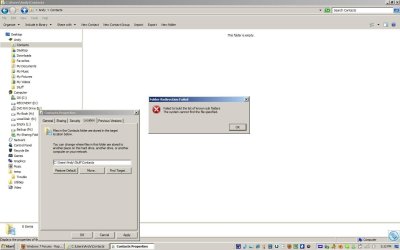
I decided to try just moving them to another location. I copied the folders, and then then the Hidden part kicked in and started working. However, when I try to Move location from inside the properties, it gives me a warning and says it can't do it.

So far, the only 3rd party programs I have used are Classic Shell and 7 Taskbar Tweaker. I did follow your tutorial to remove Favorites and Libraries, if that could have anything to do with it.
 

Attachments

  • screen4.jpg
    screen4.jpg
    107.2 KB · Views: 36

My Computer

Computer Manufacturer/Model Number
Dell Inspiron 1720 Laptop
OS
Windows 7
Memory
4 GB
Monitor(s) Displays
17 in built in
Hard Drives
2 TB Western Digital External, 320 Internal.
Cooling
A fan + cut up pillo case directing airflow under the laptop
I just tested it with Favorites and Libraries removed from the Navigation Pane, and it made no difference for me. Contacts was still removed under the "Computer" group with "Show all folders" unchecked.

Whatever is causing your user profile to be added as a separate group seems to be the cause of this. I cannot get my system to replicate this.

If you do not have user selected and have computer selected to not have the separate user profile group, does the Contacts folder display under the "Computer" group still?
 

My Computer

Computer type
PC/Desktop
Computer Manufacturer/Model Number
Self built custom
OS
64-bit Windows 11 Pro for Workstations
CPU
Intel i7-8700K OC'd to 5 GHz
Motherboard
ASUS ROG Maximus XI Formula Z390
Memory
64 GB (4x16GB) G.SKILL TridentZ RGB DDR4 3600 MHz
Graphics Card(s)
ASUS ROG-STRIX-GTX1080TI-O11G-GAMING
Sound Card
Integrated
Monitor(s) Displays
2 x Samsung Odyssey G7 27"
Screen Resolution
2560x1440
Hard Drives
1TB Samsung 990 PRO M.2,
4TB Samsung 990 PRO PRO M.2,
TerraMaster F8 SSD Plus NAS
PSU
Seasonic Prime Titanium 850W
Case
Thermaltake Core P3
Cooling
Corsair Hydro H115i
Keyboard
Logitech wireless K800
Mouse
Logitech MX Master 4
Internet Speed
2 Gb/s Download and 100 Mb/s Upload
Antivirus
Malwarebyte Anti-Malware Premium
Browser
Google Chrome
Other Info
Logitech Z625 speaker system,
Logitech BRIO 4K Pro webcam,
HP Color LaserJet Pro MFP M477fdn,
APC SMART-UPS RT 1000 XL - SURT1000XLI,
Galaxy S23 Plus phone
Yes, Contacts still is. Also, not sure if it is relevant, but I have noticed it several times now. When I do unckeck Show All Folders, as I did to take the screenshot below, I paste it into MS Paint, and when I try to save, the program shuts down. Repeatedly, until I check Show All Folders again, as if when it tries to view the Save To area without it check, something kills it.
 

Attachments

  • scren5.jpg
    scren5.jpg
    102.6 KB · Views: 22

My Computer

Computer Manufacturer/Model Number
Dell Inspiron 1720 Laptop
OS
Windows 7
Memory
4 GB
Monitor(s) Displays
17 in built in
Hard Drives
2 TB Western Digital External, 320 Internal.
Cooling
A fan + cut up pillo case directing airflow under the laptop
It sounds like you have some corruption there. As a test to see if this is just in your user account or the whole system, create and log in to a new administrator account. Next, see if you have the same issues while trying the commands again.
 

My Computer

Computer type
PC/Desktop
Computer Manufacturer/Model Number
Self built custom
OS
64-bit Windows 11 Pro for Workstations
CPU
Intel i7-8700K OC'd to 5 GHz
Motherboard
ASUS ROG Maximus XI Formula Z390
Memory
64 GB (4x16GB) G.SKILL TridentZ RGB DDR4 3600 MHz
Graphics Card(s)
ASUS ROG-STRIX-GTX1080TI-O11G-GAMING
Sound Card
Integrated
Monitor(s) Displays
2 x Samsung Odyssey G7 27"
Screen Resolution
2560x1440
Hard Drives
1TB Samsung 990 PRO M.2,
4TB Samsung 990 PRO PRO M.2,
TerraMaster F8 SSD Plus NAS
PSU
Seasonic Prime Titanium 850W
Case
Thermaltake Core P3
Cooling
Corsair Hydro H115i
Keyboard
Logitech wireless K800
Mouse
Logitech MX Master 4
Internet Speed
2 Gb/s Download and 100 Mb/s Upload
Antivirus
Malwarebyte Anti-Malware Premium
Browser
Google Chrome
Other Info
Logitech Z625 speaker system,
Logitech BRIO 4K Pro webcam,
HP Color LaserJet Pro MFP M477fdn,
APC SMART-UPS RT 1000 XL - SURT1000XLI,
Galaxy S23 Plus phone
I've gotten around the issue by moving both the Contacts and Favorites into a sub folder, then making them hidden. The Hidden-ness works there, but the computer still can use them (tested with Windows Live Messenger). The problem with the not allowing me to move, that I mentioned earlier, is a symptom of a global problem I'm having. Whenever I move files or folders, or rename, the system gives me an error saying it cannot find the file/folder, but when I click Try Again, it works. Always consistent, always have to click Try Again once. So when I did the move thing from Properties, it tried once, messed up, and then wouldn't try again. When I just dragged and dropped, it allowed me to Try Again, and successfully move them.

Thank you for the time and help!
 

My Computer

Computer Manufacturer/Model Number
Dell Inspiron 1720 Laptop
OS
Windows 7
Memory
4 GB
Monitor(s) Displays
17 in built in
Hard Drives
2 TB Western Digital External, 320 Internal.
Cooling
A fan + cut up pillo case directing airflow under the laptop
You're most welcome. I happy to hear that you got it sorted. :)
 

My Computer

Computer type
PC/Desktop
Computer Manufacturer/Model Number
Self built custom
OS
64-bit Windows 11 Pro for Workstations
CPU
Intel i7-8700K OC'd to 5 GHz
Motherboard
ASUS ROG Maximus XI Formula Z390
Memory
64 GB (4x16GB) G.SKILL TridentZ RGB DDR4 3600 MHz
Graphics Card(s)
ASUS ROG-STRIX-GTX1080TI-O11G-GAMING
Sound Card
Integrated
Monitor(s) Displays
2 x Samsung Odyssey G7 27"
Screen Resolution
2560x1440
Hard Drives
1TB Samsung 990 PRO M.2,
4TB Samsung 990 PRO PRO M.2,
TerraMaster F8 SSD Plus NAS
PSU
Seasonic Prime Titanium 850W
Case
Thermaltake Core P3
Cooling
Corsair Hydro H115i
Keyboard
Logitech wireless K800
Mouse
Logitech MX Master 4
Internet Speed
2 Gb/s Download and 100 Mb/s Upload
Antivirus
Malwarebyte Anti-Malware Premium
Browser
Google Chrome
Other Info
Logitech Z625 speaker system,
Logitech BRIO 4K Pro webcam,
HP Color LaserJet Pro MFP M477fdn,
APC SMART-UPS RT 1000 XL - SURT1000XLI,
Galaxy S23 Plus phone
Back
Top