How can I grant my guest account access to certain files in explorer?

rcik

New member
Local time
11:54 AM
Messages
3
Hi,

I have recently set up a guest account in an attempt to use it when friends are over/want to watch a few movies. Currently I cannot see any files in explorer when logged in (to either the pre setup guest or a newly created account). I have granted access to select files on my main account, but still cannot see them when I swap logins. Can anyone shed some light on what I am doing wrong?

Thanks,

Richard
 

My Computer My Computer

At a glance

32
Computer type
PC/Desktop
OS
32
Antivirus
United Kingdom
Hi Rcik, welcome to the Seven Forums.

What you describe is exactly why the Public folders exist. Everything saved under Public (Public Videos, Public Pictures and so on) can be accessed by all users, also the built-in Guest user account.

You can find the Public user folders in C:\Users\Public (default location).

Kari
 

My Computer My Computer

At a glance

Windows 10 Pro x64 EN-GB1.6 GHz Intel Core i7-720QM Processor6 GBATI Mobility Radeon HD 5850 Graphics
Computer type
Laptop
Computer Manufacturer/Model Number
HP ENVY 17-1150eg
OS
Windows 10 Pro x64 EN-GB
CPU
1.6 GHz Intel Core i7-720QM Processor
Memory
6 GB
Graphics Card(s)
ATI Mobility Radeon HD 5850 Graphics
Sound Card
Beats sound system with integrated subwoofer
Monitor(s) Displays
17" laptop display, 22" LED and 32" Full HD TV through HDMI
Screen Resolution
1600*900 (1), 1920*1080 (2&3)
Hard Drives
Internal: 2 x 500 GB SATA Hard Disk Drive 7200 rpm
External: 2TB for backups, 3TB USB3 network drive for media
Cooling
As Envy runs a bit warm, I have it on a Cooler Master pad
Keyboard
Logitech diNovo Media Desktop Laser (bluetooth)
Mouse
Logitech Performance Mouse MX
Internet Speed
50/10 Mbps VDSL
Antivirus
Windows Defender 4.3.9431.0
Browser
Maxthon 3.5.2., IE11
Ok, so if I use the public folders, I would have to copy and paste whatever movies I want at the current time into those folders, using up hard drive space? If that is the case, I would prefer the guest account to have general access to the videos folder, using no extra HD space and saving time moving folders around. Can that work?

Thanks for the quick reply Kari.
 

My Computer My Computer

At a glance

32
Computer type
PC/Desktop
OS
32
Antivirus
United Kingdom
Looks like we think differently about this.

I save for instance all my shared videos, recorded TV and such only in Public folders. This way every user including myself can access them without any additional sharing. Any user can open the Videos library which contains that user's personal Videos folder and the Public Videos folder. User will not even see the difference.

I can see no point in saving some of the movies in my personal folders going through additional steps in sharing them. That's why the Public folders exist.
 

My Computer My Computer

At a glance

Windows 10 Pro x64 EN-GB1.6 GHz Intel Core i7-720QM Processor6 GBATI Mobility Radeon HD 5850 Graphics
Computer type
Laptop
Computer Manufacturer/Model Number
HP ENVY 17-1150eg
OS
Windows 10 Pro x64 EN-GB
CPU
1.6 GHz Intel Core i7-720QM Processor
Memory
6 GB
Graphics Card(s)
ATI Mobility Radeon HD 5850 Graphics
Sound Card
Beats sound system with integrated subwoofer
Monitor(s) Displays
17" laptop display, 22" LED and 32" Full HD TV through HDMI
Screen Resolution
1600*900 (1), 1920*1080 (2&3)
Hard Drives
Internal: 2 x 500 GB SATA Hard Disk Drive 7200 rpm
External: 2TB for backups, 3TB USB3 network drive for media
Cooling
As Envy runs a bit warm, I have it on a Cooler Master pad
Keyboard
Logitech diNovo Media Desktop Laser (bluetooth)
Mouse
Logitech Performance Mouse MX
Internet Speed
50/10 Mbps VDSL
Antivirus
Windows Defender 4.3.9431.0
Browser
Maxthon 3.5.2., IE11
Personally I have quite a few gb in movies organised in my user video folder. The thought of having to move or start using public folders, on the occasional chance that my friend would like to watch a movie on my laptop seems a bit too much effort for me. If someone knows how to make a folder available to view from the guest account that would be great.
 

My Computer My Computer

At a glance

32
Computer type
PC/Desktop
OS
32
Antivirus
United Kingdom
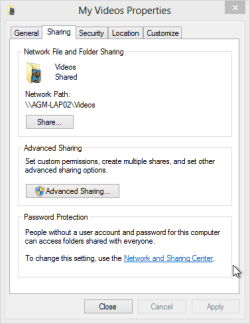
Share tab on folder properties.

My Videos Properties.png

Don't forget to click the Advanced Sharing button and enable sharing from there.

If it was me I'd simply move the contents of my personal video folder to Public Videos. The Videos library would show them exactly as now but instead of manually sharing individual movies or folders each user could access them.

It's quite funny in fact when Windows has these magnificent built-in features making things so incredibly easy but users still insist doing it in more complicated ways.
 

My Computer My Computer

At a glance

Windows 10 Pro x64 EN-GB1.6 GHz Intel Core i7-720QM Processor6 GBATI Mobility Radeon HD 5850 Graphics
Computer type
Laptop
Computer Manufacturer/Model Number
HP ENVY 17-1150eg
OS
Windows 10 Pro x64 EN-GB
CPU
1.6 GHz Intel Core i7-720QM Processor
Memory
6 GB
Graphics Card(s)
ATI Mobility Radeon HD 5850 Graphics
Sound Card
Beats sound system with integrated subwoofer
Monitor(s) Displays
17" laptop display, 22" LED and 32" Full HD TV through HDMI
Screen Resolution
1600*900 (1), 1920*1080 (2&3)
Hard Drives
Internal: 2 x 500 GB SATA Hard Disk Drive 7200 rpm
External: 2TB for backups, 3TB USB3 network drive for media
Cooling
As Envy runs a bit warm, I have it on a Cooler Master pad
Keyboard
Logitech diNovo Media Desktop Laser (bluetooth)
Mouse
Logitech Performance Mouse MX
Internet Speed
50/10 Mbps VDSL
Antivirus
Windows Defender 4.3.9431.0
Browser
Maxthon 3.5.2., IE11
Personally I have quite a few gb in movies organised in my user video folder. The thought of having to move or start using public folders, on the occasional chance that my friend would like to watch a movie on my laptop seems a bit too much effort for me. If someone knows how to make a folder available to view from the guest account that would be great.

If you have these movies in the C:>Users>Video's Library, then by default the Public folder location is already included in the Library "first picture" then you would need to enable sharing using the sharing tab for the C:Users>Public folder.

You can move select video folders into the Public folder so they can be viewed by the guest. This doesn't create two copies of the movie, it only moves the link to the movie into the Public folder.

Or if you want the guest account to have full access to all movies in the Video Library then try using the Homegroup style sharing settings, right click a Library folder and choose "Share With">Specific People" choose>Add' then choose "Everyone" from the drop down list, select read/write access as desired etc. "second picture".

This should allow access from the Guest account although I've only tested this with the workgroup machines which aren't included in the Homegroup but it should work with the guest account as well. If not then the Public folders are the best option.
 

Attachments

  • Library video's public.PNG
    Library video's public.PNG
    19.8 KB · Views: 6
  • share with Everyone.PNG
    share with Everyone.PNG
    6.7 KB · Views: 5

My Computer My Computer

At a glance

Windows 7 Ult, Windows 8.1 Pro,Q9650-4.275GHz, E8600 4.5GHz, E6750-3.8GHzG.Skill PC2 9600 1200Mhz 5 5 5 15 2TGTX480
Computer type
PC/Desktop
Computer Manufacturer/Model Number
Home built
OS
Windows 7 Ult, Windows 8.1 Pro,
CPU
Q9650-4.275GHz, E8600 4.5GHz, E6750-3.8GHz
Motherboard
Evga 780i FTW
Memory
G.Skill PC2 9600 1200Mhz 5 5 5 15 2T
Graphics Card(s)
GTX480
Sound Card
Asus Xonar D2
Monitor(s) Displays
HannsG
Screen Resolution
1680X1050
Hard Drives
GSkill Phoenix Pro 120GB SSD
PSU
ThermalTake Toughpower 1000Watt modular
Case
ThermalTake XaserV
Cooling
Xigmatek S1283
Keyboard
Logitech G15
Mouse
Logitech G9
Internet Speed
T1
Back
Top