Oldnewb
New member
Guys this may sound like I am paranoid and I admit my problem could be a hardware or codecs not playing nice with each other. I am good at breaking my computer and therefore have become pretty good at fixing it too.
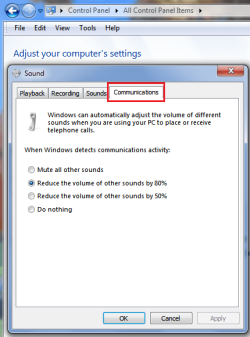
Here is the problem in a nutshell. My mic will mute itself or sometimes the mic volume moves to zero. I only use it to record the audio that my security camera program encodes to whatever video it records. I always check the box "record with audio" ,whether I have it set to record on motion detection or continuous recording.
But HERE is the kicker. It only does it when I am online "connected to my lan". .....If I disable my lan adapter (or simply unplug my cat5e) it does not do it.
Guys I can plug my cable in and the mic will mute within 60 seconds. I SEE it happen. I mouse click it back on and 5 seconds later it mutes again. It like some has as invisible mouse cursor f-ing with me. I have ran netstat-ano and run whois on all the established connection ip's and no luck.
That has to be some way I can set up a process monitor or something to identify the cause.
HELP guide me which direction to go.
Remember it works fine offline. If I could eliminate the possibility that its a hacker, then I could go about uninstalling some of my media programs and video editors fix a conflict in software myself.
So as my thread title is worded.................How can I tell if I am being hacked?
Gentleman thanks for your time.
Here is the problem in a nutshell. My mic will mute itself or sometimes the mic volume moves to zero. I only use it to record the audio that my security camera program encodes to whatever video it records. I always check the box "record with audio" ,whether I have it set to record on motion detection or continuous recording.
But HERE is the kicker. It only does it when I am online "connected to my lan". .....If I disable my lan adapter (or simply unplug my cat5e) it does not do it.
Guys I can plug my cable in and the mic will mute within 60 seconds. I SEE it happen. I mouse click it back on and 5 seconds later it mutes again. It like some has as invisible mouse cursor f-ing with me. I have ran netstat-ano and run whois on all the established connection ip's and no luck.
That has to be some way I can set up a process monitor or something to identify the cause.
HELP guide me which direction to go.
Remember it works fine offline. If I could eliminate the possibility that its a hacker, then I could go about uninstalling some of my media programs and video editors fix a conflict in software myself.
So as my thread title is worded.................How can I tell if I am being hacked?
Gentleman thanks for your time.
My Computer
At a glance
Windows 7 Pro x64AMD Phenon II x 4 9654 STICKS 2GB PATRIOT DDR3RADEON HD5770 1GB DDR5
- Computer type
- PC/Desktop
- Computer Manufacturer/Model Number
- Custom Build
- OS
- Windows 7 Pro x64
- CPU
- AMD Phenon II x 4 965
- Motherboard
- MSI 7612 (nVIDIA NF980-G65)
- Memory
- 4 STICKS 2GB PATRIOT DDR3
- Graphics Card(s)
- RADEON HD5770 1GB DDR5
- Sound Card
- 7.1 Surround Sound C-Media
- Monitor(s) Displays
- Just a bunch of Displays (JABOD)
- Screen Resolution
- Very Pretty Colors
- Hard Drives
- Cheap off brand 240GB SSD
TOSHIBA 1TB
2 X WESTERN DIGITAL BLK 1TB
PLUS MANY OTHERS SET TO "JABOD" CONFIGURATION
- PSU
- 600 WATT
- Case
- CUSTOMHACK by PC ENTERPRISES
- Cooling
- FANCY RADIATOR TYPE WITH NEAT LEDS GLOWING
- Keyboard
- CRAPPY LOGITECH
- Mouse
- CRAPPY LOGITECH
- Internet Speed
- 150mbps Comcast Blast
- Antivirus
- NORTON 360 supplied by Comcast
- Browser
- Crappy Chrome
- Other Info
- MY SYSTEM IS GETTING OLD BUT HAS BEEN SURPRISINGLY ROBUST AND DEPENDABLE. TIME TO SET UP A "GO FUND ME" ACCOUNT SO YALL CAN BUY ME A NEW BUILD.