Solved How do I bypass os select screen that appears during boot?

lbeck

New member
Local time
9:05 PM
Messages
65
Location
Hillsborough, NC
I did a clean install of win 7 pro 64 bit to get rid of vista. During the install and program reload i deleted the old vista windows directory. Now when I boot my machine it gives a screen to select my os prior to loading windows 7.

How can I disable or bypass that screen?
 

My Computer My Computer

Computer type
PC/Desktop
Computer Manufacturer/Model Number
Dell Inspiron 530
OS
Win 7 pro 64 bit
CPU
Intel Q6600 @ 2.4 GHz
Memory
4 MB RAM
Graphics Card(s)
Radeon 1 GB HD 4650
Hard Drives
500 GB boot drive Samsung HD 501J ATA
1 TB rive Samsung HD 103UJ ATA
2 TB Seagate GoFlex USB drive for backup
PSU
750 Watt
Internet Speed
25 Mbps down; 1.7 Mbps up
Antivirus
Avast free
Browser
Google Chrome / IE 9
Other Info
Acronis True Image 2012 for backups
I don't know how you "deleted the Vista directory" but that is not how to Clean Install Windows 7. If you have a Dual Boot menu now then you must have installed Win7 to another partition.

Did you boot the installer, do a Custom Install using the Drive Options in Steps 7/8 to delete all partitions, create and format new as you wish. This is a Clean install.

If you have a Dual Boot menu then you likely just installed Win7 to another partition and still have Vista on there. Can you select Vista from the menu?

Either follow the steps I outlined above or post back a screenshot of Disk Management - Post a Screen Capture Image
 
Last edited:

My Computer My Computer

Computer Manufacturer/Model Number
HP, Dell, Gateway, Toshiba - 4 laptops and 2 desktops
OS
Vista, Windows7, Mint Mate, Zorin, Windows 8
CPU
from 1.6GHz Duo to i7
Monitor(s) Displays
2x HP w2207
Hard Drives
5x HDD, 7x SSD, 12x Externals
Keyboard
with trackball - no mices
Mouse
Trackball mice
Internet Speed
DSL 6000
I don't know how you "deleted the Vista directory" but that is not how to Clean Install Windows 7. If you have a Dual Boot menu now then you must have installed Win7 to another partition.

Did you boot the installer, do a Custom Install using the Drive Options in Steps 7/8 to delete all partitions, create and format new as you wish. This is a Clean install.

If you have a Dual Boot menu then you likely just installed Win7 to another partition and still have Vista on there. Can you select Vista from the menu?

Either follow the steps I outlined above or post back a screenshot of Disk Management - Post a Screen Capture Image
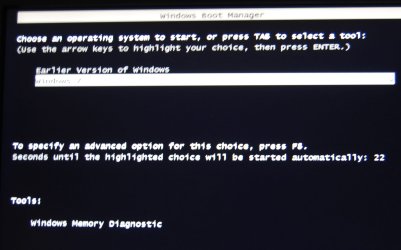
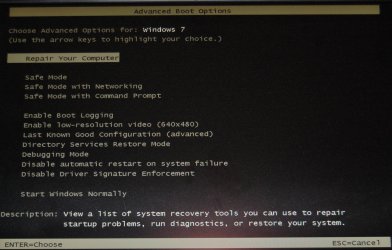
Since this is before Windows is loaded I can't so a screen capture so I took a picture of the screen. The one labled Advanced Boot Manager comes after the BIOS screen and prior to loading windows. If I click F8 I get the second "Advanced Boot Options". I stopped here because I don't want to revert to an earlier time and reverse many of the programs and settings that I've installed.

What I want to do is to bypass the boot options altogether, since I don't envision needing to revert to an "earlier version of windows."
 

Attachments

  • Win Boot Mgr.JPG
    Win Boot Mgr.JPG
    176.6 KB · Views: 3
  • Adv Boot Options.jpg
    Adv Boot Options.jpg
    313 KB · Views: 3

My Computer My Computer

Computer type
PC/Desktop
Computer Manufacturer/Model Number
Dell Inspiron 530
OS
Win 7 pro 64 bit
CPU
Intel Q6600 @ 2.4 GHz
Memory
4 MB RAM
Graphics Card(s)
Radeon 1 GB HD 4650
Hard Drives
500 GB boot drive Samsung HD 501J ATA
1 TB rive Samsung HD 103UJ ATA
2 TB Seagate GoFlex USB drive for backup
PSU
750 Watt
Internet Speed
25 Mbps down; 1.7 Mbps up
Antivirus
Avast free
Browser
Google Chrome / IE 9
Other Info
Acronis True Image 2012 for backups
I just explained that menu would not be there if you had actually clean installed Win7 and not left Vista on the HD in another partition. So we need to see the requested screenshot of http://www.sevenforums.com/tutorials/274797-disk-management-post-screen-capture-image.html to look at the configuration once you boot into Win7. Please do that now.

It would also help if you can tell us what you did exactly when it came time to select where to install Win7. You should have used the Drive Options to delete all partitions and create new in Steps 7/8 of http://www.sevenforums.com/tutorials/1649-clean-install-windows-7-a.html

I also asked you exactly what happens when you choose Earlier Version of Windows?
 
Go to start and type : msconfig
select the boot tab and make windows7 the default
then set timeout to 0
see if that works for you.
 

My Computer My Computer

Computer Manufacturer/Model Number
Dell Dimension E510
OS
Windows 7 Home Premium 32bits
CPU
Intel Pentium 4 521
Motherboard
Dell Inc. ORD203
Memory
DDR2 4096MBytes
Graphics Card(s)
ATI Radeon HD 2400 Series
Sound Card
On-Board Sigma Tel High Definition Audio
Monitor(s) Displays
Dell ST2210 1920x1080x60 hertz
Hard Drives
320 SATA
500 SATA
PSU
Antec 430 Watts
Case
Dell
Cooling
Standard Fans
That only hides the listing for the Vista OS or remnants which may still be on the HD or he would not get the Boot Menu. Nine times out of ten we find that the install has been made to a Recovery or data partition with the old OS still onboard. So we don't just hide the Dual Boot listing when half the HD might be taken by the old OS or some other mess made.

This requires special steps which we can specify only after seeing the Disk Mgmt screenshot.
 
I just explained that menu would not be there if you had actually clean installed Win7 and not left Vista on the HD in another partition. So we need to see the requested screenshot of http://www.sevenforums.com/tutorials/274797-disk-management-post-screen-capture-image.html to look at the configuration once you boot into Win7. Please do that now.

It would also help if you can tell us what you did exactly when it came time to select where to install Win7. You should have used the Drive Options to delete all partitions and create new in Steps 7/8 of http://www.sevenforums.com/tutorials/1649-clean-install-windows-7-a.html

I also asked you exactly what happens when you choose Earlier Version of Windows?
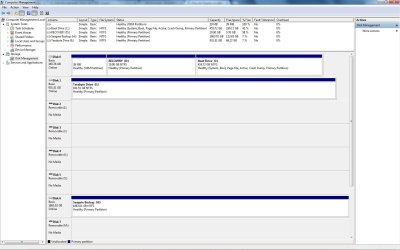
The requested screen capture is attached.

Forgive my memory, but during the multiple steps in the clean install, I don't recall "what you did exactly when it came time to select where to install Win7. " I don't think I did anything weird though. I suspect that if a choice was to install on my C: drive that I selected that. I don't recall choosing to delete all partitions, but I may have. My objective in the clean install prior to learning of this forum was to delete Vista and install 7, knowing that I'd need to re-install programs. Somewhere I read that it was not necessary and inadvisable to reformat the HDD. I think this was on a Microsoft site concerning a clean install procedure for Win 7.

If I choose to "choose Earlier Version of Windows" it goes back to the BIOS screen and then gives the same request.

Let me know if I can provide further info.
 

Attachments

  • LLB Computer Mgmt.jpg
    LLB Computer Mgmt.jpg
    121.5 KB · Views: 7

My Computer My Computer

Computer type
PC/Desktop
Computer Manufacturer/Model Number
Dell Inspiron 530
OS
Win 7 pro 64 bit
CPU
Intel Q6600 @ 2.4 GHz
Memory
4 MB RAM
Graphics Card(s)
Radeon 1 GB HD 4650
Hard Drives
500 GB boot drive Samsung HD 501J ATA
1 TB rive Samsung HD 103UJ ATA
2 TB Seagate GoFlex USB drive for backup
PSU
750 Watt
Internet Speed
25 Mbps down; 1.7 Mbps up
Antivirus
Avast free
Browser
Google Chrome / IE 9
Other Info
Acronis True Image 2012 for backups
There are no specs listed so we don't know what brand PC you have, but it's likely the Recovery partition won't run now anyway, nor is the OEM partition needed.

What I would do is look over the steps for getting and keeping a perfect Clean Reinstall - Factory OEM Windows 7 to see how close you came. If it varied much and you see better choices you could have made then I'd do it over, this time deleting all partitions during install.

Otherwise if you'd want to delete and reclaim the space from the first two partitions we can help you do that.

But if you'd prefer to keep what you have then it looks okay with the boot files on C and nothing awry. To remove the Dual Boot menu type msconfig in Start Search box, on Boot tab delete the extra listing. If this doesn't work then install EasyBCD (click Download - no Name or Email required) to do the same on the Edit OS Menu tab.
 
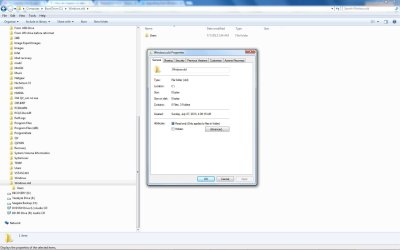
Thanks. I like this forum so decided to fill in some specs for better future support. Also, I did some remembering and found that the exact procedure was from MSFT here. The only deviation is when at some point the procedure, or the reinstallation of programs, claimed that I was running out of space on my boot drive. At that point I looked at the files there and saw that a directory called windows.old was very large, so I attempted to delete it. It's actually still there but is empty.

I've come too far to do another clean install. I'd rather live with the unwanted boot screen than to re-install my programs.

I'll try the other options that you suggest and will report back on success/failure, but I may not get to resuming this for a day or so. Decided to post now in case anything just added may provide additional clues.

Thanks again.
 

Attachments

  • Old Windows Directory.jpg
    Old Windows Directory.jpg
    92.9 KB · Views: 6
Last edited:

My Computer My Computer

Computer type
PC/Desktop
Computer Manufacturer/Model Number
Dell Inspiron 530
OS
Win 7 pro 64 bit
CPU
Intel Q6600 @ 2.4 GHz
Memory
4 MB RAM
Graphics Card(s)
Radeon 1 GB HD 4650
Hard Drives
500 GB boot drive Samsung HD 501J ATA
1 TB rive Samsung HD 103UJ ATA
2 TB Seagate GoFlex USB drive for backup
PSU
750 Watt
Internet Speed
25 Mbps down; 1.7 Mbps up
Antivirus
Avast free
Browser
Google Chrome / IE 9
Other Info
Acronis True Image 2012 for backups
Having Windows.old means you didn't even boot the installer to correctly reinstall Win7. Run Disk Cleanup to clean it out.

I told you how to get rid of the Dual Boot menu.
 
Problem solved

There are no specs listed so we don't know what brand PC you have, but it's likely the Recovery partition won't run now anyway, nor is the OEM partition needed.

What I would do is look over the steps for getting and keeping a perfect Clean Reinstall - Factory OEM Windows 7 to see how close you came. If it varied much and you see better choices you could have made then I'd do it over, this time deleting all partitions during install.

Otherwise if you'd want to delete and reclaim the space from the first two partitions we can help you do that.

But if you'd prefer to keep what you have then it looks okay with the boot files on C and nothing awry. To remove the Dual Boot menu type msconfig in Start Search box, on Boot tab delete the extra listing. If this doesn't work then install EasyBCD (click Download - no Name or Email required) to do the same on the Edit OS Menu tab.
Thanks Greg. The EasyBCD enabled bypassing the boot screen, which is exactly what I wanted!
 

My Computer My Computer

Computer type
PC/Desktop
Computer Manufacturer/Model Number
Dell Inspiron 530
OS
Win 7 pro 64 bit
CPU
Intel Q6600 @ 2.4 GHz
Memory
4 MB RAM
Graphics Card(s)
Radeon 1 GB HD 4650
Hard Drives
500 GB boot drive Samsung HD 501J ATA
1 TB rive Samsung HD 103UJ ATA
2 TB Seagate GoFlex USB drive for backup
PSU
750 Watt
Internet Speed
25 Mbps down; 1.7 Mbps up
Antivirus
Avast free
Browser
Google Chrome / IE 9
Other Info
Acronis True Image 2012 for backups
Back
Top