
How do I Change Taskbar Icon Hover Colour?

Kimchii

New member
Local time
11:36 AM
Messages
3
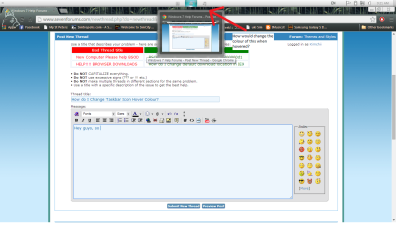
Hey guys, so I'm wondering if anyone could lead through to how to change the colour of the hover and click glow in the taskbar when you hover or select the icon with your mouse? Is it Possible?
If so could anyone lead me with the steps involved?
I've attached a pic to show what I mean.
Thanks in advance!

NOTE: I'm using a custom theme.
 

Attachments
  • Lol Help.png
    Lol Help.png
    62.8 KB · Views: 4
Last edited:

My Computer

Computer type
Laptop
Computer Manufacturer/Model Number
Acer M5-481T
OS
Windows 7 Home Premium 64-bit, Build 7601
CPU
Intel i5 3rd Generation (No.3317U)
Memory
8GB Physical RAM
Graphics Card(s)
Integrated Intel HD 4000
Antivirus
AVG 2014
Browser
Chrome
Welcome to Seven Forums Kimchii. I don't think it can be done. It's what they call Color hot-track

I hadn't even noticed this until somebody pointed it out: When you hover your mouse over a button in the Windows 7 taskbar which corresponds to a running application, the taskbar button lights up in a color that matches the colors in the icon itself. (And even more subtly, the lighting effect is centered on the mouse.)

This feature even has a name: Color hot-track. (Gentlemen, start your photocopiers.)

Some people ask how it's done. It's really nothing special. The code just looks for the predominant color in the icon. (And, since visual designers are sticklers for this sort of thing, black, white, and shades of gray are not considered "colors" for the purpose of this calculation.)

A feature I didn't even know existed much less had a name: Color hot-track - The Old New Thing - Site Home - MSDN Blogs

I have never seen anyone change this, even with Style Builder. Even gray scale icons have a color element. A Guy
 

My Computer

Computer type
PC/Desktop
OS
Windows 10 Home x64
CPU
INTEL Core i5-750 Quad-Core 3.37GHz
Motherboard
ASUS P7P55D
Memory
HyperX Fury Black Series 8GB (2 x 4GB) 1866Mhz
Graphics Card(s)
EVGA GeForce GTX 750 Superclocked 1GB 128-Bit GDDR5
Monitor(s) Displays
LG 32MA68HY 32" IPS
Screen Resolution
1920 x 1080
Hard Drives
Samsung 840 Evo 120GB, SEAGATE 500GB Barracuda® 7200.12, SATA 3 Gb/s, 7200 RPM, 16MB cache
PSU
ANTEC TruePower New TP-550, 80 PLUS, 550W
Case
ANTEC Three Hundred Illusion
Cooling
COOLER MASTER Hyper 212 Plus, 4 x 120mm 1 x 140mm Noctua's
Internet Speed
85 + Mbps
Antivirus
Avast
Browser
Vivaldi
Back
Top