how do I recover data from a non responsive hard drive?

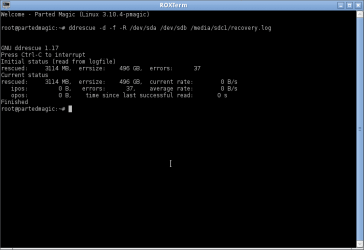
It doesn't looks good. 496 GB error size means the disk media is so bad. I am afraid that the data stored on the disk can't be recovered - even by a professional data recovery company :shock:. As a last resort, please try the below steps.

1. Press Ctrl + c to abort the cloning.

2. Try the below command.

ddrescue -d -f -R /dev/sda /dev/sdb /media/sdc1/recovery.log


The -R option will try to read sectors in reverse order. If it also hangs, rescuing this disk will be beyond the capability of "ddrescue".
 

My Computer My Computer

At a glance

Windows 7 Ultimate x64
Computer type
PC/Desktop
OS
Windows 7 Ultimate x64
okay... I'll try that now.

thanks.
 

My Computer My Computer

At a glance

Windows 7 Home Premium 32 bitIntel(R) Core(TM)2 Duo CPU E6750 @ 2.66GHz4.00 GB with 3.25 GB available(1) Radeon X1950 Series (Microsoft Corporatio...
OS
Windows 7 Home Premium 32 bit
CPU
Intel(R) Core(TM)2 Duo CPU E6750 @ 2.66GHz
Motherboard
ASUSTeK Computer INC. P5E
Memory
4.00 GB with 3.25 GB available
Graphics Card(s)
(1) Radeon X1950 Series (Microsoft Corporation - WDDM) (
Sound Card
High Definition Audio Device
Hard Drives
(1) WDC WD7501AALS-00J7B0 ATA Device
looks like it's a no... unless I did something wrong.
 

Attachments

  • Screenshot - reverse.png
    Screenshot - reverse.png
    7.4 KB · Views: 1

My Computer My Computer

At a glance

Windows 7 Home Premium 32 bitIntel(R) Core(TM)2 Duo CPU E6750 @ 2.66GHz4.00 GB with 3.25 GB available(1) Radeon X1950 Series (Microsoft Corporatio...
OS
Windows 7 Home Premium 32 bit
CPU
Intel(R) Core(TM)2 Duo CPU E6750 @ 2.66GHz
Motherboard
ASUSTeK Computer INC. P5E
Memory
4.00 GB with 3.25 GB available
Graphics Card(s)
(1) Radeon X1950 Series (Microsoft Corporation - WDDM) (
Sound Card
High Definition Audio Device
Hard Drives
(1) WDC WD7501AALS-00J7B0 ATA Device
Since we removed -r3 option, "ddrescue" will only try to read good sectors and totally avoid bad sectors. Since all good sectors are already copied by previous operation ( which is only around 3 GB ), there are no more sectors left to copy and "ddrescue" finished the cloning.

I should say that this type of heavy media damage is not common. A well equipped and highly experienced data recovery firm mght be able to rescue the data. They usually use specialized hardware cloning tool which may be able to successfully copy the sectors to another disk.

An example professional disk cloning tool - Hard Drive Data Recovery
 

My Computer My Computer

At a glance

Windows 7 Ultimate x64
Computer type
PC/Desktop
OS
Windows 7 Ultimate x64
okay, so basically, there is nothing left for us to do. The data is lost.

so I guess I move on. How do i set up my new drive as my main drive, and my working old one as just storage?

what do I need to copy over and how do I do it?
 

My Computer My Computer

At a glance

Windows 7 Home Premium 32 bitIntel(R) Core(TM)2 Duo CPU E6750 @ 2.66GHz4.00 GB with 3.25 GB available(1) Radeon X1950 Series (Microsoft Corporatio...
OS
Windows 7 Home Premium 32 bit
CPU
Intel(R) Core(TM)2 Duo CPU E6750 @ 2.66GHz
Motherboard
ASUSTeK Computer INC. P5E
Memory
4.00 GB with 3.25 GB available
Graphics Card(s)
(1) Radeon X1950 Series (Microsoft Corporation - WDDM) (
Sound Card
High Definition Audio Device
Hard Drives
(1) WDC WD7501AALS-00J7B0 ATA Device
To use the new 2 TB as the boot disk, i would recommend the below steps.

1. Disconnect the current boot disk to avoid complications. Connect the 2 TB to the first SATA port - this is important as system will always prefer to boot from the disk connected to port one.

2. Install Windows usually. I would recommend one partition dedicated for OS - 150 to 200 GB will be more than enough. Rest of the remaining space can be partitioned to one or two data storage partitions.

3. After the install finishes, connect the 500 GB disk as slave and copy all data stored on it to the new one. After that use "Disk Management" to delete the existing partitions and create a single 500 GB partition. Now this disk can be used as a backup - keep a copy of all important data on both new disk and the old 500 GB disk. If one fail in an unfortunate event ( hope to not ), your important data will be safe on the other one.
 

My Computer My Computer

At a glance

Windows 7 Ultimate x64
Computer type
PC/Desktop
OS
Windows 7 Ultimate x64
See the two install tutorials (tuts) below. They're pretty much the same process, the OEM is geared more towards PC manufacturer's machines (HP, Dell, Acer...) and it also has a bit more detail on Devices.

http://www.sevenforums.com/tutorials/1649-clean-install-windows-7-a.html

http://www.sevenforums.com/tutorials/219487-clean-reinstall-factory-oem-windows-7-a.html

Read through the tuts and ask any questions you might have before installing. Both tuts are well written and have a lot of information - pay attention to the colored info, tip, note, and warning boxes.

You can select the amount of space to use for Windows in the "Where do you want to install Windows" step.

The tuts give you a really clean install, hence the name.
 

My Computer My Computer

At a glance

x64 (6.3.9600) Win8.1 Pro & soon dual boot x6...AMD A6-3420M APU with Radeon(tm) HD Graphics6.00 GBAMD Radeon(TM) HD 6520G
Computer type
Laptop
Computer Manufacturer/Model Number
HP Pavilion dv6-6c10us
OS
x64 (6.3.9600) Win8.1 Pro & soon dual boot x64 (6.1.7601) Win7_SP1 HomePrem
CPU
AMD A6-3420M APU with Radeon(tm) HD Graphics
Motherboard
Hewlett-Packard 1805
Memory
6.00 GB
Graphics Card(s)
AMD Radeon(TM) HD 6520G
Sound Card
(1) AMD High Definition Audio Device (2) IDT High Definiti
Monitor(s) Displays
HP W2072a 20" LCD (1600 x 900) @ 60 Hz
Screen Resolution
1366 x 768 x 32 bits (4294967296 colors) @ 60 Hz
Hard Drives
ST640LM0 00 HM641JI SATA Disk Device
Keyboard
Logitech k520 wireless KB
Mouse
Logitech m320 wireless mouse (bundled with KB)
Internet Speed
15/5 | 54 MB Wireless 'n'
Antivirus
Realtime: Defender or Avast | On-demand: Malwarebytes, ESET
Browser
IE 11 on Win8, IE 10 on win 7
Other Info
Media: [Gimp, Audacity, VLC] || Comm: [WEmail 2012, Skype] || Productivity: [OpenOffice,| Textpad] || Utils: [Sysinternals, cCleaner, Speccy, Defraggler]
Back
Top