How do I restore a ''missing'' partition

LeoWinston

New member
Local time
8:36 PM
Messages
2
Hello,

I had three partitions set-up. B, C, and D. The missing one is B, the other two are fine and working. Programs that were installed on the B partition, and files can somehow be found by using the search option, but I cannot access them because the location ''refers to be unavailable''.
I've tried to google the solution and I've already tried two things.


  1. Managing storage units by right-clicking My computer, but that didn't help. It seems though the B partition, along with its contents and storage size are missing entirely.
  2. I've tried the command chkdsk on cmd. It told me that the disk was already in use and if I want to check the disk after a reboot. Naturally, I typed ''Y'', rebooted the system, it checked the file, but nothing out of the ordinary appeared. When the system finished rebooting, the disk was still missing.
I didn't try to use other methods on google because I couldn't find this problem occurring to anyone, so here I am, asking for help.

The B partition stands for Backup, it was around 100Gb large, and I had around 60Gb of occupied space there. (Photos, shows, etc.)

What do I do?
 

My Computer

Computer type
PC/Desktop
OS
windows 7 x64
A & B & C are reserved letters and M$ will not play nice if you try to use them. A & B were used for floppy drives originally and are still reserved. C is used for the system drive.
How you recover your files is for someone else that works in that area.
Art.
 

My Computer

Computer type
PC/Desktop
Computer Manufacturer/Model Number
Home built
OS
Win7 sp1 Pro 64bit / XP sp2 Pro (games only)
CPU
Intel Core 2 Duo E8400 @ 3.00GHz
Motherboard
Intel Corporation DP35DP (CPU1)
Memory
8.00 GB Dual-Channel DDR2 @ 400MHz (5-5-5-18)
Graphics Card(s)
1024MB GeForce GTX 560
Sound Card
NVIDIA High Definition Audio
Monitor(s) Displays
SyncMaster (2048x1152@60Hz)
Hard Drives
240GB Sandisc Extreme Pro SSD
244GB Seagate ST3250410AS
488GB Seagate ST500DM002-1BD142
931GB Western Digital WDC WD1003FZEX
PSU
Corsair 720
Case
ATX
Keyboard
HID Keyboard Device Logitech
Mouse
HID-compliant mouse Microsoft
Other Info
TSSTcorp CDDVDW SH-S223L

HL-DT-ST BD-RE BH12LS35
The terminology between Disk Label, Partition and Volume can be confusing. A Partition will create a new volume on a disk. Volumes are labelled volume 0, volume 1, volume 2, etc.

Do you mean the volume is now missing? If so this forum thread may be of use: Partition Volume Missing.
 

My Computer

Computer type
PC/Desktop
OS
Windows 7 x64, Vista x64, 8.1 smartphone
CPU
Intel E8400 65W 64-bit
Motherboard
Gigabyte EP45-UD3LR
Memory
DDR2 2 x 2GB, 1GB x 2
Graphics Card(s)
XFX Radeon HD5750
Sound Card
AMD High Definition Audio; Realtek High Definition Audio
Monitor(s) Displays
iiyama prolite X2377HDS
Screen Resolution
1920 x 1080
Hard Drives
500GB 7200 rpm Seagate ST3500413AS 16MB, 500GB 5400 rpm Toshiba MQ02ABF050H 32MB, 200GB 7200 rpm Seagate ST3200820AS 8MB, 2TB 7200 rpm Western Digital WD20EZRX 64MB
PSU
Enermax Liberty Modular
Case
Antec P193 Midi Tower
Keyboard
Mionix ZIBAL 60
Mouse
Razer USB 2.0 Diamondback Mouse or Huion Graphics Tablet
Browser
Internet Explorer, Lunascape, Firefox, Opera, Avast Safezone
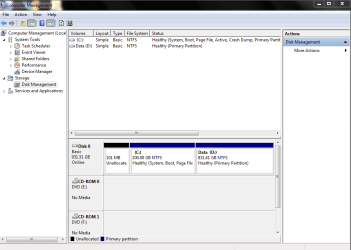
We need a screen shot from disk manager showing all the details
 

My Computer

Computer type
PC/Desktop
OS
win 8 32 bit
Screenshots

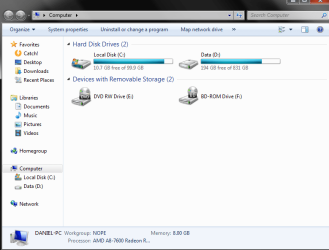
Do these help?
 

Attachments

  • 1.png
    1.png
    26.5 KB · Views: 1
  • 2.png
    2.png
    23.9 KB · Views: 1

My Computer

Computer type
PC/Desktop
OS
windows 7 x64
Aside from not being allowed to use B, programs should be on the same partition as the system, because they share some files with the system , esp. in C:\Windows. Sys+Prog is always C on my machines and D is data. When you recover the partition, merge it with C.

Secondly, it's not a good idea to keep a backup on the same disk. If you get hit by malware, the backup is toast. Use an external HD for that. You can have several partitions of data, but back them up externally.
 

My Computer

Computer type
PC/Desktop
Computer Manufacturer/Model Number
HP p6-2020t
OS
Win 7 Ult 64-bit
CPU
G620 2.6GHZ Pentium R
Memory
6 GB
Monitor(s) Displays
25" HPLV2311
Screen Resolution
1920 x 1200
Hard Drives
1 SATA, 1 exterior SATA
Case
HP
Cooling
PSU
Antivirus
Glasswire
Browser
Waterfox; Firefox; Chrome for work
Other Info
Firewall--Glasswire
Similar specs in Gateway DX4200
Verizon FIOS Wired network

1 other Win7 computer-- has SSD
Disk manager shows only c and d and a blank 100meg so I dont see were 100gig has come from unless you have resized a paritioninto d
 

My Computer

Computer type
PC/Desktop
OS
win 8 32 bit
Back
Top