sneubacher
New member
- Local time
- 1:11 PM
- Messages
- 1
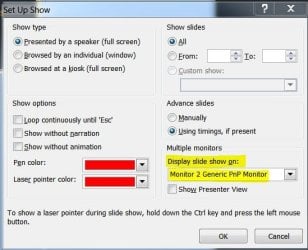
I am having issues with a projector and a laptop and the extended screen. Basically I bought a projector to give presentations, including using PowerPoint. I have a dell 3300mp projector and an alienware laptop that is spec'd out to the hilt. Laptop is running win7 ultimate 64 bit and i have an NVIDIA geforce gtx 460M graphics card. i am using an M1-A to d-sub(VGA) /USB cable to connect the two devices to each other. I am able to do the extend screen function, however, when I am using powerpoint, my PC shows the slideshow and the projector shows the main powerpoint screen/desktop (i.e. where i'd have the slides and notes accompanying them etc). How can I reverse this so the projector shows the powerpoint slideshow extended screen and my laptop shows the main powerpoint screen? (i.e. i don't want everyone reading my notes on my projection screen).
I've tried right clicking on the desktop and choosing "Screen Resolution" and i've tried just about every possible configuration on that screen but the issue persists. When I click the detect/identify buttons it correctly shows my laptop as 1 and my projector as 2. It says that my pc is the main display, and under the multiple displays drop down menu it has "extend these displays" (i have gone through all the options under this menu but as i said it still won't reverse the screens).
any ideas? This is frustrating and i have heard other people have similar issues with win7 extended screens.
I've tried right clicking on the desktop and choosing "Screen Resolution" and i've tried just about every possible configuration on that screen but the issue persists. When I click the detect/identify buttons it correctly shows my laptop as 1 and my projector as 2. It says that my pc is the main display, and under the multiple displays drop down menu it has "extend these displays" (i have gone through all the options under this menu but as i said it still won't reverse the screens).
any ideas? This is frustrating and i have heard other people have similar issues with win7 extended screens.
My Computer
At a glance
Windows 7 Ultimate 64bit
- OS
- Windows 7 Ultimate 64bit