
You are using an out of date browser. It may not display this or other websites correctly.
You should upgrade or use an alternative browser.
You should upgrade or use an alternative browser.
How do you make a USB drive bootable so I can load W7 on a netbook?
- Thread starter falze
- Start date

My Computer
At a glance
Windows 7 Home Premium x64Intel QX9650 Extreme 4.0 GHz8GB (4x2) Corsair Dominator DDR32x Radeon R390X [8GB]
- Computer type
- PC/Desktop
- Computer Manufacturer/Model Number
- Custom Build/Mod
- OS
- Windows 7 Home Premium x64
- CPU
- Intel QX9650 Extreme 4.0 GHz
- Motherboard
- ASUS Rampage Extreme Rev2
- Memory
- 8GB (4x2) Corsair Dominator DDR3
- Graphics Card(s)
- 2x Radeon R390X [8GB]
- Sound Card
- SupremeFX X-Fi
- Monitor(s) Displays
- Dell 2408WFP 26" Panel
- Screen Resolution
- 1920x1200
- Hard Drives
- 4x WD 2TB (8TB+ Total)
2x Crucial SSD 128GB (RAID-0)
1x LG Blu-ray read/write
1x Phillips LightScribe DVD read/write
- PSU
- Corsair HX1000
- Case
- CoolerMaster - Cosmos S
- Cooling
- Custom Liquid - 320mm rad w/ 3x 80mm fans, CPU/NB/SB Blocks
- Keyboard
- Logitech Illuminater Pro
- Mouse
- Logitech
- Internet Speed
- Fractional T1 - 125Mbps
- Antivirus
- ESET Security Suite / Microsoft Security Essentials
- Browser
- Cyberfox Intel x64
- Other Info
- OC'd to 5.0GHz @ 44c under full load
I followed your excellent thread and it worked like a charm!
I'm truly impressed, I really am!
And then there was easy transfer.... I can only say I still backed everything up thinking I can't put my life in the hands of easy transfer... what can I say... superb!
I am really really impressed, it was only let down by an issue with some still stuck in the floppy age antics from adaptec which meant that I couldn't try the system out on a sata controller card but hey...
I'm truly impressed, I really am!
And then there was easy transfer.... I can only say I still backed everything up thinking I can't put my life in the hands of easy transfer... what can I say... superb!
I am really really impressed, it was only let down by an issue with some still stuck in the floppy age antics from adaptec which meant that I couldn't try the system out on a sata controller card but hey...
My Computer
At a glance
Windows 7 Professional 64bitIntel Core Quad 955016GB factory installedNVIDIA Quadro K2100M
- Computer type
- Laptop
- Computer Manufacturer/Model Number
- Lenovo
- OS
- Windows 7 Professional 64bit
- CPU
- Intel Core Quad 9550
- Motherboard
- Mobile Intel QM87 Express Chipset
- Memory
- 16GB factory installed
- Graphics Card(s)
- NVIDIA Quadro K2100M
- Sound Card
- Onboard
- Monitor(s) Displays
- Apple iMac 27" display
- Screen Resolution
- 2560 x 1440
- Hard Drives
- 160gb factory fitted ssd
512gb pcie m2 2242 ssd

Jon55
New member
- Local time
- 4:54 AM
- Messages
- 129
Anyone know if any of these methods work with EFI?
My Computer
At a glance
Windows 7 64-bit (7127) & Mac OS X 10.5.72.53 GHz Intel Core2Duo (6MB L2 Cache)4GB DDR2 6678600M GT 512MB
- Computer Manufacturer/Model Number
- Apple MacBook Pro
- OS
- Windows 7 64-bit (7127) & Mac OS X 10.5.7
- CPU
- 2.53 GHz Intel Core2Duo (6MB L2 Cache)
- Memory
- 4GB DDR2 667
- Graphics Card(s)
- 8600M GT 512MB
- Monitor(s) Displays
- 15.4 LED backlit LCD
- Screen Resolution
- 1440x900
- Hard Drives
- Hitachi 250GB 5400 RPM (soon to be replaced)
- Mouse
- Logitech

if it does not boot after following any of the tutorials, try writing the boots sector also
the commands should look like this
diskpart
select disk 1 *the usb disk
clean
create partition primary
select partition 1
active
format fs=NTFS QUICK
assign
exit
e:\ *the mounted or unrared windows instalation folder
cd boot *the mounted or unrared windows instalation folder
bootsect /nt60 f: *f: is the usb stick
the commands should look like this
diskpart
select disk 1 *the usb disk
clean
create partition primary
select partition 1
active
format fs=NTFS QUICK
assign
exit
e:\ *the mounted or unrared windows instalation folder
cd boot *the mounted or unrared windows instalation folder
bootsect /nt60 f: *f: is the usb stick
My Computer
At a glance
Windows 7 x86 build 7600
- OS
- Windows 7 x86 build 7600

I always did it the simple way.. set USB as my first 'device' to check during boot, in my BIOS. Then downloaded the ISO of Windows I wanted, un-rar'd it with WinRAR, copied the contents of the un-rar'd folder and pasted it onto the flash drive. Works like that for me 
I <3 Simplicity.
I <3 Simplicity.
My Computer
At a glance
Windows 7 Ultimate, OS X 10.7, Ubuntu 11.04Intel E6750 @ 3.80GHz2x2GB & 2x1GB (6GB) OCZ Reaper 1066MHz @ 1080MHzEVGA nVidia GTX 260 896mb (216 Core) FTW Edition
- Computer Manufacturer/Model Number
- Custom | Whitebox
- OS
- Windows 7 Ultimate, OS X 10.7, Ubuntu 11.04
- CPU
- Intel E6750 @ 3.80GHz
- Motherboard
- Gigabyte GA-EP45-UD3L (Revision 1.1)
- Memory
- 2x2GB & 2x1GB (6GB) OCZ Reaper 1066MHz @ 1080MHz
- Graphics Card(s)
- EVGA nVidia GTX 260 896mb (216 Core) FTW Edition
- Sound Card
- Realtek ALC888
- Monitor(s) Displays
- 21" VIZIO TV
- Screen Resolution
- 1680x1050 @ 60Hz
- Hard Drives
- Western Digital WD6401AALS - 640GB
Hitachi HDP725016GLA380 - 160GB
- PSU
- Corsair 750W
- Case
- NZXT Nemesis Elite
- Cooling
- Thermaltake SpinQ
- Keyboard
- Logitech Wireless S520
- Mouse
- Logitech Wireless S520 - Microsoft Wireless Arc Mouse
- Internet Speed
- Download: 20mbps, Upload: 3mbps

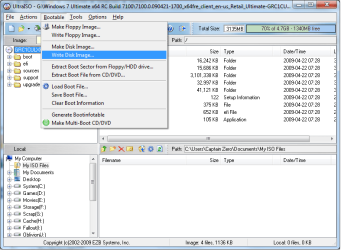
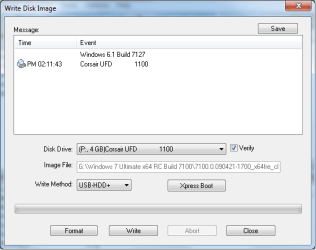
Using UltraISO 9.3 is probably the easiest way to do it.
1 - Open the ISO
2 - Bootable > Write Disk Image
3 - Select your USB drive and check 'Verify'
4 - Done.
Escellent tip! I was unaware you could do this so easily with UltraISO!!! REPS!
My Computer
At a glance
Windows 7 Ultimate 64 bit Steve Ballmer Signa...Intel Core 2 Quad - Q9550 - 2.83GHz stock - O...4GB DDR2 800MHz (PC6400) OCZ ReaperNvidia GE Force 8800 GTS
- Computer Manufacturer/Model Number
- Homebrew PC - "Alpha_Dawg"
- OS
- Windows 7 Ultimate 64 bit Steve Ballmer Signature Edition
- CPU
- Intel Core 2 Quad - Q9550 - 2.83GHz stock - OC'd to 3.6GHz
- Motherboard
- Gigabyte EP45-UD3P
- Memory
- 4GB DDR2 800MHz (PC6400) OCZ Reaper
- Graphics Card(s)
- Nvidia GE Force 8800 GTS
- Sound Card
- Asus Xonar DX
- Monitor(s) Displays
- Samsung SyncMaster 2333HD
- Screen Resolution
- 1920 x 1080
- Hard Drives
- WD Caviar Black 750GB - 7200RPM - 32MB cache
WD Caviar Green 1.5TB - 5400RPM - 64MB cache
WD Caviar Green 2.0TB - 5400RPM - 64MB cache
- PSU
- PC Power & Cooling Silencer 750
- Case
- Gigabyte 3D Aurora
- Cooling
- Case is Air - 5ea. 120mm fans (mix of Arctic and Xigmatec)
- Keyboard
- MS Natural Wireless KB
- Mouse
- MS Wireless Mouse
- Internet Speed
- 50 mbps down/5 mbps up
- Other Info
- AVerMedia - AVerTVHD G2 Dual Tuner Card
EVGABuzzer
New member
- Local time
- 7:54 AM
- Messages
- 7
Boot.Zip Password Protected ?
I am trying this but when I double click Bootme.Zip I a box that says "Archive not readable, would you like to try a password?" Is it password protected ? I think I will try downloading from another source. Maybe this one is corrupt ?
Please advise
Thanks !
EVGABuzzer
I am trying this but when I double click Bootme.Zip I a box that says "Archive not readable, would you like to try a password?" Is it password protected ? I think I will try downloading from another source. Maybe this one is corrupt ?
Please advise
Thanks !
EVGABuzzer
^^ Ugg, that's clunky tooor this which to me seems less complicated: Creating Bootable Vista / Windows 7 USB Flash Drive at Kevin’s Blog
So instead do this: (even less complicated)
You will need HP USB Disk Storage Format Tool - v2.1.8 (be warned many google links for the HP tool are DEAD)
You can find it Here!
and Bootme.zip
1. Run "HP USB Disk Storage Format Tool"
2. Select your Thumb Drive as Device
3. Select FAT as File system
4. Volume name "Windows 7"
5. Select Quick Format
6. Select Create a DOS startup disk
7. unzip the bootme.zip and point "Using DOS system files located at" to the unzipped folder with files inside
8. Start Format
Ta-Da
Sorted!
PS You wont see any files on the usbstick as they are in the boot sector
(you can also optionally do a second "format" using NTFS- don't worry "all data on drive will be lost" does NOT include the boot sector files.
There you go-My first How to... for WSF.
Cheers ALL

My Computer
At a glance
Win 7 UltimateI7-930Corsair 6GigXFX ATI5770
- Computer Manufacturer/Model Number
- Custom
- OS
- Win 7 Ultimate
- CPU
- I7-930
- Motherboard
- EVGA 160
- Memory
- Corsair 6Gig
- Graphics Card(s)
- XFX ATI5770
- Sound Card
- Integrated
- Monitor(s) Displays
- ViewSonic - Varies
- Hard Drives
- Intel X25-M
- PSU
- Xeon 1100
- Case
- Thertake
- Cooling
- Corsair H50

- Local time
- 4:54 AM
- Messages
- 50,634
Hi,
I followed the guide where I used HP USB storage format tool and bootme.
I got it to boot from the USB but when it does it opens a command prompt, now my question is:
how doe I start the windows installation from there?
kind regards,
Jos
I followed the guide where I used HP USB storage format tool and bootme.
I got it to boot from the USB but when it does it opens a command prompt, now my question is:
how doe I start the windows installation from there?
kind regards,
Jos
My Computer
At a glance
windows 7 ultimate x86
- OS
- windows 7 ultimate x86
- Local time
- 4:54 AM
- Messages
- 50,634
Use the tutorial given to load flash stick.
thanks but HP USB storage... it didn't work for me so i tried windows 7 usb/dvd.
it tells me to erase the usb so everything will be gone and i click yes.
then it tells me it's formatting and then stops and gives me: status: we were unable to copy your files..
help please?
Jos
it tells me to erase the usb so everything will be gone and i click yes.
then it tells me it's formatting and then stops and gives me: status: we were unable to copy your files..
help please?
Jos
My Computer
At a glance
windows 7 ultimate x86
- OS
- windows 7 ultimate x86

The method above works well, however if you want the long method and works 100% here it is:
Requirements:
• USB Flash Drive (4GB+)
• Microsoft Operating System DVD (Vista / Windows 7)
• A computer with Vista / Windows 7 installed.
Step 1: Format the Drive
WARNGING!: This will erase everything on your USB drive.
1. Insert the USB Drive
2. Open a Command Prompt as Administrator
(Right click on Start > All Programs > Accessories > Command Prompt and select “Run as administrator”)
3. Find the drive number of your USB Drive by typing the following.
diskpart
list dis
The number of your USB Drive will in the list. You will need this for the next step.
Note: I will assume that your USB Drive is disk 1.
4. Format the USB Drive by typing. Replace the number “1” with the number of your USB Drive.
sel dis 1
clean
cre par pri
sel par 1
act
for fs=NTFS quick
or
for fs=FAT32 quick (if you wish to use FAT32)
ass
exit
Note: Do not close the Command Prompt you will need it for more steps.
Step 2: Make the Drive Bootable
Use the bootsect utility from the Vista or Windows 7 DVD to make the USB drive bootable. In the same Command Prompt Window you were using above.
1. Insert your Windows Vista / 7 DVD into your drive.
2. Change directory to the DVD’s boot directory where bootsect is stored.
I will assume your DVD drive is E:
e:
cd e:\boot
3. Use bootsect to set the USB Drive as a bootable NTFS drive. I will assume your USB drive has been labeled P:
bootsect /nt60 P:
xcopy e:\*.* /s /e /f p:\
Note: if you are not comfortable using xcopy you may skip xcopy and use Windows Explorer for Step 3.
4. Close the Command Prompt Window.
Step 3: Copy the entire contents of the Vista or Windows DVD to the USB drive.
Set your Computers BIOS to Boot USB devices: Boot this USB Drive to install Windows or start a system recovery.
Requirements:
• USB Flash Drive (4GB+)
• Microsoft Operating System DVD (Vista / Windows 7)
• A computer with Vista / Windows 7 installed.
Step 1: Format the Drive
WARNGING!: This will erase everything on your USB drive.
1. Insert the USB Drive
2. Open a Command Prompt as Administrator
(Right click on Start > All Programs > Accessories > Command Prompt and select “Run as administrator”)
3. Find the drive number of your USB Drive by typing the following.
diskpart
list dis
The number of your USB Drive will in the list. You will need this for the next step.
Note: I will assume that your USB Drive is disk 1.
4. Format the USB Drive by typing. Replace the number “1” with the number of your USB Drive.
sel dis 1
clean
cre par pri
sel par 1
act
for fs=NTFS quick
or
for fs=FAT32 quick (if you wish to use FAT32)
ass
exit
Note: Do not close the Command Prompt you will need it for more steps.
Step 2: Make the Drive Bootable
Use the bootsect utility from the Vista or Windows 7 DVD to make the USB drive bootable. In the same Command Prompt Window you were using above.
1. Insert your Windows Vista / 7 DVD into your drive.
2. Change directory to the DVD’s boot directory where bootsect is stored.
I will assume your DVD drive is E:
e:
cd e:\boot
3. Use bootsect to set the USB Drive as a bootable NTFS drive. I will assume your USB drive has been labeled P:
bootsect /nt60 P:
xcopy e:\*.* /s /e /f p:\
Note: if you are not comfortable using xcopy you may skip xcopy and use Windows Explorer for Step 3.
4. Close the Command Prompt Window.
Step 3: Copy the entire contents of the Vista or Windows DVD to the USB drive.
Set your Computers BIOS to Boot USB devices: Boot this USB Drive to install Windows or start a system recovery.
My Computer
At a glance
Windows 7 Enterprise (x64); Windows Server 20...16GB
- Computer type
- PC/Desktop
- Computer Manufacturer/Model Number
- Dell OP7010
- OS
- Windows 7 Enterprise (x64); Windows Server 2008 R2 (x64)
- Memory
- 16GB
- Monitor(s) Displays
- 4 Dell 24" LCD
- Screen Resolution
- 1280x1024
- Keyboard
- Dell
- Mouse
- Dell Optical
- Internet Speed
- 40meg

what about the windows 7 USB tool?
Microsoft Store: Windows 7 USB/DVD Download Tool Help
I used it with an 8GB Lexar flash drive and added some IT tools to it as a complete USB tool kit. I added all the FREE software listed elsewhere on this site.
So it has a boot-able install of my windows 7
all my drivers
tools to fix any issues
and a windows transfer file to restore my settings and files.
Microsoft Store: Windows 7 USB/DVD Download Tool Help
I used it with an 8GB Lexar flash drive and added some IT tools to it as a complete USB tool kit. I added all the FREE software listed elsewhere on this site.
So it has a boot-able install of my windows 7
all my drivers
tools to fix any issues
and a windows transfer file to restore my settings and files.
My Computer
At a glance
Windows 7 Ultimate x64Intel Core i7 2670QM 2.2GHz 3.3GHz Turbo Mode12GB Dual Channel DDR3 at 1333MHz2GB GDDR5 AMD Radeon 6990M
- Computer Manufacturer/Model Number
- Alienware M17x R3
- OS
- Windows 7 Ultimate x64
- CPU
- Intel Core i7 2670QM 2.2GHz 3.3GHz Turbo Mode
- Memory
- 12GB Dual Channel DDR3 at 1333MHz
- Graphics Card(s)
- 2GB GDDR5 AMD Radeon 6990M
- Sound Card
- Audio Powered by Klipsch
- Monitor(s) Displays
- 17.3-inch WideFHD 1920 x 1080 60Hz WLED
- Screen Resolution
- 1920x1080
- Hard Drives
- 120GB SSD slot 1
1TB HDD slot 2
- Case
- alienware laptop case
- Cooling
- Dual heatsink and fans
- Keyboard
- Alienware multi color keyboard
- Mouse
- logitech G300 gaming mouse
- Other Info
- Intel® Centrino Advanced-N 6230 2x2 agn+ Bluetooth
finally got it!!!
- Local time
- 4:54 AM
- Messages
- 50,634
If MS tool doesn't work try:
USB Windows 7 Installation Key Drive - Create,
Win2Flash http://www.youtube.com/watch?v=srOoGhm-jcI
Ultra ISO Bootable tab shown earlier in thread.
These are the simplest and most reliable. One of these will always work, but sometimes it takes trying others first.
When I first got my Kingston Data Traveler tool stick, I could format Primary, copy over install files into stick and it would boot if I spilled the files out of folder into root, even with other tools on it. Now, however, it requires writing it to stick using UltraISO to apply bootsecting. So this is a changeable process.
USB Windows 7 Installation Key Drive - Create,
Win2Flash http://www.youtube.com/watch?v=srOoGhm-jcI
Ultra ISO Bootable tab shown earlier in thread.
These are the simplest and most reliable. One of these will always work, but sometimes it takes trying others first.
When I first got my Kingston Data Traveler tool stick, I could format Primary, copy over install files into stick and it would boot if I spilled the files out of folder into root, even with other tools on it. Now, however, it requires writing it to stick using UltraISO to apply bootsecting. So this is a changeable process.
Similar threads
- Replies
- 3
- Views
- 2K
- Replies
- 7
- Views
- 2K

- Replies
- 5
- Views
- 26K

- Replies
- 9
- Views
- 4K