JavaScript is disabled. For a better experience, please enable JavaScript in your browser before proceeding.
You are using an out of date browser. It may not display this or other websites correctly.
You should upgrade or use an
alternative browser .
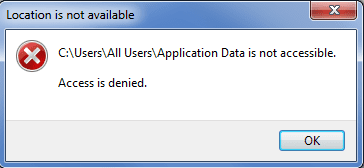
Solved how to access 'application data'
for both 'all users' and my account I can't access the 'application data' folder?
application-data-access-denied.png
18.1 KB
· Views: 8
R.I.P. March 10th 2014
Guru
VIP
Bbxrider, the applications data folder is a system point to your userid appdata
Computer type Laptop Computer Manufacturer/Model Number Toshiba Laptop Qosimo X870 OS Windows 7 Pro x64 SP1 CPU Intel Core I7 Motherboard Toshiba Qosmio Memory 16 Gigs Graphics Card(s) NVIDIA GeForce GTX 670M Monitor(s) Displays 17.7" laptop Screen Resolution 1600 x 900 Hard Drives 256 Gig SanDisk SSD for C Internet Speed 50/25 FIOS Antivirus Vipre (all you can eat for 10 machines) Browser IE and FF Other Info I have dos 6.22, wfwg 3.11, win98, 2000 and xp VHD's available for testing. MS's Virtual PC works great.
Administrator
Staff member
Hello bbxrider,
In addition to what Rich posted above, this is done for backwards compatibility for older programs.
AppData is located in the
hidden folder below:
C:\Users\(user-name)\AppData
Hope this helps,
Shawn
Computer type PC/Desktop Computer Manufacturer/Model Number Self built custom OS 64-bit Windows 11 Pro for Workstations CPU Intel i7-8700K OC'd to 5 GHz Motherboard ASUS ROG Maximus XI Formula Z390 Memory 64 GB (4x16GB) G.SKILL TridentZ RGB DDR4 3600 MHz Graphics Card(s) ASUS ROG-STRIX-GTX1080TI-O11G-GAMING Sound Card Integrated Monitor(s) Displays 2 x Samsung Odyssey G7 27" Screen Resolution 2560x1440 Hard Drives 1TB Samsung 990 PRO M.2, PSU Seasonic Prime Titanium 850W Case Thermaltake Core P3 Cooling Corsair Hydro H115i Keyboard Logitech wireless K800 Mouse Logitech MX Master 4 Internet Speed 2 Gb/s Download and 100 Mb/s Upload Antivirus Malwarebyte Anti-Malware Premium Browser Google Chrome Other Info Logitech Z625 speaker system,
New member
Thread Starter
thanks for the replies, so I can see users/userid/appdata, but don't see a 'users/all users/appdata'? there is really no 'all users/application data' at all? or it has some other place similar to 'userid/appdata'?
C:\ProgramData is the all users AppData
Computer type PC/Desktop Computer Manufacturer/Model Number Alienware Aurora ALX R4 OS Windows 10 Pro (x64) CPU Intel Core i7-3930K (3.2GHz - 4.5GHz) Motherboard Alienware Aurora-R4 x79 Memory 4x Samsung 4GB PC3-12800 DDR3 (16GB 1600MHz) Graphics Card(s) Nvidia Geforce GTX 690 Sound Card SteelSeries Siberia Elite Monitor(s) Displays Dell UltraSharp U3011 Screen Resolution 2560x1600 Hard Drives Samsung 850 Pro 256 GB, Seagate 1TB Desktop Hybrid HDD, 2x Western Digital 4TB Green HDD PSU 875W Some Dell PSU <.< Case Alienware Aurora ALX Cooling Custom Liquid Cooling (EK CPU & GPU blocks) dual EK 480RAD Keyboard Logitech G710+ Mechanical Mouse Logitech G700s Internet Speed Verizon Fios (50 mbps average) Other Info Server: Intel NUC D54250WYK: i5-4250U, 16GB, 256 GB mSATA, Windows Server 2012 R2
New member
Thread Starter
thanks again for the replies, can't really say 'now I can see and understand the MS light' but can say, 'finding some previously hard to find directories'
Administrator
Staff member
Glad we could help.
Computer type PC/Desktop Computer Manufacturer/Model Number Self built custom OS 64-bit Windows 11 Pro for Workstations CPU Intel i7-8700K OC'd to 5 GHz Motherboard ASUS ROG Maximus XI Formula Z390 Memory 64 GB (4x16GB) G.SKILL TridentZ RGB DDR4 3600 MHz Graphics Card(s) ASUS ROG-STRIX-GTX1080TI-O11G-GAMING Sound Card Integrated Monitor(s) Displays 2 x Samsung Odyssey G7 27" Screen Resolution 2560x1440 Hard Drives 1TB Samsung 990 PRO M.2, PSU Seasonic Prime Titanium 850W Case Thermaltake Core P3 Cooling Corsair Hydro H115i Keyboard Logitech wireless K800 Mouse Logitech MX Master 4 Internet Speed 2 Gb/s Download and 100 Mb/s Upload Antivirus Malwarebyte Anti-Malware Premium Browser Google Chrome Other Info Logitech Z625 speaker system,