How to backup (clone) a complex partition HD ?

carls2

New member
Local time
1:47 PM
Messages
10
My general question is how to backup rather complex looking partition structure. Specifically, my question is what software to select and whether any "not-too-expensive" software will do the job (plus the restore).

The computer is a new ACER aspire one (D257) with Win7 Starter that offers Android at bootup.

The harddisk shows the following map:

PQSERVICE Partition(01) 13312MB Windows RE
MBR 1 Partition(02) 4199MB FAT-32
System Reserved Partition (03) 100MB HPFS/NTFS
MBR 3 Partition (04) 287630MB Extended
Acer Volume (047f) 287630MB HPFS/NTFS

Can you see anything special that would make backing up use anything but a conventional cloning procedure? I'm worried about the boot to Android, since I don't know where that is coming from (MBR or somewhere else?).

Thanks for any tips or tutorial refs.

Carls2
 

My Computer My Computer

At a glance

win 7Intel core 24GB
Computer Manufacturer/Model Number
MSI
OS
win 7
CPU
Intel core 2
Motherboard
MSI
Memory
4GB
Hard Drives
320GB
Case
portable
Better idea would be for you to post a screen shot of Windows Disk Management. If not, too much guesswork is involved.

You would need to image the System Reserved for sure.

And C, whichever partition that is.

Acer does some silly things with partitions, so it's hard to tell without a picture.

PQService is probably either a recovery or tools partition.

Macrium Free Edition can usually do the job.
 

My Computer My Computer

At a glance

Windows 7 Home Premium SP1, 64-bitIntel Skylake i5-6600K, not overclocked8 GB HyperX DDR4-2666 (2 x 4 GB)none; graphics are integrated on CPU
Computer type
PC/Desktop
Computer Manufacturer/Model Number
Ignatz Special; 4 speed manual gearbox; factory air conditioning; one of one
OS
Windows 7 Home Premium SP1, 64-bit
CPU
Intel Skylake i5-6600K, not overclocked
Motherboard
AsRock Z170M Extreme 4, micro ATX
Memory
8 GB HyperX DDR4-2666 (2 x 4 GB)
Graphics Card(s)
none; graphics are integrated on CPU
Sound Card
onboard: Realtek ALC1150; external: USB Behringer UF0-202
Monitor(s) Displays
Dell S2340M 23 inch IPS
Screen Resolution
1600 x 900
Hard Drives
System: Crucial MX100 series SSD, 128 GB;
Data: Samsung Spinpoint 103SJ, 1 TB;
Backup: WD Caviar Green WD30EZRX-00D8PB0, 3 TB
PSU
Rosewill SilentNight 500 watt fanless, semi-modular
Case
Antec Solo II
Cooling
Noctua NH-U12S; Noctua F12 intake, Noctua S12A exhaust
Keyboard
Microsoft 200 6JH-00001 USB
Mouse
Dell or Microsoft optical wired; USB
Antivirus
Microsoft Security Essentials and Malwarebytes Premium
Browser
Pale Moon
Other Info
All fans PWM; speeds at idle: CPU circa 500 rpm; intake circa 600 rpm; exhaust circa 600 rpm; CPU temps 27 idle and 47 C load in a warm room (27 C/81 F) when running Intel Extreme Tuning Utility stress test.

My Computer My Computer

At a glance

Vista, Windows7, Mint Mate, Zorin, Windows 8from 1.6GHz Duo to i7
Computer Manufacturer/Model Number
HP, Dell, Gateway, Toshiba - 4 laptops and 2 desktops
OS
Vista, Windows7, Mint Mate, Zorin, Windows 8
CPU
from 1.6GHz Duo to i7
Monitor(s) Displays
2x HP w2207
Hard Drives
5x HDD, 7x SSD, 12x Externals
Keyboard
with trackball - no mices
Mouse
Trackball mice
Internet Speed
DSL 6000
Better idea would be for you to post a screen shot of Windows Disk Management. If not, too much guesswork is involved....

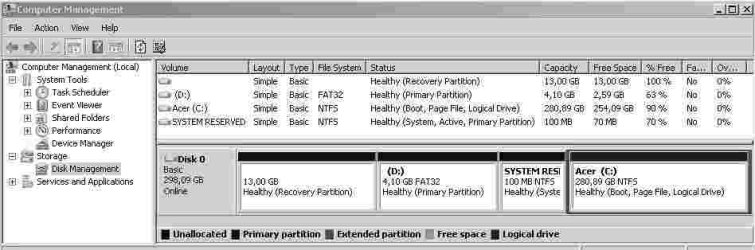
Here's the screenshot. (Reduced the size - did I destroy readability?). Thanks for you comments and for taking a look.
Carls2
 

Attachments

  • Acer1HD.jpg
    Acer1HD.jpg
    19.7 KB · Views: 32

My Computer My Computer

At a glance

win 7Intel core 24GB
Computer Manufacturer/Model Number
MSI
OS
win 7
CPU
Intel core 2
Motherboard
MSI
Memory
4GB
Hard Drives
320GB
Case
portable
Reading from left to right in the bottom portion of that pic:

The 13 GB partition is for recovery to factory specs and is not needed for Windows. It's put there by Acer. You should make a set of recovery DVDs that have the same purpose, in case this 13 GB partition gets damaged or deleted.

The 4.10 GB FAT 32 has an unknown purpose. It may be tools of some type, but it not a Windows partition.

You could back up the above 2 partitions with an image file if you wanted, but most people would not.

The next one, System Reserved, contains your boot files and is needed for Windows to start. It should be backed up via an image.

The last one is the rest of Windows and needs to be imaged.

Most would tell you to image System Reserved and C separately. Macrium Reflect Free Edition is a good choice.

Save the image files to an external drive.

I have no idea about Android, but would assume it exists on C somewhere.
 

My Computer My Computer

At a glance

Windows 7 Home Premium SP1, 64-bitIntel Skylake i5-6600K, not overclocked8 GB HyperX DDR4-2666 (2 x 4 GB)none; graphics are integrated on CPU
Computer type
PC/Desktop
Computer Manufacturer/Model Number
Ignatz Special; 4 speed manual gearbox; factory air conditioning; one of one
OS
Windows 7 Home Premium SP1, 64-bit
CPU
Intel Skylake i5-6600K, not overclocked
Motherboard
AsRock Z170M Extreme 4, micro ATX
Memory
8 GB HyperX DDR4-2666 (2 x 4 GB)
Graphics Card(s)
none; graphics are integrated on CPU
Sound Card
onboard: Realtek ALC1150; external: USB Behringer UF0-202
Monitor(s) Displays
Dell S2340M 23 inch IPS
Screen Resolution
1600 x 900
Hard Drives
System: Crucial MX100 series SSD, 128 GB;
Data: Samsung Spinpoint 103SJ, 1 TB;
Backup: WD Caviar Green WD30EZRX-00D8PB0, 3 TB
PSU
Rosewill SilentNight 500 watt fanless, semi-modular
Case
Antec Solo II
Cooling
Noctua NH-U12S; Noctua F12 intake, Noctua S12A exhaust
Keyboard
Microsoft 200 6JH-00001 USB
Mouse
Dell or Microsoft optical wired; USB
Antivirus
Microsoft Security Essentials and Malwarebytes Premium
Browser
Pale Moon
Other Info
All fans PWM; speeds at idle: CPU circa 500 rpm; intake circa 600 rpm; exhaust circa 600 rpm; CPU temps 27 idle and 47 C load in a warm room (27 C/81 F) when running Intel Extreme Tuning Utility stress test.
...

You could back up the above 2 partitions with an image file if you wanted, but most people would not.

The next one, System Reserved, contains your boot files and is needed for Windows to start. It should be backed up via an image.

The last one is the rest of Windows and needs to be imaged.

...

Thanks very much for your helpful comments. Looks like a long weekend coming up...

When it comes to the restore, if I restore just the essential two partitions for Win7, can I at a later time restore the other ACER partitions? That is, can the partitions other than System Reserved and the "C" partitions be restored later and as needed?

If I can restore what I want when I want it (great) - does that mean I will need to create partitions and space for restoring the ACER partitions at a later date? In other words, does the restore step automatically push other partitions to the side to make room for restoring the missing partitions - or do you have to repartition before the restore to make place for them?

As you can see, I'm new to the backup and restore business. Thanks for all the tips and help here.
 

My Computer My Computer

At a glance

win 7Intel core 24GB
Computer Manufacturer/Model Number
MSI
OS
win 7
CPU
Intel core 2
Motherboard
MSI
Memory
4GB
Hard Drives
320GB
Case
portable
Yes, you could restore any partition when you want as needed.

You would need to have enough "unallocated space" on the destination drive to accommodate the partition to be restored. No, the restore is not going to "push other partitions to the side". You have to have the unallocated space, which may require you to shrink existing partitions to generate unallocated space. Partition Wizard bootable disk is the best tool to do that.

As far as I know, you don't create new partitions and then restore to those partitions. You create "unallocated space". The restoration process creates the necessary partitions, assuming there is enough "unallocated space".

It shouldn't be a long weekend for you. I can make a partition of my C drive in literally 6 minutes, using Macrium, with about 5 or 6 mouse clicks. That's for a C with 30 GB occupied. System Reserved is so small as to take a few seconds.

Get Macrium here:

Macrium Reflect FREE Edition - Information and download

Get Partition Wizard bootable disk here; the link at the bottom of the page. Burn it to a disk and make sure it boots your PC. You wouldn't need it to make the image files, but you probably would need it to shrink or otherwise manipulate partitions prior to restoring.

http://www.partitionwizard.com/download.html

When manipulating partitions, DO NOT accept any choice that mentions "dynamic disks".

If you use Macrium to make the images, you would use Macrium to restore them. You MUST also make a "recovery disk" from within Macrium. The recovery disk is used to boot your PC to do a restore. If you do not have a recovery disk or if it does not boot your PC, you cannot restore and Macrium is useless.

So you need to test your recovery disk to make sure it boots the PC. You need to be able to boot from it and use the provided interface to locate your image file as well as the prospective destination to which you intend to restore.

You can make 2 types of recovery disks: Linux-based or WinPE-based. The latter is less likely to have problems and is the preferred choice.

You will note that your C drive is now marked "logical". That's fine for situations where you have at least 4 partitions, as you now do. But if you were to later change hard drives and want no more than 3 partitions, it would be fine to have a C partition that was marked "primary" rather than "logical". Logical partitions are a way to avoid the dreaded "dynamic" partitions when you want 4 or more partitions total.
 
Last edited:

My Computer My Computer

At a glance

Windows 7 Home Premium SP1, 64-bitIntel Skylake i5-6600K, not overclocked8 GB HyperX DDR4-2666 (2 x 4 GB)none; graphics are integrated on CPU
Computer type
PC/Desktop
Computer Manufacturer/Model Number
Ignatz Special; 4 speed manual gearbox; factory air conditioning; one of one
OS
Windows 7 Home Premium SP1, 64-bit
CPU
Intel Skylake i5-6600K, not overclocked
Motherboard
AsRock Z170M Extreme 4, micro ATX
Memory
8 GB HyperX DDR4-2666 (2 x 4 GB)
Graphics Card(s)
none; graphics are integrated on CPU
Sound Card
onboard: Realtek ALC1150; external: USB Behringer UF0-202
Monitor(s) Displays
Dell S2340M 23 inch IPS
Screen Resolution
1600 x 900
Hard Drives
System: Crucial MX100 series SSD, 128 GB;
Data: Samsung Spinpoint 103SJ, 1 TB;
Backup: WD Caviar Green WD30EZRX-00D8PB0, 3 TB
PSU
Rosewill SilentNight 500 watt fanless, semi-modular
Case
Antec Solo II
Cooling
Noctua NH-U12S; Noctua F12 intake, Noctua S12A exhaust
Keyboard
Microsoft 200 6JH-00001 USB
Mouse
Dell or Microsoft optical wired; USB
Antivirus
Microsoft Security Essentials and Malwarebytes Premium
Browser
Pale Moon
Other Info
All fans PWM; speeds at idle: CPU circa 500 rpm; intake circa 600 rpm; exhaust circa 600 rpm; CPU temps 27 idle and 47 C load in a warm room (27 C/81 F) when running Intel Extreme Tuning Utility stress test.
...
When it comes to the restore, if I restore just the essential two partitions for Win7, can I at a later time restore the other ACER partitions? That is, can the partitions other than System Reserved and the "C" partitions be restored later and as needed?
Yes and NO.
You need to create an image of them BEFORE they get lost or damaged.
 

My Computer My Computer

At a glance

Windows 7 Ultimate 64 bit SP1 x64AMD Phenom X4 95008 GBATI Radeon HD 4600 Series
Computer Manufacturer/Model Number
ASUSTeK Computer INC. M3A32-MVP DELUXE (CPU 1)
OS
Windows 7 Ultimate 64 bit SP1 x64
CPU
AMD Phenom X4 9500
Motherboard
ASUSTeK M3A32-MVP Deluxe (CPU 1)
Memory
8 GB
Graphics Card(s)
ATI Radeon HD 4600 Series
Sound Card
AMD High Definition Audio Device
Monitor(s) Displays
SyncMaster (1680x1050@60Hz)
Hard Drives
59GB OCZ-VERTEX2 ATA Device
+
977GB SAMSUNG HD103SJ ATA Device
+
625GB WDC WD6401AALS-00L3B2 ATA Device
Back
Top