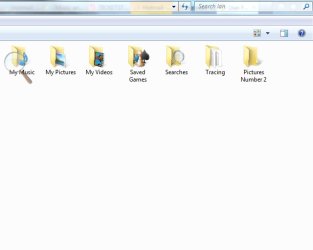
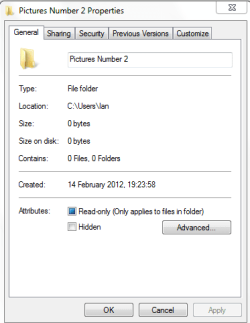
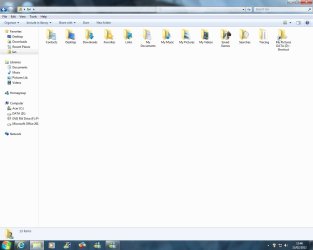
I have opened a new folder called 'Pictures Number 2' in my user name folder. By default, this new folder stores files in C Drive.
Without actually moving the folder from where it is now, ie. I want the new folder to remain in my user name folder, is it possible to change it so that anything I save to it is stored on D Drive? Or do all folders located in user name folder have to save to C?
I tried to achieve this with the 'My Pictures' folder, and it went majorly pear-shaped, and took Brink and I several days to restore the folder. So, as you can tell, you probably need to explain things to me in an uncomplicated way.
Attachments
Pictures No2.jpg
36 KB
· Views: 3
Pictures No2. A.PNG
8.6 KB
· Views: 4
My Computer
At a glance
Windows 7 Home Premium 64 bit SP1Intel i3 5403GB DDR3SD
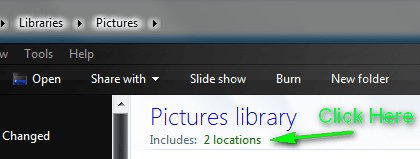
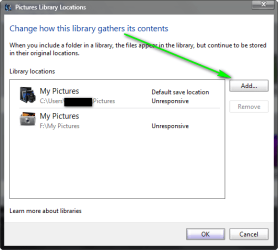
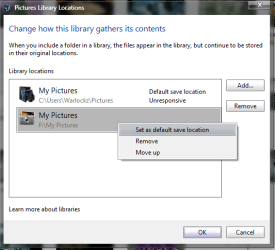
The only way I can think of is, Add the new location of your other drive to the Pictures Library Folder, "see pics below" then set your new location as the default save location by right clicking on it, and choose "set as default save location", unfortunately you can only use this feature with the main folders in your libraries. "Documents, Music, Pictures, Videos". But I hope this helps!
right click on the pic num 2 folder in D: and select create shortcut, then cut and paste the shortcut from your pic num2 folder over to the users folder
My Computer
At a glance
Microsoft Windows 7 Home Premium 64-bit 7600IIx4 amd athelon 635 processor2x2gbati radeon HD 5450
Computer Manufacturer/Model Number
Hewlett packard/p6512uk
OS
Microsoft Windows 7 Home Premium 64-bit 7600
CPU
IIx4 amd athelon 635 processor
Motherboard
FOXCONN 2AA9
Memory
2x2gb
Graphics Card(s)
ati radeon HD 5450
Sound Card
(1) Realtek High Definition Audio (2) AMD High Definition
Monitor(s) Displays
samsung lcd tv 32"
Screen Resolution
1360x 768
Hard Drives
(1) WDC WD10 01FAES-60Z2A0 SATA Disk Device (2) Maxtor OneTouch USB Device (3) ST310003 33AS USB Device (4) WD My Book 1111 USB Device
Great, done that. Created a 'My Pictures DATA (D) file in D, than c and p'ed a short cut into my user name folder.
One other question: how do I arrange the folders on my user name screen into something more logical/ordered. Tried dragging them around, but they won't stay where I put them.
Thanks Boohbah, and also Warlockz - appreciate the images, although if I attempted these, I may have lost My Pictures folder again, or even the whole library!
Attachments
Untitled.jpg
56.2 KB
· Views: 4
My Computer
At a glance
Windows 7 Home Premium 64 bit SP1Intel i3 5403GB DDR3SD
You can't rearrange folders yourself. You have to do a "Sort By" and you're stuck with the options given there. This is a known issue with Win7 that some people severely dislike.
That's 2 issues with 7 that people seem to dislike, the other being the fact that the favourites list opens on the right, instead of the left as it used to. Can't change this either, as far as I know.
My Computer
At a glance
Windows 7 Home Premium 64 bit SP1Intel i3 5403GB DDR3SD