
How to Close 'Program Name Already Running'

Cyntax

New member
Local time
11:45 AM
Messages
5
I hope you can help me here. I've search all over the Internet & on various forums trying to solve this problem for over a month now. :confused: I'm losing my hair over this!

I am trying to completely uninstall an older, outdated version of a software program and then install the newest, updated version, but it seems not everything is getting uninstalled (specifically the .junique folder containing 2 LOCK files - which is mainly intended to prevent a user from running simultaneous instances of the same Java application). This folder is apparently preventing the newly installed version from executing properly. (The program requires Java to run.)

The software application does not appear in Add or Remove Programs because it is a stand alone (.exe) program that is sitting on my Desktop. I've killed the process using the Task Manager, but when I try to open the newer version, it shows "[Program name] already running" & will not open. But it is NOT in the Task Manager at that point! No matter how many times I delete the previous version & install the new version, this same thing happens. :banghead:

I have used RevoUninstaller to uninstall Java (& all the remnants bits it left on my computer), but still no luck. (Btw, RevoUninstaller does not see this software application so I cannot uninstall it using RevoUninstaller.)

Any help with this is GREATLY appreciated!

P.S. The software developers say the problem is only happening on my computer out of the thousands of others using the software.
 

My Computer

Computer type
Laptop
Computer Manufacturer/Model Number
Gateway
OS
Windows 7 Home Premium 64bit

My Computer

Computer type
PC/Desktop
Computer Manufacturer/Model Number
Homebuild
OS
Windows 7 Ultimate 64 bit SP1
CPU
DualCore Intel Pentium D 820, 2800 MHz (14 x 200)
Motherboard
Gigabyte EX58-UD3R
Memory
Kingston DDR3 (PC3-10700H) 6.0GB
Graphics Card(s)
AMD Radeon HD 6450
Sound Card
Realtek ALC882/D/M
Monitor(s) Displays
Samsung SyncMaster 2233SW
Screen Resolution
1920 x 1080
Hard Drives
Drive #1 - WDC WD2500JB-22REA0 (232 GB)
Drive #2 - WDC WD6400AAKS-65A7B0 (596 GB)
PSU
EVGA Supernova 750w G2 Gold
Cooling
5 x 80mm Generic Fans
Keyboard
Microsoft Comfort Curve 2000
Mouse
SteelSeries IKARI 62001-1 Laser or Microsoft Laser 6000
Internet Speed
1500/256
Antivirus
NOD32 v10.1.235.0
Browser
FireFox 59.0.2 X64bit
Other Info
Telstra Technicolor TG799vac Modem
LG HL-DT-ST DVDRAM GH20NS15 ATA Device
16X52X32X52 COMBO SCSI CDRom Device
Logitech Wave Keyboard
Microsoft 6000 Laser Mouse
Have you tried Unlocker 1.9.2 to unlock and remove the files/folder?

UNLOCKER 1.9.2 BY CEDRICK 'NITCH' COLLOMB

subyroo,

I used RevoUninstaller to uninstall Java & all its remnants, & re-installed it since the software needs it to run. I have full permissions for the Junique folder, but when I tried to delete the folder using the CMD prompt, I got "access denied." I tried BOTH FileAssassin, & Unlocker 1.9.2 (neither of which worked to unlock the files because they said they could not find locked handles). After I tried those 2 unlockers, I went back to the CMD prompt to see AGAIN if I could delete the .junique folder/files & this time it said: "The system cannot find the file specified." Even though I was looking right at the folder & files inside! :shock: I then tried LockHunter to see what process was causing the files to be locked. It said: "No processes locking this file or folder have been found."

The developers say it is my problem because it is only happening on my computer :( ...even though the folder is only opening when I open their software.
 

My Computer

Computer type
Laptop
Computer Manufacturer/Model Number
Gateway
OS
Windows 7 Home Premium 64bit
Welcome to Seven Forums Cyntax. Try this. Open an advanced command prompt

Start> In search box type cmd> Right click on cmd.exe in results above and choose Run as administrator> Navigate to the directory of the folder you cannot delete, EX:

cd C:\Users\(User Name)\Desktop

Enter

Now type

del "junique" (assuming junique is the name of the folder)

Enter

If you get an error Could Not Find C:\Users\(User Name)\Desktop\junique

Then try to find the old 8.3 filename of the folder

Start> In search box type cmd> Right click on cmd.exe in results above and choose Run as administrator> Navigate to the directory of the folder you cannot delete, EX:

cd C:\Users\(User Name)\Desktop

Enter

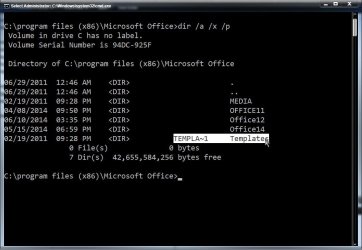
Now type dir /a /x /p

Enter

See if you see an 8.3 file name to the left of the junique listing (similar to the name next to Templates below, TEMPLA~1)

8.3.jpg

If there is an 8.3 file name, try to delete that

del junique~1 (for example)

A Guy
 

My Computer

Computer type
PC/Desktop
OS
Windows 10 Home x64
CPU
INTEL Core i5-750 Quad-Core 3.37GHz
Motherboard
ASUS P7P55D
Memory
HyperX Fury Black Series 8GB (2 x 4GB) 1866Mhz
Graphics Card(s)
EVGA GeForce GTX 750 Superclocked 1GB 128-Bit GDDR5
Monitor(s) Displays
LG 32MA68HY 32" IPS
Screen Resolution
1920 x 1080
Hard Drives
Samsung 840 Evo 120GB, SEAGATE 500GB Barracuda® 7200.12, SATA 3 Gb/s, 7200 RPM, 16MB cache
PSU
ANTEC TruePower New TP-550, 80 PLUS, 550W
Case
ANTEC Three Hundred Illusion
Cooling
COOLER MASTER Hyper 212 Plus, 4 x 120mm 1 x 140mm Noctua's
Internet Speed
85 + Mbps
Antivirus
Avast
Browser
Vivaldi
A Guy,

Thank you for the detailed instruction, however I can delete the folder. It just re-installs when I open the latest version of the software.

After doing extensive research trying to troubleshoot & figure this out & ending up at several Java programming forums (I am no programmer) :shock:, I found these posts:

http://www.wowinterface.com/forums/showthread.php?p=293866 EDIT: For some reason, you get a 404 Error when clicking this link from this site. :confused: If you copy & paste the link, it will take you there.
JD will not shutdown completely (SVN at revision 9500) - JD Community

Junique seems to be the culprit here too.

From my extremely limited knowledge, it appears it may be a Java & coding issues with the software. It seems the Junique script was written into the Java code of the newer versions of the application (not the older version that I can run).

If I'm understanding what I've read correctly, it seems like the new .exe software application cannot create the socket to bind junique on & cannot find a port (or my computer name) to connect to in order to open the latest version. Therefore the lock files get hung up. There should be 3 files in the Junique folder (2 LOCK & a PORT). I only have 2 because the application cannot connect to a port.

The application log is in gibberish & a bunch of random letters & numbers, like this...

MDcvMjMvMjAxNCAwNzo1NDo0OSAtIFN5c3RlbSBJbmZvcm1hdGlvbg==
MDcvMjMvMjAxNCAwNzo1NDo0OSAtIC0tLS0tLS0tLS0tLS0tLS0tLS0tLS0tLS0tLS0tLS0tLS0tLS0tLS0tLS0tLS0tLS0tLS0tLS0tLS0tLQ==

so I have no idea what it means! :eek:

The problem could also be that the JVM temporary file is not automatically getting deleted when I close the application. :confused:

I don't know how to fix any of this, but I'm still searching.
 
Last edited:

My Computer

Computer type
Laptop
Computer Manufacturer/Model Number
Gateway
OS
Windows 7 Home Premium 64bit

My Computer

Computer type
PC/Desktop
OS
Windows 10 Home x64
CPU
INTEL Core i5-750 Quad-Core 3.37GHz
Motherboard
ASUS P7P55D
Memory
HyperX Fury Black Series 8GB (2 x 4GB) 1866Mhz
Graphics Card(s)
EVGA GeForce GTX 750 Superclocked 1GB 128-Bit GDDR5
Monitor(s) Displays
LG 32MA68HY 32" IPS
Screen Resolution
1920 x 1080
Hard Drives
Samsung 840 Evo 120GB, SEAGATE 500GB Barracuda® 7200.12, SATA 3 Gb/s, 7200 RPM, 16MB cache
PSU
ANTEC TruePower New TP-550, 80 PLUS, 550W
Case
ANTEC Three Hundred Illusion
Cooling
COOLER MASTER Hyper 212 Plus, 4 x 120mm 1 x 140mm Noctua's
Internet Speed
85 + Mbps
Antivirus
Avast
Browser
Vivaldi
Have you tried the process in Safe Mode (w/Networking if you need internet access). You might be able to remove the files if Windows is in Safe Mode (unless you are saying that you have an entirely different issue now?).

http://www.sevenforums.com/tutorials/69585-safe-mode.html

If it works in Safe Mode, try a Clean Start to see if you have something conflicting

http://www.sevenforums.com/tutorial...ation-conflicts-performing-clean-startup.html

A Guy

I have tried starting in Safe Mode. The application that I can run in Normal mode, just hangs there & never opens.

The programmers say: "LK never actually installs on your machine, which is why you don't see it in the Add/Remove Programs section. It puts an icon on your desktop so you can access it through the Java, but that's it. Just remove all of the downloads and .exe files from your computer by dragging them to the trash." (Which is what I've ALWAYS done - for over year!)

The developers say they cannot replicate the issue on their end, and since nobody but me is having the issue, I'm on my own. They say it's NOT the software, it's something with my machine.
 

My Computer

Computer type
Laptop
Computer Manufacturer/Model Number
Gateway
OS
Windows 7 Home Premium 64bit
Try the clean start. I'm afraid I have no experience with the software, so can only offer generic possibilities. A Guy
 

My Computer

Computer type
PC/Desktop
OS
Windows 10 Home x64
CPU
INTEL Core i5-750 Quad-Core 3.37GHz
Motherboard
ASUS P7P55D
Memory
HyperX Fury Black Series 8GB (2 x 4GB) 1866Mhz
Graphics Card(s)
EVGA GeForce GTX 750 Superclocked 1GB 128-Bit GDDR5
Monitor(s) Displays
LG 32MA68HY 32" IPS
Screen Resolution
1920 x 1080
Hard Drives
Samsung 840 Evo 120GB, SEAGATE 500GB Barracuda® 7200.12, SATA 3 Gb/s, 7200 RPM, 16MB cache
PSU
ANTEC TruePower New TP-550, 80 PLUS, 550W
Case
ANTEC Three Hundred Illusion
Cooling
COOLER MASTER Hyper 212 Plus, 4 x 120mm 1 x 140mm Noctua's
Internet Speed
85 + Mbps
Antivirus
Avast
Browser
Vivaldi
I followed the Clean Startup instructions. After the clean re-start, I could not check the program because the application did not show up in Administrator mode. According to the developers, it is not actually installed on my computer. It is just an icon that sits on my desktop. I believe I access the applications functions through the developers site/server.

When I started it in Normal mode, I can see the application but it still says "Program name already running." So based on the clean startup tutorial, it isn't a program running in the background that is causing the problem.

I will try one of the other tutorials. I think it's related to the connection of the application (not being able to make one).
 

My Computer

Computer type
Laptop
Computer Manufacturer/Model Number
Gateway
OS
Windows 7 Home Premium 64bit
Back
Top