How To Customize TeamViewer Icon On System Tray To A Different One?

magnumfinger

New member
Local time
4:38 PM
Messages
5
I've recently installed Teamviewer (a remote PC program similar with LogMeIn). It works well but unfortunately, it has that annoying icon on the system tray making it not stealthy enough in case my notebook got stolen.

I'm thinking of replacing its icon with a different one like a gaming controller, or just about anything that would make it look more anonymous to the thief.
 

My Computer My Computer

At a glance

windows 7 64 bit
Computer type
PC/Desktop
OS
windows 7 64 bit

My Computer My Computer

At a glance

Win 7 Pro x64 / Win 10 ProIntel(R) Core(TM) i7-3630QM CPU @ 2.40GHz12 GB(1) Intel(R) HD Graphics 4000 (2) NVIDIA GeFo...
Computer type
Laptop
Computer Manufacturer/Model Number
Sager NP9170
OS
Win 7 Pro x64 / Win 10 Pro
CPU
Intel(R) Core(TM) i7-3630QM CPU @ 2.40GHz
Motherboard
CLEVO P170EM
Memory
12 GB
Graphics Card(s)
(1) Intel(R) HD Graphics 4000 (2) NVIDIA GeForce GTX 675M
Sound Card
(1) Realtek High Definition Audio (2) Intel(R) Display Aud
Monitor(s) Displays
17.3
Screen Resolution
1920x1080
Hard Drives
(1) Samsung 860 EVO 500GB(OS) (1) Samsung 860 EVO 500GB(Data)
Keyboard
Backlite
Antivirus
MSE, Malwarebytes Pro
Browser
Firefox
Other Info
DESKTOP: Custom-built.
OS: Win 10 Pro x64.
CASE: Rosewill R5.
CPU: Intel I5 4670K CPU @ 3.40GHz.
CPU COOLER: Cool Master Hyper 212 EVO.
MOTHERBOARD: Asus Z87-A.
MEMORY: Kingston HyperX 2x4 GB.
GPU: Nvidia Geforce 650 TI.
PSU: Corsair TX750.
DRIVES: (1) Samsung 840 120 GB SSD (2) Western Digital blue 500 GB 7200 RPM.
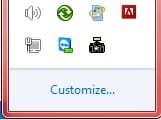
Those are special icons embedded in the program. There's no easy way to change them. They can't be accessed by the normal change icon options. You could just hide the icon using Customize Taskbar options.

As a side note; That's a program I wouldn't have on the PC anyway. If you need it, run it off a USB thumb drive.
 

My Computer My Computer

At a glance

Windows 7 Pro-x64i7-2600 3.4GHz - 3.8GHz Turbo8Gb - 2x4GB, Muskin 991770 PC3-1333Integrated Intel HD 2000
Computer type
PC/Desktop
Computer Manufacturer/Model Number
Built 2/11/2011
OS
Windows 7 Pro-x64
CPU
i7-2600 3.4GHz - 3.8GHz Turbo
Motherboard
Intel DH67BL-B3
Memory
8Gb - 2x4GB, Muskin 991770 PC3-1333
Graphics Card(s)
Integrated Intel HD 2000
Sound Card
Integrated Intel 10.1 HD, RealTek ALC892
Monitor(s) Displays
Asus LCD VH222H, Haier HL24XSL2a
Screen Resolution
1920x1080, 1920x1080
Hard Drives
Crucial SSD C300-128Gb,
Western Digital WD5002AALX - 500Gb,
Western Digital WD7501AALS - 750Gb
PSU
Seasonic 650W 80+ Gold Modular
Case
Rosewill Defender
Cooling
Stock CPU, Four 120mm case fans, PCH fan added
Keyboard
Logitech EX100 Y-RBH94 Wireless
Mouse
Logitech EX100 M-RCE95 Wireless
Internet Speed
3.0/1.5 Mbs
Antivirus
Microsoft Security Essentials
Browser
Microsoft Internet Explorer 11
Other Info
Antec Veris Premier-Multimedia IR Station,
Cyber Accoustics-3602 Speakers,
AFT XM-5U Card Reader,
Hauppauge TV-HVR-2250,
Sony LX300 USB Turntable

Attachments

  • teamviewer-icon.jpg
    teamviewer-icon.jpg
    664 bytes · Views: 40
  • teamviewer-icon-1.jpg
    teamviewer-icon-1.jpg
    3.9 KB · Views: 40

My Computer My Computer

At a glance

windows 7 64 bit
Computer type
PC/Desktop
OS
windows 7 64 bit
Those are special icons embedded in the program. There's no easy way to change them. They can't be accessed by the normal change icon options. You could just hide the icon using Customize Taskbar options.

As a side note; That's a program I wouldn't have on the PC anyway. If you need it, run it off a USB thumb drive.

Hi,

The hide icon in notification area under 'customize' option doesn't work. :(

My last option was to hide the whole systemtray using regedit tweak..
 

My Computer My Computer

At a glance

windows 7 64 bit
Computer type
PC/Desktop
OS
windows 7 64 bit
anyone? Thanks.
 

My Computer My Computer

At a glance

windows 7 64 bit
Computer type
PC/Desktop
OS
windows 7 64 bit
Changing icon in system tray

Well it can be done but make a backup first so that you can easily undo any changes.

Here's how to change an application's icon and that icon will be displayed in the system tray when it's running.

I don't know much about Team Viewer as i don't use it.

Download and install Resource Hacker

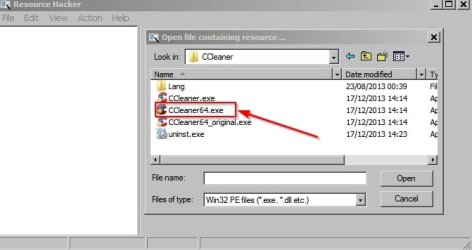
Run the program and choose File> Open then browse to the Team Viewer executable. Make sure that it's not actually running.

On my machine I'll use ccleaner 64bit executable as an example instead.

Resource Hacker.jpg

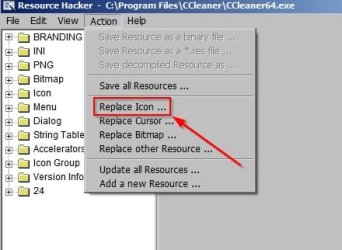
Then choose Action> Replace Icon

Resource Hacker 2.jpg

Browse to the icon that you wish to use, select it and choose "Replace Icon"

Then click File> Save

That's it!

NOTE: It's best to back up your icons first. You can use IconsExtract - Extract icon/cursor stored in EXE, DLL, OCX, CPL files (portable version) - to extract all icons on your hard drive (or thumb drive). Or just point it at the icons in your Team Viewer progam folder and copy them to a backup folder. Let it include subfolders in the search.
 
Last edited:

My Computer My Computer

At a glance

Microsoft Windows 7 Home Premium 64-bit 7601 ...AMD C-60 APU with Radeon(tm) HD Graphics4.00 GBAMD Radeon HD 6290 Graphics
Computer type
Laptop
Computer Manufacturer/Model Number
ASUS
OS
Microsoft Windows 7 Home Premium 64-bit 7601 Multiprocessor Free Service Pack 1
CPU
AMD C-60 APU with Radeon(tm) HD Graphics
Motherboard
ASUSTeK COMPUTER INC. X501U
Memory
4.00 GB
Graphics Card(s)
AMD Radeon HD 6290 Graphics
Sound Card
(1) AMD High Definition Audio Device (2) Realtek High Defi
Screen Resolution
1366 x 768 x 32 bits (4294967296 colors) @ 60 Hz
Hard Drives
Hitachi HTS545050A7E380 SATA Disk Device
Antivirus
Comodo CIS & FW, SecureAplus App Whitelisting, Threatfire
Browser
Cyberfox 64bit, Opera 64bit, Airfox
Other Info
Spy-The-Spy, HitmanPro.Alert, Norton Connect Safe, MJRegWatcher, BitDefender TrafficLight, Voodoo Shield, Zemana AntiMalware
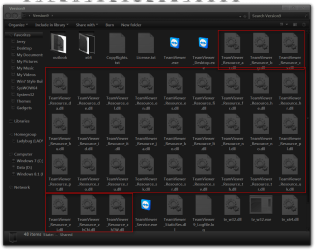
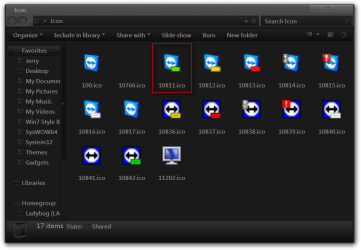
I found that icon in all of the .dll in C:\Program Files (x86)\TeamViewer\Version9 folder highlighted in red, so it could be all or just 1 not sure.

Jerry
Version9.png

Icon.png
 

My Computer My Computer

At a glance

Win 7 Pro x64 / Win 10 ProIntel(R) Core(TM) i7-3630QM CPU @ 2.40GHz12 GB(1) Intel(R) HD Graphics 4000 (2) NVIDIA GeFo...
Computer type
Laptop
Computer Manufacturer/Model Number
Sager NP9170
OS
Win 7 Pro x64 / Win 10 Pro
CPU
Intel(R) Core(TM) i7-3630QM CPU @ 2.40GHz
Motherboard
CLEVO P170EM
Memory
12 GB
Graphics Card(s)
(1) Intel(R) HD Graphics 4000 (2) NVIDIA GeForce GTX 675M
Sound Card
(1) Realtek High Definition Audio (2) Intel(R) Display Aud
Monitor(s) Displays
17.3
Screen Resolution
1920x1080
Hard Drives
(1) Samsung 860 EVO 500GB(OS) (1) Samsung 860 EVO 500GB(Data)
Keyboard
Backlite
Antivirus
MSE, Malwarebytes Pro
Browser
Firefox
Other Info
DESKTOP: Custom-built.
OS: Win 10 Pro x64.
CASE: Rosewill R5.
CPU: Intel I5 4670K CPU @ 3.40GHz.
CPU COOLER: Cool Master Hyper 212 EVO.
MOTHERBOARD: Asus Z87-A.
MEMORY: Kingston HyperX 2x4 GB.
GPU: Nvidia Geforce 650 TI.
PSU: Corsair TX750.
DRIVES: (1) Samsung 840 120 GB SSD (2) Western Digital blue 500 GB 7200 RPM.
Can you hide it or change it ?

Hello,

Can you tell me if you finally managed to hide it or change it ?

Thank you o much.
 

My Computer My Computer

At a glance

Windows 7 64 bits
OS
Windows 7 64 bits
Team Viewer system tray icon

I don't have Team Viewer installed but here's my theory:

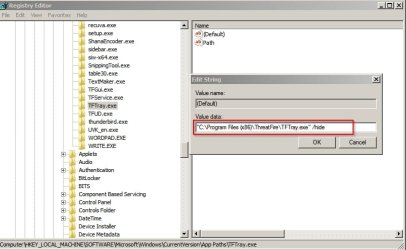
If you want to hide a system tray icon for a running program you'll need to identify the executable for the tray icon and locate it's entry in the registry.

Here's an example for another app that I have installed and running at all times:

Program Name is Threatfire

tftray.exe is the name of the executable for the system tray icon.

Search registry for tftray.exe

If you find the correct entry modify the (Default) value in the right pane.

Wrap the path in quotes and after the quotes add a space and /hide

Choose OK.

Reboot.

I don't see any problem but it's wise to backup the registry and create a system restore point first.

Registry Editor.jpg
 

My Computer My Computer

At a glance

Microsoft Windows 7 Home Premium 64-bit 7601 ...AMD C-60 APU with Radeon(tm) HD Graphics4.00 GBAMD Radeon HD 6290 Graphics
Computer type
Laptop
Computer Manufacturer/Model Number
ASUS
OS
Microsoft Windows 7 Home Premium 64-bit 7601 Multiprocessor Free Service Pack 1
CPU
AMD C-60 APU with Radeon(tm) HD Graphics
Motherboard
ASUSTeK COMPUTER INC. X501U
Memory
4.00 GB
Graphics Card(s)
AMD Radeon HD 6290 Graphics
Sound Card
(1) AMD High Definition Audio Device (2) Realtek High Defi
Screen Resolution
1366 x 768 x 32 bits (4294967296 colors) @ 60 Hz
Hard Drives
Hitachi HTS545050A7E380 SATA Disk Device
Antivirus
Comodo CIS & FW, SecureAplus App Whitelisting, Threatfire
Browser
Cyberfox 64bit, Opera 64bit, Airfox
Other Info
Spy-The-Spy, HitmanPro.Alert, Norton Connect Safe, MJRegWatcher, BitDefender TrafficLight, Voodoo Shield, Zemana AntiMalware
Back
Top