How to deal with IE9 - Tips and tricks With the IE9 we find that are

whs

New member
Guru
Gold Member
VIP
Local time
12:05 AM
Messages
26,200
Location
Florida in winter, Black Forest/Germany
With the release of IE9 we discover differences to the previous Internet Explorers and everybody has their own ways to deal with them. In this thread we should share our discoveries so that we learn from each other.

There is a Tutorial that Shawn has posted that is a good starting point. This one I have alredy "polluted" with some other suggestions (which was rightfully criticized by Night Hawk).

For now I would like to add this:

If you middle click (click with the scroll wheel) on a URL in e.g. Favorites, IE9 opens a new tab with this webpage. But it does not open the webpage itself.
 

My Computer My Computer

At a glance

Vista, Windows7, Mint Mate, Zorin, Windows 8from 1.6GHz Duo to i7
Computer Manufacturer/Model Number
HP, Dell, Gateway, Toshiba - 4 laptops and 2 desktops
OS
Vista, Windows7, Mint Mate, Zorin, Windows 8
CPU
from 1.6GHz Duo to i7
Monitor(s) Displays
2x HP w2207
Hard Drives
5x HDD, 7x SSD, 12x Externals
Keyboard
with trackball - no mices
Mouse
Trackball mice
Internet Speed
DSL 6000
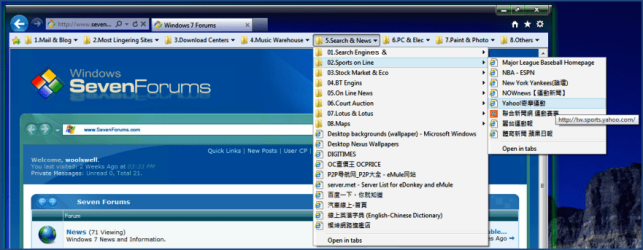
I always arrange the IE favorite bar something like this:

Image I:
01.png

Image II:
03.png
 

My Computer My Computer

At a glance

Server 2008 R2 SP1, Win7 x64 Pro SP1Intel Core 2 Duo E6700 @3.3GHzTranscend DDRII 800 4GB (2 x 2GB )GeForce 7950GX2
OS
Server 2008 R2 SP1, Win7 x64 Pro SP1
CPU
Intel Core 2 Duo E6700 @3.3GHz
Motherboard
ASUS P5W DH DELUXE
Memory
Transcend DDRII 800 4GB (2 x 2GB )
Graphics Card(s)
GeForce 7950GX2
Sound Card
Realtek ALC882M Integrated on board
Monitor(s) Displays
ACER AL2723 27" LCD
Screen Resolution
1920x1200
Hard Drives
WD 6401 AALS 640G x 1
Seagate 160 GB (Barracuda 7200.7) x 2
PSU
Zippy PSL-6720P(G1)720W
Case
Thermaltake Kandalf VA9000SWA
Cooling
Zalman CNPS9500
Keyboard
Standard
Mouse
Standard
Internet Speed
10M, Cable
Other Info
Above is one of my desktops.
Hmm, that is interesting. And if you enable "Links" in the taskbar, then you can get to your websites from there too. No need to access "Favorites" any more. You can care less whether they are left or right.

Unfortunately that would not work for me because for one I have too many favorites files and then I use the Favorites bar to store webpages for "later reading" all the time. So my favorites bar is constantly changing.
 

My Computer My Computer

At a glance

Vista, Windows7, Mint Mate, Zorin, Windows 8from 1.6GHz Duo to i7
Computer Manufacturer/Model Number
HP, Dell, Gateway, Toshiba - 4 laptops and 2 desktops
OS
Vista, Windows7, Mint Mate, Zorin, Windows 8
CPU
from 1.6GHz Duo to i7
Monitor(s) Displays
2x HP w2207
Hard Drives
5x HDD, 7x SSD, 12x Externals
Keyboard
with trackball - no mices
Mouse
Trackball mice
Internet Speed
DSL 6000
......
Unfortunately that would not work for me because for one I have too many favorites files and then I use the Favorites bar to store webpages for "later reading" all the time. So my favorites bar is constantly changing.
:p

There must be more than one thousand websites or webpages in my favorite files.
They changes or being modified everday, more or less. This kind of favorite bar has
accompanied me for more than ten years. Without it, I will know not how to enjoy
the world of internet~~~
 

My Computer My Computer

At a glance

Server 2008 R2 SP1, Win7 x64 Pro SP1Intel Core 2 Duo E6700 @3.3GHzTranscend DDRII 800 4GB (2 x 2GB )GeForce 7950GX2
OS
Server 2008 R2 SP1, Win7 x64 Pro SP1
CPU
Intel Core 2 Duo E6700 @3.3GHz
Motherboard
ASUS P5W DH DELUXE
Memory
Transcend DDRII 800 4GB (2 x 2GB )
Graphics Card(s)
GeForce 7950GX2
Sound Card
Realtek ALC882M Integrated on board
Monitor(s) Displays
ACER AL2723 27" LCD
Screen Resolution
1920x1200
Hard Drives
WD 6401 AALS 640G x 1
Seagate 160 GB (Barracuda 7200.7) x 2
PSU
Zippy PSL-6720P(G1)720W
Case
Thermaltake Kandalf VA9000SWA
Cooling
Zalman CNPS9500
Keyboard
Standard
Mouse
Standard
Internet Speed
10M, Cable
Other Info
Above is one of my desktops.
Thing I would really like to see in IE9 is:
Pocket (old read it later), just like Firefox.
New tab with your favorites pinned tabs on (exactly like Firefox), not the most popular sites there is today.
A better content download (pictures and such) and a better built in screen capture as well.
One thing that really makes me unhappy about IE9, you can't just simply drag and drop to save a single image to an folder, why Mircosfot, why??? :-(
After all it's really the smoothest fastest browser, really good, manages well heavy content sites, long forum pages, but lacks in features to Firefox.
 
Last edited:

My Computer My Computer

At a glance

Windows 7 x64 UltimateIntel 4770kCorsair Vengance DDR3 (2x8) 16GBZotac 580 GTX (nVidia)
Computer type
PC/Desktop
Computer Manufacturer/Model Number
Custom Build
OS
Windows 7 x64 Ultimate
CPU
Intel 4770k
Motherboard
Asus Maximus VI Formula
Memory
Corsair Vengance DDR3 (2x8) 16GB
Graphics Card(s)
Zotac 580 GTX (nVidia)
Sound Card
Onboard
Monitor(s) Displays
Samsung XL2370
Screen Resolution
1920x1080p
Hard Drives
1 SSD Corsair Neutron
1 WD Blue
1 Seagate
PSU
Thermaltake 1000W
Case
NZXT Phantom 530
Cooling
4 case coolers, Zalman 9900MAX CPU and GPU stock cooler
Keyboard
Microsoft X4 Sidewinder
Mouse
G700 wireless Logitech
Internet Speed
10mb/s
Antivirus
Kaspersky PURE 3
Browser
Firefox and Thor
Other Info
DVD-ROM Sony Opticarc OEM
Back
Top