Solved How to delete created boot files ?

Lovus

Banned
Local time
1:12 PM
Messages
78
Location
At my HOUSE .
Hi ! I just experimented and tried to create boot files to another drive and was successfully created . So now I want to delete it because it was just an experiment but I don't know how to delete it .
Capture.JPG
Can someone help me delete this . (Please :cry:)
 

My Computer

OS
Ultimate 32bit
Cooling
Electric Fan
Internet Speed
Slow as a TURTLE
Did you merely copy Boot Files there or use a method to move the System Active boot flags to D as well?

Please post back a screenshot of your maximized Disk Management drive map and listings:

1. Type Disk Management in Start :orb: Search box.
2. Open Disk Mgmt. window and maximize it.
3. Type Snipping Tool in Start Search box.
4. Open Snipping Tool, choose Rectangular Snip, click New, draw a box around full drive map and all listings.
5, Save Snip, attach using paper clip in Reply Box.

Tell us what is on each partition.
 
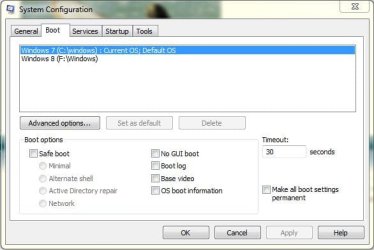
Post also what you have in System Configuration. Click Start, Type msconfig, right click and open as administrator, go to Boot ( you can see which default and other boot os, you can also delete and change default Boot OS).
 

My Computer

OS
Windows 7 x64
Gregrocker :
disk management.JPG
kradangel :
Untitled.jpg
I don't know what you're looking about . My only problem is deleting created boot files which I experimented and succefully created .

I've done this experiment through bcdboot command in elevated cmd . (easier way to delete SYSTEM RESERVED , No Boot Problems/No Startup Repairs )
 

My Computer

OS
Ultimate 32bit
Cooling
Electric Fan
Internet Speed
Slow as a TURTLE
It looks correct with System Active flags on C signifying it holds the boot files, so you can just delete the Boot files you copied to D.

Love your specs. Just don't let the goofing come back to bite you. ;)
 
Last edited:
If they aren't in use, you can rt click and delete.

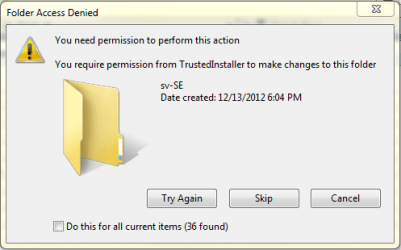
If you are having trouble with that - take ownership first - there are all kinds of permission annoyances with win 8.
 

My Computers

System One System Two

  • Computer type
    PC/Desktop
    OS
    7 X64
    CPU
    i5 8400
    Motherboard
    gigabyte b365m ds3h
    Memory
    2x8gb 3200mhz
    Hard Drives
    various
    PSU
    pure power 11 400w cm
    Case
    Coolermaster
    Cooling
    cryorig m9i
  • Computer type
    PC/Desktop
    OS
    7x64
    CPU
    g5400
    Motherboard
    ga b365m ds3h
    Memory
    8gb ddr4 2400
    PSU
    xfx pro 450w
Deleting it is not that easy .
Capture.PNG
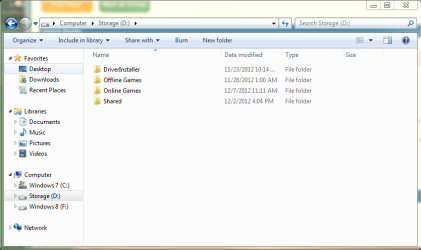
I cannot see the Boot Folder on my Drive even I set Folder Option to Reveal hidden Folders .
1.PNG
I know this is not a big problem but I don't want a mess on my PC .
 

My Computer

OS
Ultimate 32bit
Cooling
Electric Fan
Internet Speed
Slow as a TURTLE
Where did you copy the boot files from into D?

Unhide Hidden and System Files in Control Panel>Folder Options>View.

Browse into C to confirm the same boot files are still there, but do not touch them.

Since the System Active flags are on C signifying it holds the System boot files, there's almost no chance r that deleting them from D will cause problems. But I wonder why you would want to do something so utterly inane? What is it you were trying to discover?
 
OK . I created it through bcdboot command line under elevated command prompt .
What I typed in elevated command prompt is :
bcdboot c:\windows /s :d
Then a popup message will appear :
Boot files successfully created .
I was just trying it to test if I can set a non os partition to be active and it now worked . Now I am finish , I want to clean all residues from my experiments .
Hope you can help me :)
 

My Computer

OS
Ultimate 32bit
Cooling
Electric Fan
Internet Speed
Slow as a TURTLE
You too can access your boot files through address bar "C:\boot\" , but you cannot see it as a whole folder in your root drive .
 

My Computer

OS
Ultimate 32bit
Cooling
Electric Fan
Internet Speed
Slow as a TURTLE
I took ownership of all folders one by one but there is still 'd:\boot' address and I have no choice but to reformat the drive .
Thanks Greg you helped me alot .
 

My Computer

OS
Ultimate 32bit
Cooling
Electric Fan
Internet Speed
Slow as a TURTLE
Why don't you ask us whether you "have no choice but to format the drive?" Instead you inform us of this based on what?

Your "experimentation" is annoying because you don't really seem interested in learning anything, even though you're at the top tech forum amongst the top Win7 experts in the world.

If taking Ownership didn't work on all files, use Unlocker. If that fails, SIW2 can help you delete anything, anywhere.

If you're going to reinstall (not "format") then follow these steps to get a perfect Clean Reinstall - Factory OEM Windows 7.
 
What I mean is to reformat the drive not windows .
Sorry for misinterpretation :(
 

My Computer

OS
Ultimate 32bit
Cooling
Electric Fan
Internet Speed
Slow as a TURTLE
All of your suggestions and explanations worked , but there is still D:\boot address and I don't want any residues of my experiment so I reformatted it . I am experimenting because I want to learn and I use this forum to teach me and help me In case of anything goes wrong .

Again I am sorry for misinterpretation :(
 

My Computer

OS
Ultimate 32bit
Cooling
Electric Fan
Internet Speed
Slow as a TURTLE
I have the boot directory on all my drives.
 

My Computers

System One System Two

  • Computer type
    PC/Desktop
    OS
    7 X64
    CPU
    i5 8400
    Motherboard
    gigabyte b365m ds3h
    Memory
    2x8gb 3200mhz
    Hard Drives
    various
    PSU
    pure power 11 400w cm
    Case
    Coolermaster
    Cooling
    cryorig m9i
  • Computer type
    PC/Desktop
    OS
    7x64
    CPU
    g5400
    Motherboard
    ga b365m ds3h
    Memory
    8gb ddr4 2400
    PSU
    xfx pro 450w
Back
Top