
How to disable auto-sorting in subfolders in the quick panel? In the main menu, using drag and drop, I can place it in the place I need. But this does not work in a subfolder (there is automatic alphabetical sorting):
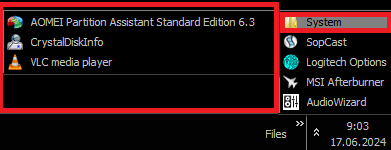
I tried the solution from this thread Windows Explorer Auto Arrange - Disable, but it didn't help.
The ability to manually sort by subfolders is very necessary. I look forward to any solution, including through the registry.
Thank you in advance.
I tried the solution from this thread Windows Explorer Auto Arrange - Disable, but it didn't help.
The ability to manually sort by subfolders is very necessary. I look forward to any solution, including through the registry.
Thank you in advance.
My Computers
-
At a glance
Windows 7- OS
- Windows 7
-
- Computer type
- PC/Desktop


