After discussing lot in this thread, How do I password protect a folder/file?, I finally installed Kruptos 2 Professional.
Now that it is installed and everything seemed to be working fine, this small thing is irritating me a bit.
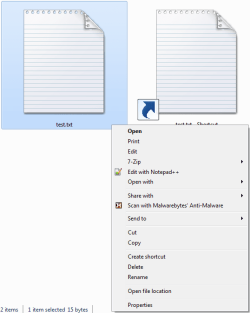
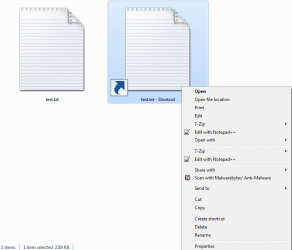
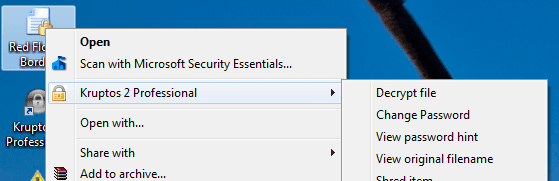
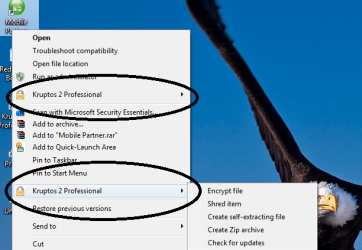
The context menu item for Kruptos appears only once for every file, which is normal but when I right click on a shortcut, it appears twice. I know that nobody encrypts a shortcut file, but still it looks bad when right clicked (see the images attached).
So can someone say that how do I edit the context menu items for shortcut files from regedit? I have looked up for Kruptos in ContextMenuHandlers and there are many and I can't understand which one to delete from regedit. Please help!
Thanks.
Now that it is installed and everything seemed to be working fine, this small thing is irritating me a bit.
The context menu item for Kruptos appears only once for every file, which is normal but when I right click on a shortcut, it appears twice. I know that nobody encrypts a shortcut file, but still it looks bad when right clicked (see the images attached).
So can someone say that how do I edit the context menu items for shortcut files from regedit? I have looked up for Kruptos in ContextMenuHandlers and there are many and I can't understand which one to delete from regedit. Please help!
Thanks.
Attachments
My Computer
- Computer Manufacturer/Model Number
- Acer Aspire 5738G
- OS
- 32-bit Windows 7 Home Premium & Windows 8 Release Preview
- CPU
- Intel(R) Core(TM)2 Duo
- Motherboard
- Acer JV50
- Memory
- 4 GB RAM DDR3
- Graphics Card(s)
- NVIDIA GeForce G 105M
- Sound Card
- Realtek High Definition
- Monitor(s) Displays
- 1x Generic PnP Monitor
- Screen Resolution
- 1366 x 768 - 32 bit
- Hard Drives
- C: (263 GB)
K: (24.3 GB)
- Keyboard
- Acer Inbuilt
- Mouse
- 5 Button Wheel Laser Mouse
- Internet Speed
- 3 MBPS Download and 2 MBPS Upload