How to have the same theme customization freedom as with XP?

My Computer My Computer

Computer type
PC/Desktop
OS
Microsoft Windows 7 Ultimate 64-bits 7601 Multiprocessor Free Service Pack 1
CPU
Intel(R) Core(TM)2 Duo CPU E8400 @ 3.00GHz
Motherboard
ASRock G41MH/USB3.
Memory
8,00 GB
Graphics Card(s)
(1) Intel(R) G41 Express Chipset (2) Intel(R) G41 Express
Sound Card
(1) VIA High Definition Audio (2) Intel(R) High Definition
Monitor(s) Displays
S24B350 Samsung
Screen Resolution
1920 x 1080 x 32 bits (4294967296 colors) @ 60 Hz
Hard Drives
(1) ST31000528AS ATA Device (2) Generic- Compact Flash USB Device (3) Generic- MS/MS-Pro USB Device (4) Generic- SD/MMC USB Device (5) Generic- SM/xD-Picture USB Device
Antivirus
ZoneAlarm Free Antivirus + Firewall version: 12.0.104.000 Vs
Bernardus, those keys didn't work either.

Bongo, I installed windows styler builder and it's far less intuitive than I thought it would be. There are wayyyyyyyyyyyyyyy too many damn values to edit and I actually would prefer the colors show up as numbers than actual colors because now I can't tell dark grey from black and I can't search for colors I wanna edit. Is there a tutorial that illustrates exactly what affects what?

http://pbrd.co/1iuTo5p

How do I edit the color of the text for that list view window? I was able to change the background by accident but the TEXT:COLOR in the very same category of the FILL:COLOR that changed the background failed to change the text, so I'm really confused.

I tried changing every single black I spotted to green and every white to dark blue which did change about half the things in Windows. There are way too many to go thru.
 
Last edited:

My Computer My Computer

Computer type
PC/Desktop
Computer Manufacturer/Model Number
Asus
OS
Windows 7 Ultimate 32-bit
CPU
i7
Memory
4GB
Hard Drives
2TB
Browser
Firefox
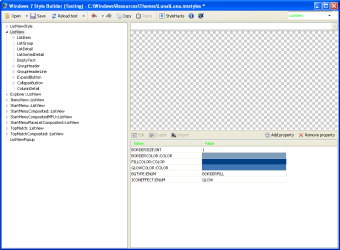
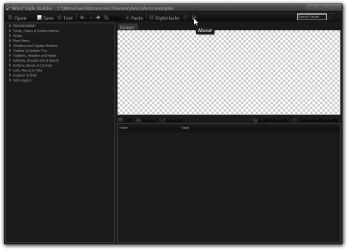
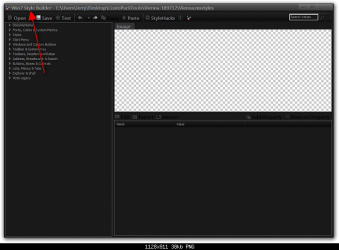
Is that all that shows on WSB? Where did you get WSB at?

Yours
tYBM4om.png

Mine
msstyles.png


Jerry
 

My Computer My Computer

Computer type
Laptop
Computer Manufacturer/Model Number
Sager NP9170
OS
Win 7 Pro x64 / Win 10 Pro
CPU
Intel(R) Core(TM) i7-3630QM CPU @ 2.40GHz
Motherboard
CLEVO P170EM
Memory
12 GB
Graphics Card(s)
(1) Intel(R) HD Graphics 4000 (2) NVIDIA GeForce GTX 675M
Sound Card
(1) Realtek High Definition Audio (2) Intel(R) Display Aud
Monitor(s) Displays
17.3
Screen Resolution
1920x1080
Hard Drives
(1) Samsung 860 EVO 500GB(OS) (1) Samsung 860 EVO 500GB(Data)
Keyboard
Backlite
Antivirus
MSE, Malwarebytes Pro
Browser
Firefox
Other Info
DESKTOP: Custom-built.
OS: Win 10 Pro x64.
CASE: Rosewill R5.
CPU: Intel I5 4670K CPU @ 3.40GHz.
CPU COOLER: Cool Master Hyper 212 EVO.
MOTHERBOARD: Asus Z87-A.
MEMORY: Kingston HyperX 2x4 GB.
GPU: Nvidia Geforce 650 TI.
PSU: Corsair TX750.
DRIVES: (1) Samsung 840 120 GB SSD (2) Western Digital blue 500 GB 7200 RPM.
I was searching only for classes named "list view" but what I should've been looking for is "tree view" which is what the background and text would be of WSB but that didn't change anything either. Now I forgot where I found item for changing the background of the Tree View windows.
 

My Computer My Computer

Computer type
PC/Desktop
Computer Manufacturer/Model Number
Asus
OS
Windows 7 Ultimate 32-bit
CPU
i7
Memory
4GB
Hard Drives
2TB
Browser
Firefox
Explorer background:
Explorer & Shell > Explorer > Items View > ItemsView > FILLCOLOR:COLOR
Text:
Explorer & Shell > Explorer > Items View > ItemsView > TEXTCOLOR:COLOR
and
Fonts, Colors & System Metrics > Fonts & System Metrics > WINDOWTEXT:COLOR


Navigation Pane:
Explorer & Shell > Explorer > ProperTree > <2> > FILLCOLOR:COLOR
TEXT COLOR:
Explorer & Shell > Explorer > TreeView > TreeItem > HOT,SELECTED, ETC.


Preview Pane
Explorer & Shell > Explorer > ReadingPane > Background > ALL 3 GRADIENTCOLOR

Jerry

 

My Computer My Computer

Computer type
Laptop
Computer Manufacturer/Model Number
Sager NP9170
OS
Win 7 Pro x64 / Win 10 Pro
CPU
Intel(R) Core(TM) i7-3630QM CPU @ 2.40GHz
Motherboard
CLEVO P170EM
Memory
12 GB
Graphics Card(s)
(1) Intel(R) HD Graphics 4000 (2) NVIDIA GeForce GTX 675M
Sound Card
(1) Realtek High Definition Audio (2) Intel(R) Display Aud
Monitor(s) Displays
17.3
Screen Resolution
1920x1080
Hard Drives
(1) Samsung 860 EVO 500GB(OS) (1) Samsung 860 EVO 500GB(Data)
Keyboard
Backlite
Antivirus
MSE, Malwarebytes Pro
Browser
Firefox
Other Info
DESKTOP: Custom-built.
OS: Win 10 Pro x64.
CASE: Rosewill R5.
CPU: Intel I5 4670K CPU @ 3.40GHz.
CPU COOLER: Cool Master Hyper 212 EVO.
MOTHERBOARD: Asus Z87-A.
MEMORY: Kingston HyperX 2x4 GB.
GPU: Nvidia Geforce 650 TI.
PSU: Corsair TX750.
DRIVES: (1) Samsung 840 120 GB SSD (2) Western Digital blue 500 GB 7200 RPM.
Explorer background:
Explorer & Shell > Explorer > Items View > ItemsView > FILLCOLOR:COLOR
Text:
Explorer & Shell > Explorer > Items View > ItemsView > TEXTCOLOR:COLOR
and
Fonts, Colors & System Metrics > Fonts & System Metrics > WINDOWTEXT:COLOR


Navigation Pane:
Explorer & Shell > Explorer > ProperTree > <2> > FILLCOLOR:COLOR
TEXT COLOR:
Explorer & Shell > Explorer > TreeView > TreeItem > HOT,SELECTED, ETC.


Preview Pane
Explorer & Shell > Explorer > ReadingPane > Background > ALL 3 GRADIENTCOLOR

Jerry

I edited all those and the text of the tree view is still black. Also, after I finished the edits and saved the Luna.msstyles, I now can't start the windows style program while the Luna theme is selected. I mean I can start the program and it opens but it doesn't ask me if I wanna import/create new/open existing style and pressing the open button does nothing.

The preview button also malfunctions horribly. I didn't realize until now when I edited the windows text color once and reloaded. It worked fine the first time, then I changed color to pink, reloaded and it displayed pink. Then I undid a couple changes including the pink text but refreshing did not change it back. So I reloaded the Luna theme to get green text again which i did. But reloading the preview on Windows Style program again changed it back to pink even when I selected black.

No wonder I couldn't find my way anywhere when I couldn't get a positive confirmation whether or not what I edited actually did anything.
 

My Computer My Computer

Computer type
PC/Desktop
Computer Manufacturer/Model Number
Asus
OS
Windows 7 Ultimate 32-bit
CPU
i7
Memory
4GB
Hard Drives
2TB
Browser
Firefox
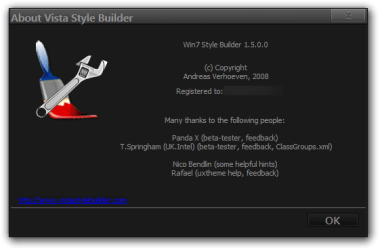
What version of WSB are you using?

Click About and see.

Jerry
Win7 Style Buildermsstyles.png

About Vista Style Builder.png
 

My Computer My Computer

Computer type
Laptop
Computer Manufacturer/Model Number
Sager NP9170
OS
Win 7 Pro x64 / Win 10 Pro
CPU
Intel(R) Core(TM) i7-3630QM CPU @ 2.40GHz
Motherboard
CLEVO P170EM
Memory
12 GB
Graphics Card(s)
(1) Intel(R) HD Graphics 4000 (2) NVIDIA GeForce GTX 675M
Sound Card
(1) Realtek High Definition Audio (2) Intel(R) Display Aud
Monitor(s) Displays
17.3
Screen Resolution
1920x1080
Hard Drives
(1) Samsung 860 EVO 500GB(OS) (1) Samsung 860 EVO 500GB(Data)
Keyboard
Backlite
Antivirus
MSE, Malwarebytes Pro
Browser
Firefox
Other Info
DESKTOP: Custom-built.
OS: Win 10 Pro x64.
CASE: Rosewill R5.
CPU: Intel I5 4670K CPU @ 3.40GHz.
CPU COOLER: Cool Master Hyper 212 EVO.
MOTHERBOARD: Asus Z87-A.
MEMORY: Kingston HyperX 2x4 GB.
GPU: Nvidia Geforce 650 TI.
PSU: Corsair TX750.
DRIVES: (1) Samsung 840 120 GB SSD (2) Western Digital blue 500 GB 7200 RPM.
Version. 2.1.520.125
 

My Computer My Computer

Computer type
PC/Desktop
Computer Manufacturer/Model Number
Asus
OS
Windows 7 Ultimate 32-bit
CPU
i7
Memory
4GB
Hard Drives
2TB
Browser
Firefox
Version. 2.1.520.125

That tells me you did not buy it, you have a cracked version that is why you are having malfunctions buttons, save trouble etc.

Jerry
 

My Computer My Computer

Computer type
Laptop
Computer Manufacturer/Model Number
Sager NP9170
OS
Win 7 Pro x64 / Win 10 Pro
CPU
Intel(R) Core(TM) i7-3630QM CPU @ 2.40GHz
Motherboard
CLEVO P170EM
Memory
12 GB
Graphics Card(s)
(1) Intel(R) HD Graphics 4000 (2) NVIDIA GeForce GTX 675M
Sound Card
(1) Realtek High Definition Audio (2) Intel(R) Display Aud
Monitor(s) Displays
17.3
Screen Resolution
1920x1080
Hard Drives
(1) Samsung 860 EVO 500GB(OS) (1) Samsung 860 EVO 500GB(Data)
Keyboard
Backlite
Antivirus
MSE, Malwarebytes Pro
Browser
Firefox
Other Info
DESKTOP: Custom-built.
OS: Win 10 Pro x64.
CASE: Rosewill R5.
CPU: Intel I5 4670K CPU @ 3.40GHz.
CPU COOLER: Cool Master Hyper 212 EVO.
MOTHERBOARD: Asus Z87-A.
MEMORY: Kingston HyperX 2x4 GB.
GPU: Nvidia Geforce 650 TI.
PSU: Corsair TX750.
DRIVES: (1) Samsung 840 120 GB SSD (2) Western Digital blue 500 GB 7200 RPM.
I don't know what you're talking about. I downloaded it from first google link I clicked.

I've gotten around the problematic routine though. I just save it, it prompts me to use Aero instead because the Luna.msstyles is in use, I do that and then it asks me if I wanna use the visual style I just saved, I say yes and it basically updates the theme I just saved. The preview button may even work now but I don't wanna jinx it.

I'm following this guide right now Complete Guide to Theme Building which helped me make substantial progress so far but I'm yet to get to that Tree View text part. It's annoying because that's what I need changed to brighter the text the most as WSP is using Tree View and it's hard to see black text on dark background.

Editing the graphics isn't so hard either (now that I know where to find them) but I wish Windows 7's paint would be as convenient as XP and Vista. Some of the graphics are as small as one pixel and the magnifying glass only works on the actual picture so I have to somehow precisely hover it over that 1x1 pixel spot. Unnecessary.
 

My Computer My Computer

Computer type
PC/Desktop
Computer Manufacturer/Model Number
Asus
OS
Windows 7 Ultimate 32-bit
CPU
i7
Memory
4GB
Hard Drives
2TB
Browser
Firefox
I don't know what you're talking about. I downloaded it from first google link I clicked.
I posted a link to the only place you can purchase Windows Style Builder in this post http://www.sevenforums.com/general-...e-customization-freedom-xp-4.html#post2680299

Ave's Windows7 Style Builder

There is no Version. 2.1.520.125, even the new beta that has not been officially released yet does not have that high a number.

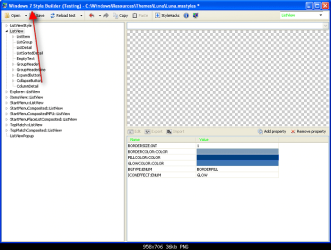
Even the title at the top of the program is different and I know mine is legit because I purchased it, did you purchase that version?

Jerry
tYBM4om.png

msstyles.png
 

My Computer My Computer

Computer type
Laptop
Computer Manufacturer/Model Number
Sager NP9170
OS
Win 7 Pro x64 / Win 10 Pro
CPU
Intel(R) Core(TM) i7-3630QM CPU @ 2.40GHz
Motherboard
CLEVO P170EM
Memory
12 GB
Graphics Card(s)
(1) Intel(R) HD Graphics 4000 (2) NVIDIA GeForce GTX 675M
Sound Card
(1) Realtek High Definition Audio (2) Intel(R) Display Aud
Monitor(s) Displays
17.3
Screen Resolution
1920x1080
Hard Drives
(1) Samsung 860 EVO 500GB(OS) (1) Samsung 860 EVO 500GB(Data)
Keyboard
Backlite
Antivirus
MSE, Malwarebytes Pro
Browser
Firefox
Other Info
DESKTOP: Custom-built.
OS: Win 10 Pro x64.
CASE: Rosewill R5.
CPU: Intel I5 4670K CPU @ 3.40GHz.
CPU COOLER: Cool Master Hyper 212 EVO.
MOTHERBOARD: Asus Z87-A.
MEMORY: Kingston HyperX 2x4 GB.
GPU: Nvidia Geforce 650 TI.
PSU: Corsair TX750.
DRIVES: (1) Samsung 840 120 GB SSD (2) Western Digital blue 500 GB 7200 RPM.
I did run a .bat patch to make it Windows 7 compatible because it would only install for Vista before. No I did not buy it, I searched for a shareware/freeware version but it didn't work with Win7 either so that patch fixed that.

I've made substantial progress so far and could customize even better than I could with XP. Of course, only because that guide gave me pointers where to find everything otherwise I'd be lost. I'm still yet to find where to change the black text in Tree View though. It's annoying because it's hard to see the text on WSB because of that. Do you confirm that the value you pointed me to really changes the color on your system?
 

My Computer My Computer

Computer type
PC/Desktop
Computer Manufacturer/Model Number
Asus
OS
Windows 7 Ultimate 32-bit
CPU
i7
Memory
4GB
Hard Drives
2TB
Browser
Firefox
I did run a .bat patch to make it Windows 7 compatible because it would only install for Vista before. No I did not buy it, I searched for a shareware/freeware version but it didn't work with Win7 either so that patch fixed that.

I've made substantial progress so far and could customize even better than I could with XP. Of course, only because that guide gave me pointers where to find everything otherwise I'd be lost. I'm still yet to find where to change the black text in Tree View though. It's annoying because it's hard to see the text on WSB because of that. Do you confirm that the value you pointed me to really changes the color on your system?
I will not be able to help anymore because this cracked Version.
 

My Computer My Computer

Computer type
Laptop
Computer Manufacturer/Model Number
Sager NP9170
OS
Win 7 Pro x64 / Win 10 Pro
CPU
Intel(R) Core(TM) i7-3630QM CPU @ 2.40GHz
Motherboard
CLEVO P170EM
Memory
12 GB
Graphics Card(s)
(1) Intel(R) HD Graphics 4000 (2) NVIDIA GeForce GTX 675M
Sound Card
(1) Realtek High Definition Audio (2) Intel(R) Display Aud
Monitor(s) Displays
17.3
Screen Resolution
1920x1080
Hard Drives
(1) Samsung 860 EVO 500GB(OS) (1) Samsung 860 EVO 500GB(Data)
Keyboard
Backlite
Antivirus
MSE, Malwarebytes Pro
Browser
Firefox
Other Info
DESKTOP: Custom-built.
OS: Win 10 Pro x64.
CASE: Rosewill R5.
CPU: Intel I5 4670K CPU @ 3.40GHz.
CPU COOLER: Cool Master Hyper 212 EVO.
MOTHERBOARD: Asus Z87-A.
MEMORY: Kingston HyperX 2x4 GB.
GPU: Nvidia Geforce 650 TI.
PSU: Corsair TX750.
DRIVES: (1) Samsung 840 120 GB SSD (2) Western Digital blue 500 GB 7200 RPM.

My Computer My Computer

Computer type
PC/Desktop
Computer Manufacturer/Model Number
Custom
OS
Windows 7 Ultimate 64Bit SP1
CPU
Intel i7 3930k
Motherboard
Asus P9X79 DELUXE
Memory
64GB
Graphics Card(s)
Sapphire AMD HD7750 Ultimate 1GB Passive Full Retail PCI-E G
Monitor(s) Displays
ASUS VE276Q 27" Widescreen LCD
Screen Resolution
1920 x 1080
Hard Drives
OCZ AGT3-25SAT3-480G 480GB Agility3 2.5 inch SATA II SSD, x 2, RAID 0 (OS Drive)
WD Caviar 3TB SATA 6 GB/s 64MB Cache, x 4, RAID 5 (Data Drive)
PSU
XFX P1-750B-UKB9 750W Edition Modular Power Supply
Case
Nanoxia Deep Silence One Dark Anthracite
Cooling
Air: Noctua D14-2011 Dual Radiator PWM CPU Cooler
Keyboard
Logitech K360
Mouse
Microsoft ARC Touch Mouse
Antivirus
AVG
Browser
IE 11, Chrome Version 32.0.1700.107 m, Firefox.

My Computer My Computer

Computer type
Laptop
Computer Manufacturer/Model Number
Sager NP9170
OS
Win 7 Pro x64 / Win 10 Pro
CPU
Intel(R) Core(TM) i7-3630QM CPU @ 2.40GHz
Motherboard
CLEVO P170EM
Memory
12 GB
Graphics Card(s)
(1) Intel(R) HD Graphics 4000 (2) NVIDIA GeForce GTX 675M
Sound Card
(1) Realtek High Definition Audio (2) Intel(R) Display Aud
Monitor(s) Displays
17.3
Screen Resolution
1920x1080
Hard Drives
(1) Samsung 860 EVO 500GB(OS) (1) Samsung 860 EVO 500GB(Data)
Keyboard
Backlite
Antivirus
MSE, Malwarebytes Pro
Browser
Firefox
Other Info
DESKTOP: Custom-built.
OS: Win 10 Pro x64.
CASE: Rosewill R5.
CPU: Intel I5 4670K CPU @ 3.40GHz.
CPU COOLER: Cool Master Hyper 212 EVO.
MOTHERBOARD: Asus Z87-A.
MEMORY: Kingston HyperX 2x4 GB.
GPU: Nvidia Geforce 650 TI.
PSU: Corsair TX750.
DRIVES: (1) Samsung 840 120 GB SSD (2) Western Digital blue 500 GB 7200 RPM.
Yer but he says he cannot see the previous menu, if he turns Aero on then he will get the first screen shot !
 

My Computer My Computer

Computer type
PC/Desktop
Computer Manufacturer/Model Number
Custom
OS
Windows 7 Ultimate 64Bit SP1
CPU
Intel i7 3930k
Motherboard
Asus P9X79 DELUXE
Memory
64GB
Graphics Card(s)
Sapphire AMD HD7750 Ultimate 1GB Passive Full Retail PCI-E G
Monitor(s) Displays
ASUS VE276Q 27" Widescreen LCD
Screen Resolution
1920 x 1080
Hard Drives
OCZ AGT3-25SAT3-480G 480GB Agility3 2.5 inch SATA II SSD, x 2, RAID 0 (OS Drive)
WD Caviar 3TB SATA 6 GB/s 64MB Cache, x 4, RAID 5 (Data Drive)
PSU
XFX P1-750B-UKB9 750W Edition Modular Power Supply
Case
Nanoxia Deep Silence One Dark Anthracite
Cooling
Air: Noctua D14-2011 Dual Radiator PWM CPU Cooler
Keyboard
Logitech K360
Mouse
Microsoft ARC Touch Mouse
Antivirus
AVG
Browser
IE 11, Chrome Version 32.0.1700.107 m, Firefox.
I'm trying to get rid of the blinding white backgrounds and making them a darker color with brighter text. I refuse to use the nauseating classic theme or the high contrast black or the depressing custom black themes found online.

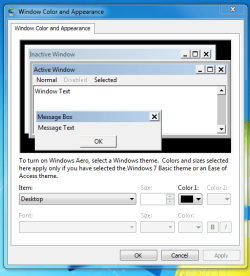
How do I get to this screen? http://www.pallareviews.com/wp-conte..._Windows_7.png Clicking Windows Color on Personalize instead gives me http://www.pallareviews.com/wp-conte...0_04-41-40.png which doesn't do anything.

Using 7 Ultimate.


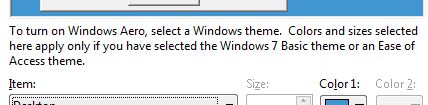
To see the first screen he needs Aero turned on the second screen can then be seen using "Advanced appearance settings........"
 

My Computer My Computer

Computer type
PC/Desktop
Computer Manufacturer/Model Number
Custom
OS
Windows 7 Ultimate 64Bit SP1
CPU
Intel i7 3930k
Motherboard
Asus P9X79 DELUXE
Memory
64GB
Graphics Card(s)
Sapphire AMD HD7750 Ultimate 1GB Passive Full Retail PCI-E G
Monitor(s) Displays
ASUS VE276Q 27" Widescreen LCD
Screen Resolution
1920 x 1080
Hard Drives
OCZ AGT3-25SAT3-480G 480GB Agility3 2.5 inch SATA II SSD, x 2, RAID 0 (OS Drive)
WD Caviar 3TB SATA 6 GB/s 64MB Cache, x 4, RAID 5 (Data Drive)
PSU
XFX P1-750B-UKB9 750W Edition Modular Power Supply
Case
Nanoxia Deep Silence One Dark Anthracite
Cooling
Air: Noctua D14-2011 Dual Radiator PWM CPU Cooler
Keyboard
Logitech K360
Mouse
Microsoft ARC Touch Mouse
Antivirus
AVG
Browser
IE 11, Chrome Version 32.0.1700.107 m, Firefox.
this screen comes after the one he wants, turn Aero on and he gets the screen he wants!
 

Attachments

  • look.png
    look.png
    2.5 KB · Views: 11

My Computer My Computer

Computer type
PC/Desktop
Computer Manufacturer/Model Number
Custom
OS
Windows 7 Ultimate 64Bit SP1
CPU
Intel i7 3930k
Motherboard
Asus P9X79 DELUXE
Memory
64GB
Graphics Card(s)
Sapphire AMD HD7750 Ultimate 1GB Passive Full Retail PCI-E G
Monitor(s) Displays
ASUS VE276Q 27" Widescreen LCD
Screen Resolution
1920 x 1080
Hard Drives
OCZ AGT3-25SAT3-480G 480GB Agility3 2.5 inch SATA II SSD, x 2, RAID 0 (OS Drive)
WD Caviar 3TB SATA 6 GB/s 64MB Cache, x 4, RAID 5 (Data Drive)
PSU
XFX P1-750B-UKB9 750W Edition Modular Power Supply
Case
Nanoxia Deep Silence One Dark Anthracite
Cooling
Air: Noctua D14-2011 Dual Radiator PWM CPU Cooler
Keyboard
Logitech K360
Mouse
Microsoft ARC Touch Mouse
Antivirus
AVG
Browser
IE 11, Chrome Version 32.0.1700.107 m, Firefox.

My Computer My Computer

Computer type
PC/Desktop
Computer Manufacturer/Model Number
HP (HP-P6212F)
OS
Microsoft Windows 7 Home Premium 64-bit 7601 Multiprocessor Free Service Pack 1
CPU
Pentium(R) Dual-Core CPU E5300 @ 2.60GHz
Motherboard
PEGATRON CORPORATION Benicia
Memory
6.00 GB
Graphics Card(s)
Intel(R) G33/G31 Express Chipset Family
Sound Card
Realtek High Definition Audio
Monitor(s) Displays
24'' HP WS LCD
Screen Resolution
1920 x 1080 x 32 bits (4294967296 colors) @ 60 Hz
Hard Drives
(1) ATA Hitachi HDT72106 SCSI Disk Device (2) Generic- Compact Flash USB Device (3) Generic- MS/MS-Pro USB Device (4) Generic- SD/MMC USB Device (5) Generic- SM/xD-Picture USB Device (6) Verbatim STORE N GO USB Device
Keyboard
Logitech G510s
Mouse
Logitech Trackball M570
Antivirus
Microsoft Security Essentials / Malwarebytes
Browser
IE / Firefox / Chrome
I wonder if you R click on taskbar/ properties you could select Aero peek on or off (if active of course).
 

My Computer My Computer

Computer type
PC/Desktop
OS
Microsoft Windows 7 Ultimate 64-bits 7601 Multiprocessor Free Service Pack 1
CPU
Intel(R) Core(TM)2 Duo CPU E8400 @ 3.00GHz
Motherboard
ASRock G41MH/USB3.
Memory
8,00 GB
Graphics Card(s)
(1) Intel(R) G41 Express Chipset (2) Intel(R) G41 Express
Sound Card
(1) VIA High Definition Audio (2) Intel(R) High Definition
Monitor(s) Displays
S24B350 Samsung
Screen Resolution
1920 x 1080 x 32 bits (4294967296 colors) @ 60 Hz
Hard Drives
(1) ST31000528AS ATA Device (2) Generic- Compact Flash USB Device (3) Generic- MS/MS-Pro USB Device (4) Generic- SD/MMC USB Device (5) Generic- SM/xD-Picture USB Device
Antivirus
ZoneAlarm Free Antivirus + Firewall version: 12.0.104.000 Vs
Back
Top