Solved How to install Failed Updates?

BLUE838

New member
Member
Local time
4:28 AM
Messages
31
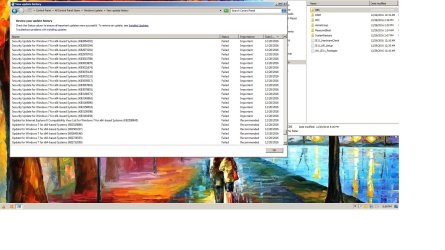
I have a lot of failed updates, how do i try to install them again? Nothing new shows up on Windows Update. Im on Windows 7 64bit Home Premium.
 

My Computer

Computer type
PC/Desktop
Computer Manufacturer/Model Number
Sony Vaio VPCL135fx
OS
Windows 7 64 Home Premium
CPU
intel core 2 quad
Memory
6GB
Browser
Mozilla Firefox
Here is the info needed

I cant upload, is there something wrong right now?
 
Last edited:

My Computer

Computer type
PC/Desktop
Computer Manufacturer/Model Number
Sony Vaio VPCL135fx
OS
Windows 7 64 Home Premium
CPU
intel core 2 quad
Memory
6GB
Browser
Mozilla Firefox

My Computer

Computer type
PC/Desktop
Computer Manufacturer/Model Number
Custom assembled by me :}
OS
Win-7-Pro64bit 7-H-Prem-64bit
CPU
i7-5930K 2nd i9-9940x both water blocked VRM's too
Motherboard
ASUS SABERTOOTH X99 2nd ASUS x299 Apex
Memory
Trident-z 3200C14 2nd Trident-z 3600C16
Graphics Card(s)
EVGA 1080ti ftw3 2nd Titan Xp both water blocked
Sound Card
Built-in Realtek
Monitor(s) Displays
1-AOC G2460PG 24"G-Sync 144Hz/ 2nd 1-ASUS VG248QE 24" 144Hz
Screen Resolution
1920 x 1080 144Hz
Hard Drives
2-Samsung M.2 Evo & Evo Plus
2-Samsung 850 EVO 500GB SSD's/ 3-2.5 W.D. Black 1tb-&3-1tb/3-3.5 WD Black 1tb hdd's
PSU
EVGA SuperNOVA 1000-P2 2nd 1200-P2
Case
2-Corsair Obsidian Series 450D Black ATX Mid Tower
Cooling
Custom water loops
Keyboard
Logitech G710+/ 2nd Logitech G910
Mouse
2-RedDragon M901 Perdition 16400 dpi Gaming mouse = wired
Internet Speed
Comcast Ping 19ms 89.31mbps download speed 6.12mbps upload
Antivirus
Malwarebytes Pro/ Superantispyware Pro
Browser
FireFox & Pale moon
Other Info
2nd ASUS X299 Apex/Intel i9-9940x with Custom water loop/7H-Prem-x64/Corsair 450D case/Ram Trident-z 3600C16 4x8gb / Samsung970Evo plus 500gb SSD/Dual ssd EZ swap evo/PSU EVGA SuperNova 1200w-P2 80+Platinum/GPU Titan Xp /8-ML-140 on push-pull on 2-280GTX rads
Test
 

My Computer

Computer type
PC/Desktop
Computer Manufacturer/Model Number
Sony Vaio VPCL135fx
OS
Windows 7 64 Home Premium
CPU
intel core 2 quad
Memory
6GB
Browser
Mozilla Firefox
Hi,
Use the Go Advanced button instead of Post quick reply to see the paperclip symbol in the reply editor might help ?
 

My Computer

Computer type
PC/Desktop
Computer Manufacturer/Model Number
Custom assembled by me :}
OS
Win-7-Pro64bit 7-H-Prem-64bit
CPU
i7-5930K 2nd i9-9940x both water blocked VRM's too
Motherboard
ASUS SABERTOOTH X99 2nd ASUS x299 Apex
Memory
Trident-z 3200C14 2nd Trident-z 3600C16
Graphics Card(s)
EVGA 1080ti ftw3 2nd Titan Xp both water blocked
Sound Card
Built-in Realtek
Monitor(s) Displays
1-AOC G2460PG 24"G-Sync 144Hz/ 2nd 1-ASUS VG248QE 24" 144Hz
Screen Resolution
1920 x 1080 144Hz
Hard Drives
2-Samsung M.2 Evo & Evo Plus
2-Samsung 850 EVO 500GB SSD's/ 3-2.5 W.D. Black 1tb-&3-1tb/3-3.5 WD Black 1tb hdd's
PSU
EVGA SuperNOVA 1000-P2 2nd 1200-P2
Case
2-Corsair Obsidian Series 450D Black ATX Mid Tower
Cooling
Custom water loops
Keyboard
Logitech G710+/ 2nd Logitech G910
Mouse
2-RedDragon M901 Perdition 16400 dpi Gaming mouse = wired
Internet Speed
Comcast Ping 19ms 89.31mbps download speed 6.12mbps upload
Antivirus
Malwarebytes Pro/ Superantispyware Pro
Browser
FireFox & Pale moon
Other Info
2nd ASUS X299 Apex/Intel i9-9940x with Custom water loop/7H-Prem-x64/Corsair 450D case/Ram Trident-z 3600C16 4x8gb / Samsung970Evo plus 500gb SSD/Dual ssd EZ swap evo/PSU EVGA SuperNova 1200w-P2 80+Platinum/GPU Titan Xp /8-ML-140 on push-pull on 2-280GTX rads
I hope this is right.
 

Attachments

  • sfcdetails.txt
    sfcdetails.txt
    40 KB · Views: 0
  • failed update.jpg
    failed update.jpg
    499.8 KB · Views: 5

My Computer

Computer type
PC/Desktop
Computer Manufacturer/Model Number
Sony Vaio VPCL135fx
OS
Windows 7 64 Home Premium
CPU
intel core 2 quad
Memory
6GB
Browser
Mozilla Firefox

My Computer

Computer type
PC/Desktop
Computer Manufacturer/Model Number
Sony Vaio VPCL135fx
OS
Windows 7 64 Home Premium
CPU
intel core 2 quad
Memory
6GB
Browser
Mozilla Firefox
OK, i fixed my problem. Turns out i don't need to update, my web browsers and videos were not playing and i figured it needed an update, cuz the problem started when i got a huge Windows Update. I uninstalled some video software and reinstalled and everything seems fine now. Thank You for all you your help. Good Karma to you.
 

My Computer

Computer type
PC/Desktop
Computer Manufacturer/Model Number
Sony Vaio VPCL135fx
OS
Windows 7 64 Home Premium
CPU
intel core 2 quad
Memory
6GB
Browser
Mozilla Firefox
Back
Top