Solved How to keep new window ... there

PinkiPad

New member
Member
VIP
Local time
2:27 PM
Messages
100
I have a lil' problem. If, for example I am working in a Firefox tab, and click the Windows calculator, it won't stay there. If I move the cursor outside the new window (calculator) it disappears behind the browser. I used to be able to open a new window and not lose it.

What setting did I change?
 

My Computer

Computer type
Laptop
Computer Manufacturer/Model Number
MS Windows 7 Home Premium 64-bit SP1
OS
Win 7 64 bit
CPU
Intel Atom N450 1.66 ghz
Motherboard
Dell Inc 00DKZ
Memory
2 gig single channel DDR2
Graphics Card(s)
Generic PnP Monitor, Intwl Graphics Media Accelerator 3150
Screen Resolution
1024x600
Hard Drives
2.44gb Western Digital
Mouse
none
Internet Speed
WiFi
Antivirus
MalwareBytes
Browser
Firefox
Other Info
Dell 14z 5432
Been a while since I posted this but the problem persists. Any help?
 

My Computer

Computer type
Laptop
Computer Manufacturer/Model Number
MS Windows 7 Home Premium 64-bit SP1
OS
Win 7 64 bit
CPU
Intel Atom N450 1.66 ghz
Motherboard
Dell Inc 00DKZ
Memory
2 gig single channel DDR2
Graphics Card(s)
Generic PnP Monitor, Intwl Graphics Media Accelerator 3150
Screen Resolution
1024x600
Hard Drives
2.44gb Western Digital
Mouse
none
Internet Speed
WiFi
Antivirus
MalwareBytes
Browser
Firefox
Other Info
Dell 14z 5432
Is it only Firefox this happens with?

I can't reproduce it. The Firefox window (or any other window) only comes to the foreground when I click on it.

Sounds like it has something to do with your mouse settings, like Snap to being active.

Edit: Make and model of computer, wired or wireless mouse?
 

My Computer

Computer type
PC/Desktop
Computer Manufacturer/Model Number
Lenovo IdeaCenter 450
OS
Windows 10 Pro X64
CPU
Intel Quad Core i7-4770 @ 3.4Ghz
Memory
16.0GB PC3-12800 DDR3 SDRAM 1600 MHz
Graphics Card(s)
Intel Integrated HD Graphics
Sound Card
Realtek HD Audio
Monitor(s) Displays
HP 22" LCD
Screen Resolution
1680 x 1050
Hard Drives
250GB Samsung EVO SATA-3 SSD
2TB Seagate ST2000DM001 SATA-2
1.5TB Seagate ST3150041AS SATA
Keyboard
Dell USB
Mouse
Lenovo USB
Internet Speed
Cable via Road Runner 3MB Upload, 30MB Download
Antivirus
Windows Defender, MBAM Pro, MBAE
Browser
Seamonkey
Other Info
UEFI/GPT
PLDS DVD-RW DH16AERSH
Happens in any application. No mouse just a touchpad. I had My Computer open, tried to type into Notebook, same thing. Dell 14z, 5432, latest update of Win 7
 

My Computer

Computer type
Laptop
Computer Manufacturer/Model Number
MS Windows 7 Home Premium 64-bit SP1
OS
Win 7 64 bit
CPU
Intel Atom N450 1.66 ghz
Motherboard
Dell Inc 00DKZ
Memory
2 gig single channel DDR2
Graphics Card(s)
Generic PnP Monitor, Intwl Graphics Media Accelerator 3150
Screen Resolution
1024x600
Hard Drives
2.44gb Western Digital
Mouse
none
Internet Speed
WiFi
Antivirus
MalwareBytes
Browser
Firefox
Other Info
Dell 14z 5432
Did you check mouse settings?
 

My Computer

Computer type
PC/Desktop
Computer Manufacturer/Model Number
Lenovo IdeaCenter 450
OS
Windows 10 Pro X64
CPU
Intel Quad Core i7-4770 @ 3.4Ghz
Memory
16.0GB PC3-12800 DDR3 SDRAM 1600 MHz
Graphics Card(s)
Intel Integrated HD Graphics
Sound Card
Realtek HD Audio
Monitor(s) Displays
HP 22" LCD
Screen Resolution
1680 x 1050
Hard Drives
250GB Samsung EVO SATA-3 SSD
2TB Seagate ST2000DM001 SATA-2
1.5TB Seagate ST3150041AS SATA
Keyboard
Dell USB
Mouse
Lenovo USB
Internet Speed
Cable via Road Runner 3MB Upload, 30MB Download
Antivirus
Windows Defender, MBAM Pro, MBAE
Browser
Seamonkey
Other Info
UEFI/GPT
PLDS DVD-RW DH16AERSH
No. I will try to find them but once I do, what am I looking for?
 

My Computer

Computer type
Laptop
Computer Manufacturer/Model Number
MS Windows 7 Home Premium 64-bit SP1
OS
Win 7 64 bit
CPU
Intel Atom N450 1.66 ghz
Motherboard
Dell Inc 00DKZ
Memory
2 gig single channel DDR2
Graphics Card(s)
Generic PnP Monitor, Intwl Graphics Media Accelerator 3150
Screen Resolution
1024x600
Hard Drives
2.44gb Western Digital
Mouse
none
Internet Speed
WiFi
Antivirus
MalwareBytes
Browser
Firefox
Other Info
Dell 14z 5432
There is a setting related to window focus with the mouse pointer.

I'm using Linux Mint at the moment, so I can't tell you the exact wording or provide a screenshot. :(
 

My Computer

Computer type
PC/Desktop
Computer Manufacturer/Model Number
n/a
OS
W7 Ultimate SP1, LM19.2 MATE, W10 Home 1703, W10 Pro 1703 VM, #All 64 bit
CPU
AMD Phenom II x6 1100T, 3.3 GHz
Motherboard
ASUS M4A88T-M/USB3 (AM3)
Memory
12GB DDR3 1333 G-Skill (4GB x 2), G-Skill (2GB x 2)
Graphics Card(s)
NVIDIA GeForce GTX 660
Sound Card
Realtek?
Monitor(s) Displays
Samsung S23B350
Screen Resolution
1920x1080
Hard Drives
WD Green 2TB (SATA), WD Green 3TB (SATA), WD Blue 4TB (SATA), WD Blue 6TB (SATA)
PSU
Cooler Master
Case
Antec GX300 Tower
Cooling
3x Antec TRICOOL 120mm Fans
Mouse
Wired Optical
Internet Speed
DSL
Antivirus
Avast
Browser
Pale Moon (64 bit)
Other Info
2018-12-27 Upgraded HDDs
2015-12-10 Upgraded case, graphics card, storage
2015-08-15 Upgraded motherboard & RAM
2015-07-15 Upgraded LM17.1 to LM17.2
Start, Control Panel, Mouse. Then just look at the different tabs. See if Snap To is set or something about Windows focus as as lehnerus2000 mentioned.
 

My Computer

Computer type
PC/Desktop
Computer Manufacturer/Model Number
Lenovo IdeaCenter 450
OS
Windows 10 Pro X64
CPU
Intel Quad Core i7-4770 @ 3.4Ghz
Memory
16.0GB PC3-12800 DDR3 SDRAM 1600 MHz
Graphics Card(s)
Intel Integrated HD Graphics
Sound Card
Realtek HD Audio
Monitor(s) Displays
HP 22" LCD
Screen Resolution
1680 x 1050
Hard Drives
250GB Samsung EVO SATA-3 SSD
2TB Seagate ST2000DM001 SATA-2
1.5TB Seagate ST3150041AS SATA
Keyboard
Dell USB
Mouse
Lenovo USB
Internet Speed
Cable via Road Runner 3MB Upload, 30MB Download
Antivirus
Windows Defender, MBAM Pro, MBAE
Browser
Seamonkey
Other Info
UEFI/GPT
PLDS DVD-RW DH16AERSH
Last edited:

My Computer

Computer type
PC/Desktop
Computer Manufacturer/Model Number
n/a
OS
W7 Ultimate SP1, LM19.2 MATE, W10 Home 1703, W10 Pro 1703 VM, #All 64 bit
CPU
AMD Phenom II x6 1100T, 3.3 GHz
Motherboard
ASUS M4A88T-M/USB3 (AM3)
Memory
12GB DDR3 1333 G-Skill (4GB x 2), G-Skill (2GB x 2)
Graphics Card(s)
NVIDIA GeForce GTX 660
Sound Card
Realtek?
Monitor(s) Displays
Samsung S23B350
Screen Resolution
1920x1080
Hard Drives
WD Green 2TB (SATA), WD Green 3TB (SATA), WD Blue 4TB (SATA), WD Blue 6TB (SATA)
PSU
Cooler Master
Case
Antec GX300 Tower
Cooling
3x Antec TRICOOL 120mm Fans
Mouse
Wired Optical
Internet Speed
DSL
Antivirus
Avast
Browser
Pale Moon (64 bit)
Other Info
2018-12-27 Upgraded HDDs
2015-12-10 Upgraded case, graphics card, storage
2015-08-15 Upgraded motherboard & RAM
2015-07-15 Upgraded LM17.1 to LM17.2
Sorry. I was looking on my iPad for the setting. I do know Windows. I know I look stupid (as I slink away in embarrassment)


*sigh*. 5 years ago I suffered a brain illness and lost most memory. I still can't retain any memory. I end up looking stupid. I'm not. I used to run a quarter-million a year business by myself with websites, beginning in 1996. All based on an idea...
 

My Computer

Computer type
Laptop
Computer Manufacturer/Model Number
MS Windows 7 Home Premium 64-bit SP1
OS
Win 7 64 bit
CPU
Intel Atom N450 1.66 ghz
Motherboard
Dell Inc 00DKZ
Memory
2 gig single channel DDR2
Graphics Card(s)
Generic PnP Monitor, Intwl Graphics Media Accelerator 3150
Screen Resolution
1024x600
Hard Drives
2.44gb Western Digital
Mouse
none
Internet Speed
WiFi
Antivirus
MalwareBytes
Browser
Firefox
Other Info
Dell 14z 5432
Now I'm confused. :confused:

Do you still need help with Windows 7?
 

My Computer

Computer type
PC/Desktop
Computer Manufacturer/Model Number
n/a
OS
W7 Ultimate SP1, LM19.2 MATE, W10 Home 1703, W10 Pro 1703 VM, #All 64 bit
CPU
AMD Phenom II x6 1100T, 3.3 GHz
Motherboard
ASUS M4A88T-M/USB3 (AM3)
Memory
12GB DDR3 1333 G-Skill (4GB x 2), G-Skill (2GB x 2)
Graphics Card(s)
NVIDIA GeForce GTX 660
Sound Card
Realtek?
Monitor(s) Displays
Samsung S23B350
Screen Resolution
1920x1080
Hard Drives
WD Green 2TB (SATA), WD Green 3TB (SATA), WD Blue 4TB (SATA), WD Blue 6TB (SATA)
PSU
Cooler Master
Case
Antec GX300 Tower
Cooling
3x Antec TRICOOL 120mm Fans
Mouse
Wired Optical
Internet Speed
DSL
Antivirus
Avast
Browser
Pale Moon (64 bit)
Other Info
2018-12-27 Upgraded HDDs
2015-12-10 Upgraded case, graphics card, storage
2015-08-15 Upgraded motherboard & RAM
2015-07-15 Upgraded LM17.1 to LM17.2
I use Win 7 on my laptop which has/had the problem. I was confused and could not find Mouse setting on my iPad. Again, the issue is clinical, not stupidity.

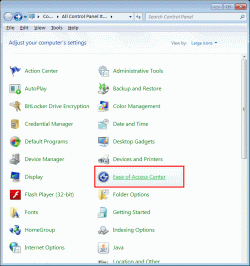
I just unchecked Activate A Window.... and now it is fixed. Thank you! I'd never have thought of mouse settings since I use the touchpad. I found Dell Touchpad settings and was able to tweak a little. I've used desktops since 1993 (Win 3.0 anyone??) so am a little unfamiliar with laptops. I had one but used it only a few times as I hated the touchpad,
 

My Computer

Computer type
Laptop
Computer Manufacturer/Model Number
MS Windows 7 Home Premium 64-bit SP1
OS
Win 7 64 bit
CPU
Intel Atom N450 1.66 ghz
Motherboard
Dell Inc 00DKZ
Memory
2 gig single channel DDR2
Graphics Card(s)
Generic PnP Monitor, Intwl Graphics Media Accelerator 3150
Screen Resolution
1024x600
Hard Drives
2.44gb Western Digital
Mouse
none
Internet Speed
WiFi
Antivirus
MalwareBytes
Browser
Firefox
Other Info
Dell 14z 5432
I'm glad to hear that your problem is solved.

I've used desktops since 1993 (Win 3.0 anyone??) so am a little unfamiliar with laptops. I had one but used it only a few times as I hated the touchpad.

You're not the only one. :D

I hate "patting" those little scratchpad things.
 

My Computer

Computer type
PC/Desktop
Computer Manufacturer/Model Number
n/a
OS
W7 Ultimate SP1, LM19.2 MATE, W10 Home 1703, W10 Pro 1703 VM, #All 64 bit
CPU
AMD Phenom II x6 1100T, 3.3 GHz
Motherboard
ASUS M4A88T-M/USB3 (AM3)
Memory
12GB DDR3 1333 G-Skill (4GB x 2), G-Skill (2GB x 2)
Graphics Card(s)
NVIDIA GeForce GTX 660
Sound Card
Realtek?
Monitor(s) Displays
Samsung S23B350
Screen Resolution
1920x1080
Hard Drives
WD Green 2TB (SATA), WD Green 3TB (SATA), WD Blue 4TB (SATA), WD Blue 6TB (SATA)
PSU
Cooler Master
Case
Antec GX300 Tower
Cooling
3x Antec TRICOOL 120mm Fans
Mouse
Wired Optical
Internet Speed
DSL
Antivirus
Avast
Browser
Pale Moon (64 bit)
Other Info
2018-12-27 Upgraded HDDs
2015-12-10 Upgraded case, graphics card, storage
2015-08-15 Upgraded motherboard & RAM
2015-07-15 Upgraded LM17.1 to LM17.2
I keep moving my hand toward a mouse :(.

I have clicked I Forgot My Password instead of Login countless times. They are SO close in some apps.
 

My Computer

Computer type
Laptop
Computer Manufacturer/Model Number
MS Windows 7 Home Premium 64-bit SP1
OS
Win 7 64 bit
CPU
Intel Atom N450 1.66 ghz
Motherboard
Dell Inc 00DKZ
Memory
2 gig single channel DDR2
Graphics Card(s)
Generic PnP Monitor, Intwl Graphics Media Accelerator 3150
Screen Resolution
1024x600
Hard Drives
2.44gb Western Digital
Mouse
none
Internet Speed
WiFi
Antivirus
MalwareBytes
Browser
Firefox
Other Info
Dell 14z 5432
If you are sure that your problem is actually fixed, you should mark this thread as solved. :)
 

My Computer

Computer type
PC/Desktop
Computer Manufacturer/Model Number
n/a
OS
W7 Ultimate SP1, LM19.2 MATE, W10 Home 1703, W10 Pro 1703 VM, #All 64 bit
CPU
AMD Phenom II x6 1100T, 3.3 GHz
Motherboard
ASUS M4A88T-M/USB3 (AM3)
Memory
12GB DDR3 1333 G-Skill (4GB x 2), G-Skill (2GB x 2)
Graphics Card(s)
NVIDIA GeForce GTX 660
Sound Card
Realtek?
Monitor(s) Displays
Samsung S23B350
Screen Resolution
1920x1080
Hard Drives
WD Green 2TB (SATA), WD Green 3TB (SATA), WD Blue 4TB (SATA), WD Blue 6TB (SATA)
PSU
Cooler Master
Case
Antec GX300 Tower
Cooling
3x Antec TRICOOL 120mm Fans
Mouse
Wired Optical
Internet Speed
DSL
Antivirus
Avast
Browser
Pale Moon (64 bit)
Other Info
2018-12-27 Upgraded HDDs
2015-12-10 Upgraded case, graphics card, storage
2015-08-15 Upgraded motherboard & RAM
2015-07-15 Upgraded LM17.1 to LM17.2
Back
Top