
How to make file transfer from my laptop to a CD/DVD much faster?

annetin

New member
Local time
11:45 AM
Messages
2
Location
London
Hello! So, well right now I am copying files (around 3.6GB) to a DVD. The thing is though, it is taking much more longer than it should take (apparently, it should take only 5-10 minutes?). It says it'll take **4 HOURS** for the file transfer to finish.

Why is it that it is taking so long?

Why is it that it is transferring files at a much slower rate (1.1mb) in comparison to the rate it would take if the file transfer is to a USB (around 4mb or more)


Here is a screen shot.
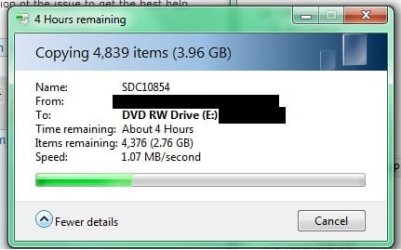
4 hours.jpg


PS. I am new to this whole forum thing so I don't really know a structure to stick by, and also I hope I posted this on the correct thread!


Is there a way to improve file transfer rate to a DVD? I need it to be fast as I am backing up my laptop.
-A
 

My Computer My Computer

At a glance

Windows 7 Ultimate x64
OS
Windows 7 Ultimate x64
Typically on normal file copying operations, a common bottleneck is when you're copying multiple files together. The screenshot shows a whooping 4000 files to be copied, so I think that's the real cause. The underlying reason is the internal data structures that must be kept (something like the "bureaucracy" of the file system), as it needs to create the file name, permissions, space assignment and so for each individual file. Because of that, it's MUCH faster to copy a single 2GB file than 2000 1MB files, regardless of medium. I guess that's with the USB drive you had many less files.

You said you're copying to DVD but of course that's not possible, you're trying to burn a DVD using the Windows explorer built in feature? If so, try using some serious program. What it does really is to copy all files to a temp folder on the hard disk (here's where the slowdown comes from) and then create an image on the fly for the burning itself. A real DVD burner program would not copy all the files over to a temp folder, but just create the image directly saving the copying of thousands of files.
 

My Computer My Computer

At a glance

Windows 7 Ultimate x64Intel Core i7-740QM8 GB DDR3NVIDIA GeForce 330GT
Computer type
Laptop
Computer Manufacturer/Model Number
Toshiba Sattelite A665-S6092
OS
Windows 7 Ultimate x64
CPU
Intel Core i7-740QM
Memory
8 GB DDR3
Graphics Card(s)
NVIDIA GeForce 330GT
Screen Resolution
1366x768
Hard Drives
Samsung 840 SSD 500GB
1TB USB3 external HD
Cooling
Coolermaster Notepal U3 notebook cooling pad
Internet Speed
3mbps ASDL
Antivirus
ClamWin 0.98.7
Browser
Opera 12.17 x86 (main), Firefox 38 (sec), IE11 (last resort)
If you are dead set on using a DVD then I too recommend that you use an actual DVD burning program. But USB flash or an external drive is the way to go in my opinion. I am terrible at protecting my DVDs so scratches, damage and losing them is almost a guarantee.

If you are backing up your computer I would also consider creating a system image, rather than simply exporting all your personal files alone. The system image will allow you to restore your disk to the exact way it is when your create the image. This will include all updates, drivers, files, pics, music, programs etc...
 

My Computer My Computer

At a glance

Windows 7 Home Premium 64bitIntel *will update* (slipped my mind) (2 core)6GB
Computer Manufacturer/Model Number
HP Pavilion p6204y
OS
Windows 7 Home Premium 64bit
CPU
Intel *will update* (slipped my mind) (2 core)
Memory
6GB
Hard Drives
Seagate Barrcuda 750Gb
Case
Stock
Back
Top