Solved How to make internet image backgrounds transparent?

CanAm

New member
Local time
6:17 PM
Messages
40
Hi all,

I am new to this forum and this is my first post so bear with me. I think I am in the right thread, but if I'm not I hope the moderator will move this post to the correct one. :)

What I want to do is download an image from the internet and then make the background transparent so I can use it on a Tee Shirt Design website.

First off, I already have "Paint" and it has a 'Transparent Selection" feature, but I don't know how to use it the way I explained above. Can someone tell me how to do this, or if it is even possible?

Secondly, if 'Paint" won't do what I want, do I need to download "Windows Essentials" or some other free software? I don't know if Windows Essentials has this feature.

Thanks in advance for your replies and I will check back tomorrow to read them.
 

My Computer My Computer

Computer type
PC/Desktop
Computer Manufacturer/Model Number
Compaq Presario
OS
Windows 7
CPU
AMD DUAL-CORE PROCESSOR E-300
Memory
3GB RAM
Graphics Card(s)
AMD RADEON HD 6310
Hard Drives
500GB
Antivirus
Kaspersky
Browser
Google Chrome
You can check out GIMP, it's free and has more features than paint. I am no good with image manipulation though, you will have to ask others about it.
 

My Computer My Computer

Computer type
PC/Desktop
Computer Manufacturer/Model Number
Custom Build
OS
Windows 7 Ultimate x64 SP1
CPU
AMD Phenom 2 1090T
Motherboard
Gigabyte GA-890FXA-UD5
Memory
2x8GB Kingston HyperX Fury Black 1600Mhz Unganged
Graphics Card(s)
MSI GTX 970 Gaming 4G
Sound Card
Realtek On-Board HD 7.1 Audio / Logitech G35
Monitor(s) Displays
3xAcer GD245HQ
Screen Resolution
1920x1080
Hard Drives
Samsung 850 Pro 512GB SSD - OS /
WD Caviar Black SATA 3 - 1 TBx2 - Dynamic RAID 0 /
WD Caviar Green SATA 2 - 640GBx2 - Dynamic RAID 0 /
WD Caviar Green SATA 2 - 640GB - Internal Backup /
Seagate Barracude SATA 3 - 3TB - External Backup/ Sync
PSU
HighPower 1000W
Case
Cooler Master HAF 932
Cooling
Noctua NH-D14
Keyboard
Logitech G19
Mouse
Logitech G500
Internet Speed
100/4 Mbit Cable (100GB quota)
Antivirus
ZoneAlarm Extreme Security / MBAM Pro / MBAE Free / SAS Free
Browser
IE 11 - Firefox - Chrome
Other Info
Logitech F710/ G27/ G940/ Z5500 // TrackIR 5 // Nvidia 3D Surround Vision
Hi and welcome to SevenForums,
I would leave all of the details to the t-shirt maker just give them the files you want to use they will do the magic ;)
Cheers.
 

My Computer My Computer

Computer type
PC/Desktop
Computer Manufacturer/Model Number
Custom assembled by me :}
OS
Win-7-Pro64bit 7-H-Prem-64bit
CPU
i7-5930K 2nd i9-9940x both water blocked VRM's too
Motherboard
ASUS SABERTOOTH X99 2nd ASUS x299 Apex
Memory
Trident-z 3200C14 2nd Trident-z 3600C16
Graphics Card(s)
EVGA 1080ti ftw3 2nd Titan Xp both water blocked
Sound Card
Built-in Realtek
Monitor(s) Displays
1-AOC G2460PG 24"G-Sync 144Hz/ 2nd 1-ASUS VG248QE 24" 144Hz
Screen Resolution
1920 x 1080 144Hz
Hard Drives
2-Samsung M.2 Evo & Evo Plus
2-Samsung 850 EVO 500GB SSD's/ 3-2.5 W.D. Black 1tb-&3-1tb/3-3.5 WD Black 1tb hdd's
PSU
EVGA SuperNOVA 1000-P2 2nd 1200-P2
Case
2-Corsair Obsidian Series 450D Black ATX Mid Tower
Cooling
Custom water loops
Keyboard
Logitech G710+/ 2nd Logitech G910
Mouse
2-RedDragon M901 Perdition 16400 dpi Gaming mouse = wired
Internet Speed
Comcast Ping 19ms 89.31mbps download speed 6.12mbps upload
Antivirus
Malwarebytes Pro/ Superantispyware Pro
Browser
FireFox & Pale moon
Other Info
2nd ASUS X299 Apex/Intel i9-9940x with Custom water loop/7H-Prem-x64/Corsair 450D case/Ram Trident-z 3600C16 4x8gb / Samsung970Evo plus 500gb SSD/Dual ssd EZ swap evo/PSU EVGA SuperNova 1200w-P2 80+Platinum/GPU Titan Xp /8-ML-140 on push-pull on 2-280GTX rads
Thanks GokAy and ThrashZone for the replies! I will look into GIMP as you sugessted GokAy, thanks! ThrashZone, one of the Tee Shirt websites I use does have a transparency feature, but the other one doesn't. I would use the first one exclusively, but the brand they use for the 2XLT size I need only comes in a limited amount of colors. But thanks for your reply anyway. Hopefully GIMP will have the feature I am looking for, or someone else will come forward and tell me of some free software that definitely has it. It would also be great if someone else could tell me how to use Windows 7 "Paint" the way I want it to. In the meantime, thanks again to both of you for your help.
 

My Computer My Computer

Computer type
PC/Desktop
Computer Manufacturer/Model Number
Compaq Presario
OS
Windows 7
CPU
AMD DUAL-CORE PROCESSOR E-300
Memory
3GB RAM
Graphics Card(s)
AMD RADEON HD 6310
Hard Drives
500GB
Antivirus
Kaspersky
Browser
Google Chrome
Hi,
Yes GIMP uses Layer Opacity not a transparent listing,
So really you just need to
A- Make sure you have a high resolution image to work with,
Open GIMP and use File/ Open as Layer,
Then on the top it will show Opacity and click on the little down arrow until you like it,
Then go to File and Export image,
Type a name and file type in the top and Export.
 

My Computer My Computer

Computer type
PC/Desktop
Computer Manufacturer/Model Number
Custom assembled by me :}
OS
Win-7-Pro64bit 7-H-Prem-64bit
CPU
i7-5930K 2nd i9-9940x both water blocked VRM's too
Motherboard
ASUS SABERTOOTH X99 2nd ASUS x299 Apex
Memory
Trident-z 3200C14 2nd Trident-z 3600C16
Graphics Card(s)
EVGA 1080ti ftw3 2nd Titan Xp both water blocked
Sound Card
Built-in Realtek
Monitor(s) Displays
1-AOC G2460PG 24"G-Sync 144Hz/ 2nd 1-ASUS VG248QE 24" 144Hz
Screen Resolution
1920 x 1080 144Hz
Hard Drives
2-Samsung M.2 Evo & Evo Plus
2-Samsung 850 EVO 500GB SSD's/ 3-2.5 W.D. Black 1tb-&3-1tb/3-3.5 WD Black 1tb hdd's
PSU
EVGA SuperNOVA 1000-P2 2nd 1200-P2
Case
2-Corsair Obsidian Series 450D Black ATX Mid Tower
Cooling
Custom water loops
Keyboard
Logitech G710+/ 2nd Logitech G910
Mouse
2-RedDragon M901 Perdition 16400 dpi Gaming mouse = wired
Internet Speed
Comcast Ping 19ms 89.31mbps download speed 6.12mbps upload
Antivirus
Malwarebytes Pro/ Superantispyware Pro
Browser
FireFox & Pale moon
Other Info
2nd ASUS X299 Apex/Intel i9-9940x with Custom water loop/7H-Prem-x64/Corsair 450D case/Ram Trident-z 3600C16 4x8gb / Samsung970Evo plus 500gb SSD/Dual ssd EZ swap evo/PSU EVGA SuperNova 1200w-P2 80+Platinum/GPU Titan Xp /8-ML-140 on push-pull on 2-280GTX rads
I don't think the OP wants to make his image transparent, but to delete the background ie cut out the subject and save it with a transparent background. GIMP can do this. You import the image, add alpha channel (alpha means transparency), select and delete the background and export as png. PNG supports transparency unlike jpg etc. This video shows how

https://www.youtube.com/watch?v=DCoTky6ddcU
 
Last edited:

My Computer My Computer

Computer type
PC/Desktop
Computer Manufacturer/Model Number
self build
OS
W10 Pro x64, W7 Pro x64 in VMware
CPU
i7 2600K @ 4.4GHz
Motherboard
MSI Z68A-GD80
Memory
8GB Mushkin @ 1600MHz
Graphics Card(s)
Nvidia GTX 750 Ti
Monitor(s) Displays
27" Benq + 27" LG
Screen Resolution
1080p
Hard Drives
500GB 850 Evo SSD + 3 * 2TB Seagate
PSU
EVGA 650 GS modular
Case
Antec 300
Cooling
Seidon 120V v2
Internet Speed
62/18 Mbps
Antivirus
Defender (W10) + MSE (W7)
Browser
Firefox
Sorry for posting something irrelevant , but how do you post on this forum ?
 

My Computer My Computer

Computer type
Laptop
Computer Manufacturer/Model Number
Asus
OS
Windows 7 home premium 64 bit
Thanks ThrashZone and wasnotwas for the help on GIMP. I also found Clipping Magic https://clippingmagic.com/ but that costs money, and Lunapic LunaPic | Free Online Photo Editor which is also free. I will be checking out all of these over the weekend and wil be back on Monday if there are any further posts.

Thanks again to ALL of you!
 

My Computer My Computer

Computer type
PC/Desktop
Computer Manufacturer/Model Number
Compaq Presario
OS
Windows 7
CPU
AMD DUAL-CORE PROCESSOR E-300
Memory
3GB RAM
Graphics Card(s)
AMD RADEON HD 6310
Hard Drives
500GB
Antivirus
Kaspersky
Browser
Google Chrome
Hi all,

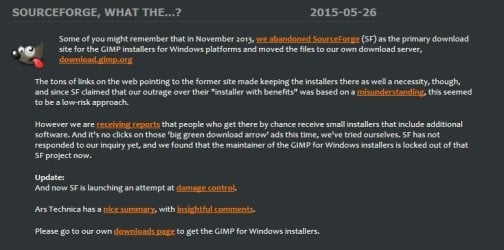
I was just trying to download GIMP when I saw this: SourceForge grabs GIMP for Windows

Sounds like something I will stay away from, at least until it gets worked out for Windows 7.

Have a great weekend everybody and I will be back on Monday.
 

My Computer My Computer

Computer type
PC/Desktop
Computer Manufacturer/Model Number
Compaq Presario
OS
Windows 7
CPU
AMD DUAL-CORE PROCESSOR E-300
Memory
3GB RAM
Graphics Card(s)
AMD RADEON HD 6310
Hard Drives
500GB
Antivirus
Kaspersky
Browser
Google Chrome

My Computer My Computer

Computer type
PC/Desktop
Computer Manufacturer/Model Number
Custom Build
OS
Windows 7 Ultimate x64 SP1
CPU
AMD Phenom 2 1090T
Motherboard
Gigabyte GA-890FXA-UD5
Memory
2x8GB Kingston HyperX Fury Black 1600Mhz Unganged
Graphics Card(s)
MSI GTX 970 Gaming 4G
Sound Card
Realtek On-Board HD 7.1 Audio / Logitech G35
Monitor(s) Displays
3xAcer GD245HQ
Screen Resolution
1920x1080
Hard Drives
Samsung 850 Pro 512GB SSD - OS /
WD Caviar Black SATA 3 - 1 TBx2 - Dynamic RAID 0 /
WD Caviar Green SATA 2 - 640GBx2 - Dynamic RAID 0 /
WD Caviar Green SATA 2 - 640GB - Internal Backup /
Seagate Barracude SATA 3 - 3TB - External Backup/ Sync
PSU
HighPower 1000W
Case
Cooler Master HAF 932
Cooling
Noctua NH-D14
Keyboard
Logitech G19
Mouse
Logitech G500
Internet Speed
100/4 Mbit Cable (100GB quota)
Antivirus
ZoneAlarm Extreme Security / MBAM Pro / MBAE Free / SAS Free
Browser
IE 11 - Firefox - Chrome
Other Info
Logitech F710/ G27/ G940/ Z5500 // TrackIR 5 // Nvidia 3D Surround Vision

My Computer My Computer

Computer type
PC/Desktop
Computer Manufacturer/Model Number
self build
OS
W10 Pro x64, W7 Pro x64 in VMware
CPU
i7 2600K @ 4.4GHz
Motherboard
MSI Z68A-GD80
Memory
8GB Mushkin @ 1600MHz
Graphics Card(s)
Nvidia GTX 750 Ti
Monitor(s) Displays
27" Benq + 27" LG
Screen Resolution
1080p
Hard Drives
500GB 850 Evo SSD + 3 * 2TB Seagate
PSU
EVGA 650 GS modular
Case
Antec 300
Cooling
Seidon 120V v2
Internet Speed
62/18 Mbps
Antivirus
Defender (W10) + MSE (W7)
Browser
Firefox
OK, I downloaded GIMP. It's getting late in the day for me here, so I will have to let you know later how I did with it. I am marking this thread as closed and will start a new one after I get a chance to look at GIMP.
 

My Computer My Computer

Computer type
PC/Desktop
Computer Manufacturer/Model Number
Compaq Presario
OS
Windows 7
CPU
AMD DUAL-CORE PROCESSOR E-300
Memory
3GB RAM
Graphics Card(s)
AMD RADEON HD 6310
Hard Drives
500GB
Antivirus
Kaspersky
Browser
Google Chrome
The hard part for what you want to do in GIMP is selecting the background. It takes a while to master, but there's plenty of tutorials on YouTube on using the fuzzy select tool combined with quick mask selection for this task.
 

My Computer My Computer

Computer type
PC/Desktop
Computer Manufacturer/Model Number
self build
OS
W10 Pro x64, W7 Pro x64 in VMware
CPU
i7 2600K @ 4.4GHz
Motherboard
MSI Z68A-GD80
Memory
8GB Mushkin @ 1600MHz
Graphics Card(s)
Nvidia GTX 750 Ti
Monitor(s) Displays
27" Benq + 27" LG
Screen Resolution
1080p
Hard Drives
500GB 850 Evo SSD + 3 * 2TB Seagate
PSU
EVGA 650 GS modular
Case
Antec 300
Cooling
Seidon 120V v2
Internet Speed
62/18 Mbps
Antivirus
Defender (W10) + MSE (W7)
Browser
Firefox
Hi All,
This is the final update I spoke of in my last post. Like I said I downloaded GIMP and after trying all the other great suggestions I ended up following the You Tube video that wasnotwas had left here on an earlier post. There were so many steps I had to stop and replay the video to write down all the instructions. The result came out VERY well though, and all I had to do was export my saved GIMP image to a format my tee shirt websites use, like PNG.

So, a BIG THANKS TO ALL OF YOU for all your help, and I will be back next time I have a problem I can't solve. I'm also going to save this Windows 7 forum to my FAVORITES list because I'm glad I found it! :D
 

My Computer My Computer

Computer type
PC/Desktop
Computer Manufacturer/Model Number
Compaq Presario
OS
Windows 7
CPU
AMD DUAL-CORE PROCESSOR E-300
Memory
3GB RAM
Graphics Card(s)
AMD RADEON HD 6310
Hard Drives
500GB
Antivirus
Kaspersky
Browser
Google Chrome
Glad you got it sorted.
 

My Computer My Computer

Computer type
PC/Desktop
Computer Manufacturer/Model Number
self build
OS
W10 Pro x64, W7 Pro x64 in VMware
CPU
i7 2600K @ 4.4GHz
Motherboard
MSI Z68A-GD80
Memory
8GB Mushkin @ 1600MHz
Graphics Card(s)
Nvidia GTX 750 Ti
Monitor(s) Displays
27" Benq + 27" LG
Screen Resolution
1080p
Hard Drives
500GB 850 Evo SSD + 3 * 2TB Seagate
PSU
EVGA 650 GS modular
Case
Antec 300
Cooling
Seidon 120V v2
Internet Speed
62/18 Mbps
Antivirus
Defender (W10) + MSE (W7)
Browser
Firefox
Back
Top