JavaScript is disabled. For a better experience, please enable JavaScript in your browser before proceeding.
You are using an out of date browser. It may not display this or other websites correctly.
You should upgrade or use an
alternative browser .
Solved How to restore corrupted Libraries
Somehow I've manged to corrupt/delete various Library files from the standard Library setup...Looks like mostly the Public folders. I have full Acronis bu's from today (corrupted/missing libraries) and three months ago (Libraries AOK). Is there a way to 'reset' the Libraries to the default setup so I can then restore anything that I have lost in the process from both today's full backup and full back up from three months ago
Computer type PC/Desktop Computer Manufacturer/Model Number Self built OS Windows 7 Pro 64bit SP1 CPU AMD FX-6100 Six-Core Processor Motherboard M5A78L-M LX PLUS Memory 2ea Corsair-1333MHz-PC3-10666-240-pin-CMX4GX3M1A1333C9 Graphics Card(s) NVIDIA GeForce GT 630 - 1023MB (EVGA) Sound Card OnBoard Via High Def Audio Monitor(s) Displays Samsung 204B main - ASUS VS228 secondary Screen Resolution 1920x1080 main - 1920x1080 secondary Hard Drives Samsung SSD 840 128GB Win7 Pro 64bit - Western Digital WDC 465GB - Seagate 640GB Sata B/U - Maxtor 500GB Sata B/U - Maxtor 200GB Sata PSU Antec 650 watt Cooling Multiple case fans Keyboard MS USB dual Wireless Keyboard - IntelliType Pro Mouse MS USB dual Wireless Mouse - IntelliPoint Internet Speed Cox Cable Antivirus Bitdefender IS 2014 Browser FireFox Primary - IE 11 Other Info Hauppaguge Win TV HVR-1250 (Model 22xxx, Hybrid ATSC/QAM)
Administrator
Staff member
Computer type PC/Desktop Computer Manufacturer/Model Number Self built custom OS 64-bit Windows 11 Pro for Workstations CPU Intel i7-8700K OC'd to 5 GHz Motherboard ASUS ROG Maximus XI Formula Z390 Memory 64 GB (4x16GB) G.SKILL TridentZ RGB DDR4 3600 MHz Graphics Card(s) ASUS ROG-STRIX-GTX1080TI-O11G-GAMING Sound Card Integrated Monitor(s) Displays 2 x Samsung Odyssey G7 27" Screen Resolution 2560x1440 Hard Drives 1TB Samsung 990 PRO M.2, PSU Seasonic Prime Titanium 850W Case Thermaltake Core P3 Cooling Corsair Hydro H115i Keyboard Logitech wireless K800 Mouse Logitech MX Master 4 Internet Speed 2 Gb/s Download and 100 Mb/s Upload Antivirus Malwarebyte Anti-Malware Premium Browser Google Chrome Other Info Logitech Z625 speaker system,
New member
Member
VIP
Thread Starter
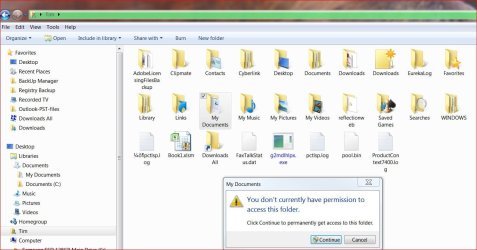
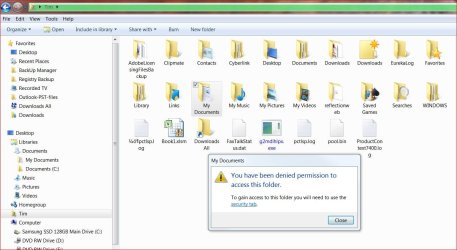
OK...got the default libraries back - but - what I was trying to do is move all included folders in My Libraries to a secondary HDD. My new SSD is filling up fast.
permissions1.jpg
138.4 KB
· Views: 0
permissions2.jpg
137.8 KB
· Views: 0
Computer type PC/Desktop Computer Manufacturer/Model Number Self built OS Windows 7 Pro 64bit SP1 CPU AMD FX-6100 Six-Core Processor Motherboard M5A78L-M LX PLUS Memory 2ea Corsair-1333MHz-PC3-10666-240-pin-CMX4GX3M1A1333C9 Graphics Card(s) NVIDIA GeForce GT 630 - 1023MB (EVGA) Sound Card OnBoard Via High Def Audio Monitor(s) Displays Samsung 204B main - ASUS VS228 secondary Screen Resolution 1920x1080 main - 1920x1080 secondary Hard Drives Samsung SSD 840 128GB Win7 Pro 64bit - Western Digital WDC 465GB - Seagate 640GB Sata B/U - Maxtor 500GB Sata B/U - Maxtor 200GB Sata PSU Antec 650 watt Cooling Multiple case fans Keyboard MS USB dual Wireless Keyboard - IntelliType Pro Mouse MS USB dual Wireless Mouse - IntelliPoint Internet Speed Cox Cable Antivirus Bitdefender IS 2014 Browser FireFox Primary - IE 11 Other Info Hauppaguge Win TV HVR-1250 (Model 22xxx, Hybrid ATSC/QAM)
Administrator
Staff member
Not sure what method you used to move the folders, but you could use the tutorial below to add "Take Ownership" to the context menu. You would then be able to right click on a folder or file, and click on "Take Ownership" to be granted ownership and access permission of the item.
http://www.sevenforums.com/tutorials/1911-take-ownership-shortcut.html
Computer type PC/Desktop Computer Manufacturer/Model Number Self built custom OS 64-bit Windows 11 Pro for Workstations CPU Intel i7-8700K OC'd to 5 GHz Motherboard ASUS ROG Maximus XI Formula Z390 Memory 64 GB (4x16GB) G.SKILL TridentZ RGB DDR4 3600 MHz Graphics Card(s) ASUS ROG-STRIX-GTX1080TI-O11G-GAMING Sound Card Integrated Monitor(s) Displays 2 x Samsung Odyssey G7 27" Screen Resolution 2560x1440 Hard Drives 1TB Samsung 990 PRO M.2, PSU Seasonic Prime Titanium 850W Case Thermaltake Core P3 Cooling Corsair Hydro H115i Keyboard Logitech wireless K800 Mouse Logitech MX Master 4 Internet Speed 2 Gb/s Download and 100 Mb/s Upload Antivirus Malwarebyte Anti-Malware Premium Browser Google Chrome Other Info Logitech Z625 speaker system,
Next time don't move the folders but make new folders and move the stuff. Then right click on the folders and INCLUDE them into the appropriate library.
Computer Manufacturer/Model Number HP, Dell, Gateway, Toshiba - 4 laptops and 2 desktops OS Vista, Windows7, Mint Mate, Zorin, Windows 8 CPU from 1.6GHz Duo to i7 Monitor(s) Displays 2x HP w2207 Hard Drives 5x HDD, 7x SSD, 12x Externals Keyboard with trackball - no mices Mouse Trackball mice Internet Speed DSL 6000
New member
Member
VIP
Thread Starter
Thanks as always guys...things back to normal now !!
Computer type PC/Desktop Computer Manufacturer/Model Number Self built OS Windows 7 Pro 64bit SP1 CPU AMD FX-6100 Six-Core Processor Motherboard M5A78L-M LX PLUS Memory 2ea Corsair-1333MHz-PC3-10666-240-pin-CMX4GX3M1A1333C9 Graphics Card(s) NVIDIA GeForce GT 630 - 1023MB (EVGA) Sound Card OnBoard Via High Def Audio Monitor(s) Displays Samsung 204B main - ASUS VS228 secondary Screen Resolution 1920x1080 main - 1920x1080 secondary Hard Drives Samsung SSD 840 128GB Win7 Pro 64bit - Western Digital WDC 465GB - Seagate 640GB Sata B/U - Maxtor 500GB Sata B/U - Maxtor 200GB Sata PSU Antec 650 watt Cooling Multiple case fans Keyboard MS USB dual Wireless Keyboard - IntelliType Pro Mouse MS USB dual Wireless Mouse - IntelliPoint Internet Speed Cox Cable Antivirus Bitdefender IS 2014 Browser FireFox Primary - IE 11 Other Info Hauppaguge Win TV HVR-1250 (Model 22xxx, Hybrid ATSC/QAM)
Administrator
Staff member
Great news. Glad we could help.
Computer type PC/Desktop Computer Manufacturer/Model Number Self built custom OS 64-bit Windows 11 Pro for Workstations CPU Intel i7-8700K OC'd to 5 GHz Motherboard ASUS ROG Maximus XI Formula Z390 Memory 64 GB (4x16GB) G.SKILL TridentZ RGB DDR4 3600 MHz Graphics Card(s) ASUS ROG-STRIX-GTX1080TI-O11G-GAMING Sound Card Integrated Monitor(s) Displays 2 x Samsung Odyssey G7 27" Screen Resolution 2560x1440 Hard Drives 1TB Samsung 990 PRO M.2, PSU Seasonic Prime Titanium 850W Case Thermaltake Core P3 Cooling Corsair Hydro H115i Keyboard Logitech wireless K800 Mouse Logitech MX Master 4 Internet Speed 2 Gb/s Download and 100 Mb/s Upload Antivirus Malwarebyte Anti-Malware Premium Browser Google Chrome Other Info Logitech Z625 speaker system,