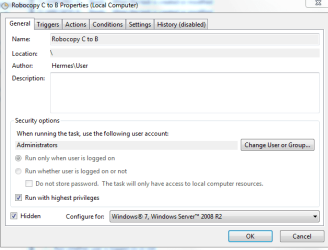
How to Robocopy my files to Linkstation.

Wait I see what's happening!
It just shows on the taskbar...Excellent...:)
Thanks Golden...
Now How to get the scheduler to work.
I always get a (0x10) error code...
 

Attachments

  • Capture.PNG
    Capture.PNG
    3.3 KB · Views: 5
Last edited:

My Computer My Computer

At a glance

Stools
OS
Stools

My Computer My Computer

At a glance

XP / Win7 x64 ProIntel Quad-Core Q9450 @ 3.2GHz2x2GB GSkill DDR2NVIDIA GeForce 8600 GTS (EVGA)
OS
XP / Win7 x64 Pro
CPU
Intel Quad-Core Q9450 @ 3.2GHz
Motherboard
Asus P5-E
Memory
2x2GB GSkill DDR2
Graphics Card(s)
NVIDIA GeForce 8600 GTS (EVGA)
Monitor(s) Displays
Dell 2408WFP
Screen Resolution
1920x1200
I'm not sure if it would solve the problem, but have you considered simplyfing and using SyncToy?
 

My Computer My Computer

At a glance

Windows 7 Ultimate x64 SP1Intel Core i7-260012 GB Patriot Extreme DDR3-1333Nvidia GTX 470
OS
Windows 7 Ultimate x64 SP1
CPU
Intel Core i7-2600
Motherboard
Gigabyte GA-P67A-UD3P-B3
Memory
12 GB Patriot Extreme DDR3-1333
Graphics Card(s)
Nvidia GTX 470
Monitor(s) Displays
Dell UltraSharp 2209WA
Hard Drives
OCZ Agility3 240 GB, WD5001AALS, WD7501AALS
PSU
OCZ ModStream 700W
Case
CoolerMaster HAF 912 Advanced
Cooling
CoolerMaster Hyper 212 Plus
If you want it to run completely invisible, try this...

Create a VBScript file like "RunInv.vbs" with the following line:

Code:
CreateObject("Wscript.Shell").Run ""   & WScript.Arguments(0) & "", 0,   False
Save that in your System32 directory and in your scheduled task call that file with robocopy arguments something like this:

Code:
RunInv.vbs "Robocopy C:\Users\User\Documents\Clive B:\Documents\Clive /NJS /MIR /E"
You need those quotes but I'm not exactly sure how to handle the quoted paths inside of it, whether it requires a double double quote or some sort of escape character. It might be a bit of trial and error from the command-line first.

I pulled that from this site:

windows - Run a completly hidden batch file - Super User

Or you could try something like Hstart or cmdow that has command line options for running invisibly.
 

My Computer My Computer

At a glance

XP / Win7 x64 ProIntel Quad-Core Q9450 @ 3.2GHz2x2GB GSkill DDR2NVIDIA GeForce 8600 GTS (EVGA)
OS
XP / Win7 x64 Pro
CPU
Intel Quad-Core Q9450 @ 3.2GHz
Motherboard
Asus P5-E
Memory
2x2GB GSkill DDR2
Graphics Card(s)
NVIDIA GeForce 8600 GTS (EVGA)
Monitor(s) Displays
Dell 2408WFP
Screen Resolution
1920x1200
I'm not sure if it would solve the problem, but have you considered simplyfing and using SyncToy?

Why use other software when I have already paid for robocopy.

FliGi7
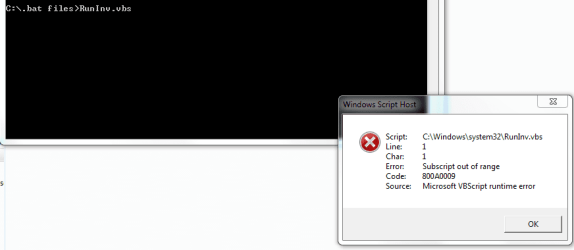
Error
 

Attachments

  • Capture.PNG
    Capture.PNG
    11.3 KB · Views: 7
Last edited:

My Computer My Computer

At a glance

Stools
OS
Stools
I have found that the creation of a shortcut is irrelevant to the Task Scheduler as it will fixate on the Batch file itself not the shortcut...:sarc:
 

My Computer My Computer

At a glance

Stools
OS
Stools
Why use other software when I have already paid for roboform.
Why pay for software when something free and just as good exists *shrugs*.
 

My Computer My Computer

At a glance

Windows 7 Ultimate x64 SP1Intel Core i7-260012 GB Patriot Extreme DDR3-1333Nvidia GTX 470
OS
Windows 7 Ultimate x64 SP1
CPU
Intel Core i7-2600
Motherboard
Gigabyte GA-P67A-UD3P-B3
Memory
12 GB Patriot Extreme DDR3-1333
Graphics Card(s)
Nvidia GTX 470
Monitor(s) Displays
Dell UltraSharp 2209WA
Hard Drives
OCZ Agility3 240 GB, WD5001AALS, WD7501AALS
PSU
OCZ ModStream 700W
Case
CoolerMaster HAF 912 Advanced
Cooling
CoolerMaster Hyper 212 Plus
I'm not sure if it would solve the problem, but have you considered simplyfing and using SyncToy?

Why use other software when I have already paid for robocopy.

FliGi7
Error

Yea, it's giving you an error because it's not meant to be run without command line arguments after it, as I stated/showed in my example to you.
 

My Computer My Computer

At a glance

XP / Win7 x64 ProIntel Quad-Core Q9450 @ 3.2GHz2x2GB GSkill DDR2NVIDIA GeForce 8600 GTS (EVGA)
OS
XP / Win7 x64 Pro
CPU
Intel Quad-Core Q9450 @ 3.2GHz
Motherboard
Asus P5-E
Memory
2x2GB GSkill DDR2
Graphics Card(s)
NVIDIA GeForce 8600 GTS (EVGA)
Monitor(s) Displays
Dell 2408WFP
Screen Resolution
1920x1200
I'm not sure if it would solve the problem, but have you considered simplyfing and using SyncToy?

Why use other software when I have already paid for robocopy.

FliGi7
Error

Yea, it's giving you an error because it's not meant to be run without command line arguments after it, as I stated/showed in my example to you.

So what your saying is Robocopy doesn't work like I want it to. Before I tried to use Robocopy I tried allwaysync. Didn't like the Idea of having a third party system for which Robocopy would do the job.
 

My Computer My Computer

At a glance

Stools
OS
Stools
Why use other software when I have already paid for robocopy.

FliGi7
Error

Yea, it's giving you an error because it's not meant to be run without command line arguments after it, as I stated/showed in my example to you.

So what your saying is Robocopy doesn't work like I want it to. Before I tried to use Robocopy I tried allwaysync. Didn't like the Idea of having a third party system for which Robocopy would do the job.

No, what I'm saying is that it didn't work because you only followed the first half of the example I showed you. It's not meant to be run by just typing RunInv.vbs and hitting enter. It needs command-line arguments after it, as in the example.
 

My Computer My Computer

At a glance

XP / Win7 x64 ProIntel Quad-Core Q9450 @ 3.2GHz2x2GB GSkill DDR2NVIDIA GeForce 8600 GTS (EVGA)
OS
XP / Win7 x64 Pro
CPU
Intel Quad-Core Q9450 @ 3.2GHz
Motherboard
Asus P5-E
Memory
2x2GB GSkill DDR2
Graphics Card(s)
NVIDIA GeForce 8600 GTS (EVGA)
Monitor(s) Displays
Dell 2408WFP
Screen Resolution
1920x1200
Back
Top