
TheGreyWizard
New member
- Local time
- 5:01 PM
- Messages
- 50
How to setup win7 so it doesn't prompt the upgrade to 10 & no tracking
So obviously windows is pushing the alerts hard to upgrade to windows 10, but I don't want anything to do with windows 10
So how do I permanently disable the alert to upgrade to win10?
Also a big issue with 10 is the tracking they are implementing and are also pushing this tracking into win7 - so how do I disable these new win10 style tracking/data collection abilities?
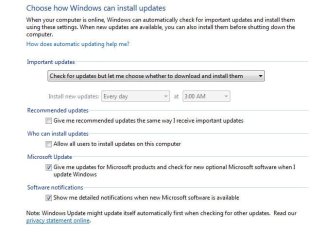
And I'd also like to setup win7 to just install major updates to avoid it resetting these changes within my win7 install with "regular" updates?
So obviously windows is pushing the alerts hard to upgrade to windows 10, but I don't want anything to do with windows 10
So how do I permanently disable the alert to upgrade to win10?
Also a big issue with 10 is the tracking they are implementing and are also pushing this tracking into win7 - so how do I disable these new win10 style tracking/data collection abilities?
And I'd also like to setup win7 to just install major updates to avoid it resetting these changes within my win7 install with "regular" updates?
My Computer
At a glance
Windows 7 64Intel 5820k16gbEVGA 970 GTX
- Computer type
- PC/Desktop
- Computer Manufacturer/Model Number
- Custom
- OS
- Windows 7 64
- CPU
- Intel 5820k
- Motherboard
- Asrock x99m Extreme4
- Memory
- 16gb
- Graphics Card(s)
- EVGA 970 GTX
- Monitor(s) Displays
- Dell U3415W
- Hard Drives
- Samsung 256g 850 Pro
Samsung 128g 850 Pro
- PSU
- EVGA 1000 P2


 . Look for a download link "block_GWX_final.zip". Extract and run the bat file.